Prime Videoで録画する方法(黒画面にならないように)

Amazon Prime Videoでは、数千もの人気映画や名作映画、テレビ番組を提供しています。しかし、お気に入りの番組をオフラインで視聴したり、クリップを保存したりしたい場合はどうすればよいでしょうか?その場合、重要な質問は次のとおりです。 Prime Videoで録画できますか?この簡単なガイドでは、Amazon Prime Videoの録画方法や、イライラするブラックスクリーン問題を回避する方法など、皆さんの疑問にお答えします。
ページコンテンツ:
パート1:Prime Videoで録画できますか?
一般的に、Prime Videoでは録画できません。Prime VideoにはDirecTVのような録画機能が内蔵されていません。さらに、Amazonは一般的な画面録画ソフトをブロックしています。通常の画面録画ソフトを使用しようとすると、通常は音声だけが録音され、画面は真っ黒になります。

しかし、Amazonプライムビデオを録画してお気に入りの番組を保存する簡単な方法がいくつかあります。正しい方法を見ていきましょう。
パート2:Prime Videoでブロックされずに録画する方法
方法1:Primeでの録画に最適なスクリーンレコーダー
Prime Videoで録画を試みる場合は、映像と音声コンテンツに直接アクセスできる信頼性の高い画面録画ソフトが必要になります。 Apeaksoft スクリーンレコーダー まさにあなたが必要としているものです。動画のオリジナル品質を維持しつつ、4K品質にまで高画質化することも可能です。Prime Videoの映画やエピソードの長さに関わらず、最高の品質と滑らかな映像で安定して録画できます。
ステップ 1: Apeaksoft Screen Recorderを入手
クリック 無料体験 ダウンロード、インストール、起動するには、下のボタンをクリックしてください。 Apeaksoft スクリーンレコーダー.
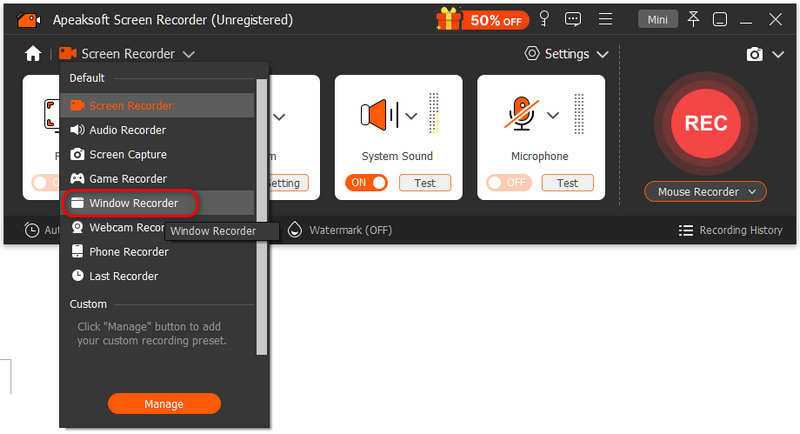
ステップ 2: ウィンドウレコーダーを選択
Apeaksoft Screen Recorder のメインインターフェースで、 スクリーンレコード 選択するドロップダウンリスト ウィンドウレコーダー.
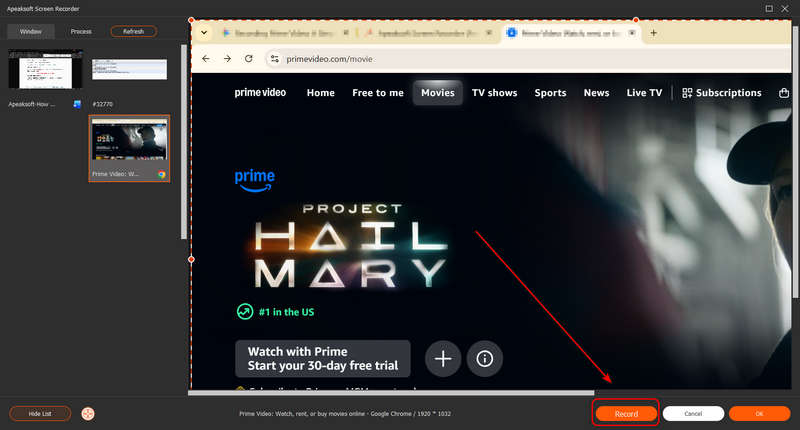
ステップ 3: Prime Videoの録画を開始
Prime Videoのブラウザウィンドウを選択してください。次に、右下隅にある録画ボタンをクリックして録画を開始します。
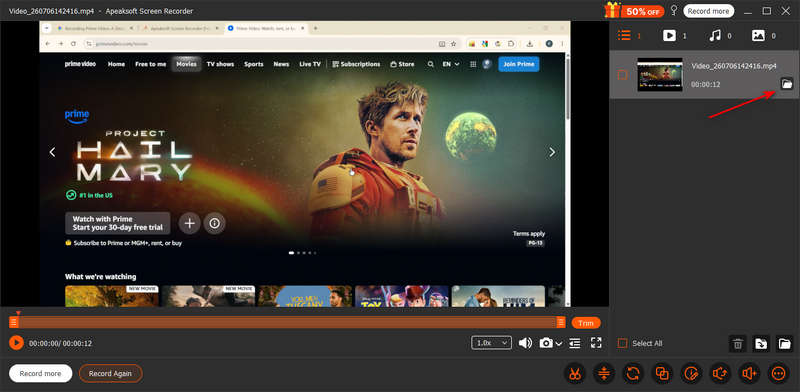
ステップ 4: 録画したプライムビデオを保存する
クリック 録画 もう一度ボタンをクリックして録画を停止します。すると、録画したビデオがリストに表示されます。 開いたフォルダ プライムビデオの録画を確認するには、このボタンをクリックしてください。
方法2:ハードウェアアクセラレーションをオフにする
Prime Videoで録画した動画に黒や白のブロックノイズが発生する場合は、ブラウザのハードウェアアクセラレーションをオフにしてください。
- Google Chromeの場合: クリック カスタマイズ ボタン(右上の3つの点)> 設定 > システム >オフにする グラフィックアクセラレーションが利用可能な場合は使用する Chromeを再起動してください。
- エッジの場合: 3つの点をクリック > 設定 > システムとパフォーマンスオフにする グラフィックアクセラレーションが利用可能な場合は使用する Edgeを再起動してください。
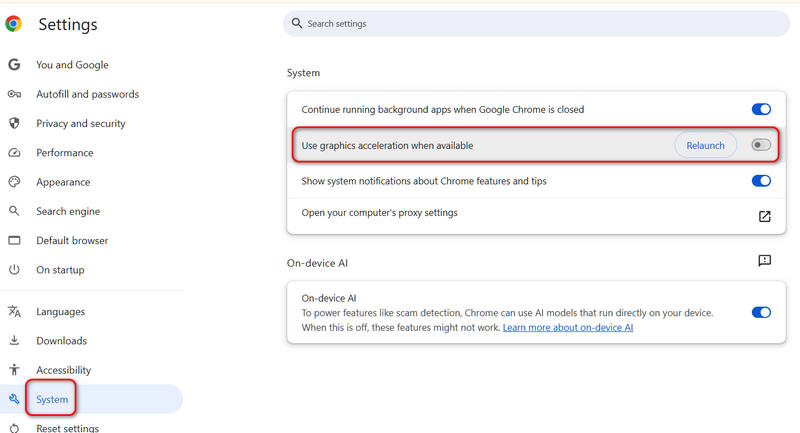
その後、Prime Videoで画面録画を再度試してみてください。今度は、ブロックされることなく録画に成功するかもしれません。
パート3:Prime Videoをオフライン視聴用にダウンロードする方法
Prime Videoの料金を支払っている場合は、Prime Videoを画面録画する必要はありません。最も簡単な方法は、Amazonの公式ダウンロード機能を使用することです。これにより、インターネットデータを使用せずにオフラインで動画を視聴できます。
- 1.Video Cloud Studioで プライムビデオアプリ お使いのスマートフォン、タブレット、またはWindows 10/11搭載パソコンでご利用いただけます。
- 2.保存したい映画やテレビ番組を探してください。
- 3.クリック ダウンロード ボタンをクリックし、ビデオの画質を選択して、完了するまでお待ちください。
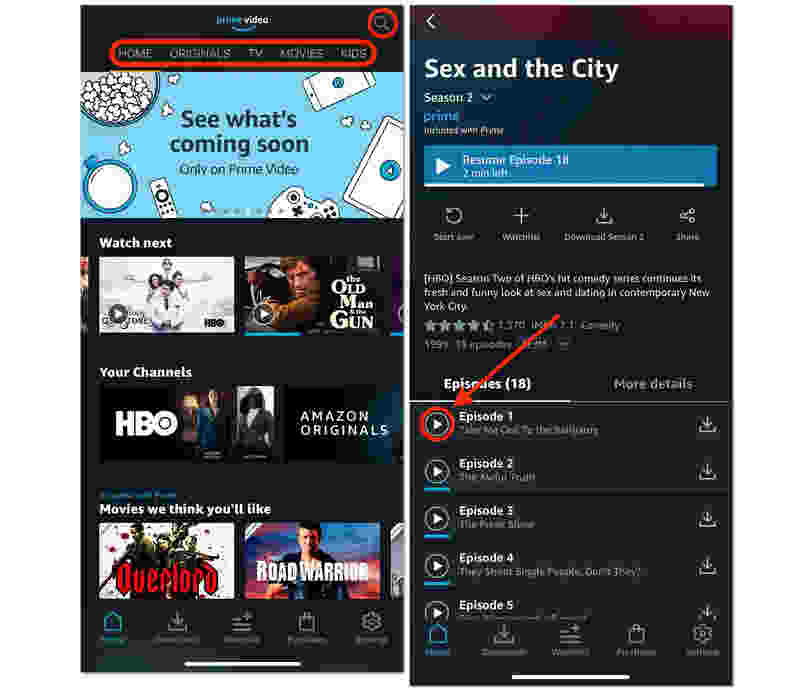
注意: Prime Videoからダウンロードした動画は、パソコンやスマートフォンに永久に保存されるわけではありません。ダウンロードした動画を30日間視聴しないと、自動的に削除されます。また、再生してから40時間経過しても削除されません。さらに、Prime Videoプレミアムの有効期限が切れた場合も、動画は再生できなくなります。
パート4:Prime Videoでの録画方法に関するよくある質問
Amazon Primeでサッカーの試合を録画できますか?
はい、Amazon Primeでサッカーの試合を録画できます。Apeaksoft Screen Recorderを使えば、ブロックされることなく試合を直接録画し、インターネット接続なしでオフラインで視聴できます。
Amazon PrimeにはDVR機能はありますか?
いいえ、Prime VideoにはDVR機能はありません。お気に入りの映画やテレビ番組を録画するには、動画をダウンロードするか、サードパーティ製の画面録画ソフトを使用してください。
Amazon Primeでライブイベントを後から視聴できますか?
はい、可能です。通常、Prime Videoは著作権を保持している限り、ライブイベントの完全なリプレイを保存します。イベントのリプレイを直接視聴したり、画面録画したりできます。
結論
今あなたが知っている Prime Videoで録画する方法! 最高品質で手間なく視聴するには、まず公式アプリ内で動画をダウンロードしてみてください。Prime Video から映画やテレビ番組を画面録画する必要がある場合は、まずウェブブラウザのハードウェアアクセラレーションをオフにしてから、 Apeaksoft スクリーンレコーダー 画面録画を行うには、この機能を使用してください。オフライン再生に最適なビデオと音声品質が得られます。

関連記事