公開されているSnapchatストーリーをスクリーンショットした人物を確認できますか?

主要なポイント(要点)
- You can see how many times your public Snapchat Story was screenshotted, but screenshots from non-friends cannot be traced to specific viewers.
- Snapchat may show the usernames of friends who screenshot your public Snapchat Story.
- All Snapchat Story screenshot data automatically expires after 24 hours.
Are you wondering whether you can see who screenshotted your public Snapchat Story? Unlike private friend-only stories, public Snapchat stories have different screenshot policies, which confuse most users. Check this post to learn the details about the rules for Snapchat Public Stories!
ページコンテンツ:
Snapchat Screenshot Notification: Public Story vs Private Story
Snapchat uses two entirely different tracking systems for private friend-only stories and public stories, which explains why users struggle to see who screenshotted your public Snapchat Story.
Private Friend-Only Stories
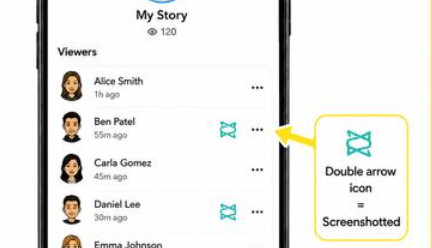
This story mode is only visible to your added Snapchat friends. For your Snapchat friends, Snapchat provides detailed screenshot information. You can open the viewer list and see a double-arrow icon next to the username who has taken a screenshot.
Public Snapchat Stories
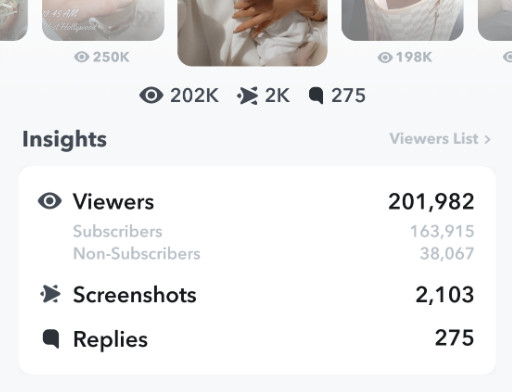
Unlike Private Stories, Public Stories are visible to all Snapchat users, including friends and strangers. For these public posts, screenshot tracking is partial. If your Snapchat friends take screenshots, you will see their usernames and screenshot symbols in your viewer list. However, if a stranger has taken a screenshot, you cannot see who is he/she. You will only see an increased total screenshot number.
How to See Who Screenshotted Your Public Snapchat Story
As we mentioned above, full screenshot tracking of Public Story is unavailable, but you can still view limited, valid screenshot data on your public Snapchat Story.
ステップ 1: Open Snapchat and tap your profile button.
ステップ 2: Select your target public story and open the content page.
ステップ 3: Swipe up to see the viewer list. Usernames marked with double-arrow icons are friends who screenshotted your story.
ステップ 4: Open Public Profile Insights, and you will see the total screenshot count.
ヒント: Keep in mind that these records are temporary. All view and screenshot statistics vanish once the 24-hour story period ends.
Why Can't You See Who Screenshotted Your Public Snapchat Story
Snapchat protects the privacy of non-friends who view your Public Story. Unlike private Stories that are only visible to added friends you know, Public Stories are open to any other Snapchat user on the platform. If the app showed you every username that took a screenshot, it would compromise those users' privacy, which does not align with Snapchat's privacy policy.
Bonus: How to Screenshot Snapchat Stories or Chats Without Notifications
Due to Snapchat's strict screenshot tracking rules, taking a regular screenshot of a friend's Public Story or a chat may trigger a screenshot notification. If you want to save public or private Snapchat stories without alerts in high quality, Apeaksoft スクリーンレコーダー 理想的な解決策かもしれません。
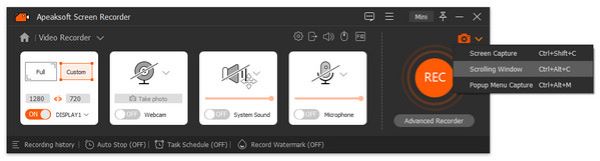
This reliable desktop screen recorder enables you to capture screenshots on Snapchat Story or chat without sending any screenshot notifications for free. You can also add annotations on your screenshots with drawings and text. Also, you can edit them as needed. This tool also enables you to take a スクリーンショットをスクロールする.
Besides screenshots, you can also use it to record Snapchat chats or Story for later review in full HD. During the recording, you can get flexible area selection and lossless quality output without notifying the other side.
ステップ 1: Download this powerful tool for free by clicking the download button below.
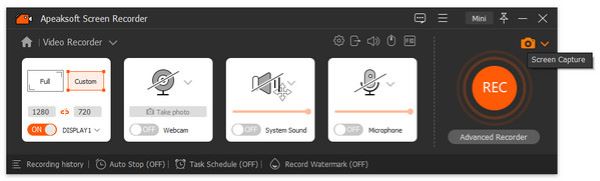
ステップ 2: 選択する スクリーンキャプチャ from the drop-down list in the top-left corner.
ステップ 3: You will see a crosshair on your screen. You can drag it to select the area you want.
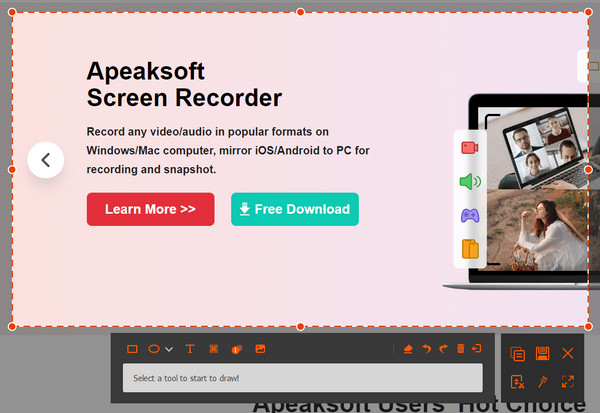
ステップ 4: You can use the tools on the screen to crop, mark, highlight, or annotate your Snapchat screenshot.
ステップ 5: If you want to take a scrolling screenshot, you can click the downward arrow in the top-right corner and choose Scrolling Screenshot from the drop-down list.
ヒント: このツールは次のような場合にも役立ちます screenshot FaceTime without a notification.
結論
This article has introduced in detail how Snapchat deals with screenshot tracking and what you can see for Public Stories. In summary, you can see friends who screenshotted your Public Snapchat Story, while nonfriends screenshotters stay hidden. If you want to take a Snapchat screenshot without notifying others, you can give Apeaksoft スクリーンレコーダー 試してみます。

関連記事