FaceTimeが画面録画を通知する場合の詳細な回答

FaceTimeは、Appleが開発したプリインストール済みのビデオチャットアプリで、2人以上のユーザーがリアルタイムでお互いの顔を見ながら会話できます。AppleはFaceTimeのプライバシーとシンプルさを重視しています。FaceTimeで友達と笑い合っているときに、ふと「もし録画されていたらどうしよう?」という考えが頭をよぎったとしましょう。私たちの調査によると、このような疑問は珍しくありません。この記事では、その疑問に答えます。 FaceTimeは画面録画時に通知します iPhoneまたはMacで。
ページコンテンツ:
パート1:FaceTimeは画面録画を通知するのか?
AppleはFaceTimeの画面録画時に通知しますか?いいえ、FaceTimeは誰かがビデオ通話を画面録画してもユーザーに通知しないため、プライベートな会話のセキュリティが低下します。iPhone、iPad、MacコンピュータのいずれでFaceTimeを録画しても、ポップアップも音も通知もありません。
AppleがFaceTimeをこのように設計したのには、録画コントロールがないこと、内蔵の画面録画機能がアプリにアクティビティを報告しないこと、会話を中断できないことなど、いくつかの理由があります。
パート2:誰かがFaceTimeを録画しているかどうかを見分ける方法
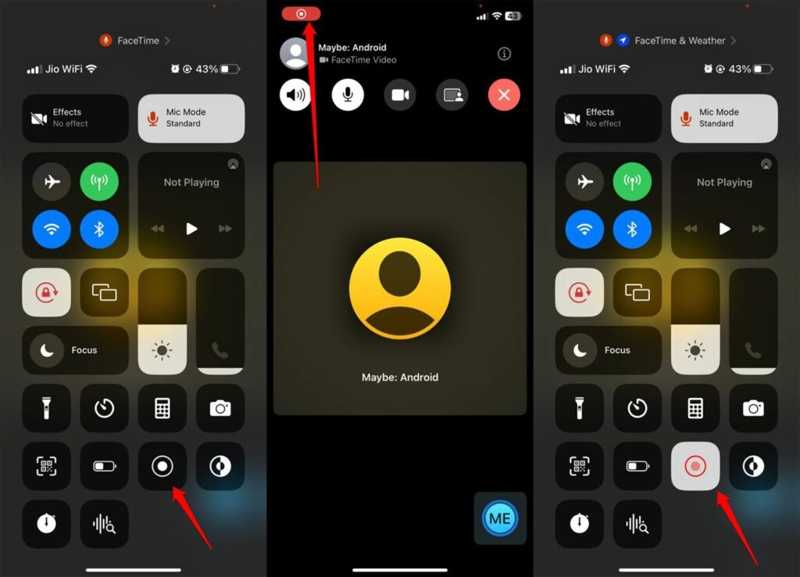
FaceTimeで画面録画の通知が表示されなくても、いくつかの兆候を観察することで録画が開始されるかどうかを知ることができます。厳密には確実な方法はありませんが、これらの兆候を覚えておけば、チャットのプライバシーと安全性を確保できます。
サイン1:記録ドット
FaceTimeで画面録画を行う場合、内蔵の画面録画機能を使用する場合でも、サードパーティ製の画面録画アプリを使用する場合でも、画面上に赤い録画マークが表示されます。相手の画面にも録画マークが表示されている場合は、相手があなたのビデオ通話を画面録画していることを意味します。通話中に、FaceTimeで画面共有を依頼することもできます。
兆候2:遅延または遅れ
重要なシンボルの1つは、ラグと遅延です。FaceTimeで通話する際、多くのリソースが使用されます。誰かがFaceTimeの画面録画をオンにすると、デバイスの不具合や発熱により、ビデオが突然ラグや遅延を起こすことがあります。
兆候3:不審な音や行動
に FaceTimeを録画する iPhoneまたはMacでは、発信者はコントロールセンターを開き、画面録画機能にアクセスする必要があります。FaceTime通話中に、不審なクリック音が聞こえたり、奇妙な動作が見られたりする場合があります。
兆候4:異常な要求
FaceTimeの画面録画が行われているかどうかを見分けるもう一つの手がかりは、通話中の不審な要求や行動です。このような問題が発生した場合、発信者は何らかの目的のためにFaceTime通話を録画しようとしている可能性が高いでしょう。
パート3:FaceTimeでプライバシーを保護する方法
FaceTimeで友人や家族と連絡を取り合う場合、いくつかのヒントに従うことでプライバシーを保護できます。FaceTimeで通話する際に安全を確保するための実用的なヒントとコツをご紹介します。
- 1.信頼できる人にだけ連絡してください。
- 2.カメラの映像に個人情報を表示しないでください。
- 3.FaceTimeを使う際は、友人や家族に直接尋ねてください。
- 4.Zoomのように、チャットの画面録画時に通知してくれる代替アプリを使用してください。
パート4:ラグなしでFaceTimeを録画する究極の方法
他の人に通知せずに FaceTime を録画したい場合は、 Apeaksoft スクリーンレコーダー これは良い選択肢です。iPhoneやiPadでビデオ通話を録画してパソコンに接続できるため、チャットが中断されることはありません。さらに、直感的なデザインで操作も簡単です。

100万人以上がダウンロードしました 1,000,000 users
- iPhoneでFaceTime通話をスムーズに録音できます。
- FaceTime通話をHDビデオで保存する。
- さまざまなビデオ形式をサポートします。
- 画面録画中は他のユーザーに通知しません。
- 録画予約機能など、ボーナス機能を提供する。
iPhoneでラグなくFaceTimeを録画する方法
ステップ 1: FaceTimeレコーダーをインストール
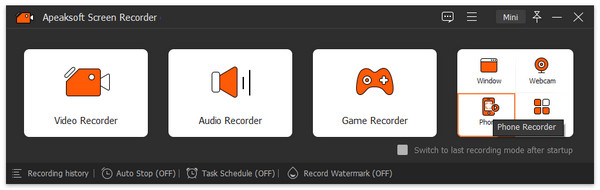
FaceTimeレコーダーソフトウェアをコンピュータにインストールしたら起動してください。Windows 11/10/8/7/XP/VistaおよびMac OS X 10.13以降で利用可能です。 電話レコーダー をクリックして iOSレコーダー次に、画面の指示に従ってiPhoneの画面をミラーリングしてください。
ステップ 2: FaceTime を録音する
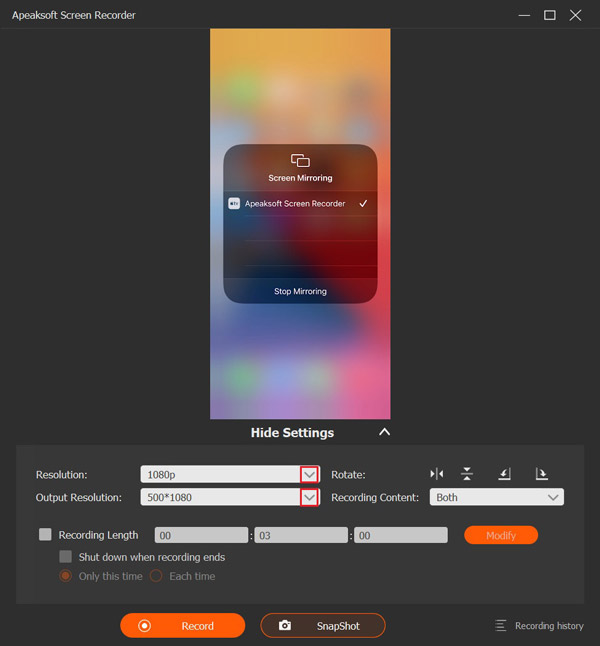
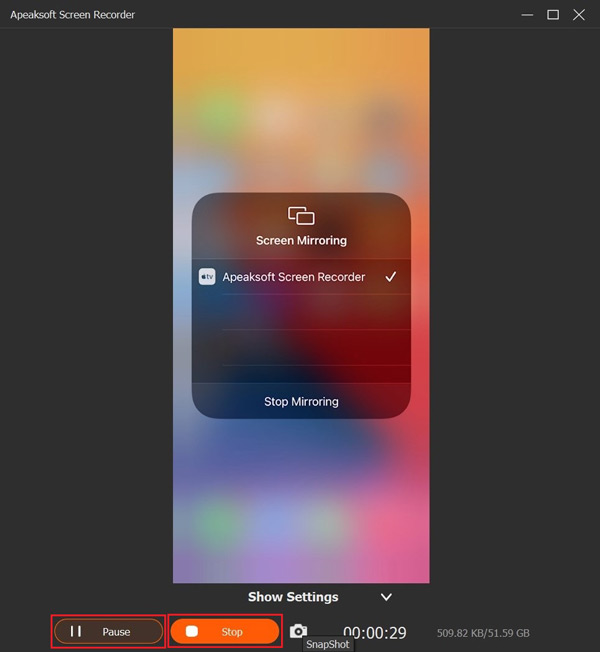
解像度と録画内容を設定します。 電話スピーカーiPhoneでFaceTime通話を開始し、 録画 通話の録音を開始するには、ボタンを押してください。
ステップ 3: 通話録音を保存する
通話が完了したら、 Force Stop ウィンドウのボタンを押して通話録音をハードドライブに保存します。処理中は、ボタンを押すことで一時的に録音を停止できます。 ポーズ ボタン。録画を見るには、クリックしてください。 録音履歴 そして最新の動画を開きます。
ヒント: ビデオ形式や出力フォルダを変更する場合は、メインインターフェースの [設定] メニューをクリックして、 出力 環境設定ダイアログのタブ。
結論
この記事では、 FaceTimeは画面録画を開始したときに通知します iPhone、iPad、またはMacで。これで、答えと関連する知識を学ぶことができます。他の人がFaceTime通話を画面録画している疑いがある場合は、私たちのヒントに従って真実を伝えてください。FaceTime通話を秘密裏に保存したい場合は、 Apeaksoft スクリーンレコーダー 一般の人々にとって優れた選択肢です。
関連記事