FRPFile Firmwarebdとは何か、そしてそれを使ってFRPをバイパスする方法は?

Google は Android にいくつかのセキュリティ対策を導入しています。Google FRP (Factory Reset Protection) は、Android 5.1 Lollipop で Google が導入したネイティブのセキュリティ機能です。新しい Android デバイスを入手すると、Google アカウントでアクティベートするように求められます。その後、Google FRP が自動的に有効になります。リンクされた Google アカウントがないと、FRP を削除できません。この記事では、 FRPファイル ファームウェアDB関連するユーティリティを共有するためのオンラインプラットフォーム。
ページコンテンツ:
パート1:FRPFile FirmwareDBとは何か
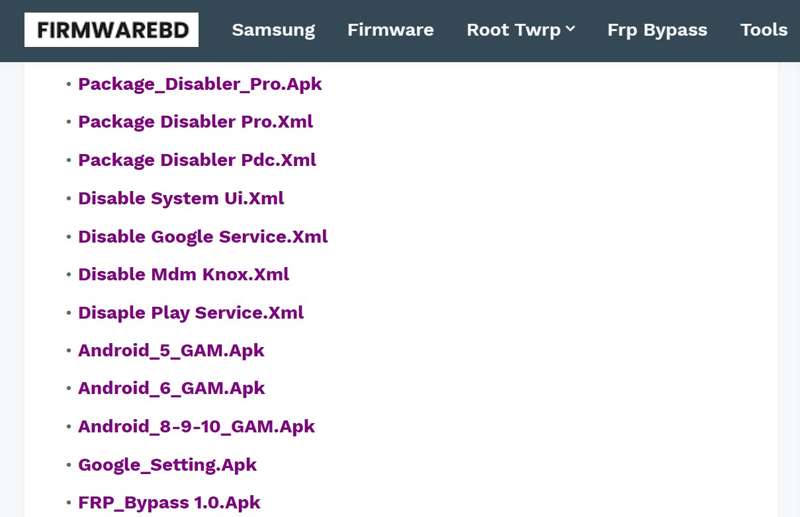
FRPFile FirmwareDBは、FRPバイパスツール、ファームウェアファイル、および関連ユーティリティを収集するサードパーティのオンラインポータルです。Googleの公式ウェブサイトではありません。このプラットフォームは、コミュニティ主導のファイルアーカイブです。
FRPFile FirmwareDBの主要機能
- 1. パスワードなしでGoogle FRPをバイパスできるFRPバイパスAPKを提供します。
- 2. Samsung、Pixel、Oppo、OnePlus、Motoなど、様々なメーカーのファームウェアファイルを提供しています。
- 3. 画面ロックを忘れてしまった場合に、Android端末のロックを解除する方法。
- 4. パフォーマンスを向上させるために、純正ROMをフラッシュする方法に関するチュートリアルを提供します。
- 5. 破損したIMEI番号を修復し、ネットワーク接続を復旧します。
- 6. Android端末をルート化することで、より詳細な制御が可能になります。
- 7. 新しいツールやファームウェアなどを定期的にアップデートしてください。
- 8. 主要な携帯電話ブランド向けのROMファイルとフラッシュファイルを提供します。
- 9. ブランドやモデルごとにファームウェアファイルやツールを検索してください。
- 10. サムスン、オッポ、ワンプラス、シャオミなど、様々なブランドに対応しています。
我々が好きなもの
- 幅広いFRPツールとAPKを提供します。
- 主要な携帯電話メーカーすべてのファームウェアファイルを網羅しています。
- 最新バージョンのAndroidに対応した新しいツールを定期的にアップデートしてください。
- 完全無料で利用でき、ログインや支払いは一切不要です。
嫌いなもの
- 一部 FRPバイパスツール また、公益事業には技術的なスキルが求められる。
- ファームウェアおよびフラッシュファイルは安全ではない可能性があります。
- カスタマーサポートは限定的です。
FRPFile Firmwarebdは無料ですか?
はい、FRPFile Firmwarebdは無料でアクセスでき、ほとんどのブラウザで利用可能です。プラットフォーム上のほとんどのファイルとツールは無料でダウンロードして使用できます。ただし、一部のユーティリティでは、携帯電話のロック解除やFRPのバイパス時に追加料金が発生する場合があります。
FRPFile Firmwarebdは合法ですか?
FRPFile Firmwarebdはコミュニティによって運営されています。すべてのツールとファイルは他の開発者から提供されています。すべてのアイテムが安全かつ合法的に使用できるとは限りません。
パート2:FRPFile FirmwareDBの使い方
ステップ 1: Video Cloud Studioで 設定 アプリを携帯電話に追加します
ステップ 2: MFAデバイスに移動する アプリと通知, 高機能, 特別なアプリへのアクセス.
ステップ 3: 不明なアプリをインストールするそして、ブラウザを選択してください。
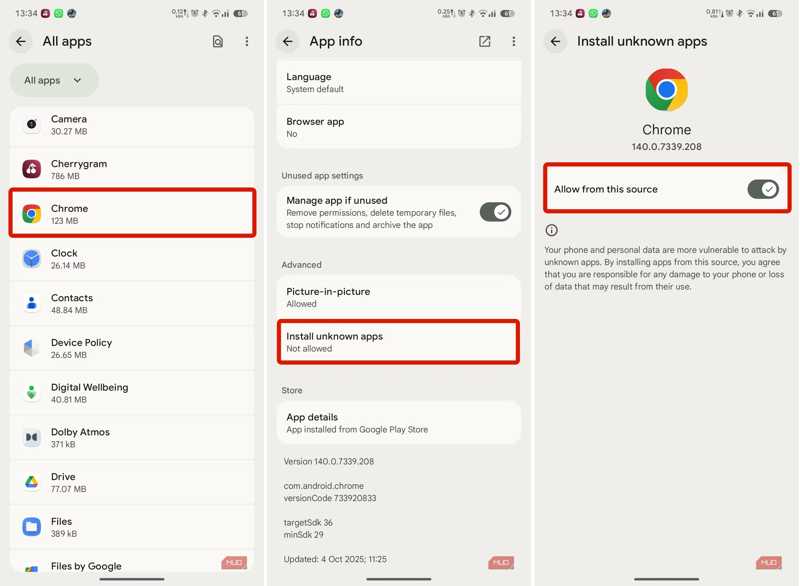
ステップ 4: トグルオン このソースから許可.
ステップ 5: ホーム画面に戻ってブラウザを開いてください。
ステップ 6: frpfile/firmwarebd.com を検索し、検索結果からウェブサイトを開いてください。
ステップ 7: リストからFRPバイパスAPKを見つけてタップしてください。
ヒント: ウェブページでは、Smart Switchなどの他のAPKも閲覧できます。
ステップ 8: ダウンロード後、内蔵のファイルマネージャーアプリを実行してください。
ステップ 9: に行きます ダウンロード フォルダを開き、APKファイルをタップします。
ステップ 10: をタップ INSTALL APKをインストールするには、ボタンをクリックしてください。
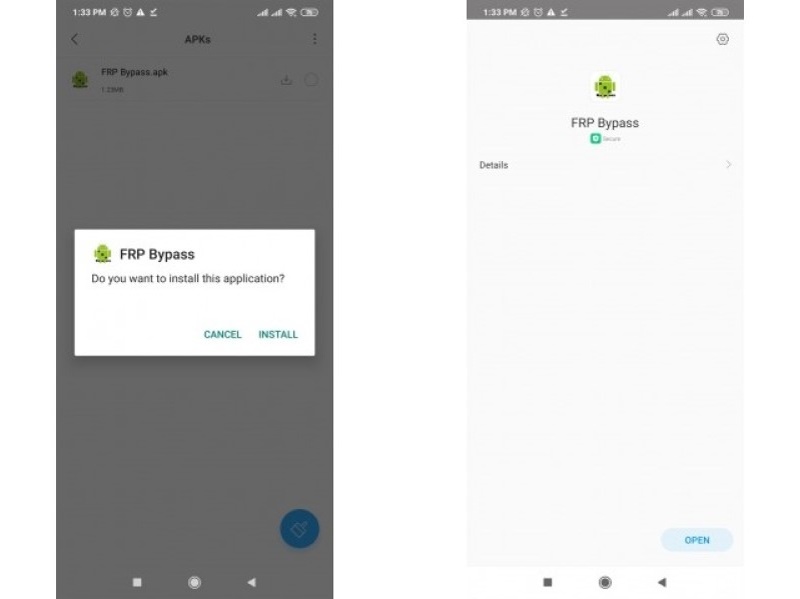
ステップ 11: 完了したら、 設定 アプリ。
ステップ 12: に行く ゼネラルマネジメント, リセット.
ステップ 13: 工場データリセット ヒット リセット.
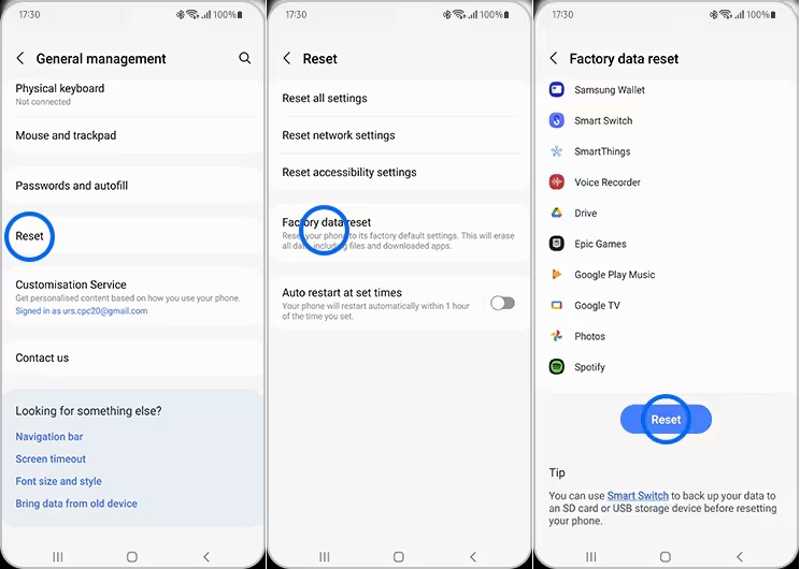
ステップ 14: 携帯電話が再起動したら、新しいデバイスとして設定します。
パート3:FRPFile FirmwareDBに代わるより良い選択肢
FRPFile FirmwareDB はすべての電話機で利用できません。さらに、成功率は低いです。幸いなことに、 Apeaksoft DroidAide Android ロック解除 Googleアカウントがリンクされていなくても、AndroidデバイスのFRPロックを解除できます。使いやすいインターフェースで操作も簡単です。

100万人以上がダウンロードしました 1,000,000 users
- AndroidスマートフォンのFRPロックを素早く解除します。
- Googleアカウントとの連携は不要です。
- スマートフォンのリセットなど、あらゆる状況に対応します。
- Samsung、Moto、Googleなど、主要なAndroidブランドに対応しています。
- Android端末のロック解除など、ボーナス機能を提供する。
安全なダウンロード
FRPFile FirmwareDBを使用せずに、お使いの携帯電話のFRPをバイパスする方法
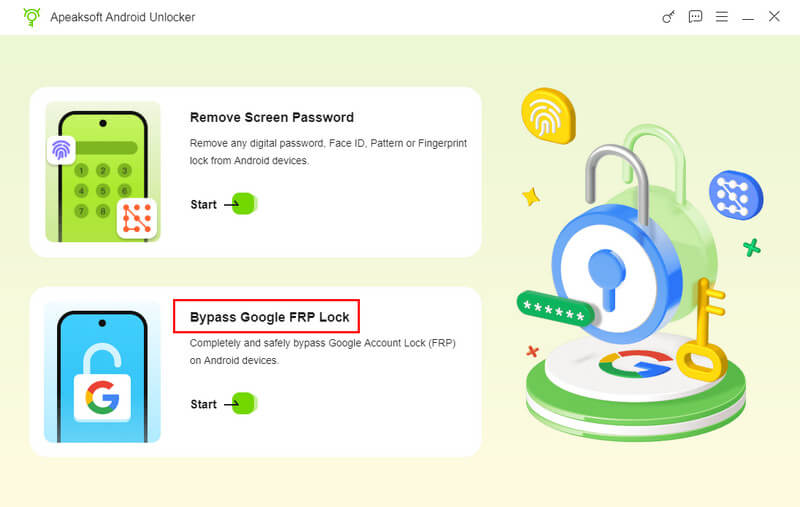
ステップ 1: FRPバイパスツールをインストールします
お使いのコンピューターにFRPFile FirmwareDBの代替ソフトをダウンロードしてインストールしてください。次に、それを起動して、 Google FRP ロックをバイパスする 続行するモードです。
ステップ 2: お使いの携帯電話に接続します
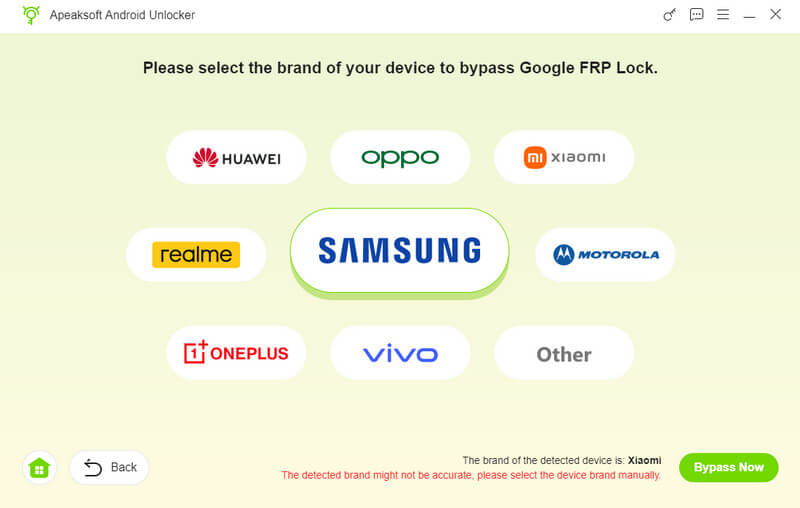
お使いのスマートフォンのメーカーを選択し、互換性のあるUSBケーブルでデバイスをコンピューターに接続してください。このコンピューターを信頼していることを確認してください。ソフトウェアはすぐにスマートフォンを認識します。
ステップ 3: FRPのバイパス
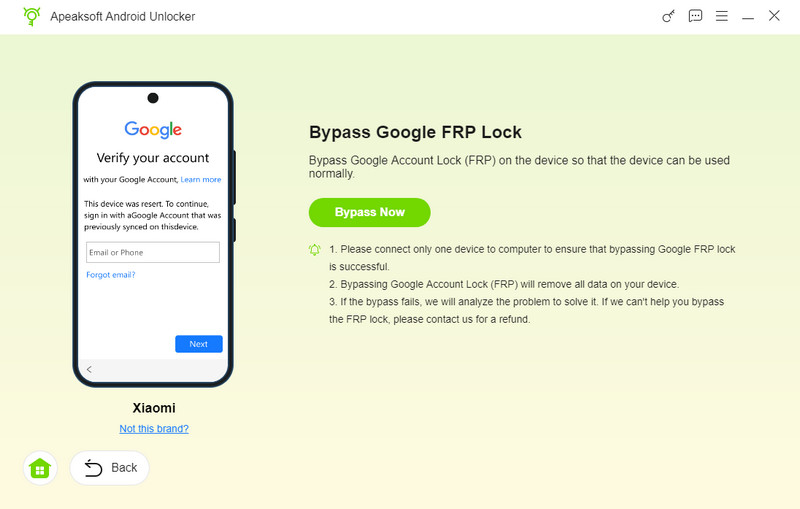
クリック 今すぐバイパス ボタンを押すと、FRPロックのバイパスが自動的に開始されます。次に、画面の指示に従って設定が完了したらデバイスを有効化してください。処理が完了するまで待ち、スマートフォンを接続解除してからソフトウェアを閉じます。
結論
このガイドでは、FRPをバイパスする方法を紹介しました MotorolaのFRPFile FirmwareBDSamsungなどのデバイスに対応しています。まずは、このプラットフォームとは何か、どのように動作するのかを学びましょう。ただし、無料プラットフォームはすべてのAndroidブランドやデバイスに対応しているわけではないので、代替案として以下をお勧めします。 Apeaksoft DroidAide Android ロック解除ほぼすべてのAndroid端末のFRPロックを解除できます。
関連記事