How to Recover Deleted Slack Messages Without Backup

Slack is a platform or app designed for business connections. Some deleted Slack messages may be highly relevant to your work, so it's important to know how to recover them. However, different from Teams or Gmail, which offer an obvious data recovery feature, there is no built-in Recycle Bin or a straightforward option to restore Slack deleted messages. Don't worry, this post will provide available ways to find or recover deleted Slack messages, including direct messages and channel messages.
PAGE CONTENT:
Part 1: Check Whether the Deleted Slack Message Is Still Available
Before trying to recover a deleted Slack message, you can make sure that the message was actually deleted first. Sometimes, the messages are not deleted but sent a long time ago or posted in a different conversation or channel.
Check Deleted Direct Messages on Slack
Slack can save your direct or channel messages. If it's been a while, you can check them. From the conversation history, you can make Slack recover deleted messages. You can also use Slack's search feature to look for the sender, keywords, or other details related to the missing message.

Check Deleted Slack Channel Messages
Your Slack channel messages are more important, for they may be related to your company or a project. Slack recovers deleted messages from a channel with a specific History feature.
Step 1. Log in to your Slack account, and you'll see your Slack channels from your company or team. Click the History button at the top of the interface. Then, you can see the channels with message history.
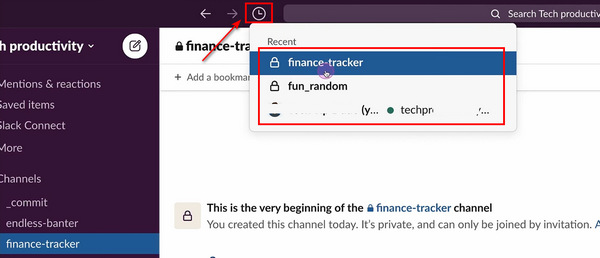
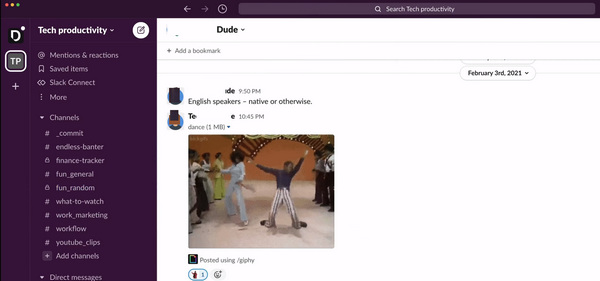
Step 2. Click on a channel, and you will recover deleted messages on Slack. It would be best if you realized that recovering channel messages is not as easy as recovering Facebook messages, for some private channels decline your permission to the conversation history.
Part 2: Recover Deleted Messages on Slack via Exporting
If you are a workspace owner or admin, you can easily export a channel to retrieve recently deleted Slack messages. Just like exporting WhatsApp chats, Slack offers a direct way to export your channel data, and you can locate your deleted messages on Slack in the downloaded ZIP file.
Depending on your Slack plan and export permissions, Workspace Owners or Org Owners may also be able to export data from private channels and direct messages.
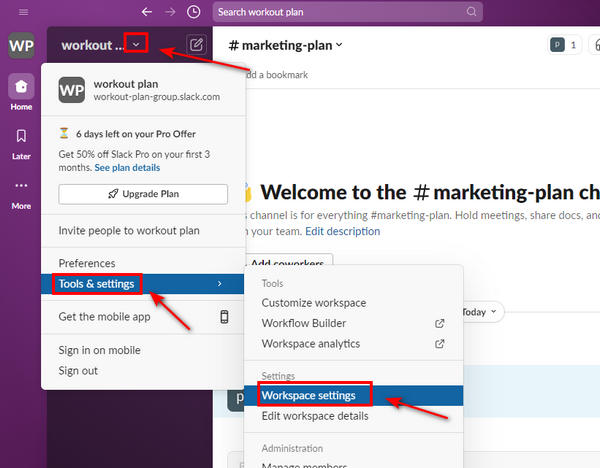
Step 1. Open your Slack and click the Dropdown button of your channel, then the Tools & settings and Workspace settings buttons.
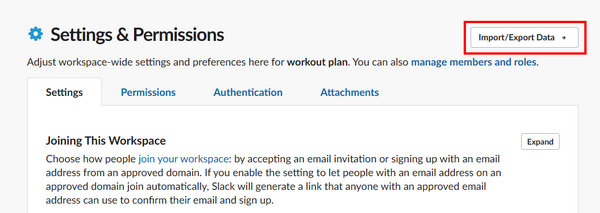
Step 2. The following steps deserve your attention. Please click the Import/Export Data button on the Settings & Permissions panel to start recovering deleted Slack messages.
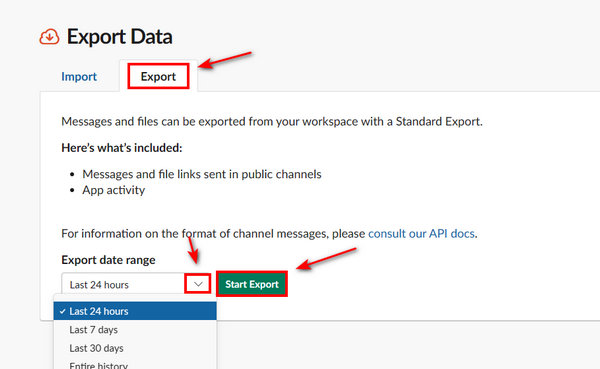
Step 3. You should click the Export button. Then, click the Dropdown button to select a saved Slack channel data period. Finally, click the Start Export button to recover the deleted Slack messages.
Part 3: Recover Deleted Slack Messages Without Backup from Your Computer
Just as Slack claims, "Deleting a message is permanent." However, the deleted Slack message may still be recoverable if its data or a copy of it remains on your computer. In this case, you can use tools like Apeaksoft Data Recovery to recover deleted Slack messages saved locally. Even though you've erased the entire hard drive, you can still recover lost data with this powerful program.

Downloaded by over 1,000,000 users
- Scan an entire hard drive to retrieve deleted Slack messages.
- Preview the deleted messages in advance.
- Highlight the deleted Slack messages.
- Compatible with both Windows and Mac.
Secure Download
Secure Download

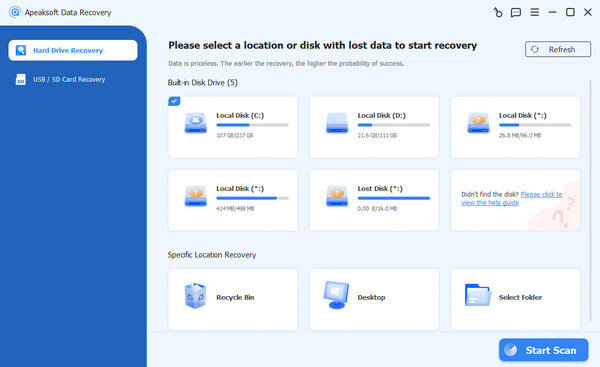
Step 1. Download Apeaksoft Data Recovery and launch it. Then, you can choose a hard disk to search for the deleted messages by clicking the Start Scan button.
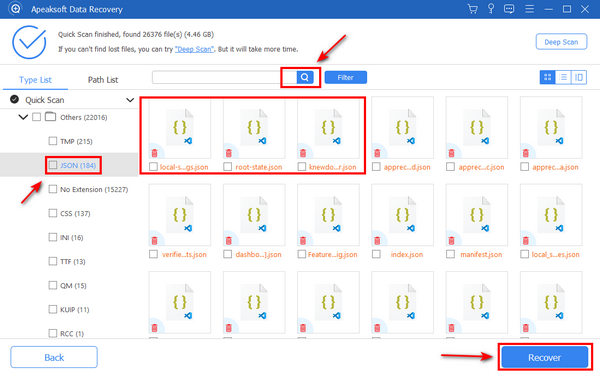
Step 2. Since you want to recover deleted messages on Slack, you can choose the Document and Others file types. Slack message backups are saved in JSON or TXT format, so you can search for the file types in the Search box and then select the deleted Slack messages based on the date. When you put your cursor on a file, you'll see its date. Then, click the Recover button to recover the deleted messages on Slack.
Part 4: FAQs of Deleted Slack Messages
Is there a Trash folder in Slack?
No, there isn't. There's no way to recover deleted Slack messages from a so-called Trash folder or Recycle Bin.
Why can't I find the deleted Slack messages in the exported file?
Your Slack plan or export permissions may limit your export.
Does Slack automatically delete old messages?
Yes. There will be a data retention policy that determines how long messages are kept. When messages reach the period, Slack can automatically delete them. Note that these messages cannot be recovered through a Slack data export.
Conclusion
In this post, you can learn details about how to recover deleted messages on Slack. You can check the conversation history from both direct messages and channels. The exported files also contain the deleted Slack messages. If those message files get lost, you can use Apeaksoft Data Recovery to restore the deleted Slack message and data files easily if they are stored locally.
 Apeaksoft Data Recovery
 Recover deleted or lost data on Windows and Mac computer.
Secure Download
Secure Download
Related Articles