

Top Free Disk Partition Recovery Software for Beginners

Have you ever had a hard drive suddenly lose a partition? Important documents, photos, and other items seem to disappear in an instant. The first reaction of many users is: No, the data is gone. In fact, this situation does not mean that it is irretrievable. As long as new data has not overwritten the partition, you can still find the lost data and partition with the help of free partition recovery software.
PAGE CONTENT:
Part 1. What Is a Hard Disk Partition
Before we talk about recovery, understanding the concept of hard disk partitions will help clarify what to do next. Hard disk Partition refers to the division of a physical hard disk into multiple independent areas, such as the common system partition C disk and storage partition D disk. The benefits of this are easier data management, more efficient system operation, and more orderly backup and file storage.
When a partition is accidentally deleted, becomes RAW, or is unrecognized due to a system error, the data may be temporarily inaccessible. However, as long as the partition structure has not been overwritten, free partition recovery software can still scan the underlying sectors and rebuild the partition table to make the files visible again.
Part 2. Common Causes of Partition Loss on Windows
Once you understand how partitions work, you'll have a better idea of why they're lost and why recovery isn't hopeless. Next, let's look at the common situations that cause partitions to disappear to determine which of these situations your hard drive falls into.
Deletion by mistake
When using disk management tools to adjust, reformat, or convert partitions, improper operation may directly delete the original partition.
File system corruption
Power outages, system crashes, and forced shutdowns can corrupt partition tables and turn partitions into RAW, making them inaccessible.
Viruses
Some attacks modify the system partition table or hide partitions, making the hard disk look "missing".
Hardware failure
An aging or damaged hard drive may not be able to read the partition structure, which is common after years of HDD use.
System update
Partition structures may be overwritten or overwritten when you upgrade your system, convert from MBR to GPT, or reinstall Windows.
Either way, as long as new data does not overwrite the partition, you still have a chance to retrieve the lost partition with tools like free HDD partition recovery software. Before entering the recovery tool, the most important point is: do not continue to write or format the hard drive, otherwise the recovery success rate will be significantly reduced.
Part 3. Top 5 Best Partition Recovery Tools
Choosing the right recovery tool will directly affect the success of partition retrieval. Different software varies in scanning ability, interface ease of use, and recovery stability. The following options are commonly used and highly rated by users, all of which support free hard drive partition recovery.
Apeaksoft Data Recovery [Most Recommended]
Apeaksoft Data Recovery is designed for data loss scenarios caused by accidental deletion, formatting, RAW partition, and system errors. It has a friendly user interface and can be easily completed even for the first time. Supports recovery of partition data from HDD, SSD, USB, SD card, and other devices, and provides the preview function before scanning to avoid invalid recovery.
Best Hard Drive Partition Recovery Tool for Free
- Supports NTFS, FAT32, exFAT and other mainstream formats
- Quick scan and deep scan dual mode
- Recovers documents, photos, audio, video and compressed packages
- High recovery success rate on RAW partitions
Secure Download
Secure Download

Step 1. If you are doing this for the first time, it is best to save the current data with a backup app in advance. Then download and open the Apeaksoft software on your computer.
Step 2. Select the type of data you want to recover (multiple options available) and the target disk. Then, click the Scan button.
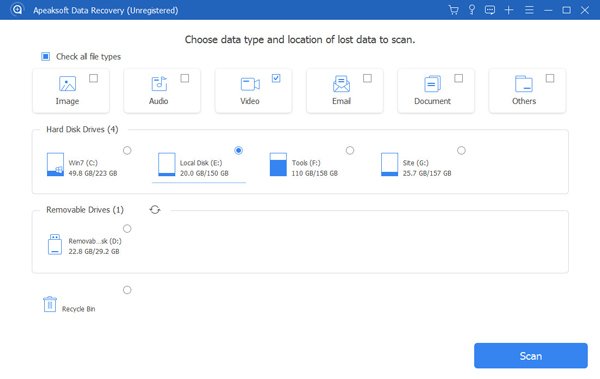
Step 3. If the fast Scan fails to find the target file or the partition structure is abnormal, select Deep Scan.
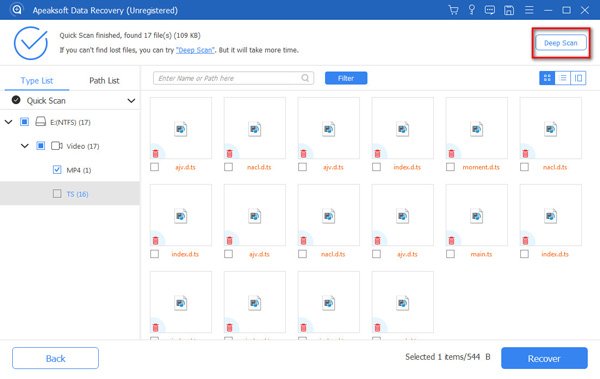
Step 4. Once the scan is complete, use the left directory or top filters to narrow down the results by file type/time/size.
Step 5. After selecting the file or folder you want to restore, click Recover. In the Save dialog box that pops up, be sure to save the recovered file to another disk or external storage to avoid overwriting the residual data that has not been scanned.
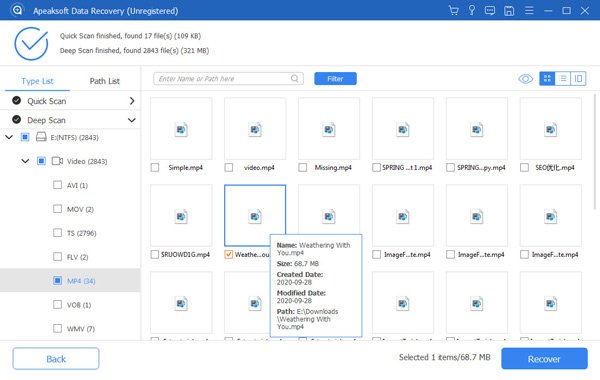
Tips: Here, we demonstrate using a Mac. The steps on Windows are slightly different, so please refer to the product’s guide page for details.
Disk Drill
Brief Overview
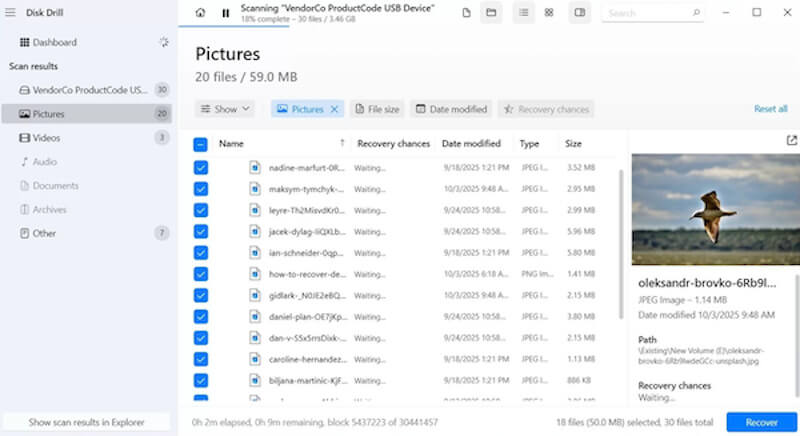
Disk Drill is a modern tool that combines recovery and user experience. In addition to the recovery function, it also has built-in data protection and backup modules, so it is often used in free disk partition recovery software scenarios, especially for users who want to organize data before recovery visually.
- Support 700+ file format recognition
- Provides scan preview, filter and label classification
- Simple interface and clear operation logic
- The free version is limited in the amount of data it can recover
- Some features are biased towards the macOS ecosystem
TestDisk
Brief Overview
TestDisk is an open source and professional free partition data recovery software. Compared with other file-level recovery software, TestDisk is closer to the underlying structure operation, which is very suitable for cases of severe partition damage or no partition table. It is a common tool for technical users.
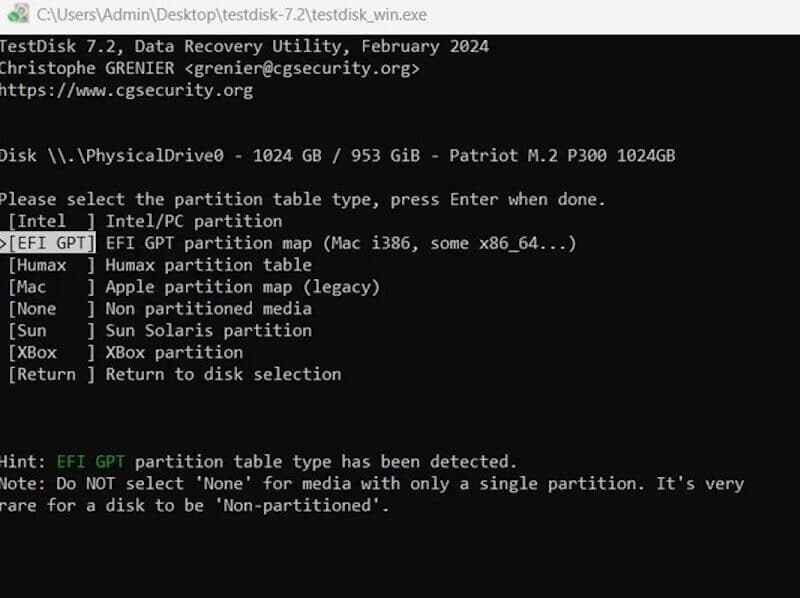
- Restores unbootable system disks
- Works with PhotoRec for file recovery
- Completely free with no limit on the number of recoveries
- Command-line operations are expensive for beginners to learn
- No visual interface
DiskGenius
Brief Overview
DiskGenius not only supports the recovery of lost partitions, but also has disk management capabilities such as format conversion, bad track detection, and you can even wipe cache on partition. It is a versatile tool. It is especially suitable for scenarios that require deeper processing, and is a popular choice for many engineers to implement free HDD partition recovery software.
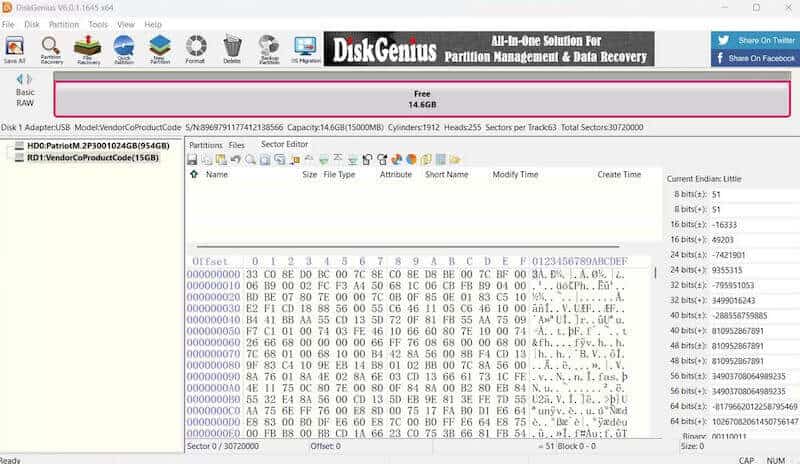
- Repairable partition tables, MBR and directory structures
- Support WinPE startup environment
- All-in-one tools without the need to install multiple software
- Limited free features
- More setup options for beginners
MiniTool Partition Wizard
Brief Overview
MiniTool Partition Wizard is a software to manage disk structure as the core, and provides scanning and partition data recovery free functions. It is particularly suitable for adjusting disk structure while restoring partitions, such as repartitioning, migrating systems, detecting disk status, etc.
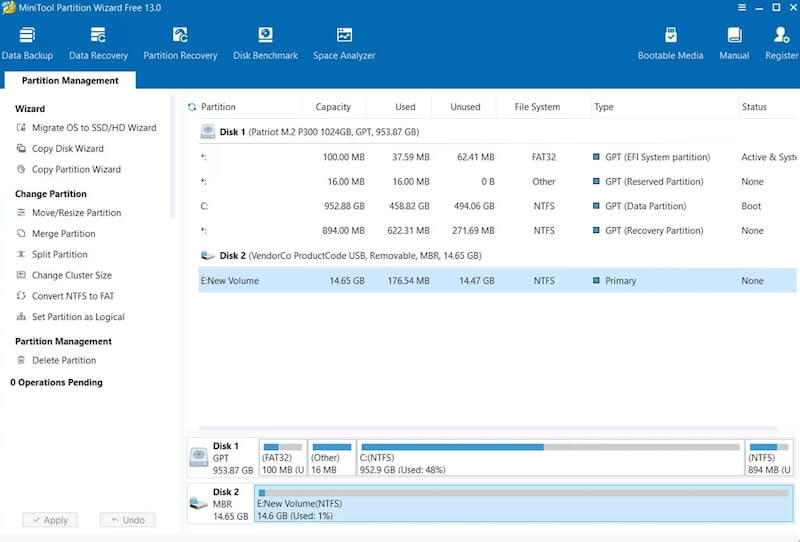
- Provide zone health detection (SMART)
- Can scan and recover accidentally deleted or lost partitions
- Function classification is clear, suitable for daily maintenance
- The free version limits recovery integrity
- Slow scan speed, especially for older HDDS
Conclusion
Therefore, you can try free disk partition recovery software first before you actually give up your data. Many times, you'll get your lost partitions and important files back faster than you think. If you're looking for a combination of Recovery accuracy, efficiency, and simplicity, Apeaksoft Data Recovery is usually a safer and less hassle-free choice.
Related Articles




