

How to Recover Deleted Emails on Your Desktop or Mobile

Accidentally deleting an important email is a big challenge; however, major email providers have added Trash or Recycle Bin into their apps. It gives you a chance to recover deleted emails before they are permanently removed or the Trash is emptied. In fact, even if your emails are permanently gone, you can bring them back. This tutorial demonstrates proven methods to find the lost emails from Gmail, Outlook, Yahoo, AOL, and more.
PAGE CONTENT:
Part 1: A Quick Way to Recover Any Deleted Emails
Can you recover permanently deleted emails? When you open your email on your desktop, no matter in a browser or using an application, it will be downloaded and saved on your hard drive. It means that you can get it back using Apeaksoft Data Recovery before it is overwritten.
A Quick Way to Recover Permanently Deleted Emails
- Retrieve deleted emails of any provider.
- Preview lost emails and attachments.
- Support a wide range of file types and formats.
- Work on Windows 11 to XP, macOS 10.7 and above.
Secure Download
Secure Download

How to Recover Permanently Deleted Emails on Your Desktop
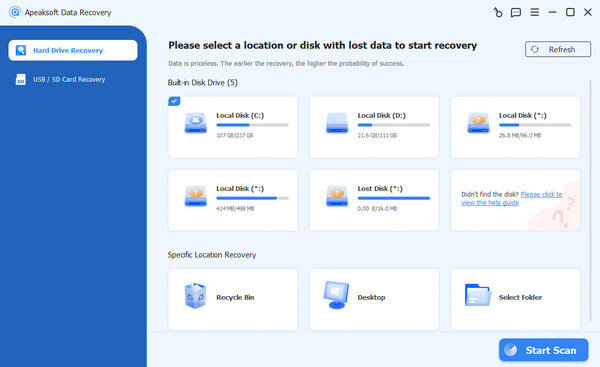
Step 1. Install the email recovery tool
Run the email recovery software after installing it on your PC. There is another version for Mac. Go to the Hard Drive Recovery tab, pick a disk where emails are saved, and click Start Scan.
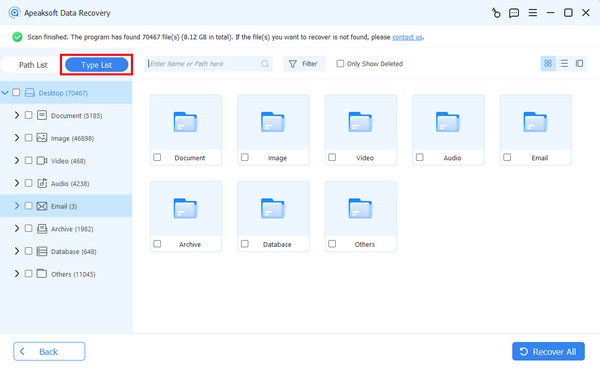
Step 2. Preview emails
When data scanning is complete, go to the Type List tab, and check Email to view all emails on your hard disk. The Filter option lets you quickly locate specific emails.
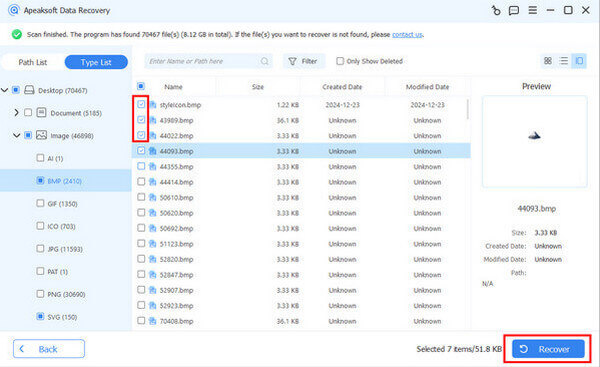
Step 3. Recover deleted emails
Select all emails and attachments you would like to retrieve, and click the Recover button. Set an output folder and confirm recovering permanently deleted emails from Gmail.
Part 2: How to Recover Deleted Emails from Gmail
For Gmail users, they can recover emails deleted within 30 days from the Trash folder on either their desktop or mobile device. Even if you cannot find them in the Trash folder, Google Vault allows you to recover permanently deleted Gmail.
How to Recover Deleted Emails from Gmail’s Trash
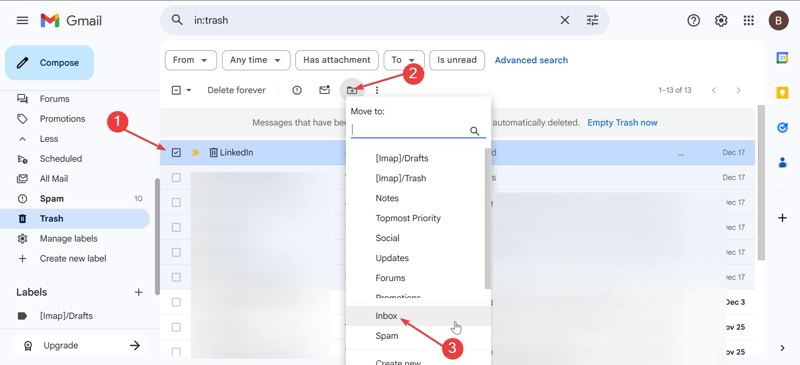
Step 1. Access Gmail in a browser, and go to the Trash folder.
Tips: Or open the Gmail app, tap the Hamburger button, and choose Trash.
Step 2. Find and select the desired emails.
Step 3. Click or tap Move to, and choose Inbox to recover deleted emails from Trash.
How to Recover Permanently Deleted Emails from Gmail
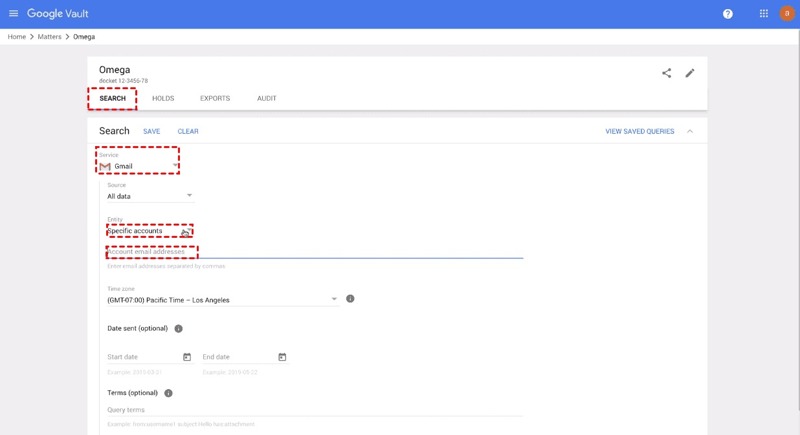
Step 1. Go to https://vault.google.com/ and sign in with your Google Workspace account.
Step 2. Click Matters, choose Create, and name the matter.
Step 3. Open the new matter and click Search.
Step 4. Pick Gmail from the Service, input your email address, and configure other settings.
Step 5. Click the Search button.
Step 6. Then, download the permanently deleted emails from Gmail.
Part 3: How to Recover Deleted Emails in Outlook
The design makes it easy to recover deleted emails from Outlook. The built-in Deleted Items folder keeps your deleted emails for up to 30 days. Moreover, it lets you get back permanently deleted emails from the server.
How to Recover Deleted Emails from Outlook
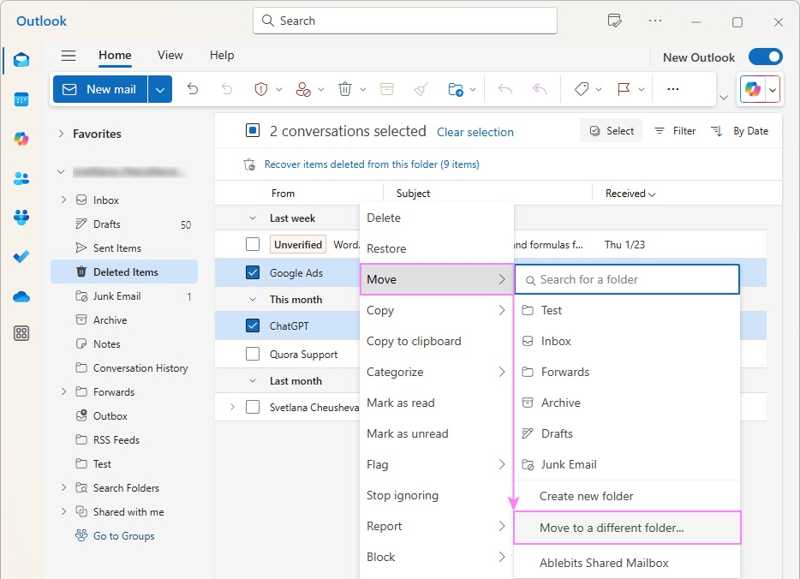
Step 1. Open the Outlook client or in a browser, and log in with your account.
Step 2. Go to the Deleted Items folder.
Step 3. Check the desired emails, click the Restore button, choose Move, and pick the destination.
How to Recover Permanently Deleted Emails from Outlook
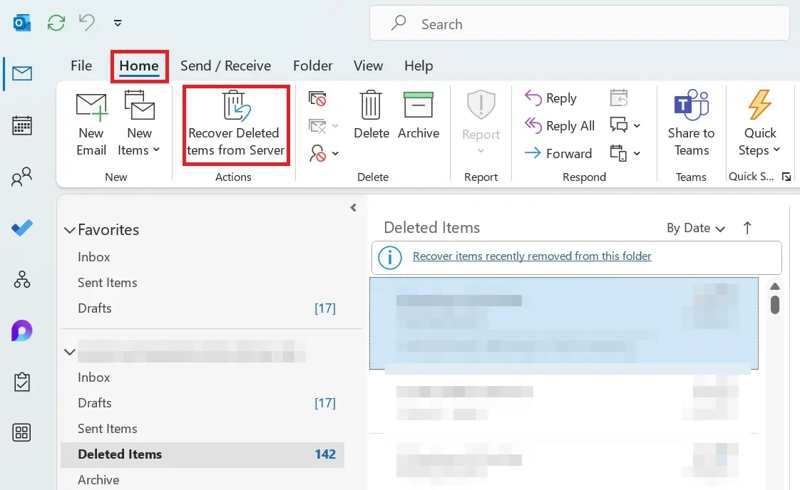
Step 1. Go to the Home tab at the top of Outlook, and open the Deleted Items folder.
Step 2. Click Recover Deleted Items from Server.
Step 3. Select one or multiple emails from the list.
Step 4. Pick Restore Selected Items and click OK.
Note: If you see Trash rather than Deleted Items, your account doesn’t support recovering permanently deleted emails from Outlook.
Further Reading
Part 4: How to Recover Deleted Emails from Yahoo
Yahoo comes with the Trash or Deleted Items folder. It keeps your deleted emails up to 30 days. If your emails are permanently deleted, you have to submit a restore request on the Yahoo Recovery page.
How to Recover Deleted Emails from Yahoo
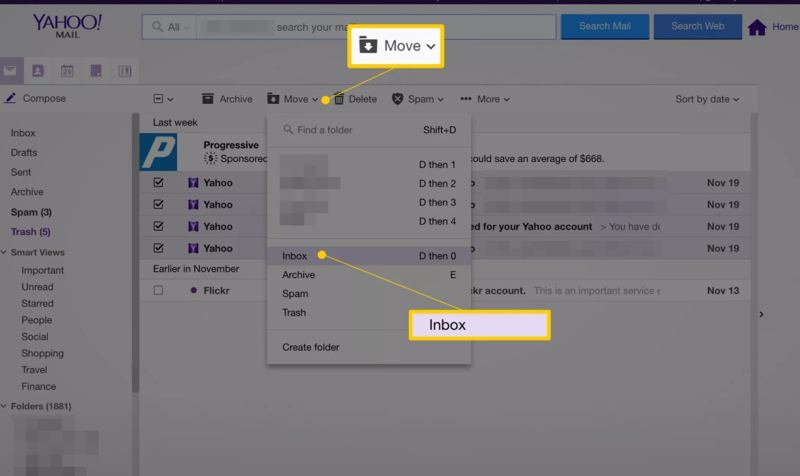
Step 1. Open Yahoo in a browser or the Yahoo app.
Step 2. Log in with your account.
Step 3. Go to the Trash or Deleted Items folder.
Step 4. Select the emails you want to recover.
Step 5. Hit Move and choose a folder, like Inbox.
How to Restore Permanently Deleted Emails from Yahoo
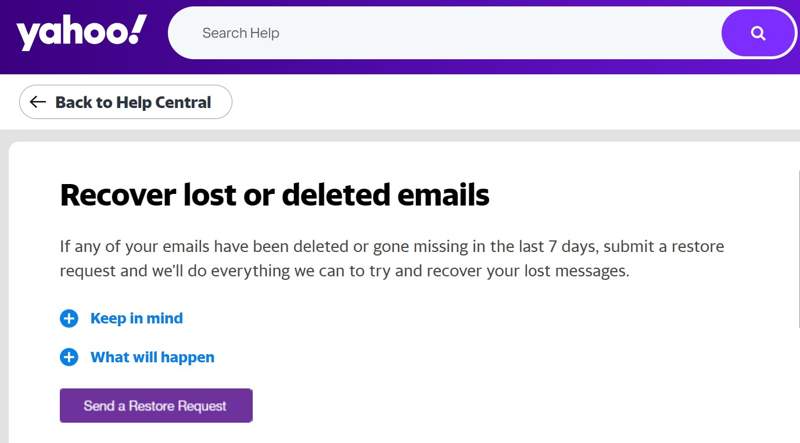
Step 1. If you cannot recover deleted emails from Yahoo’s Trash folder, visit https://help.yahoo.com/kb/SLN2552.html in a browser.
Step 2. Click the Send a Restore Request button.
Step 3. Enter your account and password.
Step 4. Fill out the form according to your situation.
Step 5. Click Create Request to submit your request and wait for a response..
Part 5: How to Recover Deleted Emails from AOL
AOL’s Trash folder stores your deleted emails for 7 days. If you need to recover deleted emails from AOL for longer than 7 days, you have to access the AOL Server. However, the success rate is not high.
How to Recover Deleted Emails from AOL
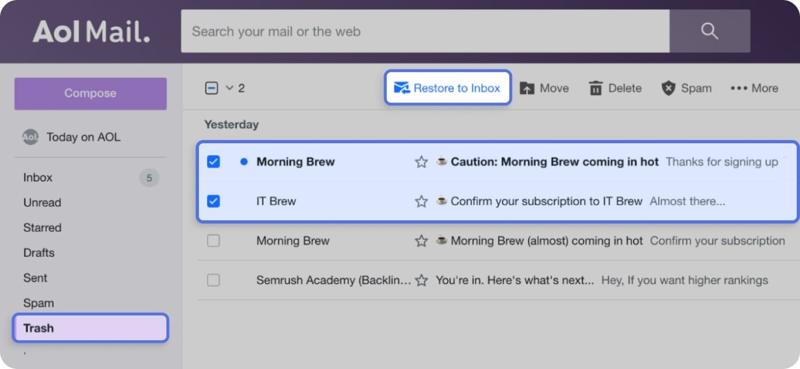
Step 1. Access AOL in a browser or app.
Step 2. Open the Trash folder. In the mobile app, tap Inbox and select Trash.
Step 3. Select the emails you wish to recover, and hit Restore to Inbox or hit Move and pick the right folder.
How to Recover Permanently Deleted Emails from AOL

Step 1. Access the AOL Help website in your browser.
Step 2. Choose the Support Options on the sidebar.
Step 3. Click Live Support and select the option that can describe your needs.
Step 4. Next, submit a request for AOL email recovery.
Conclusion
This guide explained how I can recover a deleted email from Gmail, Outlook, Yahoo, AOL, and other providers. You can read our guide, pick the right method, and follow our steps to retrieve lost messages and attachments, including permanently deleted emails. Apeaksoft Data Recovery is able to restore any deleted emails quickly, such as recently deleted or permanently erased emails.
Related Articles




