

How to Recover Deleted Files from Android with No Root

When you want to access deleted files on your Android device, the most recommended solution is to use Android data recovery software.
However, you may notice that almost all Android Data Recovery tools suggest rooting your Android phone to recover data.
If you know the root risk, you will reject the option immediately.
Is there any way to recover deleted files from an unrooted Android phone?
Of course, yes.
This page shows you the safe and efficient way to recover deleted files without rooting your Android phone.
PAGE CONTENT:
Part 1: Why Most Tools Require Root to Recover Deleted Android Files
Actually, rooting an Android phone will increase the success rate of scanning and recovering deleted files on your phone. Let's explain it in detail.
When you delete files from an Android phone, they are only invisible on Android, but still exist on your phone. They are just going to "Unallocated" from "Allocated" on the storage unit. To recover deleted files from "Unallocated" on the storage unit, use Android data recovery software to access the storage unit and scan for and read the data.
However, to prevent your phone from being infected with a virus, Android phone manufacturers have implemented certain restrictions that prevent users from accessing certain features, including storage.
As a result, for reading deleted files, the data recovery software must obtain permission to access and read the storage units. To obtain permission, rooting an Android phone is the solution.
Part 2: Is It Possible to Recover Deleted Files from an Unrooted Android Phone
Can You Recover Android Data Without Root? Yes, however, Yes, however, only a few Android data recovery programs can do that.
However, things have become much more complicated in recent years. Since Android 10, Google has introduced stricter security mechanisms, including Scoped Storage and File-Based Encryption (FBE), which significantly limit how apps can access internal storage and encrypt user data at a deeper system level.
Rooting an Android phone comes with unavoidable consequences, such as invalidating the warranty, increasing vulnerability to viruses., etc. So many users are not willing to root their Android phones to recover deleted files.
Though most Android data recovery programs do not support data recovery from unrooted Android devices, Apekasoft Data Recovery can help you recover deleted files from Android without root.
Tips: If you develop a good habit of backing up your Android phone to a computer, you can recover deleted data from the backup.
Part 3: How to Recover Deleted Files from Android Without Root (SD Card Only)
Apeaksoft Data Recovery is a tool that recovers deleted files without root access. This method does not attempt to scan the encrypted internal storage. Instead, it directly retrieves the data from the removable SD card, which acts as an external storage device that you can access and scan without root privileges on your Android device.
Recover Deleted Files from Android Unrooted
- Recover deleted videos and photos from an unrooted Android.
- Recover deleted documents and other data from Android without root.
- Support both deep and quick scans to successfully recover files.
- Compatible with both Windows and Mac.
Secure Download
Secure Download

How to Do Unrooted Android Recovery
Step 1. Connect the SD card to the computer
Free download Data Recovery to your computer. Install and run it immediately. Put your SD card into the card reader. Insert your card into the computer.
Step 2. Scan Android files
Select USB / SD Card Recovery from the left. Find your SD card on the right. Click Scan Disk.
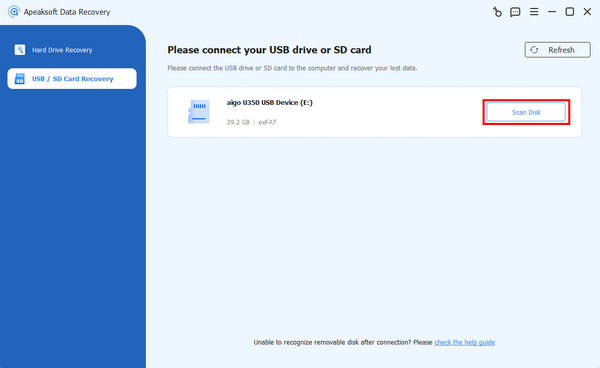
Step 3. A deep scan will be performed automatically. Wait patiently.
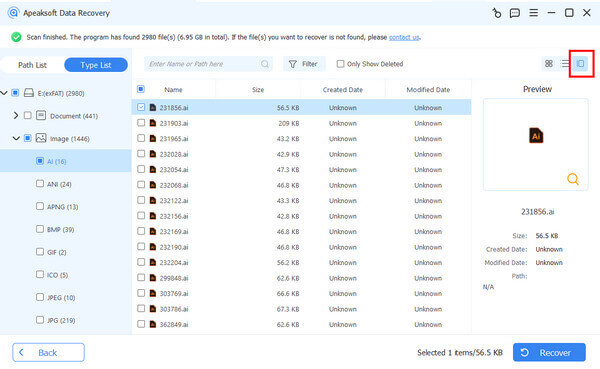
Step 4. You will see the data type on the left. Click the corresponding one and view detailed information on the right.
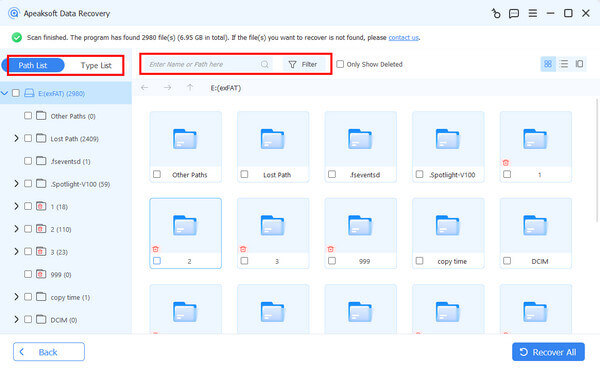
You can use the filter feature to quickly locate the desired files.
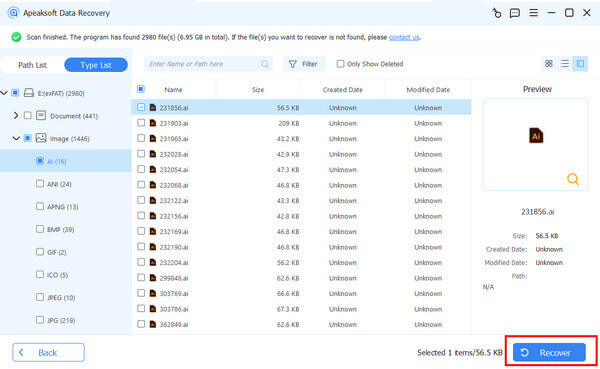
Step 5. Check the target data, then click the Recover button in the bottom-right corner. Now you can check the deleted files on your Android phone directly on your computer.
Part 4: FAQs of Recovering Deleted Files from an Unrooted Android
Where is the recycle bin in Android?
There is no recycle bin in Android. But you can find recently deleted photos in the Recent Deleted folder in the Photos app.
How to recover deleted files from Android internal storage?
You need to use a file recovery tool. Apeaksoft Android Data Recovery is professional data recovery software that recovers deleted files from Android internal storage or SD card, like SMS, contacts, call logs and documents.
Is it possible to recover deleted files from an SD Card on Android?
Actually, deleted Android files remain on your SD card, hidden. When you save the new Android data to the SD card. When you save the new Android data to the SD card, those deleted files will be overwritten. So, you’d better find a professional data recovery tool to recover the deleted files as soon as possible.
Conclusion
When you lose files on an Android phone, you can seek help from third-party tools to recover deleted Android files without root. Though the tools require root permissions, you can still use Apeaksoft Data Recovery to recover data from an unrooted Android phone by reading the SD card easily.
Secure Download
Secure Download
Related Articles




