4 Workable Methods to Recover Deleted Instagram Messages

Instagram is a versatile photo-sharing app for both iOS and Android users. You can also send a message and chat on Instagram with anyone you follow. However, it's upsetting when you accidentally delete these memorable IG messages. Can you recover deleted messages on Instagram? How to recover deleted Instagram messages? Don't worry! This article will provide detailed and feasible methods for iPhone and Android users to tackle this issue.
PAGE CONTENT:
- Part 1. Can You Recover Deleted Instagram Messages
- Part 2. [Official] Recover Deleted Messages from Instagram Meta
- Part 3. Restore Deleted Instagram Messages from Backup
- Part 4. Restore Deleted Instagram Messages from Android Notification History
- Part 5. Recover Deleted Instagram Messages from the Recipient
- Bonus Tip. Recover Instagram Photos & Media from Your iPhone
Part 1. Can You Recover Deleted Instagram Messages
The answer depends on how the messages were removed and whether backup data still exists. Instagram’s deletion process is a multi-stage procedure controlled by Meta and does not happen instantly. When you choose to delete a conversation, the message is first flagged for removal. It is then transferred to an inactive storage state before eventually being scheduled for permanent deletion.
If the chats are still stored on Instagram's server or included in a previous backup. It is highly possible to recover deleted Instagram messages. However, if they were permanently deleted or unsent, the chances of restoration become much lower.
| Method | Works When | Data Completeness | Risk Level | Success Rate |
| Request Instagram Meta | Messages are still stored on Instagram’s servers | Full chat | No risk | Medium |
| Restore from Backup | Backup was made before messages were deleted | Full device | High (overwrites current data) | Medium – High |
| Android Notification History | Notification history was enabled before deletion | Partial text only | No risk | Low |
| Ask the Recipient | The other person still has the conversation | Full or Partial | No risk | High |
Part 2. [Official] Recover Deleted Messages from Instagram Meta
This is the safest way to recover deleted Instagram messages, including your messages, posts, and stories. Requesting your Instagram data can help you retrieve messages that are still stored on Instagram’s servers. However, you should note that if the messages were permanently deleted or unsent by the other person, they may not be included in the downloaded file. Below are the detailed steps.
Step 1. Open the Instagram on your phone. Tap the profile in the lower right corner.
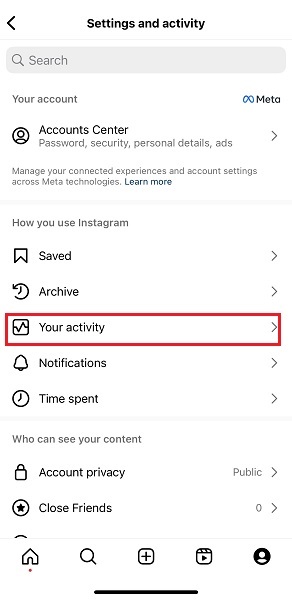
Step 2. Tap the three horizontal lines in the upper right corner of the screen. Locate the Your activity option and tap it to move on.
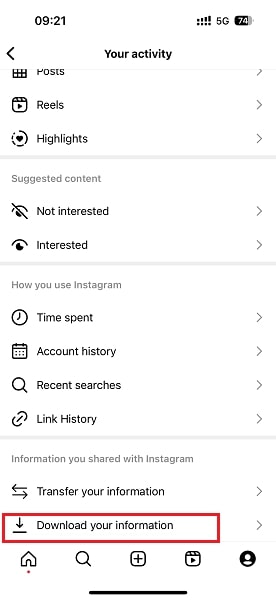
Step 3. Scroll down to the Download your information option and tap it to confirm. Follow the on-screen information and add your email to request a data copy.
Step 4. Enter your email address on the next page, and then Instagram will send the data to your email.
Step 5. Check the email on your account and download the data file from the email. You will see the recovered Instagram messages in the Messages folder.
Tips: It will take about 48 hours for the Instagram official to deal with your request.
Part 3. Restore Deleted Instagram Messages from Backup
For iPhone users, there is a dedicated data recovery tool called iTunes. If you have backed up your iPhone before deleting IG messages, you can use iTunes to recover deleted messages on Instagram. Below are the detailed steps about how to find deleted messages on Instagram:
Step 1. Launch iTunes on your computer.
Step 2. Click the phone-like pattern in the top left corner of the page.
Step 3. Go to the Backups section and click the Restore Backup button. Choose a backup that you think will keep the deleted IG messages, and then click Restore.
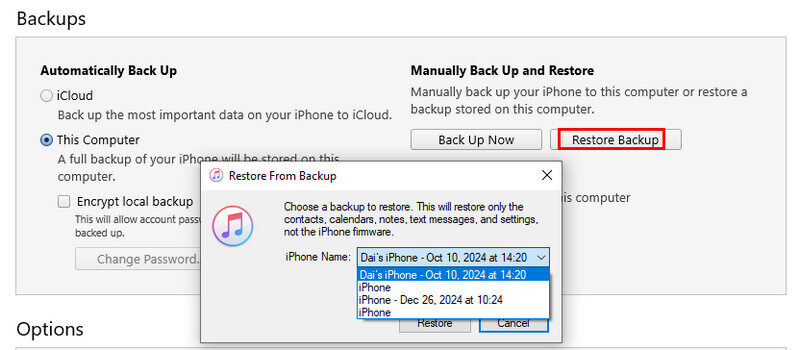
Tips: Your iPhone will restart and return to the previous backup version. All your later data will be overwritten.
Part 4. Restore Deleted Instagram Messages from Android Notification History
If you are an Android 11 or above version user and enabled the Instagram Notification and the Notification History feature before you delete the IG messages, you can recover deleted messages on Instagram via Notification History.
Follow the comprehensive steps below to recover deleted Instagram messages:
Step 1. Unlock your Android phone and go to the Settings app. Navigate to the Apps & notifications > Notifications.
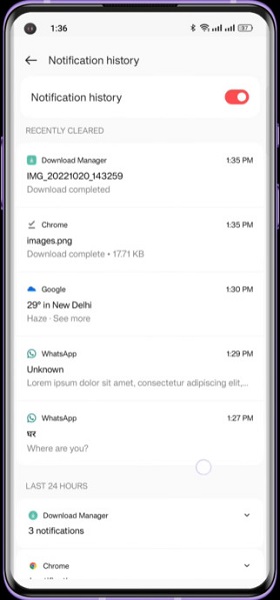
Step 2. Here, tap the Notification history. Then, you can check the deleted IG messages you received.
Part 5. Recover Deleted Instagram Messages from the Recipient
Apart from downloading all your Instagram information, you can try to contact your chat partners and ask them to help you screenshot the content of the IG messages. Then, you can see deleted messages on Instagram.
However, this method depends on whether your partner wants to share the messages with you or not. Sometimes, it may be embarrassing to make such requests.
Bonus Tip. Recover Instagram Photos & Media from Your iPhone
If none of the methods above worked, your Instagram chat messages may have been permanently deleted from Instagram’s servers and are no longer included in your backups. However, even if the chat messages can’t be restored, your shared memories, like photos, videos, and attachments, might still be recoverable as long as they were once saved on the local. All you need is a professional recovery tool like Apeaksoft iPhone Data Recovery.
Recover Deleted Instagram Photos & Media
- Recover deleted/permanently deleted data from iOS devices and iTunes/iCloud backup.
- Recover Instagram photos, videos, etc. as long as they were kept locally.
- Unlike iTunes, it can recover iPhone data selectively.
- You are enabled to preview before recovering.
- Support all iOS devices and versions, including iPhone 18 series and iOS 27.
Secure Download
Secure Download
Conclusion
Can you see deleted messages on Instagram after reading our tutorial?
The article shares the 4 possible methods to recover deleted Instagram messages when you delete the Instagram message or clear search on Instagram accidentally. Hope this post will be helpful!
Related Articles