

How to Recover Deleted TikTok Videos on iPhone/Android

As one of the most popular social media platforms, there are oceans of videos on TikTok. It allows users to always have an eye on the ongoing events on the platform and take immediate action on them. Whether it is a video from your own account or someone else’s post, it is frustrating if you lose it. This tutorial shares five methods to recover deleted TikTok videos on your iPhone or Android phone.
PAGE CONTENT:
Part 1: Recover Deleted TikTok Videos from Drafts
TikTok has a handy drafts feature. It saves your videos in progress. If you accidentally deleted a video when editing it, it might be resting safely as a draft. You can post the video or save it to an album.
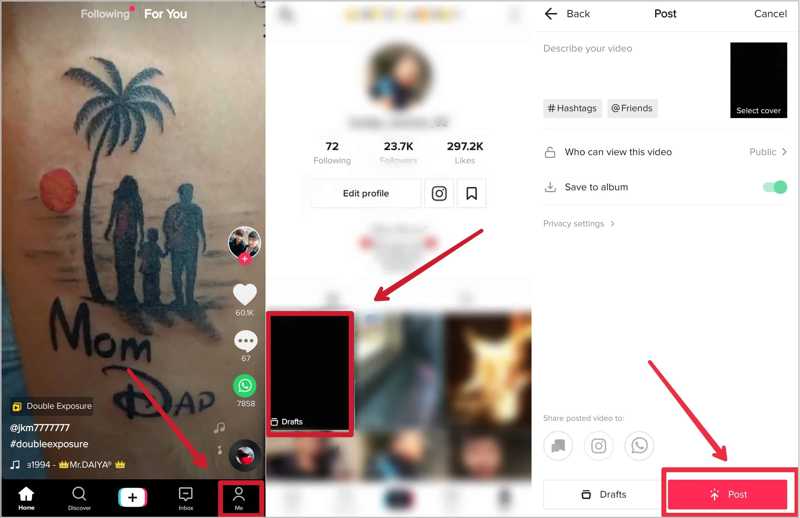
Step 1. Go to the Me tab at the bottom of your TikTok app.
Step 2. Choose the Drafts folder.
Step 3. Find and select the deleted video to enter the video-post screen.
Step 4. Toggle on Save to album and tap Post.
Part 2: Ask TikTok to Recover Deleted Videos
Can deleted TikTok videos be recovered? Yes, you can contact TikTok customer support to bring deleted videos back to your account. When TikTok receives your report, it will recover your video in a few days.
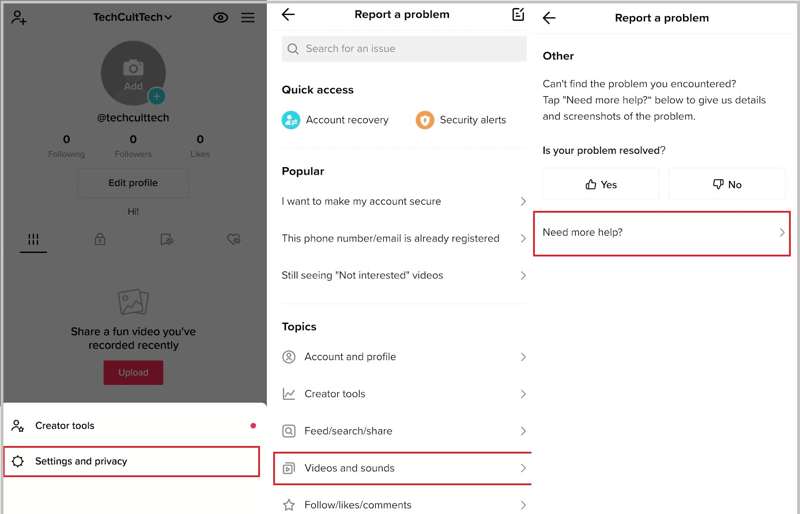
Step 1. Open the TikTok app.
Step 2. Tap on your profile and press the Hamburger button.
Step 3. Choose Settings and privacy and tap Report a problem.
Step 4. Next, choose Videos and sounds under the Topics section.
Step 5. Scroll down and tap Other and choose Other.
Step 6. Tap Need more help and enter your video recovery request.
Step 7. Finally, tap the Submit button.
Note: It takes 1 to 5 days to receive a reply from TikTok.
Part 3: Recover Deleted TikTok Videos from Gallery
If you save your videos to albums when posting on TikTok, you can recover them from your photo gallery on your iPhone or Android phone. Moreover, the built-in Recently Deleted or Trash album offers a chance to recover deleted videos on TikTok.
On an iPhone
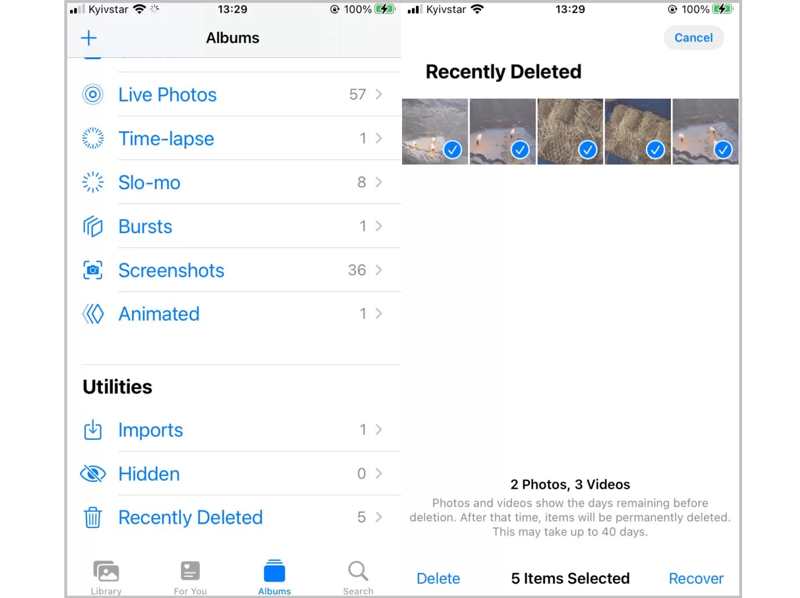
Step 1. Run the Photos app.
Step 2. Go to the Albums tab and choose Recently Deleted.
Step 3. Select the deleted videos and tap the Recover button.
On an Android Phone
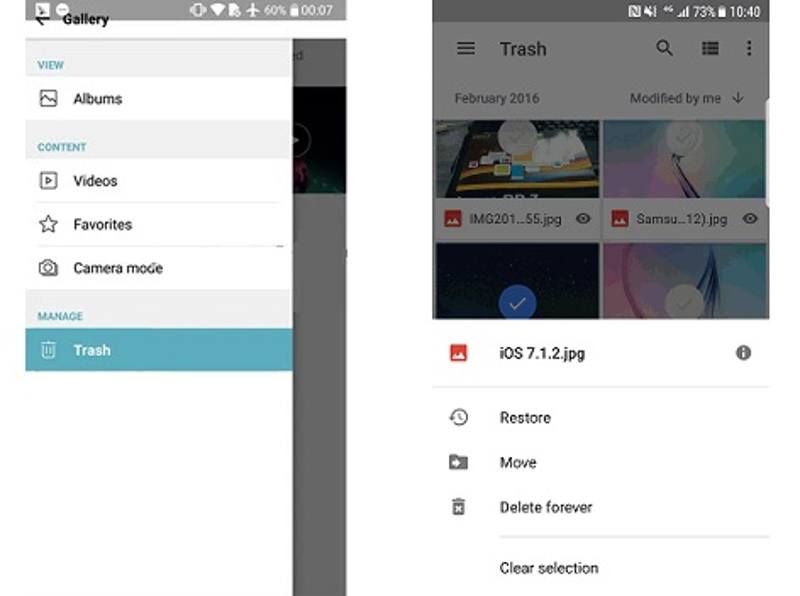
Step 1. Open the Gallery app.
Step 2. Tap the More button with a three-dot icon and choose Trash or Recycle Bin.
Step 3. Select the deleted videos and tap Restore.
Part 4: Recover Liked or Favorite TikTok Videos
How to recover a deleted TikTok video shared by someone else? You can browse your watch history, and you can find the liked or favorite videos. Then, you can watch it again and add it to your favorite list.
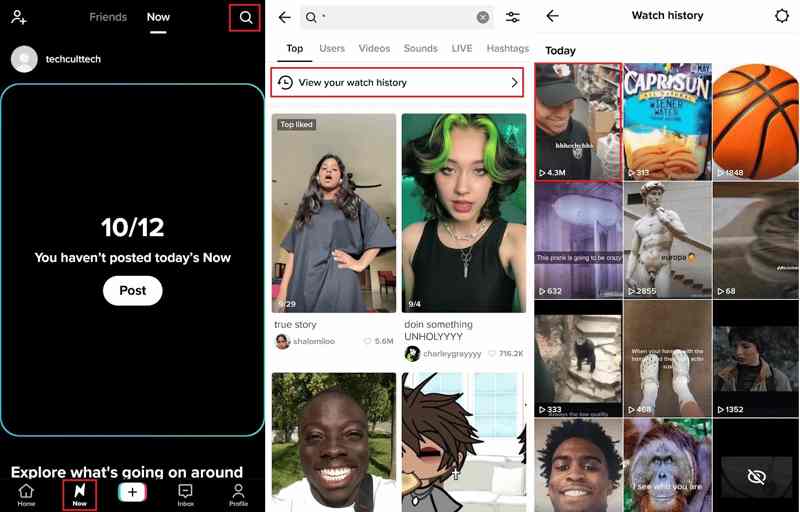
Step 1. Run your TikTok app.
Step 2. Go to the Now tab from the bottom.
Step 3. Tap the Search button, enter * in the search bar, and tap Search.
Step 4. Then, hit View your watch history and find the desired video.
Step 5. Tap the video and watch it again.
Part 5: Recover TikTok Videos with Data Recovery
If the methods above are unavailable, Apeaksoft iPhone Data Recovery can help you recover deleted TikTok videos on your iPhone without backup. The intuitive interface makes it simple to use, even for beginners.
The Ultimate Way to Recover TikTok Videos on Your iPhone Without Backup
- Recover deleted TikTok videos from your iPhone.
- Recover deleted TikTok messages, videos, and more files before recovery.
- Retrieve videos from iPhone memory or iTunes/iCloud backup.
- Support the latest models of iPhone and iPad.
Secure Download
Secure Download

How to Recover TikTok Videos from Your iPhone
Step 1. Connect to your iPhone
Download and install the best video recovery software for iPhone on your PC. There is another version for Mac. Connect your iPhone to your PC with a Lightning cable. Open the software and choose Recover from iOS Device. If you want to recover videos from iTunes or iCloud backup, choose Recover from iTunes Backup File or Recovery from iCloud Backup File.
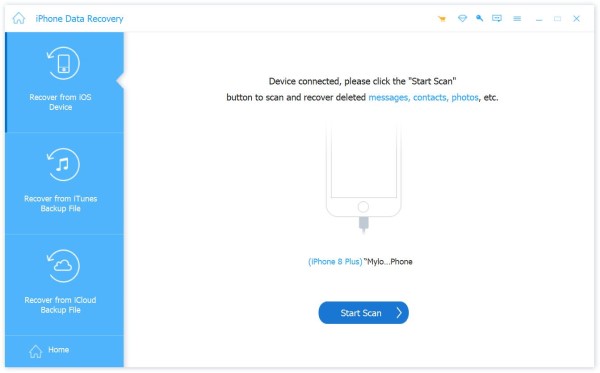
Step 2. Preview deleted videos
Click the Start Scan button to scan your iPhone memory. When it is done, select Camera Roll and App Videos to view your videos. Pull down the Show All option and choose Show Deleted Only to quickly find the deleted TikTok videos.
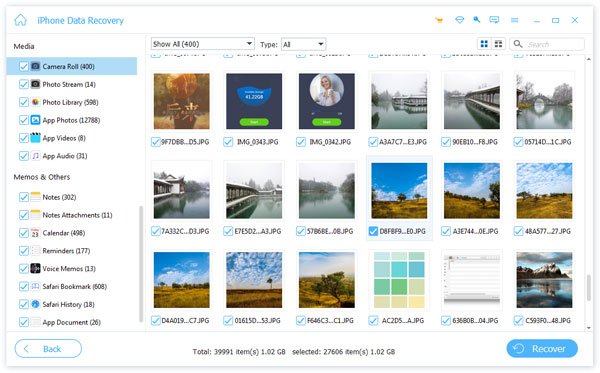
Step 3. Recover deleted TikTok videos
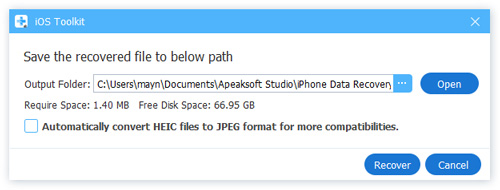
Mark all desired videos and click the Recover button. Set an output folder and hit Recover.
Conclusion
This article explained five methods to recover deleted TikTok videos on your iPhone or Android phone. The Drafts folder stores the deleted TikTok videos that you have edited. Or you can ask TikTok to retrieve your deleted videos. Furthermore, you can learn how to find the lost liked or favorite videos on TikTok. Apeaksoft iPhone Data Recovery enables you to effectively get back deleted videos on an iPhone. Other questions? Please write them down below this post.
Related Articles




