


Recover Deleted WhatsApp Messages on Android & iPhone

Accidentally deleted your WhatsApp messages? Changed to a new phone and lost your WhatsApp chats? You are not alone.
Fortunately, it is still possible to restore WhatsApp chats, whether you are using an Android phone or iPhone.
This guide will walk you through proven methods to recover deleted WhatsApp messages, whether you have a backup on Google Drive or iCloud or need to restore WhatsApp chats without backup.
PAGE CONTENT:
Part 1: Quick Overview - Can You Recover Deleted WhatsApp Messages
Can I recover deleted WhatsApp messages? Of course!
There is a built-in WhatsApp backup feature that can automatically save your chat history to the cloud storage or local files (Android only). Once you've enabled this feature, it will be of great convenience to get back deleted WhatsApp messages.
Can I recover deleted WhatsApp messages without backups? Still possible!
When you delete WhatsApp messages, they are not immediately erased from your device. Instead, they remain in the device storage until new data overwrites them. This means that as long as the deleted data hasn’t been overwritten, there is still a chance to recover your WhatsApp chat history with third-party data recovery tools before they are permanently overwritten.
| Situation | Method |
| Have a Backup | Restore Android WhatsApp from Google Drive backup |
| Restore iPhone WhatsApp from iCloud backup | |
| Restore WhatsApp from Android local backup | |
| Without Backup | Recover deleted WhatsApp messages with professional recovery software |
Part 2: How to Restore Deleted Messages on WhatsApp from Backup
As mentioned above, WhatsApp provides a built-in backup feature that enables users to save chat history to cloud storage or local files. In this part, we will show you how to recover deleted WhatsApp messages from Google Drive, iCloud, and Android local backups step by step.
Tips: To check whether you have an available backup, open WhatsApp Settings, and go to Chats > Chat Backup.
How to See Deleted WhatsApp Messages Using Google Drive on Android
If you have Google Drive on your Android device, you may be able to recover deleted WhatsApp messages after uninstalling WhatsApp using your backup.
Step 1. Uninstall the WhatsApp app from your mobile phone completely.
Step 2. Go to Google Play Store, download and install WhatsApp on your Android again.
Step 3. Open WhatsApp, log in to your original account and verify your phone number following the instructions.
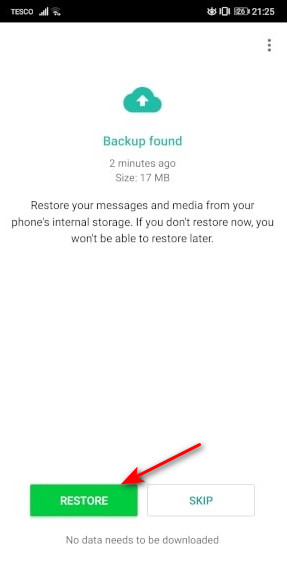
Step 4. When a dialog pops up and asks you whether to restore WhatsApp from Google Drive to Android, you should tap on Restore to start the process.
Step 5. If you see "Congratulations" appear on the screen, all WhatsApp chats in Google Drive backup are restored to your Android phone. You can read them in WhatsApp.
How to Get Back WhatsApp Messages from iCloud Backup
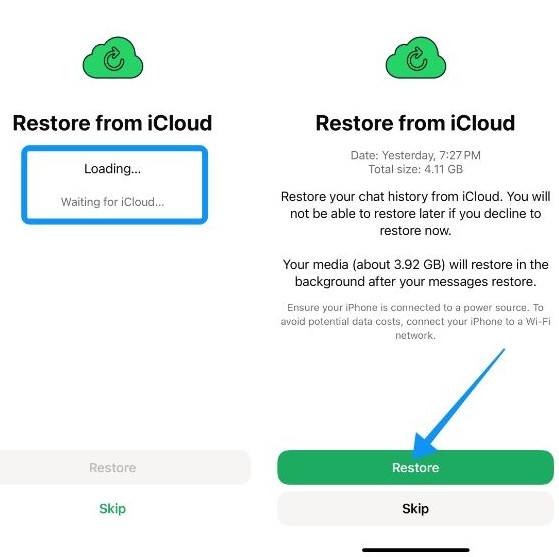
If you have previously enabled iCloud backup on your iPhone, you retrieve deleted WhatsApp messages after uninstalling WhatsApp by restoring your chat history from backup. This process will overwrite your current WhatsApp data.
Step 1. Uninstall WhatsApp from your iPhone first.
Step 2. Reinstall it from the App Store.
Step 3. Open and verify with your previous phone number.
Step 4. Choose Restore Chat History on the screen when prompt.
How to Recover Deleted WhatsApp Messages from Android Local Storage
Unlike iPhone, Android devices may automatically store local WhatsApp backup files in the phone’s internal storage. If you don't find your target WhatsApp messages in the Google Drive backup, you can try to find them in the local database files.
Step 1. Open the File Manager app on your Android phone.
Step 2. Find the older backup file like msgstore-2026-05-18.1.db.crypt14.
Step 3. Rename it to msgstore.db.crypt14.
Step 4. Reinstall WhasApp and log in with the same phone number.
Step 5. Tap Restore when prompted.
Part 3: How to Recover Deleted WhatsApp Messages Without Backup [iPhone & Android]
Haven't backed up your WhatsApp before the messages are lost? Or, your WhatsApp backup is missing or failed? Don't worry! There are still solutions to recover deleted WhatsApp messages without backup. This section will walk you through the most reliable solutions step by step on Android and iPhone.
How to Recover Deleted WhatsApp Messages Without Backup on iPhone:
If you don’t have a backup, recovering deleted WhatsApp messages on iPhone can be challenging - but not impossible. You can seek help from free WhatsApp data recovery software to make WhatsApp chat recovery simpler. For example, Apeaksoft iPhone Data Recovery provides multiple recovery modes to help you retrieve deleted WhatsApp messages on an iPhone in different situations.

Downloaded by over 1,000,000 users
- Recover deleted WhatsApp messages on iPhone without backup.
- Preview specific data before the recovery.
- Support the latest iPhone 17 series and iOS 26/27 Beta.
Secure Download
Secure Download
Step 1. Install iPhone Data Recovery on your PC
Download and install this deleted WhatsApp chat recovery software on your computer. Hook up your iPhone to your computer and run this application. It will detect your iPhone automatically.
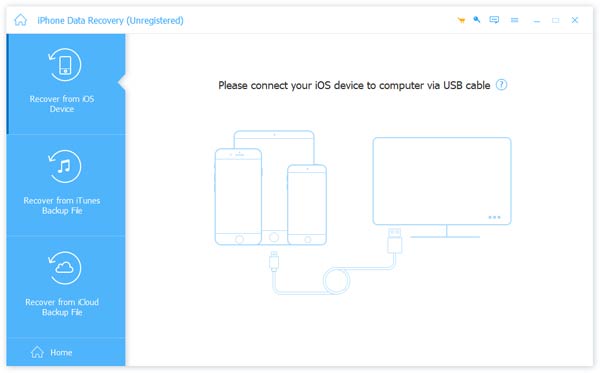
Step 2. Scan the entire phone for WhatsApp recovery
When your iPhone is ready, click on the Start Scan button to analyze your mobile phone and discover recoverable data.
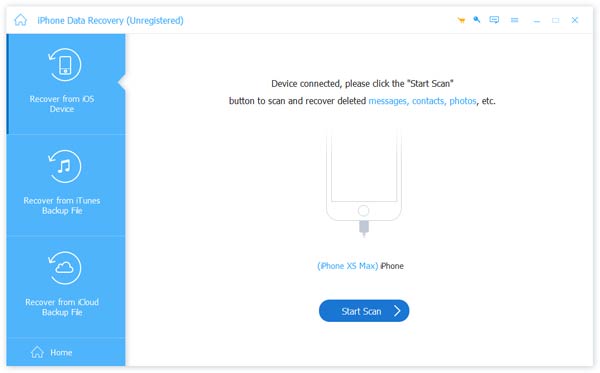
Step 3. Preview WhatsApp chat history
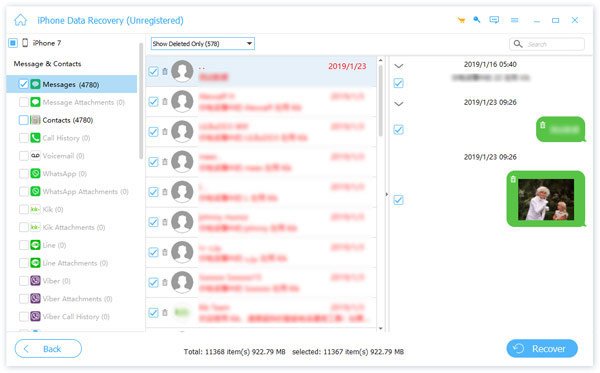
On the detail window, choose the WhatsApp option under the Message & Contacts section on the left side. Then, all deleted WhatsApp messages will show up on the right side. You can preview and select any important WhatsApp data to recover.
Step 4. Recover deleted messages from WhatsApp
After selection, click on the Recover button to finish recovering deleted WhatsApp messages. Then, you have grasped how to recover deleted WhatsApp messages from your smartphone. It enables you to recover recently-deleted apps with ease.
Tips: You can also find deleted history on iPhone via this tool.
How to Recover Deleted WhatsApp Chats Without Backup on Android:
Our research found that fewer Android users back up their phones frequently. In this case, using a professional data recovery tool can improve your chances. For example, specialized software like Apeaksoft Android Data Recovery supports WhatsApp message recovery on most Android devices.
Downloaded by over 1,000,000 users
- Recover deleted WhatsApp messages on Android without backup.
- Recover, backup, and restore deleted WhatsApp messages.
- Preview chat content before the recovery.
- Support a wide range of Android models and systems.
Secure Download
Secure Download
Step 1. Install Android data recovery to your computer
You can download and install the corresponding version on your computer from the button above.
Step 2. Connect Android phone to PC
Connect your Android phone to your computer via a USB cord. Follow the on-screen instructions to turn on the USB debugging mode on your mobile phone.
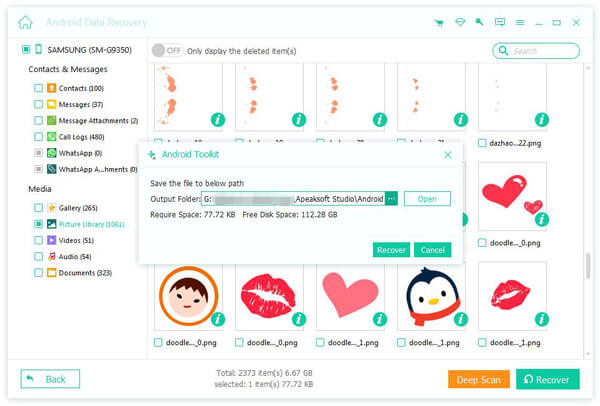
Step 3. Preview WhatsApp messages
When successfully connected, you can select the WhatsApp option on the left sidebar to open the message history panel on the right side. Here, you can preview all WhatsApp messages and select what you want to get back.
Step 4. How to recover deleted WhatsApp messages
If you are ready, click on the Recover button to restore selected WhatsApp messages to your computer.
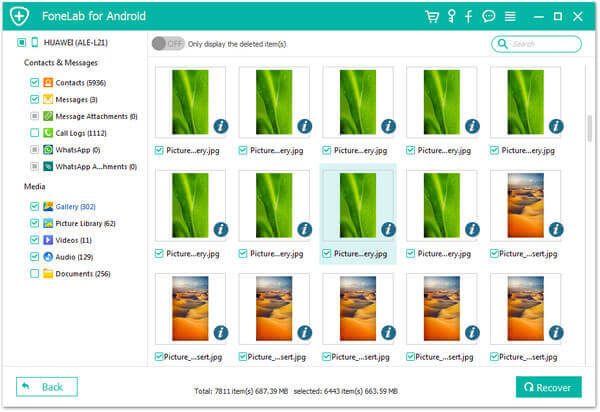
Tips: You can also follow similar steps to recover deleted WhatsApp images.
Part 4: FAQs About Recovering Deleted WhatsApp Messages
Can I recover WhatsApp messages without backup?
Yes. As long as the deleted message data haven't been overwritten, you can use professional data recovery software to scan and recover them - no backup needed.
How far back can WhatsApp messages be recovered?
It depends on whether the data has been overwritten and if a backup is available. If you have a backup, you can restore messages from the last backup date. If you don't have a backup, you can usually recover only recently deleted messages before new data replaces them.
Are WhatsApp messages permanently deleted?
It will not be deleted immediately. After a WhatsApp message is deleted, it may temporarily remain on your device's storage space until it is overwritten by new data.
Conclusion
In this guide, we cover several effective ways to recover deleted WhatsApp messages on iPhone and Android phone.
If you’re using Android, you can restore chats from a Google Drive backup or try a reliable recovery tool like Apeaksoft Android Data Recovery when no backup is available. For iPhone users, restoring from iCloud or using a professional recovery solution like Apeaksoft iPhone Data Recovery can also help retrieve lost messages.
As you can see, recovering deleted WhatsApp messages is not as difficult as you thought if you choose the right method and tool.
 Apeaksoft iPhone Data Recovery
 Recover deleted or lost data from iOS Devices, iTunes, and iCloud backup.
Secure Download
Secure Download
Related Articles




