How to Recover Recently Deleted Photos on iPhone and iPad

Key Takeaways
- Deleted photos will be kept in the Recently Deleted folder for 30 days.
- You can recover recently deleted photos directly from the Photos app within 30 days of deletion. Otherwise, they will be permanently deleted.
- From iOS 16, accessing the Recently Deleted album requires Face ID, Touch ID, or your device passcode for verification.
When you delete photos from your Camera Roll, they go to an album called Recently Deleted instead of being removed from your iPhone immediately. Before the expiration, you can undelete your pictures on your iOS device without extra software or hardware. This guide will talk about how to recover recently deleted photos on iPhone, as well as how to recover photos deleted from the Recently Deleted album.
PAGE CONTENT:
Part 1: Where Recently Deleted Photos Go on iPhone
What Are Recently Deleted Photos on iPhone? Apple added a Recently Deleted album in the Photos app when it released iOS 8. From then on, your deleted photos will be saved on the album for 30 days. After that, these photos will be removed automatically and permanently. It means that you can find the recently deleted photos easily. The benefits of the Recently Deleted album include:
1. Recover accidentally deleted photos from your Photos library.
2. Hide private photos to the Recently Deleted album, so that others won't find them.
3. Undo photo deletion within the 30-day limit if you find the photos are still useful.
Another key question is where to find recently deleted photos on iPhone. The Recently Deleted album can be found on the Albums screen in your Photos app on an iPhone running iOS 8 and above. Moreover, the Recently Deleted album is also accessible on the iCloud website if you enable iCloud Photos on your iPhone or iPad.
Part 2: How to Recover Recently Deleted Photos on iPhone
As mentioned previously, the Recently Deleted album is accessible on both your iPhone and iCloud. It means that you can get recently deleted iPhone photos on your device or in a web browser. We demonstrate the processes respectively below.
How to See Recently Deleted Photos on iPhone
Step 1. If you accidentally delete some important photos on your iPhone, open the Photos app.
Step 2. Go to the Collections tab from the bottom, and tap Recently Deleted under the Utilities section.
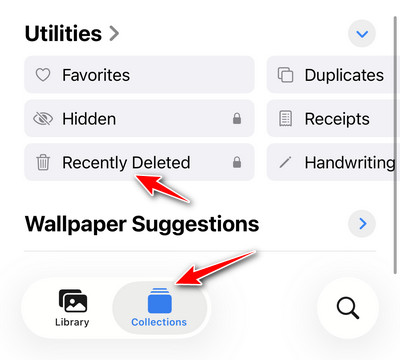
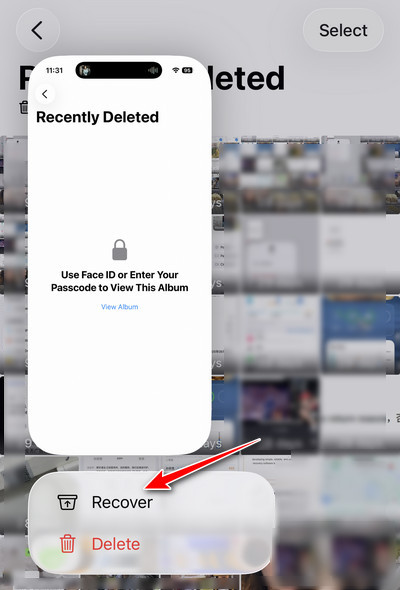
Step 3. If you have updated to iOS 16 or later, unlock the album with your Face ID or Touch ID. Then you will see all recently deleted photos on your iPhone in thumbnails.

Step 4. If you want to recover a single recently deleted photo, you can long-press the item and choose Recover.
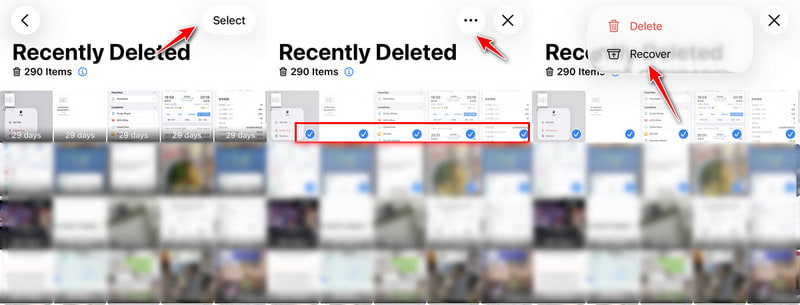
Step 5. If you want to recover multiple recently deleted photos, you can tap the Select button in the top right, select the target items, then tap the three-dot button and choose Recover.
How to Check Recently Deleted Photos on iCloud
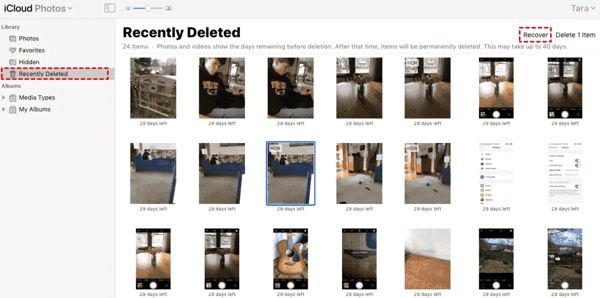
Step 1. If you enabled iCloud Photos on your iPhone, open a web browser, and access icloud.com. Sign in to your iCloud with your Apple ID and password.
Tips: If you have set up two-factor authentication, input the verification code that appears on your screen.
Step 2. Choose Photos on the home page to access iCloud Photos. Then head to the Recently Deleted album under the Library section on the left column.
Step 3. Select the photos that you want to retrieve, and click the Recover button at the top right side. Now, the recently deleted iPhone photos are retrieved to iCloud Photos. You can download them at any time.
Bonus: How to Recover Photos Deleted from Recently Deleted Album
If you cannot find target deleted photos in the Recently Deleted album, they are probably permanently deleted after 30 days or removed by mistake. Although these photos no longer appear in the album, you can still try professional recovery software, such as Apeaksoft iPhone Data Recovery, to recover photos deleted from Recently Deleted album by scanning your iPhone.

Downloaded by over 1,000,000 users
- Recover permanently deleted photos from iPhone.
- Preview the photo before recovery.
- Selectively recover photos you want.
- 3 steps to get your photos deleted from Recently Deleted back.
Secure Download
Secure Download

Step 1. Download this tool from the button above and connect your iPhone to your computer.
Step 2. Click the Start Scan button to allow this program to scan your iPhone.
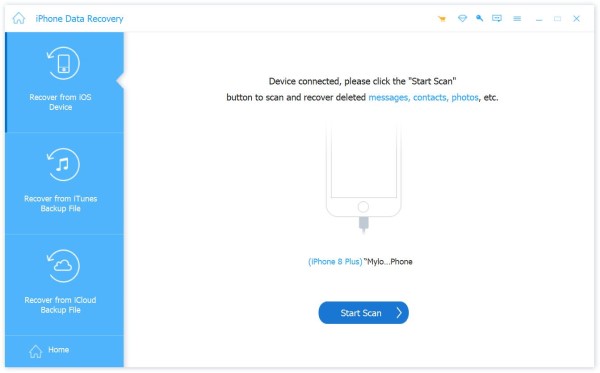
Step 3. Select photo-related option from the left panel.
Step 4. Preview and select deleted photos (marked in red characters) on the right page.
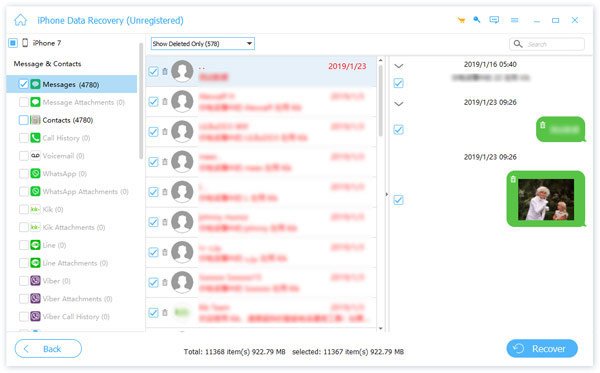
Step 5. Click the Recover button and choose a saving path on your computer.
Part 3: FAQs About Recovering Recently Deleted Photos
Why cannot I find my deleted photos in the Recently Deleted album?
If your photos were deleted more than 30 days ago, you won't find them in the Recently Deleted album. Moreover, if you recover or delete photos in the Recently Deleted album, you won't find them either.
Is it possible to recover deleted photos after deleting them from Recently Deleted?
Yes. You can recover deleted photos from a backup after you delete them from Recently Deleted. Moreover, you can use professional iOS data recovery applications to restore deleted photos from your iPhone memory.
Are permanently deleted photos really gone from the iPhone?
No, they are still on your memory before overwritten by other data.
Conclusion
Now, you should understand how to find and recover recently deleted photos on your iPhone or iPad. The Recently Deleted album lets you get back deleted photos quickly within the time limit. You can also access the Recently Deleted album on the iCloud website. Moreover, Apeaksoft iPhone Data Recovery enables you to recover photos deleted from the Recently Deleted album.
 Apeaksoft iPhone Data Recovery
 Recover deleted or lost data from iOS Devices, iTunes, and iCloud backup.
Secure Download
Secure Download
Related Articles