

5 Best Free Photo Recovery Tools on Desktop in 2026

In 2026, our lives are documented in high-definition pixels. From professional portfolios to family vacation albums, digital photos are among our most precious assets. However, a single accidental click or a corrupted memory card can result in devastating data loss. If you’ve found yourself staring at an empty folder where your gallery used to be, don't panic. There are many powerful free photo recovery tools доступен.
We'll compare 5 excellent photo recovery software in this post, and you can check their detailed info and select the one you like so that you can quickly bring back your lost photos.
СОДЕРЖАНИЕ СТРАНИЦЫ:
Part 1: Comparison of 5 Free Photo Recovery Software
We've tested 10 programs and finally selected the 5 free photo recovery tools below. They can precisely recover your photos on different devices.
| ПРОГРАММНОЕ ОБЕСПЕЧЕНИЕ | Поддерживаемые форматы | Скорость сканирования | Шанс успеха |
| Apeaksoft Восстановление данных | All major formats: JPG, TIFF, RAW (CR2, NEF, etc.), PNG, BMP, GIF, PSD. | Very Fast (2–5 mins for a standard drive scan). | High (~92%–95%) |
| Recuva | Standard formats: JPG, PNG, GIF, BMP. Basic support for common RAW files. | Fast (Quick Scan) to Moderate (Deep Scan). | Средний (~85%) |
| PhotoRec | Extensive: 480+ file signatures including nearly every specialized camera RAW. | Slow (Thorough sector-by-sector carving). | Very High (Last resort) |
| Диск Дрель | Comprehensive: 400+ types including JPG, HEIC, TIFF, and high-end RAW. | Fast (Among the quickest for Deep Scans). | Высокий (~90%+) |
| Звездное Восстановление Данных | Broad: JPG, PNG, HEIC, and major DSLR RAW (Canon, Nikon, Sony). | Moderate (Can be slow on large or fragmented drives). | High (~88%–91%) |
Part 2: Review of 5 Free Photo Recovery Software
1. Apeaksoft Восстановление данных
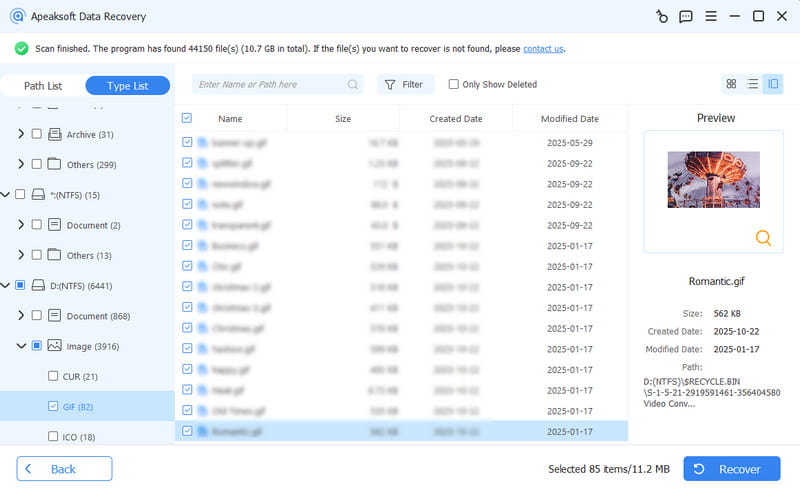
Apeaksoft Восстановление данных is a streamlined, professional-grade free photo recovery software on Windows and Mac. It is built for speed and high-efficiency scanning of both internal drives and removable hardware. It can quickly and precisely scan your computers to find the lost or permanently deleted photos. It supports most common and rare photo formats, like JPG, JPEG, PNG, SVG, BMP, GIF, and more. What's more, its seamless recovery capability can highly maintain the original image quality. You just need to select and then accurately bring back your beloved photos with this photo data recovery software free.
- Платформа: Windows 11/10/8/7, macOS.
- Лучшие для: Users who need a fast, reliable scan and want to verify photo integrity before committing to a recovery.
- Шанс успеха: High (~95%–99%).
Precisely Recover Lost Photos on Your Hard Drive
- Quickly scan and narrow down results by photo extension, like JPG, PNG, TIFF, RAW, etc.
- Highlight deleted photos in red, making them instantly distinguishable.
- Offer quick scan and deep scan for different recovery purposes.
- Open and preview photos with the original image quality.

- The scanning speed is very fast.
- The recovered photos all have high image quality.
- Keep your photos and data safe.
- The recovery success rate is very high.
- It cannot recover lost photos on mobile phones.
2. Recuva
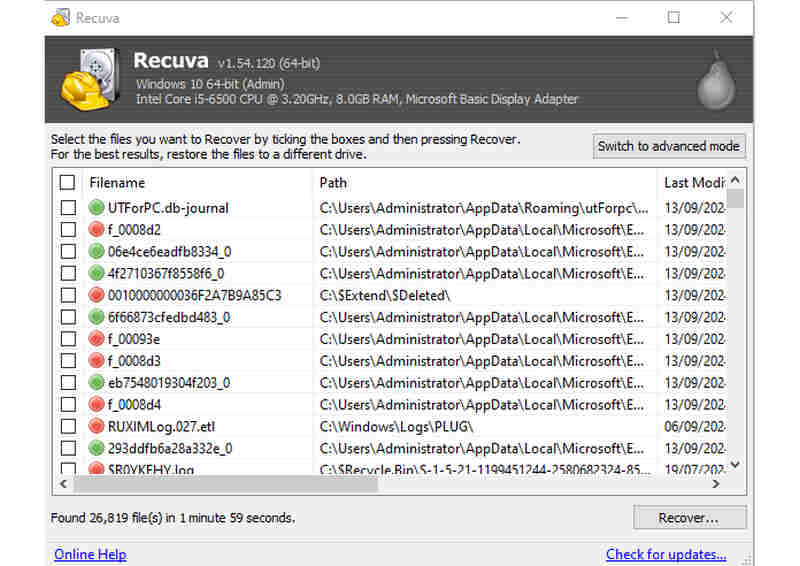
Recuva is a veteran utility in the Windows ecosystem, renowned for its ability to interface directly with the Master File Table (MFT) of NTFS drives. While many free photo recovery tools focus on flashy interfaces, Recuva focuses on low-level accessibility, making it one of the few reliable options that offer truly unlimited image data recovery for free. It is particularly effective for logical data loss, such as when a user empties the photos in the Recycle Bin or when a software bug deletes a folder. Its Deep Scan mode attempts to find files by searching for their unique headers in the clusters of a formatted drive, providing a lifeline for older hardware and legacy file systems.
- Платформа: Только Windows.
- Лучшие для: Windows users who need to recover massive volumes of photos without data caps and prefer a lightweight, no-nonsense application.
- Шанс успеха: Medium (~85%).
Key Features of Recuva:
- Classify different file types to help you quickly find all lost photos.
- Allow you to preview and select desired photos to recover.
- The streamlined interface can make the photo recovery work easy and fast.
- Protect your photo and date safety and privacy.
- Recuva is completely free.
- No volume size limit.
- Support portable version (with a USB).
- Работает только на Windows.
- Cannot well support the latest camera RAW photos.
Дальнейшее чтение
3. PhotoRec
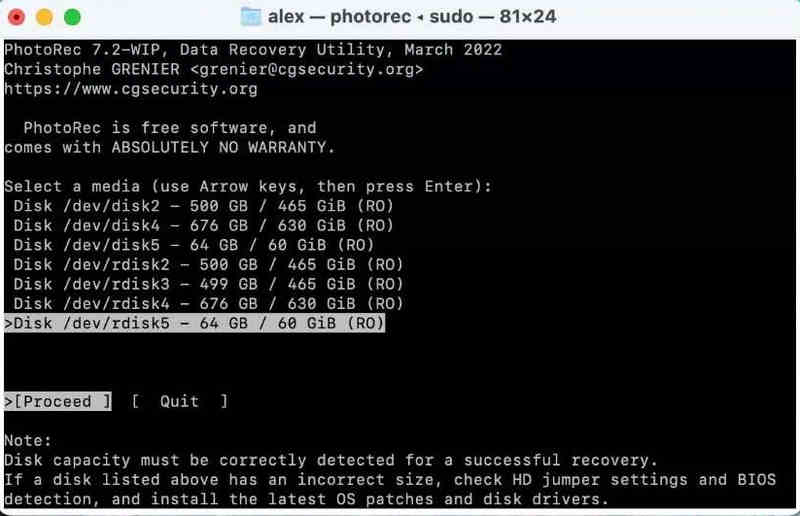
PhotoRec is a powerhouse of Open-Source Data Carving. This free photo recovery program operates on a fundamentally different logic than most recovery tools: it ignores the file system entirely and reads the raw byte-stream of the disk. By searching for Magic Numbers (unique file signatures), it can find photos on drives where the partition table is completely destroyed or the drive is unreadable by the OS. This signature-based approach makes the photo recovery software the ultimate last resort for professional photographers dealing with corrupted SD cards from DSLRs or mirrorless cameras that show Format Disk errors.
- Платформа: Виндовс, МакОС, Линукс.
- Лучшие для: Advanced users or tech-savvy photographers dealing with severely corrupted memory cards or non-standard file systems.
- Шанс успеха: Very High (Best-in-class for fragmented or RAW data).
Key Features of PhotoRec:
- Recognize over 480 file extensions by analyzing the underlying data patterns.
- Calculates the storage media size to better reassemble fragmented image files.
- Maintain the source photos and keep your privacy and data safety.
- It's available on most computer devices.
- Бесплатно и с открытым исходным кодом.
- Well support recovering RAW photos.
- It can handle unmountable drives.
- Новичкам сложно пользоваться.
- Keep metadata of the original photos.
4. Дисковая дрель
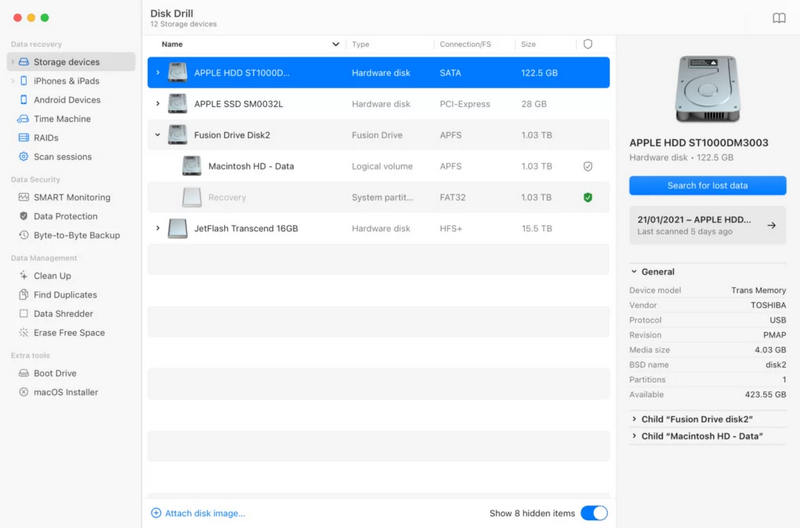
Disk Drill is widely considered a reliable free data recovery tool due to its focus on user experience and proactive data protection. It integrates deeply with modern operating systems, particularly macOS (supporting the latest M-series chips). Beyond just recovery, this free photo recovery tool acts as a disk health monitor. It uses a Recovery Vault system that tracks metadata for deleted files in real-time, making future recoveries instantaneous and perfect. Its scanning logic is highly sophisticated, capable of reassembling fragmented photos that other software might miss due to its Smart Scan algorithm.
- Платформа: Виндовс, макОС.
- Лучшие для: Users who value a premium, polished interface and want a 'safety net' to prevent future photo loss on their primary workstation.
- Шанс успеха: High (~90%+).
Key Features of Disk Drill:
- Utilize the Vault to increase the recovery success rate.
- Easily classify your photo types to easily select and recover them.
- Keep the metadata of lost images after recovery.
- Offer a smart computer monitor feature.
- This free photo recovery software works well on Mac computers.
- Offer a fashionable interface with a simple workflow.
- Protect your data and photo privacy.
- The free version is limited in macOS.
- The maximum recovery size is 500MB in the free version.
5. Звездное восстановление данных
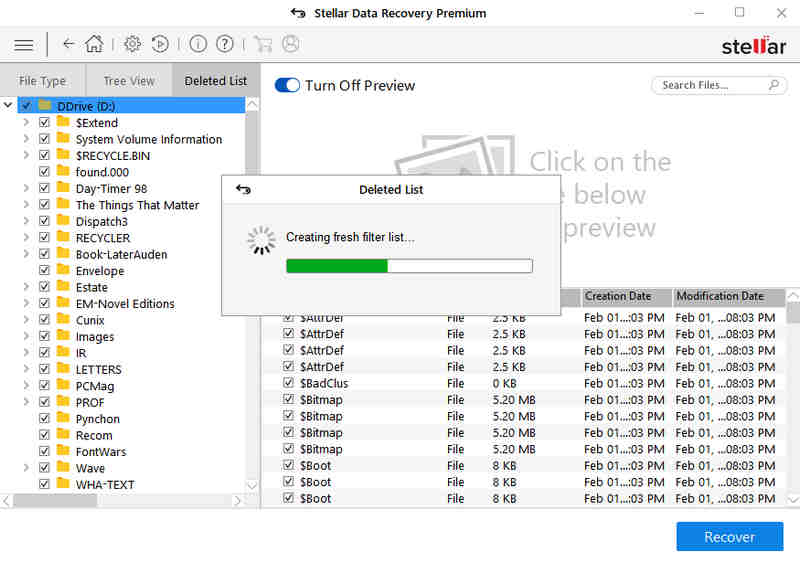
Звездное Восстановление Данных is backed by 30 years of data laboratory experience, and its software reflects a Forensic-Level Approach to recovery, making it a reliable free photo recovery software for permanently deleted images. It is specifically engineered to handle Missing Partitions - scenarios where an entire drive letter has vanished due to disk re-partitioning or corruption. The software’s detail-oriented nature is visible in its File Header Learning capability, which allows it to adapt to new camera technologies. Stellar is a robust, heavy-duty solution that treats every scan like a forensic investigation, ensuring that no sector is left unexamined.
- Платформа: Виндовс, макОС.
- Лучшие для: Users dealing with complex missing volume issues or those using niche/professional camera equipment with non-standard file formats.
- Шанс успеха: High (~88%–91%).
Key Features of Stellar Data Recovery:
- Support deep partition reconstruction to recover permanently deleted photos.
- Deal with common and rare camera RAW images.
- Highly reduce the burden on the CPU to scan the lost data.
- Support photo and data recovery for USB and optical drives.
- It's very reliable and has a high success rate.
- Work stably and seamlessly on most Windows and Mac computers.
- Support most photo formats and even 4K photos.
- Free recovery is capped at 1GB.
- The deep scan is very slow.
Part 3: Detailed Guide to Recover Lost Photos
With the free photo recovery programs above, you can easily bring back your desired lost images on a Windows or Mac computer. Their operations are also very easy. Let's take Apeaksoft Восстановление данных :
Шаг 1. Просканируйте свой компьютер
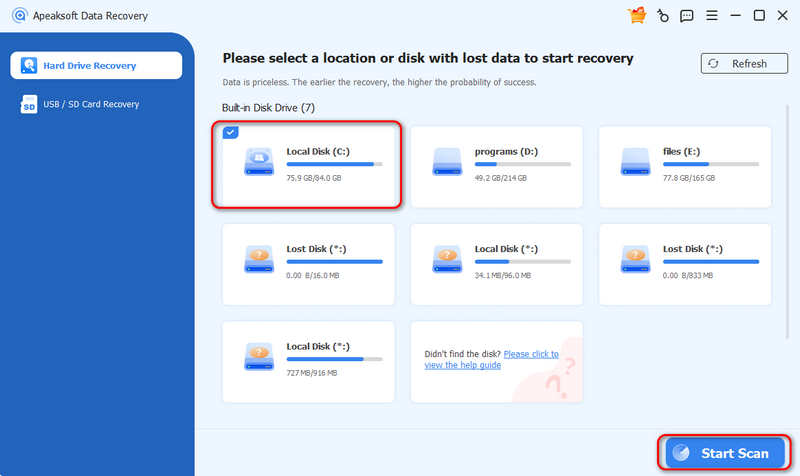
Скачайте, установите и запустите Apeaksoft Восстановление данных on your computer. Select a place where your photos were lost, like Локальный диск (C:) or select multiple hard drives. Then, click the Начать сканирование .
Шаг 2. Select and Recover Photos
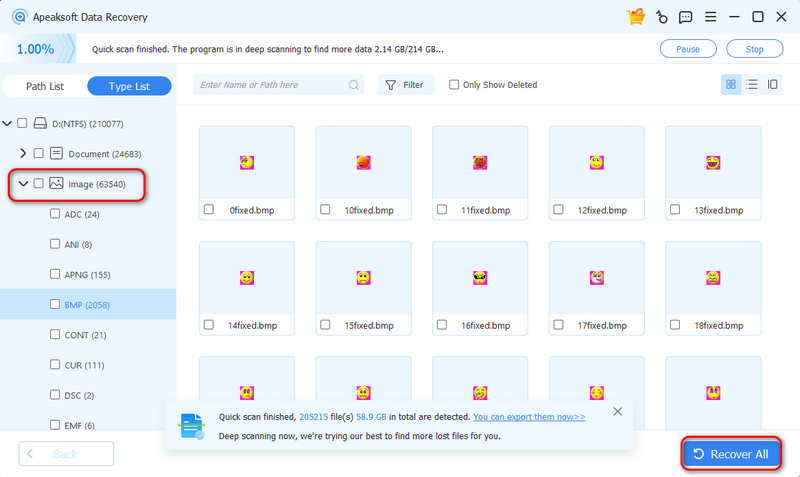
During the scanning process, you can already select your lost photos. Select Фотографии at the left bar. Then, select your desired image format. Now, you can preview and select the lost photos and click the Восстановить все кнопка, чтобы восстановить их.
Part 4: FAQs of Free Photo Recovery
Can I recover deleted photos for free?
Yes, you can. There are many free photo recovery tools available on the internet, like Apeaksoft Data Recovery, Stellar Data Recovery, and PhotoRec. They are easy to use and can recover most photo types.
Does free photo recovery software steal my data and privacy?
It depends. Many free photo recovery programs that are downloaded from official sources are reliable. If you downloaded a cracked version, it may be harmful.
Is Recuva 100% free?
Yes, the free version of Recuva supports full recovery without size limit. However, the paid version has stronger capabilities.
Заключение
With the 5 free photo recovery software, you can easily bring back your lost images. Also, they may support many other common file types, like videos, document files, and more. You can rely on them whenever you have your precious data and files lost. Apeaksoft Восстановление данных is overall the best choice for you to deal with any data loss on Windows and macOS computers. It can quickly scan all lost files without taking too much CPU so that you can perform a fast and precise data recovery.
Статьи по теме
Ищете лучшую программу для восстановления видео? Вот 6 лучших вариантов, которые помогут вам восстановить удалённые или повреждённые видео.
Если у вас не работает Photo Booth Video при записи видео на Mac, эта статья для вас. Мы покажем вам причины и решения.
Прочитайте эту статью и восстановите повреждённые JPEG-фотографии с помощью лучших онлайн-инструментов и инструментов для ПК. Вы можете безопасно восстановить данные изображений.
Если вы ищете лучшую программу для восстановления данных с SD-карт, вам повезло, поскольку вот 15 лучших инструментов для восстановления данных с SD-карт.



