


iPhone sesli mesajlarınızı mı kaybettiniz? İşte onları hızlıca geri yüklemenin yolu.

iPhone sesli mesajlarınızın aniden kaybolması her zaman can sıkıcıdır. Birçoğumuz değerli sesli mesajlarımızı yanlışlıkla sileriz veya bir iOS güncellemesinden sonra kaybederiz. İyi haber şu ki, kayıp sesli mesajlarınız kurtarılabilir! Bunu öğrenmek için bu kılavuzu okuyun. iPhone'da silinen sesli mesajlar nasıl kurtarılır?Yedekleriniz olsun ya da olmasın!
SAYFA İÇERİĞİ:
- Bölüm 1: iPhone'umda Sesli Mesajlarımı Neden Bulamıyorum?
- Bölüm 2: Silinen Mesajlar Aracılığıyla Silinen Sesli Mesajları Kurtarma
- Bölüm 3: Yedeklemelerle Silinen Sesli Mesajları Kurtarma
- Bölüm 4: Yedekleme Olmadan Silinen Sesli Mesajları Kurtarma
- Bölüm 5: iPhone Sesli Mesajlarınızı Kurtarma Hakkında Sıkça Sorulan Sorular
Bölüm 1: iPhone'umda Sesli Mesajlarımı Neden Bulamıyorum?
Sesli mesajlarınızın görünmemesi gerçekten sinir bozucu. Bazen kalıcı olarak silinmezler, sadece sistem sorunları nedeniyle gizlenirler. Sesli mesajlarınızın görünmemesinin birkaç nedeni olabilir.
- Cihazınız hasar görmüş.
Su hasarı, kırık ekran veya donanım sorunları veri kaybına neden olabilir ve sesli mesajlarınıza erişilemez hale getirebilir. - iOS güncellemesi başarısız oldu.
Başarısız bir iOS güncellemesi, sesli mesaj sisteminde aksaklıklara neden olarak mesajlarınızın geçici olarak kaybolmasına yol açabilir. - Onları yanlışlıkla sildiniz.
Bazen eski mesajlar silinirken sesli mesajlar yanlışlıkla kaldırılabiliyor. - iPhone'unuzun depolama alanı dolu.
Yetersiz iPhone depolama alanı Bu durum, cihazınızda yeni sesli mesajların yüklenmesini veya senkronize edilmesini engelleyebilir.
iPhone'da silinen sesli mesajları kurtarabilir misiniz? Evet! Birçok durumda, silinen sesli mesajlarınız hala kurtarılabilir. Bunları geri almanın etkili yollarını öğrenmek için okumaya devam edin.
Bölüm 2: Silinen Mesajlar Aracılığıyla Silinen Sesli Mesajları Kurtarma
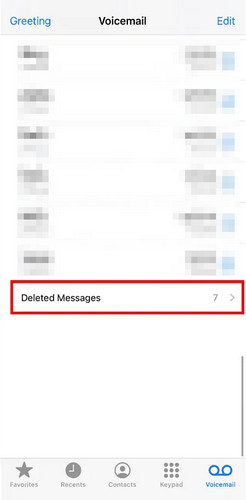
iPhone'unuz iOS 16 veya daha yeni bir sürüm kullanıyorsa, silinen sesli mesajlar cihazınızdan anında kaldırılmaz. Son silinen mesajlar bölümüne taşınırlar ve kalıcı olarak silinmeden önce 30 güne kadar orada saklanırlar. Bu nedenle, önemli bir sesli mesajı yanlışlıkla sildiyseniz, onu kurtarma şansınız hala yüksektir. Bu aynı zamanda iPhone'da silinen sesli mesajları kurtarmanın en hızlı ve en kolay yoludur.
1 Adım. Açın Telefon uygulamasını tıklayın ve Sesli mesajlar sekmesi.
2 Adım. Aşağı kaydırın ve dokunun Silinen mesajlar altta.
3 Adım. Kurtarmak istediğiniz sesli mesajları seçin ve dokunun. UndeleteArdından sesli mesaj, silinmeden önceki orijinal konumunda yeniden görünecektir.
Bölüm 3: Yedeklemelerle Silinen Sesli Mesajları Kurtarma
iPhone verilerinizi düzenli olarak yedekliyorsanız, sesli mesajlarınızı iCloud veya iTunes yedeklemesinden kolayca geri yükleyebilirsiniz.
Not: Bu yöntem iPhone'unuzu yedekleme tarihine geri yükler, bu nedenle yedeklemeden sonra oluşturulan tüm yeni veriler kaybolacaktır. Şunlara dikkat edin: iPhone'unuzu iTunes'a yedekleyin Devam etmeden önce lütfen iCloud'u kullanın!
ICloud Yedeklemesinden Geri Yükleme
Silinen sesli mesajları son silinen mesajlar arasında bulamıyorsanız, yedekleme kullanarak yine de kurtarabilirsiniz. iPhone'unuzda iCloud yedeklemesi daha önce etkinleştirilmişse, silinen sesli mesajlarınızı iCloud yedeklemesinden kurtarabilirsiniz.
1 Adım. Mevcut verilerinizi iCloud'a yedekleyin.
2 Adım. iCloud yedeklemesinden geri yüklemek için öncelikle cihazınızı silmeniz gerekir. Şuraya gidin: Ayarlar > Genel > iPhone'u Aktarın veya Sıfırlayın. Musluk Tüm İçeriği ve Ayarları Sil.
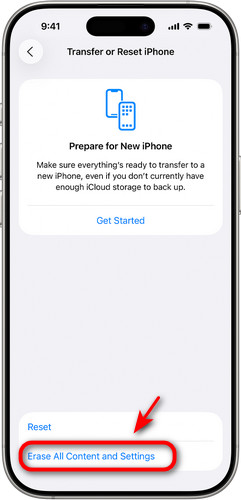
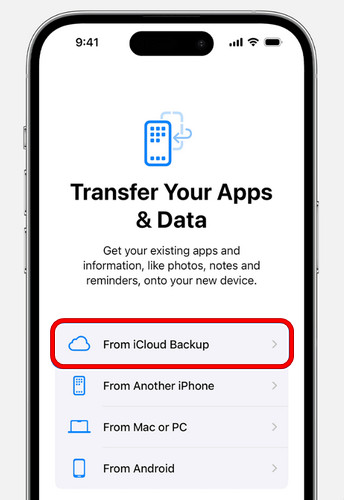
3 Adım. iPhone'unuz yeniden başlatıldıktan sonra, ekrandaki kurulum yönergelerini izleyin. İstendiğinde, aşağıdaki seçeneklerden birini seçin. ICloud Yedeklemesinden Geri Yüklemeve sesli mesajlarınızı içeren yedekleme dosyasını seçin.
iTunes/Finder Yedeklemesinden Geri Yükle
iTunes veya Finder'da yerel yedeklemeleri olan kullanıcılar için iPhone'dan silinen sesli mesajları kurtarmak kolaydır. Bu yöntem, iTunes/Finder yüklü bir bilgisayar gerektirir.
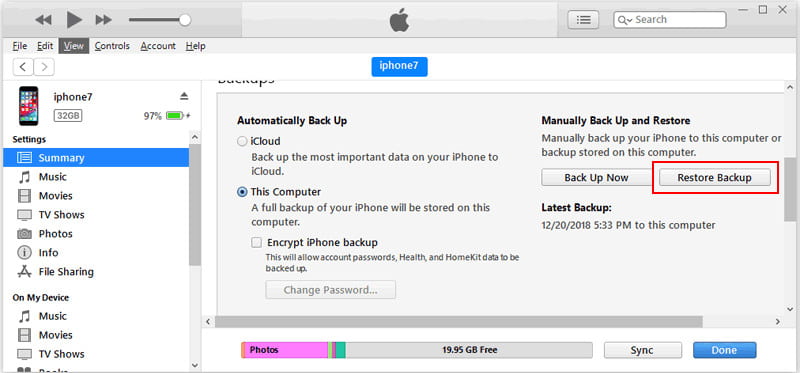
1 Adım. Bilgisayarınızda iTunes veya Finder'ı açın. iPhone'unuzu USB kablosu kullanarak bilgisayarınıza bağlayın.
2 Adım. Panelin üst kısmından cihazınızı seçin. Tıklayın. ÖZET or Genel seçin Restore Backup.
3 Adım. Sesli mesajların uygun yedekleme seçeneğini seçin ve tıklayın. Restore.
Bölüm 4: Yedekleme Olmadan Silinen Sesli Mesajları Kurtarma
Silinen sesli mesajları kurtarmanın en güvenli yolu şüphesiz yedeklemelerdir, ancak çoğu kullanıcı düzenli yedekleme alışkanlığına sahip değildir. Peki ya kaydedilmiş iCloud veya iTunes yedeklemeleriniz yoksa? Panik yapmayın! Yedeklemeler olmadan da silinen sesli mesajları kurtarmanın 2 yolu daha var.
Apeaksoft iPhone Veri Kurtarma
Geçerli yedeklemeleriniz yoksa, iPhone'unuzdan silinen sesli mesajları kurtarmak için en iyi seçeneğiniz profesyonel üçüncü taraf araçlardır. Apeaksoft iPhone Veri Kurtarma iPhone'unuzun dahili depolama alanını derinlemesine tarayabilir, kalan sesli mesaj verilerini bulabilir ve ardından bunları seçici olarak kurtarabilir.

tarafından indirildi 1,000,000 kullanıcılar
- Yedekleme yapmadan iPhone'unuzdan silinen sesli mesajları kurtarın.
- Mesajlar, kişiler, hatırlatıcılar ve daha fazlası dahil olmak üzere çeşitli iOS verilerini kurtarın.
- Kurtarılabilecek tüm verileri önizleyin ve yalnızca seçilen dosyaları geri yükleyin.
- Tüm iPhone modellerini ve en yeni iOS sürümlerini yüksek başarı oranıyla destekler.
Güvenli indirme
Güvenli indirme
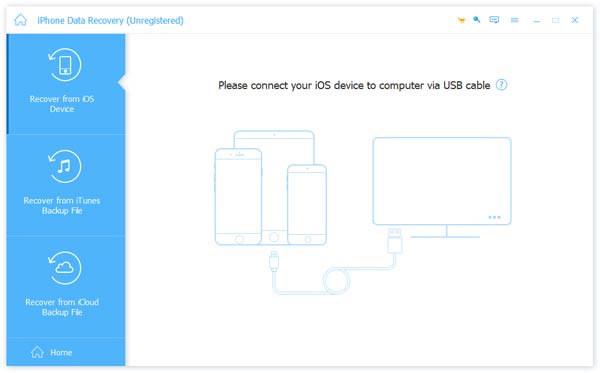
1 Adım. Bilgisayarınızda yazılımı başlatın ve tıklayın. İOS Cihazından Kurtar Soldaki çubukta. iOS cihazınızı USB üzerinden bilgisayara bağlayın. Dokunun. Güven Bilgisayarınıza güvenmek.
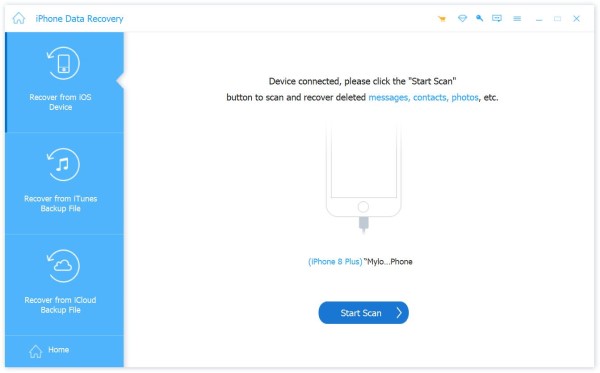
2 Adım. Tıkla Taramayı Başlat butonuna basın ve iPhone'unuzdaki tüm verileri tarayacaktır.
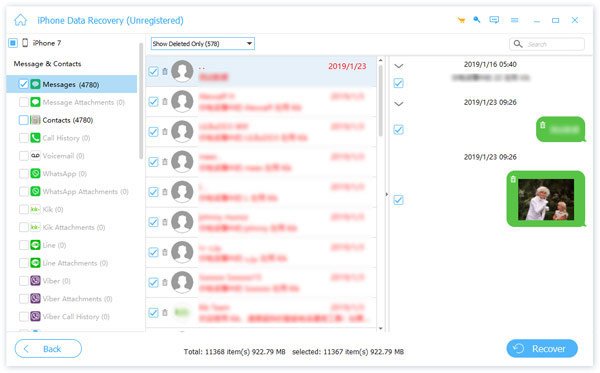
3 Adım. Seçebilirsiniz tümünü göster or Yalnızca Silinmişleri Göster Tarama sonuçlarını hızlıca önizlemek için. Kurtarmak istediğiniz sesli mesajı seçin ve tıklayın. Kurtarmak.
Operatörün Müşteri Desteğiyle İletişime Geçin
iPhone sesli mesajlarınızı hala kurtaramıyorsanız, doğrudan operatörünüzle iletişime geçin. Operatörler, silindikten sonra genellikle 30 ila 90 gün arasında değişen sınırlı bir süre için sunucularında sesli mesaj verilerini saklayabilirler. Ancak, operatörler sesli mesaj kayıtlarını yalnızca kısa bir süre saklarlar. Saklama süresi sona erdikten sonra, eski sesli mesajlar artık sunucularından kurtarılamayabilir.
Bölüm 5: iPhone Sesli Mesajlarınızı Kurtarma Hakkında Sıkça Sorulan Sorular
Yedeklemem yoksa iPhone'umdan silinen sesli mesajları kurtarabilir miyim?
Evet. Öncelikle, Telefon uygulamasında yakın zamanda silinen mesajları kontrol edin. Sesli mesajlar artık orada yoksa, yedekleme yapmadan silinen sesli mesajlarınızı kurtarmak için Apeaksoft iPhone veri kurtarma gibi profesyonel bir araç kullanmayı deneyebilirsiniz.
Silinen sesli mesajlar iPhone'da ne kadar süreyle kalır?
Silinen sesli mesajlar, kalıcı olarak silinmeden önce genellikle 30 güne kadar son silinen mesajlar arasında saklanır. Ancak, bu süre servis sağlayıcınıza bağlı olarak daha uzun olabilir.
Silinen sesli mesajları kalıcı olarak nasıl kaldırabilirsiniz?
iPhone'da sesli mesajları kalıcı olarak silmek için, aşağıdaki uygulamayı açın: Telefon uygulama ve dokunun Sesli mesajArdından, yakın zamanda silinen mesajları açın ve dokunun. Tümünü temizle Tüm mesajları tek seferde silmek veya tek tek sesli mesajları manuel olarak silmek için.
Sonuç
için iPhone'da silinen sesli mesajları kurtarmaÖncelikle, sildiğiniz mesajları Telefon uygulamasından kontrol edin. iCloud veya iTunes yedeğiniz varsa, tüm ses dosyalarınızı geri almak için yedeğinizi geri yükleyin. Yedekleme yapmayanlar için profesyonel kurtarma yazılımı en güvenilir seçenektir ve mobil operatörünüz de yakın zamanda silinen sesli mesajları kurtarmada yardımcı olabilir.
 Apeaksoft iPhone Veri Kurtarma
 iOS cihazlardan, iTunes'tan ve iCloud yedeklemesinden silinen veya kaybolan verileri kurtarın.
Güvenli indirme
Güvenli indirme
İlgili Makaleler




