

Hard Reset info Review - Can HardReset.info Bypass FRP

HardReset.info is a good solution when your Android phone is in FRP (Google Account lock). But you must want to know it further if it’s your first time hearing of it. After all, based on its name, it’s not easy to figure out what HardReset.info is or if HardReset.info FRP Bypass has an APK file. This article will help you review it in detail. You will have a full understanding of HardReset.info and know how to unlock the Google Account lock on your Android phone easily.
Disclaimer: All FRP bypass operations must be performed only on devices that you legally own or have explicit authorization to access. Attempting to bypass FRP on a lost or stolen device is strictly prohibited and may violate local laws and regulations in certain countries.
PAGE CONTENT:
Part 1: What Is HardReset.info
HardReset.info is a website that provides many tech tips for smartphones, especially for Android FRP removal. For example, it introduces how to unlock FRP on different Android brands using desktop programs or mobile apps. It also offers a HardReset.info FRP Bypass APK file on Android phones. However, you should note that HardReset.info functions primarily as a tutorial aggregation platform, compiling methods and guides from different sources, but it doesn’t offer a continuously maintained FRP bypass software or dedicated technical support service.
HardReset.info - Bypass Google Account Lock
HardReset.info FRP Bypass is diligent in collecting many methods to bypass FRP on various Android phone brands. You can choose your phone brand, and then you’ll see many FRP bypass methods on different phone models of your brand. HardReset.info offers detailed guides with screenshots. You won’t feel puzzled by these tutorials. There are also APK files from HardReset.info FRP Bypass.
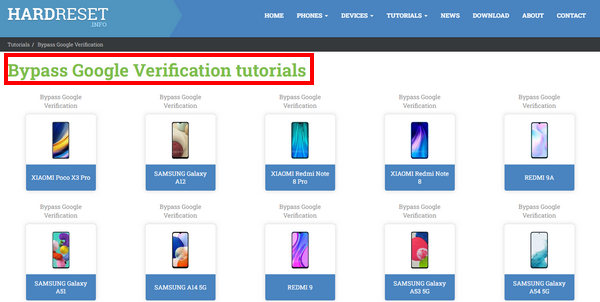
However, HardReset.info mainly relies on older, exploit-based techniques that are no longer effective on newer Android versions, especially on Android 15/16. This is because some loopholes have been closed in recent Android releases and security patches. On the patched versions, Android has restricted access to system intents, tighter control over TalkBack and Setup Wizard exploits, enhanced Google Play Services verification, and stricter permission and signature checks for side-loaded APKs.
HardReset.info - Other Powerful Features
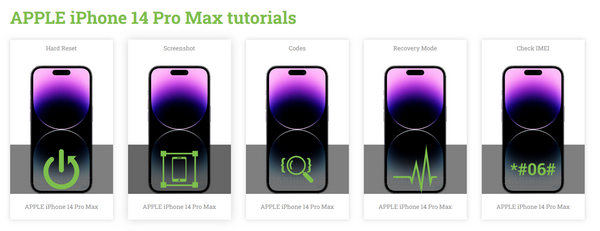
It’s a pity if you ignore other practical features in HardReset.info. For example, you can learn some code tricks to unlock hidden functions on your Android phone when it’s in some restricted modes. You can also learn how to screenshot and soft or hard reset your Android phone of different models. HardReset.info. also teaches you how to use some basic or advanced tricks on Apple devices, such as IMEI check, carrier changing, etc.
HardReset.info. - Unbiased Review
To ensure an objective review, we tested the FRP bypass tutorials provided by HardReset.info on multiple Android brands, including Samsung, Xiaomi, OPPO, and Huawei, across different Android versions ranging from Android 9 to Android 16. Our tests find that the FRP bypass method of HardReset.info is mainly effective only on older versions. Some tutorials are applicable to Samsung and Xiaomi running Android 9-10, but the process is complicated, and the success rate is unstable. While on Android 12 and above, nearly all the tutorials failed due to the enhancement of the security mechanism and Google account verification.
If you want to bypass the FRP lock using HardReset.info, you can refer to the overall pros and cons below:
- Good performance on relatively old Android versions.
- Offer many FRP removal methods for various Android brands.
- Provide both desktop and mobile apps for FRP removal.
- Offer other practical tech tips for smartphones.
- Poor performance on Android 12 and above.
- It’s not easy for beginners to follow.
- There’s no update or support for the programs and apps.
- Some FRP methods rely on third-party APK files that may trigger false positives from antivirus software.
- Lack of APK source reliability verification.
Part 2: How to Download and Use HardReset.info to FRP Bypass
Now, you can learn how to download and use HardReset.info FRP Bypass apps or programs. You should go to the official website of HardReset.info (https://www.hardreset.info/) and choose a tutorial for your phone.
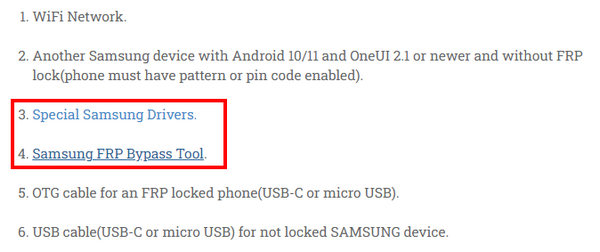
Step 1. You should follow the tutorial to prepare all the necessary things, such as a desktop program and a driver for your phone.
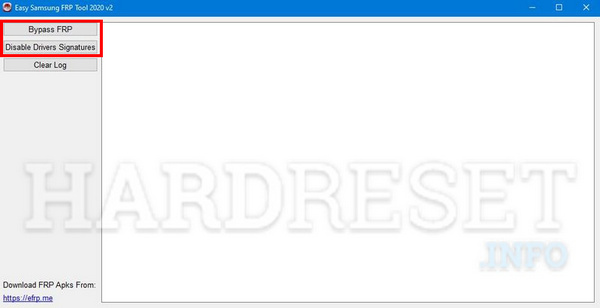
Step 2. You should connect your phone to your computer and click the Disable Drivers Signatures button first and then the Bypass FRP button. In this way, you can easily remove the FRP on your Android with HardReset.info FRP Bypass.
Part 3: The Best Alternative to HardReset.info FRP Bypass
If your Android phone runs a relatively higher version like Android 15 or 16, you may need an alternative to bypass the FRP lock because HardReset.info supports limited Android OS versions. Apeaksoft Android Unlocker is such an ideal solution. It can quickly remove FRP on many Android OS versions. You don’t need to search for a specific tutorial for a phone model as HardReset.info did, but choose your phone brand and then one-click remove FRP on your phone.
Reliable Alternative to HardReset.info
- Bypass FRP on the latest Android versions.
- Remove the Google FRP Lock with only one click.
- Official download link and streamlined guides.
- 24/7 customer and technical support at your assistance.
Secure Download
Step 1. Download the Software
Press the above button to download this program for free.
Step 2. Connect Your Device
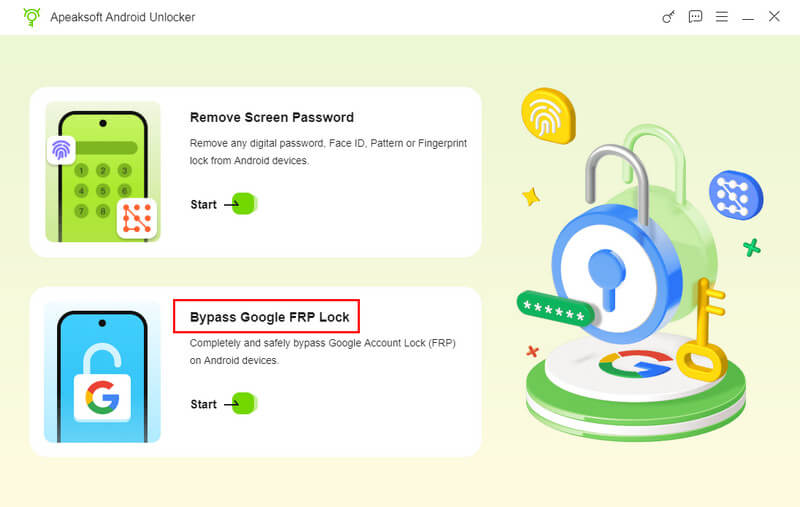
Connect your device to the computer and choose Bypass Google FRP Lock.
Step 3. Activate Your Device
Follow the on-screen instructions to configure the environment and activate your device. Then, this tool will automatically bypass the FRP lock.

Tips: While Apeaksoft Android Unlocker offers a higher success rate and broader system coverage, FRP removal results may still vary depending on the device model, Android version, and security patch level. No solution can guarantee a 100% success rate on all devices.
Part 4: FAQs of Hard Reset info FRP Bypass
Is it free to use HardReset.info FRP Bypass APK?
Yes, it is. HardReset.info provides free desktop software and mobile apps for FRP removal. Whether it’s a third-party or self-developed application, it is all free on the HardReset.info website.
Do I need to unroot my Android before I use HardReset.info FRP Bypass?
No, you don’t need to do that. You can unroot your Android to regain security. However, there’s no relationship between root and FRP removal. HardReset.info FRP Bypass doesn’t require any adjustment on your Android phones.
Does HardReset.info support the newest Samsung phone?
Yes, it does. However, the apps and programs you can see on the HardReset.info website don’t support the newest devices or OS versions. It offers merely feasible methods for those products and Android versions.
Conclusion
HardReset.info FRP Bypass is a good website for FRP removal ideas and applications. You can get what you want for your Android devices. If you want to remove FRP quickly, however, Apeaksoft Android Unlocker is a better alternative to HardReset.info that can bypass the Google account verification with only a few clicks.
Related Articles
Do you want to bypass MDM on Android? You can read this article to check if your Android has MDM and then learn how to bypass it.
If you want to bypass activation on your LG device, read this post and learn the 3 most comprehensive methods to make it.
Bypassing the LG lock screen when you forget your password is troublesome. You can do it using the Camera, Forgot pattern feature, and professional software.
Do you know what QuickShortcutMaker is and what it is used for? Come on and utilize this tool as a pro to bypass the FRP lock on your Android device.



