A Complete Guide to Unlocking a Stolen iPhone Without Passcode

Losing your iPhone unexpectedly is upsetting. The moment your device gets stolen, the worry instantly pops up: can someone unlock my iPhone without passcode? Many iPhone users ask this question when they are concerned about data security. This guide provides clear answers, offers practical tips to protect your data on a stolen device, and introduces feasible methods to unlock your iPhone in similar situations.
PAGE CONTENT:
Part 1: Can Someone Unlock My iPhone Without Passcode
It's heartbreaking to lose your iPhone or have it stolen. The first question that probably comes to your mind is: "Can someone unlock my iPhone without my passcode?" The answer is yes. Although Apple has built-in security protections, there are still ways to unlock iPhone without a passcode. A thief might try to guess your passcode - if it's simple, your iPhone could be unlocked easily. Even if you use a complex passcode, there are still other methods to bypass the screen lock. We will discuss these methods in Part 3.
Part 2: What Should You Do If Your iPhone is Stolen
If your iPhone is stolen, take the following steps immediately to protect your personal data and increase the chances of recovering your device.
Turn on Lost Mode via Find My
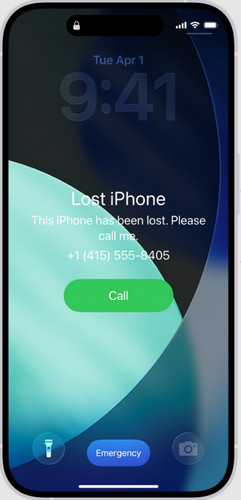
Lost Mode is an Apple security feature in Find My. When your iPhone is lost or stolen, it helps protect your personal data. Once you activated Lost Mode, it will immediately lock your iPhone with a passcode. You can also leave a message or a contact number on the lock screen. While in Lost Mode, your iPhone's location can be tracked online, and any Apple Pay cards linked to the device are temporarily disabled.
How to turn on Lost Mode:
Step 1. Open the Find My app on another Apple device or log in to iCloud.com.
Step 2. Select your lost iPhone from All Devices, and select Mark As Lost.
Step 3. Add a custom message or a phone number on the locked screen, then select Save Changes.
Change Your Apple ID Password
Change your Apple ID password to prevent unauthorized access to your iCloud or other Apple services.
Step 1. Go to account.apple.com and log in to your Apple Account.
Step 2. Select Sign-In & Security, then click Password, and follow the on-screen instructions to change your Apple ID password.
Erase Your iPhone Remotely
If you've tried everything but still cannot recover your iPhone, the last step is to erase all the data on your lost device. You can do this remotely using Find My on another Apple device or by visiting iCloud.com.
Step 1. Go to iCloud.com and log in to your Apple Account.
Step 2. Click on Find Device. In All Devices, select the lost iPhone you want to remove.
Step 3. Tap Erase to start removing all the data from your iPhone.
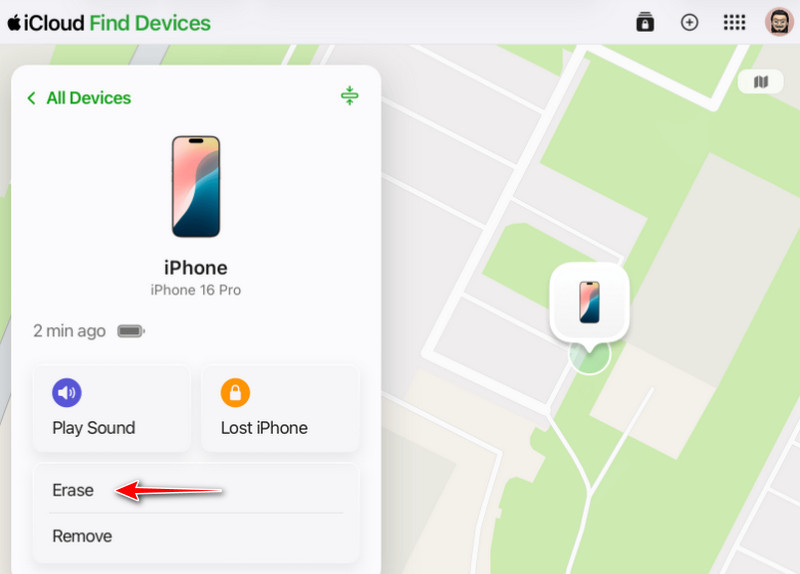
Note: Do Not remove the device from Find My! Removing it from your device list will remove Activation Lock, which could make it easier for the thief to unlock and resell your iPhone.
Part 3: How to Unlock a Stolen iPhone Without Passcode
Theft is a completely unacceptable and illegal act. In this section, we focus on situations where you accidentally bought a locked iPhone and how to unlock an iPhone without passcode. These 2 methods can resolve this problem and answer the question "Can someone unlock my iPhone without passcode?"
Unlock iPhone with Apeaksoft iFoneKit (Easiest)
Apeaksoft iFoneKit iOS Unlocker is a professional unlock tool that allows you to remove the iOS screen lock from a stolen iPhone. If you forgot your iPhone passcode or bought a second-hand iPhone locked to the previous owner, you can use it to unlock your device without passcode. It supports all iOS models and versions, including the latest iOS 26/iPadOS 26.

Downloaded by over 1,000,000 users
- Unlock a stolen, damaged, second-hand iPhone without a passcode.
- Remove Face ID, Touch ID, and screen passcode in minutes.
- Remove MDM, Apple ID, iTunes backup, and Screen Time passwords.
- Remove SIM card lock from various carriers.
Secure Download
Secure Download
How to unlock iPhone without passcode:
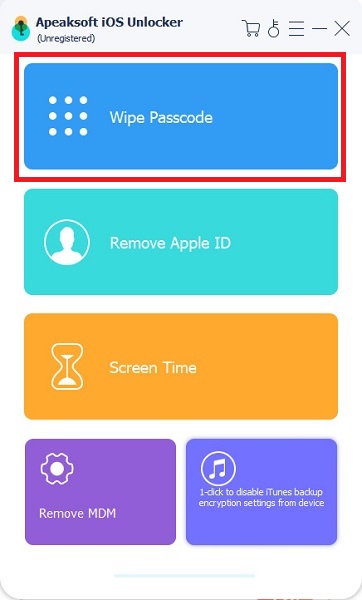
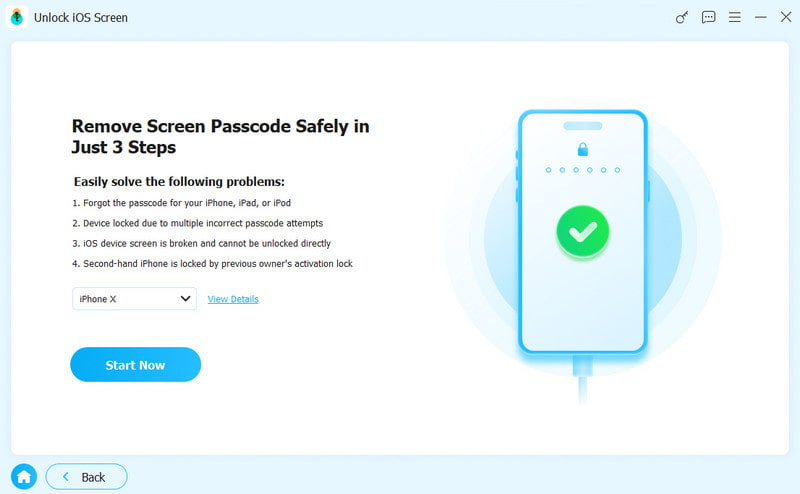
Step 1. Launch the software on a computer and select Unlock iOS Screen from the main interface.
Step 2. Connect your iPhone to the computer using a USB cable. Confirm your device information, and click Start Now if everything is correct.
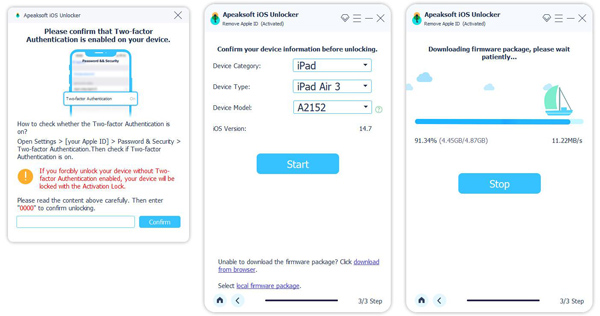
Step 3. Download the firmware package. Please wait patiently while it downloads.
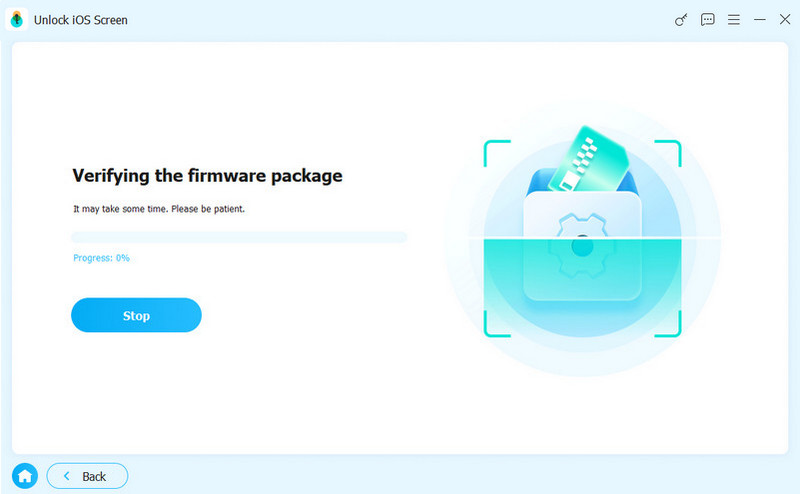
Step 4. Follow the on-screen instructions to confirm this action. You may need to verify the firmware twice. Wait until the verification is complete.
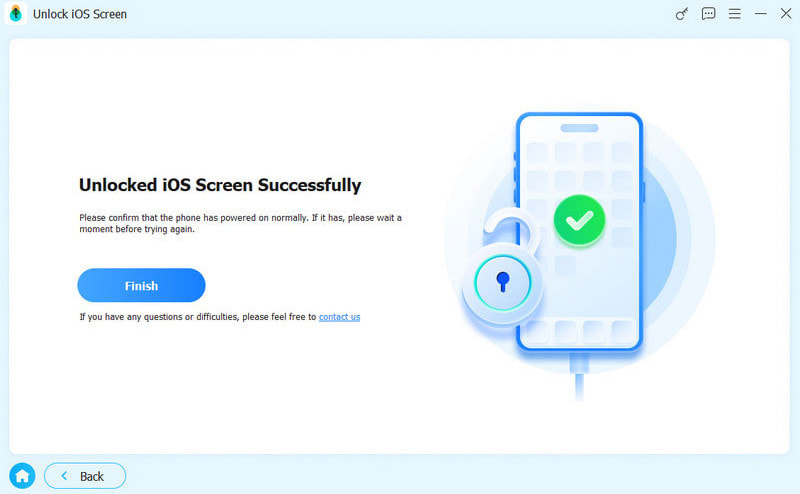
Step 5. After verification, the unlocking process will start automatically, and all your data on your device will be erased. Then, your iPhone will restart, and you can create a new screen passcode.
Unlock iPhone via Recovery Mode (Official)
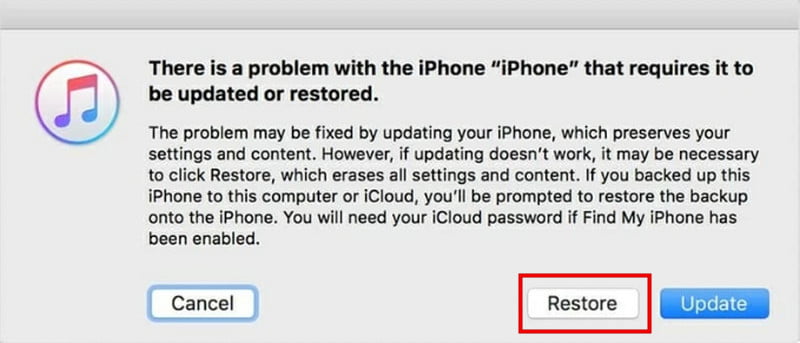
You can also remove the screen lock by putting your iPhone into Recovery Mode. You'll need a computer with the latest version of iTunes installed and a USB cable. Keep in mind that this method will restore your iPhone to factory settings, so be sure to back up your data beforehand.
Step 1. Download and install the latest version of iTunes on your computer.
Step 2. Put your iPhone into Recovery Mode according to your model:
- iPhone 8 and later: Press and release the Volume Up button, then press and release the Volume Down button. Press and hold the Power button until Recovery Mode appears.
- iPhone 7/iPhone 7 Plus: Press and hold the Volume Down and Side buttons at the same time until the Recovery Mode screen appears.
- iPhone 6S and earlier: Press and hold the Home and Side buttons together until the Recovery Mode screen shows up.
Step 3. Connect your iPhone to the computer using a USB cable. Open iTunes and select your device from the list.
Step 4. Click Restore to remove the passcode from the stolen iPhone. This progress will erase all the data on it.
Part 4: FAQs About Unlocking a Stolen iPhone
Can someone unlock my iPhone in Lost Mode without passcode?
The Lost Mode is not a 100% secure measure to keep your iOS device safe. If you use a simple passcode, it could be guessed by someone with malicious intent.
Can police get into my locked iPhone?
Not easily. Apple doesn't give police a special way to unlock iPhones. In most cases, law enforcement needs a warrant and may use advanced forensic tools to access the device. Even then, getting into a locked iPhone isn't always possible.
Can Apple unlock my iPhone passcode?
Apple cannot unlock the passcode for you directly. The only thing Apple can do is remove the Activation Lock.
Conclusion
Can someone unlock my iPhone without my passcode? In most cases, the answer is no, iPhones are built with strong security to protect your data. However, in certain situations, some tools and methods may allow you to unlock an iPhone without a passcode.
If your device is lost or stolen, stay calm and act quickly: turn on Lost Mode, change your Apple ID password, and erase the device remotely. If you find back your phone but the passcode is modified, a proper unlocking tool like Apeaksoft iFoneKit can help you.
 Apeaksoft iFoneKit
 Unlock all types of iOS passwords from iPhone, iPad and iPod.
Secure Download
Secure Download
Related Articles