關於我們

Remove Previous Owner Apple ID Without Password Safely

Can't use iCloud on your second-hand iPhone because it's still tied to the previous owner's Apple ID? Want to know how to remove Apple ID from previous owner? This guide covers the most effective methods to remove the Apple ID and use your device without restrictions.

Part 1: How to Remove Apple ID from Previous Owner

If you can contact the previous owner, things can be easier to remove the previous owner Apple ID. Here are the most effective methods you can try together.

請注意: If the device was purchased through a certified second-hand platform, try contacting the previous owner via the platform. For private transactions, be sure to protect your personal privacy and avoid sharing any sensitive device information.

Method 1: Remotely Remove Previous Owner Apple ID via iCloud

最適合: When the previous owner is available to assist (Fastest).

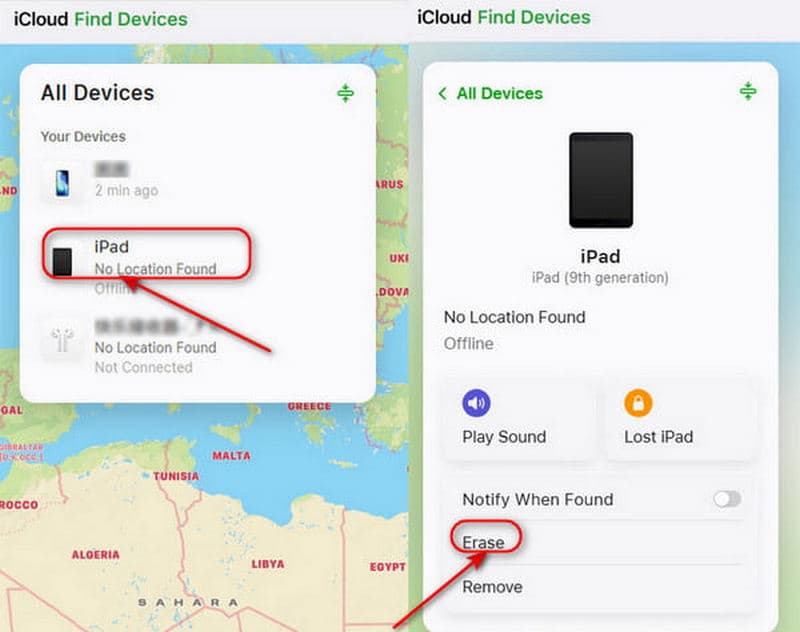
The previous owner can remove their Apple ID from the device remotely through iCloud.com.

步驟二 造訪 iCloud.com and log in to their Apple Account.

步驟二 點擊 尋找設備. In the list of 所有設備, select the device you want to remove.

步驟二 選擇 擦除此設備. Tap Erase to start removing the previous Apple ID.

Remotely Remove Via iCloud

Method 2: Remove iPhone from Apple ID Device List

最適合: When the previous owner cannot access a computer but can operate another Apple device.

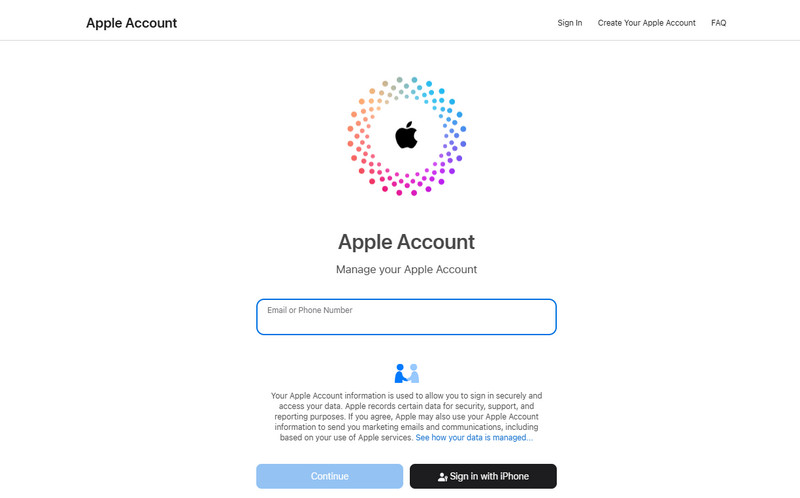
The previous owner can also log into their Apple Account to remove your device from account.

步驟二 Go to account.apple.com and sign in with the previous owner's Apple ID.

步驟二 Scroll down to select the 設備 section and select your device.

步驟二 點擊 從帳戶中刪除. Then the previous owner Apple ID won't be linked to your device.

Remove from Apple ID Device List

Part 2: How to Remove Apple ID Without Previous Owner

If you can't contact the previous owner, is there any way to remove Apple ID without the help of previous owner? The answer is yes - check out the four methods below to get it done.

Method 1: Apeaksoft iFoneKit - Remove Apple ID Without Password

最適合: Users who want to remove Apple ID without the previous owner.

The quickest and easiest way is to use a professional third-party tool. Apeaksoft iFoneKit is a reliable option that can handle various types of iOS locks. It can remove Apple ID in different scenarios - whether you forgot the password or bought a second-hand iPhone that's locked to someone else's Apple Account. iFoneKit can bypass these restrictions easily and allow you to enjoy all Apple services.

Apeaksoft iFoneKit

Your Reliable iOS Unlock Solution

  • Remove Apple ID on iPhone/iPad easily and safely without a password.
  • Erase Face ID/Touch ID/4-digit/6-digit password within a few clicks.
  • Get rid of MDM, iTunes backup encryption, and Screen Time locks.
  • Compatible with all iOS models and versions (iOS 26/iPadOS 26).
免費下載

安全下載

免費下載

安全下載

iFoneKit

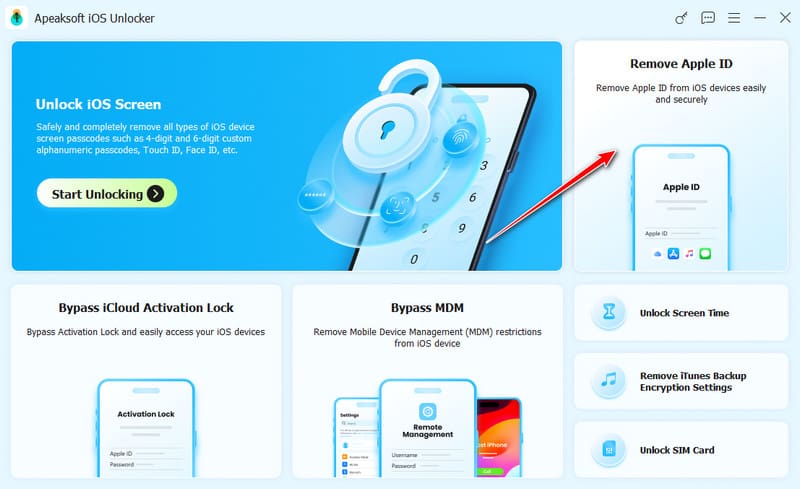
步驟二 Launch the software on your computer, and choose the 刪除Apple ID mode in the interface. Connect your iOS device to the computer and tap 信任 on your device to allow the connection.

選擇刪除Apple ID

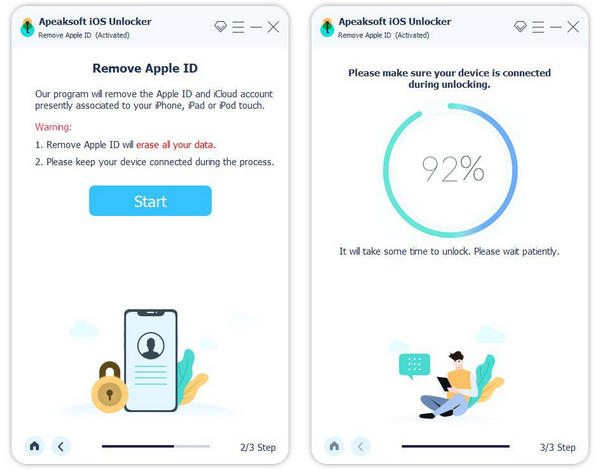
步驟二 在操作欄點擊 現在開始 button to begin the removal process.

If Find My is disabled, the software will start removing your Apple ID immediately.

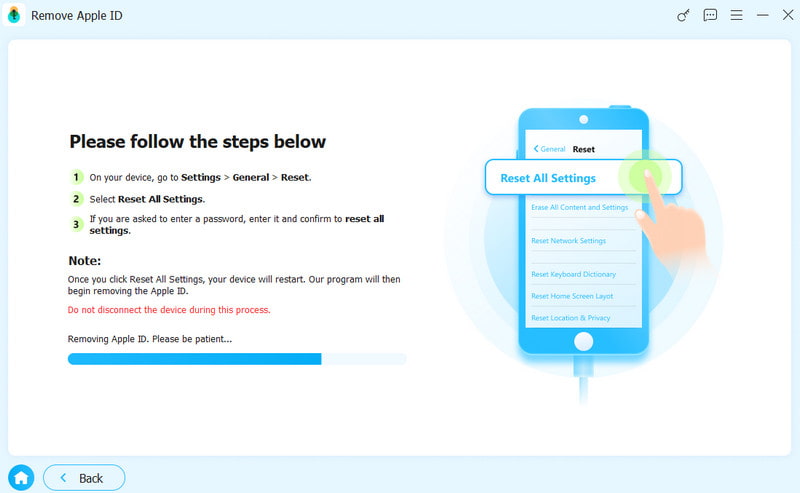
If Find My is enabled, you need to follow the on-screen instructions to reset your iOS device first.

請注意: The reset will delete all data on your device, so make sure to back up your important information in advance.

復位所有設置

步驟二 在操作欄點擊 OK button to proceed, then click 再次確認 when prompted. The previous owner Apple ID will be removed soon.

刪除 Apple ID

Method 2: Contact Apple Support to Remove Apple ID

最適合: Users who have valid proof of purchase and prefer an official removal method.

If you purchased the iPhone through official channels, or you have valid proof of ownership, you can submit a request to Apple Support to remove the previous owner Apple ID.

Prepare your proof of purchase, such as a sales receipt or invoice from an Apple Store, authorized reseller, or carrier. You can contact Apple Support through their official website or visit an Apple Store. The verification process may take a few days. Once your request is approved, Apple will remove the Apple ID from your device.

Method 3: Restore Apple ID via iTunes/Finder

最適合: When the Apple ID password is known but the account cannot be removed from Settings normally due to system issues.

Another official way to remove Apple ID from previous owner is to use iTunes/Finder to restore your iPhone via iTunes/Finder. This method will delete all your data on your device, so be sure to back up your important information before restoring. Then you can 從先前的備份中恢復您的 iPhone.

步驟二 Put your iPhone into Recovery Mode.

對於iPhone 8及更高版本:

按下並釋放 調高音量 button quickly, then the 音量減小 按鈕。 按住 電力 button until you see Recovery Mode appear.

對於iPhone 7 / 7 Plus:

繼續按 音量減小 按鈕, button together until Recovery Mode appears on the screen.

For iPhone 6S and earlier:

首页 以及 buttons together and hold them until Recovery Mode appears on your phone.

步驟二 Connect your iPhone to your computer using a USB cable and open iTunes/Finder.

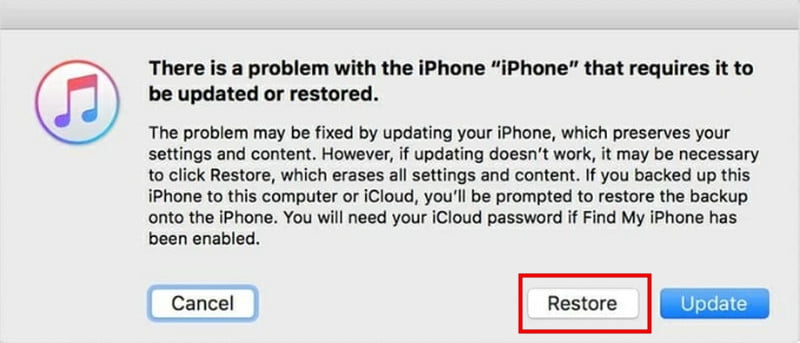
步驟二 點擊 概要 標籤,然後選擇 恢復iPhone to restore your Apple ID.

Restore Apple ID iTunes Finder

Method 4: Erase Previous Owner Apple ID via Settings

最適合: When the Apple ID password is available and the device is accessible.

How to remove previous owner apple ID without any extra apps? You can 恢復出廠設置 to erase the precious owner Apple ID.

步驟二 造訪 設定 並選擇 一般說明.

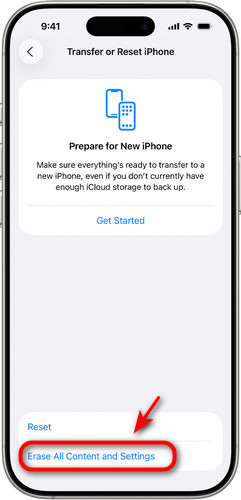
步驟二 敲打 轉移或重置 iPhone 並選擇 抹掉所有內容和設置.

步驟二 接下來,點按 繼續 and follow the instructions to remove previous owner Apple ID.

Erase Apple ID Settings

Part 3: FAQs About Removing Previous Owner Apple ID

Is it possible to remove Apple ID without previous owner?

Yes! You can try using a professional unlocking tool like Apeaksoft iFoneKit, factory reset your device, or contact Apple Support if you have valid proof of purchase.

How to add a new Apple ID after removing the previous one?

造訪 設定,點擊 登錄到您的iPhone, then enter your Apple ID and password. After signing in, you'll be able to access full Apple services.

Can Apple remove the previous owner’s Apple ID for me?

Yes, Apple can help remove the previous owner's Apple ID, but only if you provide valid proof of ownership. You can contact Apple Support online or visit an Apple Store.

結語

現在你知道了 how to remove previous owner Apple ID without password! If you can reach the previous owner, that's the ideal scenario - you can resolve the issue effortlessly. If not, don't worry, you can still try alternative solutions, such as using Apeaksoft iFoneKit. So, which method worked best for you?

相關文章

諾亞米勒 - 手機解鎖和數據傳輸專家
諾亞米勒 - 手機解鎖和數據傳輸專家

專長: 解鎖 iOS · 解鎖安卓 · 資料傳輸 · iOS 使用技巧

Noah Miller 是 Apeaksoft 的編輯,專注於手機解鎖和資料傳輸解決方案。他測試過數十款 iOS 和 Android 工具。他撰寫有關設備解鎖、數據傳輸和解決手機系統問題的指南。