Apeaksoft iPhone Eraser - Real-World Test and Detailed Reviews

If you are ready to use or purchase Apeaksoft iPhone Eraser but still feel unsure about its features or real-world performance, check this in-depth Apeaksoft iPhone Eraser review. We take a comprehensive look at its core features, data erasing abilities, pricing plans, and real-use experience. Keep reading.
PAGE CONTENT:
General Overview of Apeaksoft iPhone Eraser
Apeaksoft iPhone Eraser is a professional iOS data erasing tool developed by Apeaksoft Studio and first released in 2019. As its name suggests, it is designed to erase data on iPhones permanently and thoroughly. What's worth mentioning is that it is not limited to iPhones; it can also help you erase data on iPads and iPod touch.
This tool is perfect for users who want to sell, trade, or gift their iOS devices and worry about security risks and privacy leakage. Moreover, this tool is also useful when you need to clear junk files or uninstall useless apps to free up your iPhone storage.
| Item | Details |
| Publisher | Apeaksoft Studio |
| Initial Release | 2019 |
| Supported Platforms | Windows, Mac |
| Compatible Devices | iPhone, iPad, iPod touch |
| iOS Compatibility | iOS 5 and above (supports the latest iOS version) |
Two Core Features of Apeaksoft iPhone Eraser [Explained]
As you can see from the left panel of the program interface, Apeaksoft iPhone Eraser mainly has two features: Erase All Data and Free Up Space.
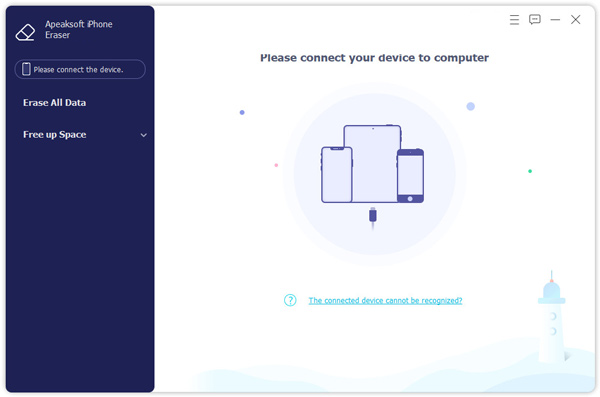
Within the Erase All Data option, you can pick from three erasing levels: Low, Middle, and High.
| Erasing Level | Overwrite Times | Description |
| Low | 1 time | Fast and regular erasure. Data may still be recoverable with professional tools. |
| Middle | 2 times | Much harder to recover the erased data. |
| High | 3 times | Highest security level. Data is nearly impossible to recover. |
The Free Up Space section packs more practical cleanup tools, including Erase Junk Files, Uninstall Applications, Delete Large Files, and Clean up Photos. The best part is that everything is displayed clearly on one screen, so you don't need to jump between different settings on your iPhone to clean up manually.
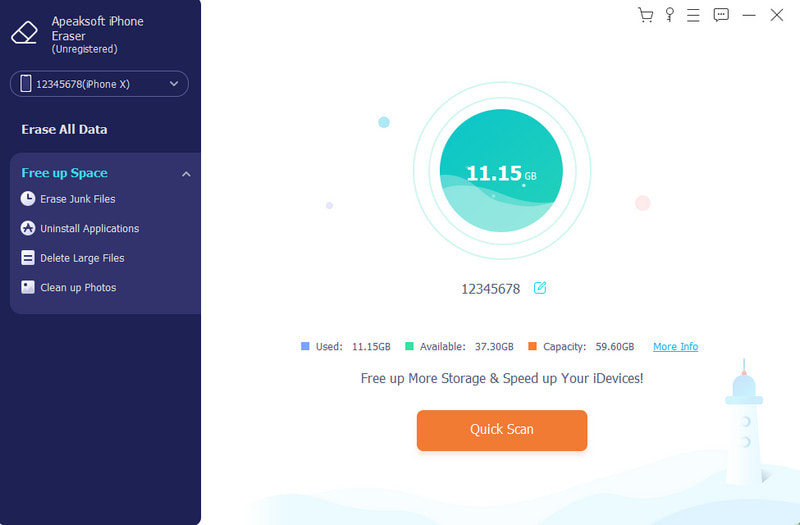
- Erase Junk Files. It scans and clears hidden junk files and deletes duplicates on iPhone that you cannot easily find on your own.
- Uninstall Applications. It gathers your rarely used apps, so you can decide whether to remove them all at once.
- Delete Large Files. It visually shows which files take up the most storage for you to review and delete.
- Clean up Photos. It lets you compress photos or export them to your computer to save storage space.
Secure Download
Secure Download
Apeaksoft iPhone Eraser Pricing & Subscription Plans
Apeaksoft iPhone Eraser offers a free trial version. However, it has some limitations. In the trial version, you can erase media files only for the Erase All Data function. You are also allowed to scan and preview data and erase junk files, which can meet your basic needs.
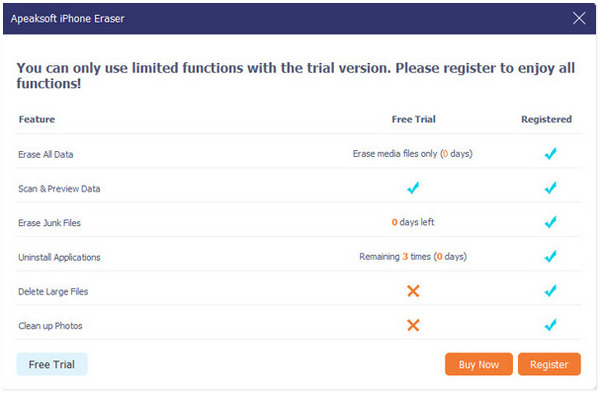
If you plan to sell your iPhone, you may need a premium version to clear your device completely and thoroughly.
| License Type | Price | Details | Guarantee |
| 1 Month License | $14.95 | Auto-renewal, works on 1 PC for up to 6 iOS devices | 7-Day money back guarantee |
| Lifetime Single-User License | $39.96 | One-time purchase, 1 PC for up to 6 iOS devices, lifetime free updates and support | 30-Day money back guarantee |
Prices may change. Please refer to the official Apeaksoft pricing website for the latest pricing details.
Apeaksoft iPhone Eraser: Tested Reviews
To evaluate how this tool performs in real scenarios, we carried out several tests and summarized our test settings in the table below.
How We Test
| Test Item | Detailed Information |
| Test Device | iPhone 14 (256GB) |
| iOS Version | Latest official iOS version |
| Connection Method | Stable USB connection |
| Tested Core Features | Junk cleaning, app uninstallation, large file deletion, photo compression, and full data erasure |
| Test Environment | No other mobile management software running in the background |
Test Results
| Test Function | Real Test Data | Storage Change | Data Recoverability |
| Full Device Storage Scan | 1 minute 20 seconds | / | / |
| Low-Level Data Erasure | 18 minutes completed | 212GB free space after wipe | recoverable via professional iOS data recovery tools |
| Middle-Level Data Erasure | 36 minutes completed (2-pass overwriting) | 212GB free space after wipe | partial data may be retrieved |
| High-Level Data Erasure | 54 minutes completed (3-pass DoD standard) | 212GB free space after wipe | almost unrecoverable |
| Erase Junk Files | 1 minute 10 seconds | Freed 1.4GB | / |
| Uninstall Applications | 1 minute 45 seconds | Freed 1.8GB | / |
| Clean up Photos | 450 photos (2.8GB) compressed to 1.1GB | Freed 1.7GB | / |
Tested Pros & Cons
- It provides flexible erasing levels.
- It will erase data permanently and thoroughly if you choose the High erasing level.
- You can free up device storage space with one click, no messy iOS settings.
- You can preview the files before deleting them in case of deleting useful files.
- You need to connect your iPhone or iPad to the computer with a USB cable.
- The highest-level erasure takes a long time to complete.
Apeaksoft iPhone Eraser vs iMyFone Umate Pro & Coolmuster iOS Eraser
To find out how Apeaksoft iPhone Eraser performs, we also researched two popular iPhone erasing tools on the market. They are iMyFone Umate Pro and Coolmuster iOS Eraser. Below are our comparison results.
| Comparison Point | Apeaksoft iPhone Eraser | iMyFone Umate Pro | Coolmuster iOS Eraser |
| Erasing Levels | 3 levels | 4 levels | 3 levels |
| Daily Storage Cleanup | Junk, apps, large files, photo compression | Basic cleanup only | Only data erasure |
| USB Required | Yes | Yes | Yes |
| Preview Before Deletion | Yes | Partial preview | No |
| Photo Compression & Export | Built-in | Not supported | Not supported |
Conclusion
All in all, Apeaksoft iPhone Eraser is a time-saving tool if you want to free up iOS device storage. It is also an ideal tool that can guarantee your privacy and data security when selling or gifting your old devices. If you are looking for a simple all-in-one iOS eraser and storage cleaner, just give it a try.
 Apeaksoft iPhone Eraser
Erase data and settings from iOS devices permanently.
Secure Download
Secure Download
Related Articles