


Kuinka palauttaa poistetut iPhone-muistutukset ilman iCloudia

iPhonen Muistutukset-appi auttaa sinua seuraamaan tärkeitä tehtäviä, aikatauluja ja päivittäisiä suunnitelmia. Joten kun muistutukset katoavat yhtäkkiä iOS-päivityksen tai vahingossa tapahtuvan poiston jälkeen, se voi olla stressaavaa. Kuinka palauttaa poistetut muistutukset iPhonessaTässä oppaassa opit viisi yksinkertaista ja tehokasta tapaa saada muistutuksesi takaisin vaivattomasti.
SIVUN SISÄLTÖ:
Osa 1: Miksi iPhone-muistutukset katoavat järjestelmäpäivityksen jälkeen
Monet iPhone-käyttäjät huomaavat muistutustensa katoavan iOS 26 -päivityksen jälkeen. Joskus muistutuksia poistetaan vahingossa vanhoja tehtäviä siivotessa. Toisissa tapauksissa ohjelmistohäiriöt uuden päivityksen jälkeen voivat estää muistutuksia näkymästä oikein.
Toinen yleinen syy on iCloud-synkronointiongelmat. Jos kirjaudut sisään toiselle iCloud-tilille tai poistat vahingossa muistutusten synkronoinnin käytöstä, muistutusluettelosi saattavat kadota laitteesta. Joissakin tapauksissa vanhan iCloud-varmuuskopion palauttaminen voi korvata olemassa olevat muistutustiedot. Tehdasasetusten palautus voi aiheuttaa saman ongelman.
Onneksi puuttuvat muistutukset ovat usein palautettavissa. Seuraavissa osioissa näytämme sinulle useita tehokkaita tapoja palauttaa poistetut muistutukset iPhonessa.
Osa 2: Poistettujen muistutusten palauttaminen iPhonessa (virallinen)
Jos muistutuksesi ovat kadonneet äskettäin, Apple tarjoaa useita virallisia tapoja palauttaa ne. Alla on kolme tehokasta virallista tapaa saada poistetut muistutuksesi takaisin.
Palauta poistetut muistutukset äskettäin poistetusta kansiosta
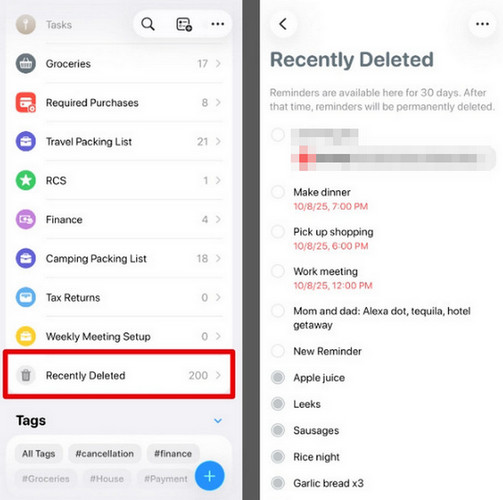
Jos iPhonessasi on iOS 18 tai uudempi, asiat helpottuvat huomattavasti. Voit palauttaa poistetut muistutukset Äskettäin poistetut -kansion kautta, jos poistit ne vahingossa 30 päivän sisällä.
Vaihe 1. Avaa Muistutukset iPhone-sovelluksessa vieritä alas ja napauta Hiljattain poistettu kansio.
Vaihe 2. Napauta palautettavia poistettuja muistutuksia ja valitse sitten Palauta saadaksesi muistutuksen takaisin.
Palauta poistetut muistutukset iPhonessa iCloudista
Jos käytit iCloudia muistutusten synkronointiin, voit ehkä palauttaa poistetut muistutukset palauttamalla aiemman arkistoidun version iCloud.com-sivustolta. Huomaa kuitenkin ennen muistutusten palauttamista iCloudista, että se korvaa nykyiset muistutuksesi arkistoiduilla muistutuksilla.
Huomautus: Poistettujen muistutusten palauttaminen poistaa kaikki jaettujen muistutuslistojen tiedot. Jos käytät jaettuja muistutuslistoja, kirjoita muistiin listojen nimet, osallistujat ja käyttöoikeudet. Palauttamisen jälkeen voit jakaa ne uudelleen ja pyytää muita kutsumaan sinut uudelleen omistamiinsa listoihin.
Poistettujen muistutusten palauttaminen iCloud.comin kautta:
Vaihe 1. Siirry osoitteeseen icloud.com/reminders ja kirjaudu sitten Apple-tilillesi.
Vaihe 2. Valitse Apps -painiketta oikeassa yläkulmassa ja valitse Data Recovery.
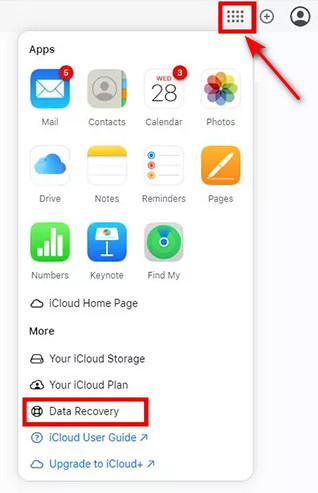
Vaihe 3. valita Palauta kalenterit ja muistutukset nähdäksesi saatavilla olevat arkistoidut versiot.
Vaihe 4. Selaa päivämäärän ja kellonajan mukaan lueteltuja varmuuskopioversioita, etsi sitten ennen muistutusten katoamista luotu versio ja napsauta sitten Palauttaa.
Huomautus: Älä muokkaa tai luo muistutuksia, kun prosessi on kesken. Kaikkia uusia muutoksia ei voida tallentaa palautuksen aikana.
Palauta poistetut muistutukset iPhonessa iTunesin kautta
Käyttäjät voivat palauttaa poistetut muistutukset iPhonessa palauttamalla ne iTunes backupTämä menetelmä vaatii tietokoneen, johon on asennettu iTunes/Finder.
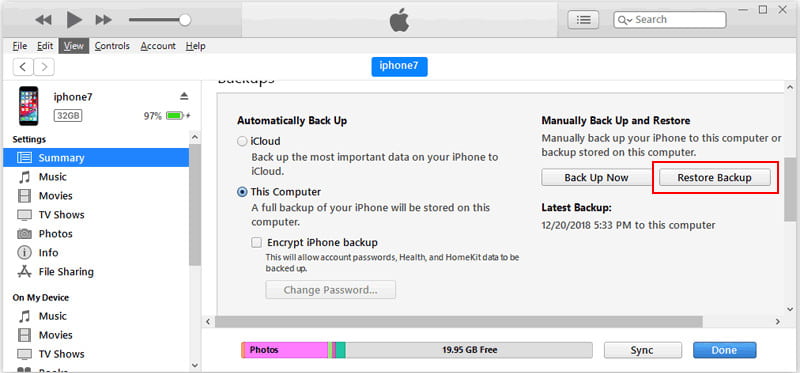
Vaihe 1. Avaa iTunes tietokoneellasi. Liitä iPhone tietokoneeseen USB-kaapelilla.
Vaihe 2. Valitse laitteesi paneelin yläreunasta. Napsauta Yhteenveto ja valitse Palauta varmuuskopiointi.
Vaihe 3. Valitse poistettujen muistutusten varmuuskopio ja napsauta Palauta.
Osa 3: Poistettujen muistutusten palauttaminen iPhonessa ilman iCloudia
Jos et ottanut iCloud-varmuuskopiointia käyttöön etukäteen, onko olemassa mitään tapaa palauttaa poistettuja muistutuksia iPhonesta? Ehdottomasti! Tässä osiossa käsittelemme kahta käytännön tapaa palauttaa kadonneita muistutuksia ilman iCloudia.
Palauta muistutukset iPhonessa palautustyökalulla
Omistettu palautustyökalu voi säästää paljon aikaa, kun yrität hakea poistettuja muistutuksiasi. Apeaksoft iPhone Data Recovery on tehokas ratkaisu, joka voi palauttaa yli 30 erityyppistä iOS-tietoa iPhonesta, iPadista tai iPodista. Se voi palauttaa kadonneet tietosi erilaisissa tilanteissa, olipa laitteellesi tehty tehdasasetusten palautus, fyysinen vaurio tai järjestelmähäiriöitä.

Ladannut yli 1,000,000 Käyttäjät
- Palauta poistetut muistutukset iPhonestasi ilman varmuuskopioita.
- Palauta tiedot iOS-laitteista tai iTunes/iCloud-varmuuskopiosta.
- Palauta yli 30 erityyppistä dataa, mukaan lukien muistutuksia, valokuvia ja viestejä.
- Tukee kaikkia iPhone-malleja ja uusimpia iOS-versioita korkealla onnistumisprosentilla.
Suojattu lataus
Suojattu lataus
Vaihe 1. Käynnistä ohjelmisto tietokoneella ja napsauta Palauta iOS-laitteesta vasemmassa palkissa. Liitä iOS-laitteesi tietokoneeseen USB:n kautta. Napauta Luottamus luottamaan tietokoneeseesi.
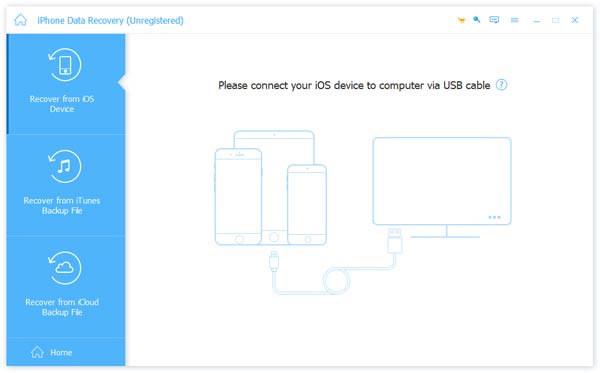
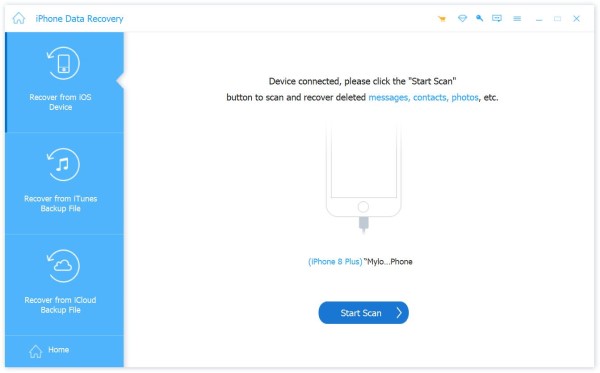
Vaihe 2. Valitse Aloita haku -painiketta, ja se skannaa kaikki iPhonessasi olevat tiedot.
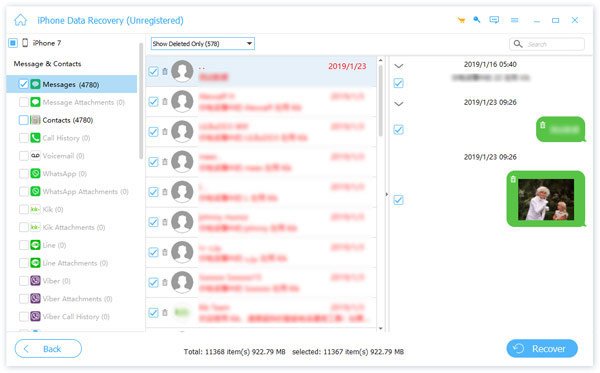
Vaihe 3. Voit valita Näytä kaikki or Näytä vain poistetut esikatsellaksesi skannaustuloksia nopeasti. Valitse palautettava muistutus ja napsauta toipua.
Palauta muistutukset iPhonessa sähköpostitse
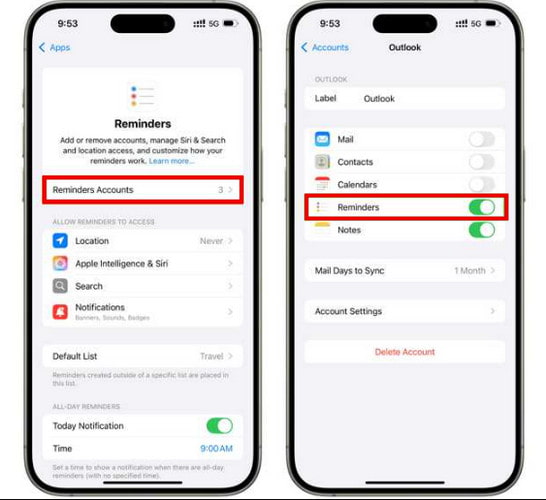
Jos olet synkronoinut muistutuksesi sähköpostitilin, kuten Gmailin, Yahoon tai Outlookin, kanssa, muistutuksesi saattavat näkyä myös kyseisen sähköpostitilin kalenteri-, tehtävä- tai muistutusosiossa. Jos siis poistat muistutuksen vahingossa, voit löytää ja palauttaa sen synkronoidun sähköpostitilin kautta.
Vaihe 1. Avaa sähköpostitili, joka on synkronoitu muistutuksiisi.
Vaihe 2. Siirry Kalenteri, Tehtävättai Muistutus -osio sähköpostitililläsi.
Vaihe 3. Etsi poistetut muistutukset ja palauta ne sitten iPhoneesi tai kopioi muistutusten tiedot manuaalisesti takaisin iPhoneesi.
Osa 4: Vinkkejä tulevien muistutusten katoamisen estämiseksi
Muistutusten menettäminen on turhauttavaa, mutta nämä vinkit voivat auttaa sinua estämään sen:
- Pidä aina iCloud-synkronointi käytössä.
- Varmuuskopioi iPhone säännöllisesti iCloudin tai iTunesin avulla.
- Varmuuskopioi tärkeät tiedostot ennen iOS-päivityksiä tietojen menetyksen välttämiseksi.
- Tarkista jaetut muistutuslistat ja varmista, että synkronointiasetukset ovat oikein.
Yhteenveto
Yhteenvetona voidaan todeta, että voit palauta poistetut muistutukset iPhonessa Äskettäin poistetut -kansiosta, iCloud- tai iTunes-varmuuskopioista tai käytä ammattimaista työkalua, kuten Apeaksoft iPhone Data Recovery, kun varmuuskopiota ei ole saatavilla. Näitä menetelmiä noudattamalla voit palauttaa tärkeät muistutuksesi nopeasti ja pitää tehtäväsi aikataulussa!
 Apeaksoft iPhone Data Recovery
 Palauta poistetut tai kadonneet tiedot iOS-laitteista, iTunesista ja iCloud-varmuuskopioista.
Suojattu lataus
Suojattu lataus
Aiheeseen liittyvät artikkelit




