Comment contourner le verrouillage d'un iPad par son propriétaire sans mot de passe

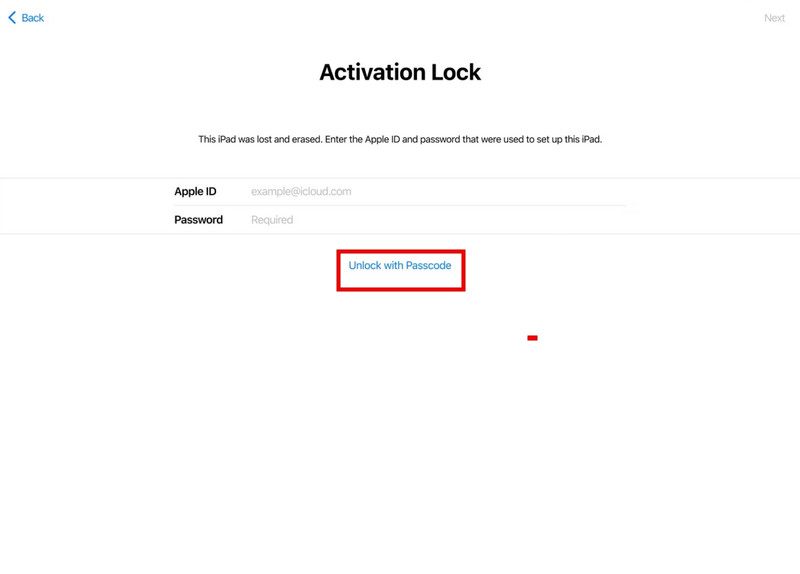
Vous allumez votre iPad après une réinitialisation ou juste après avoir acheté un appareil d'occasion, et vous voyez soudain… iPad verrouillé par le propriétaire À ce stade, l'appareil demande l'identifiant Apple et le mot de passe d'origine, et vous ne pouvez pas poursuivre la configuration.
Cela se produit à cause du verrouillage d'activation, une fonction de sécurité qui protège votre appareil contre les accès non autorisés. Bien qu'il contribue à la sécurité de vos données, il peut aussi poser problème si vous oubliez le mot de passe de votre identifiant Apple. Dans ce guide, nous vous présenterons les méthodes les plus efficaces pour contourner ou supprimer le verrouillage de l'iPad, afin que vous puissiez choisir la solution la plus adaptée à votre situation.
CONTENU DE LA PAGE :
- Partie 1 : Comment déverrouiller un iPad verrouillé par son propriétaire à l’aide d’un identifiant Apple ou d’un code d’accès
- Partie 2 : Comment déverrouiller un iPad verrouillé à son propriétaire sans code d’accès
- Partie 3 : Comment déverrouiller un iPad verrouillé par son propriétaire - 3 méthodes éprouvées
- Partie 4 : FAQ sur le contournement du verrouillage de l’iPad par son propriétaire
Partie 1 : Comment déverrouiller un iPad verrouillé par son propriétaire à l’aide d’un identifiant Apple ou d’un code d’accès
Si vous connaissez les identifiants Apple associés à l'iPad ou le code d'accès le plus récent, vous pouvez facilement le déverrouiller depuis l'écran « Verrouillé par le propriétaire ». Avant de commencer, assurez-vous que votre iPad est connecté à un réseau Wi-Fi stable.
Étape 1 : Sur le Verrouillé pour le propriétaire Sur l'écran, saisissez l'identifiant Apple et le mot de passe d'origine, puis appuyez sur Retour pour déverrouiller votre iPad.
Étape 2 : Vous pouvez également appuyer sur Déverrouiller avec mot de passe et choisissez Utiliser le code d'accès de l'appareil pour déverrouiller l'iPad à l'aide du code d'accès le plus récent. Cette option est disponible uniquement si Trouver mon et Authentification à deux facteurs ont été activées avant le verrouillage de l'appareil.
Partie 2 : Comment déverrouiller un iPad verrouillé à son propriétaire sans code d’accès
Que faire si vous ne connaissez pas le mot de passe de votre identifiant Apple ou le code de déverrouillage précédent ? Dans ce cas, vous ne pourrez pas déverrouiller directement votre iPad ; vous devrez contourner le verrouillage d’activation pour y accéder à nouveau. Un outil de déverrouillage dédié peut grandement simplifier cette opération.
Si vous êtes bloqué sur l'écran « iPad verrouillé au propriétaire », Apeaksoft iFoneKit Cet outil vous permet de contourner le verrouillage d'activation Apple pour déverrouiller votre iPad facilement et en toute sécurité. Quel que soit le type de verrouillage qui vous empêche d'accéder à votre appareil, il le gère sans effort.

Téléchargé par plus de 1,000,000 des opportunités
- Supprimez l'identifiant Apple du précédent propriétaire d'un iPhone/iPad d'occasion.
- Effacez le code d'accès, Face ID et Touch ID en quelques clics.
- Contournez facilement les mots de passe MDM, de chiffrement de sauvegarde iTunes et de Temps d'écran.
- Supprimez les restrictions de carte SIM des différents opérateurs.
Téléchargement sécurisé
Téléchargement sécurisé
Comment déverrouiller un iPad avec Apeaksoft iFoneKit :
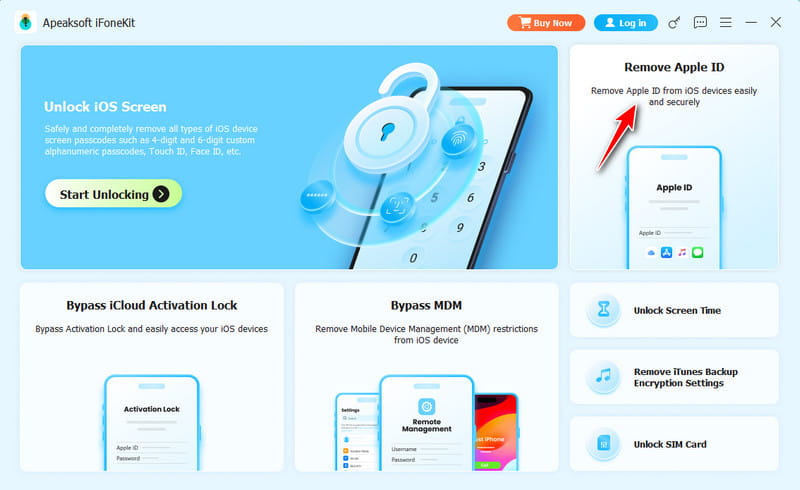
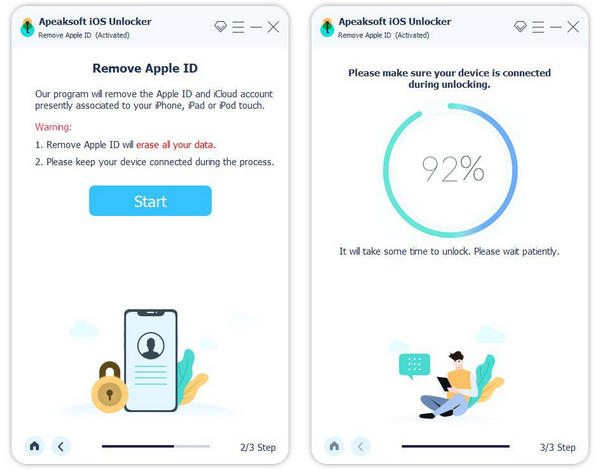
Étape 1 : Téléchargez et lancez le logiciel sur votre ordinateur. Choisissez Supprimer l'identifiant Apple mode. Connectez votre iPad à un ordinateur et appuyez sur Confiance sur votre iPad.
Étape 2 : Cliquez sur Commencez maintenant bouton pour commencer la suppression de l'identifiant Apple.
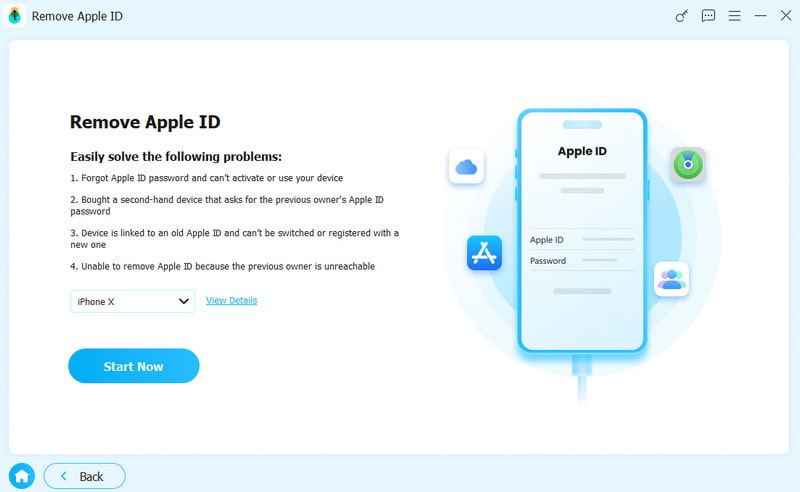
Si la fonction Localiser est désactivéeiFoneKit va immédiatement commencer à supprimer votre identifiant Apple.
Si la fonction Localiser est activéeVous devrez d'abord réinitialiser votre iPad. Suivez les instructions à l'écran pour effectuer la réinitialisation. Cette étape effacera toutes les données de votre appareil ; assurez-vous donc de sauvegarder vos données importantes au préalable.
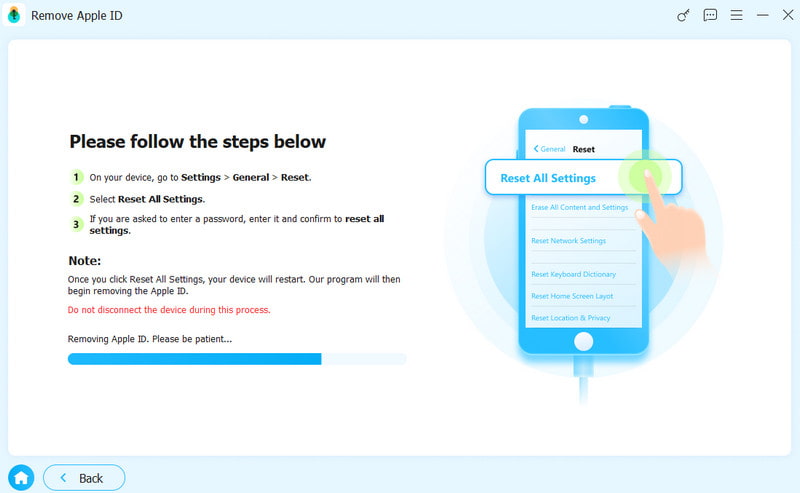
À noter: Après avoir contourné le verrouillage d'activationCertaines fonctionnalités, comme la connexion iCloud, l'accès à l'App Store ou le service cellulaire, peuvent être limitées en fonction du modèle de l'appareil et de la version du système.
Partie 3 : Comment déverrouiller un iPad verrouillé par son propriétaire - 3 méthodes éprouvées
Existe-t-il une solution pour déverrouiller un iPad verrouillé par son propriétaire sans mot de passe ? Oui, voici trois alternatives utiles dans certaines situations. Consultez-les pour
Contactez l'ancien propriétaire pour le supprimer via iCloud
Idéal pour : Les utilisateurs qui peuvent entrer en contact avec l'ancien propriétaire de l'iPad.
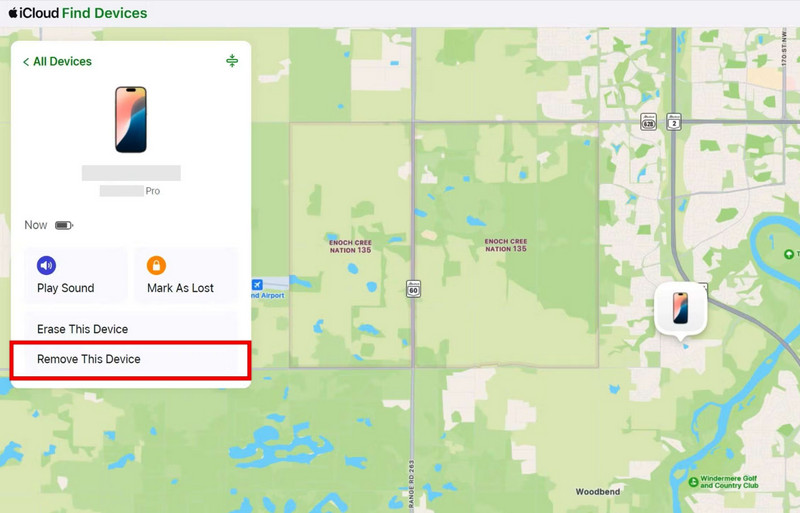
Si vous parvenez à contacter l'ancien propriétaire, la solution la plus efficace est de lui demander de supprimer votre iPad de son compte. Il pourra se connecter à son compte iCloud et supprimer l'appareil à distance.
Étape 1 : Demandez à l'ancien propriétaire de se rendre sur iCloud.com et de se connecter avec son identifiant Apple.
Étape 2 : Cliquez sur Trouver mon Choisissez cette option et sélectionnez l'iPad dans la liste des appareils.
Étape 3 : Cliquez à nouveau Retirer ce périphérique, puis confirmez la suppression.
Contourner le verrouillage d'un iPad par son propriétaire via DNS
Idéal pour : Utilisateurs avancés possédant des versions plus anciennes d'iPad et ayant besoin d'une solution temporaire pour accéder à des fonctionnalités limitées.
Contourner le verrouillage d'activation via DNS est une solution de contournement qui ne fonctionne que dans certains cas. Elle ne supprime pas le verrouillage d'activation, mais peut vous donner accès à certaines fonctions de base. Cette méthode est compatible uniquement avec les iPad fonctionnant sous iOS 8 à iOS 10.3.3.
À noter: Cette solution n'offre qu'un accès temporaire et limité, et son taux de réussite est relativement faible.
Étape 1 : Allumez votre iPad et connectez-le à un réseau Wi-Fi.
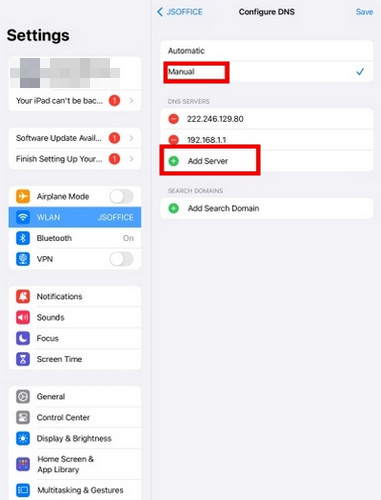
Étape 2 : Accédez à l'écran des paramètres Wi-Fi, puis cliquez sur le symbole « i » à côté de votre réseau Wi-Fi.
Étape 3 : Faites défiler vers le bas et appuyez sur configurer DNSSaisissez l'adresse IP du serveur DNS de votre région.
- USA: 104.154.51.7
- Europe: 104.155.28.90
- Asie: 104.155.220.58
- Amérique du Sud: 35.199.88.219
- Australie et Océanie: 35.189.47.23
- Autres continents: 78.100.17.60
Étape 4 : Appuyez sur le bouton Retour, réactivez le Wi-Fi et saisissez votre mot de passe. L’écran « Activer l’iPad » s’affichera alors. Suivez les instructions à l’écran pour configurer votre iPad.
Supprimer le verrouillage de l'iPad au propriétaire via l'assistance Apple
Idéal pour : Les utilisateurs qui préfèrent une méthode officielle et sécurisée avec une preuve d'achat valide.
Si aucune des méthodes précédentes n'a fonctionné, la meilleure solution est de contacter l'assistance Apple. Vous pouvez soumettre une demande via getsupport.apple.com ou vous rendre dans un Apple Store.
Il s'agit de la méthode la plus sûre pour supprimer le verrouillage d'activation, mais Apple exigera votre reçu d'achat ou une autre preuve de propriété valide pour vérifier que l'appareil vous appartient. Assurez-vous que votre document indique clairement les détails de l'appareil avant de soumettre votre demande. Après examen de la demande, le processus peut prendre plusieurs jours. Si la vérification est concluante, Apple vous aidera à déverrouiller l'appareil.
Partie 4 : FAQ sur le contournement du verrouillage de l’iPad par son propriétaire
Comment déverrouiller un iPad verrouillé au nom de son propriétaire sans identifiant Apple ?
L'outil professionnel Apeaksoft iFoneKit permet de supprimer l'identifiant Apple du précédent propriétaire de votre iPad sans mot de passe. Il est compatible avec la plupart des appareils et versions iOS, y compris les dernières versions iOS 26/27 et iPadOS 26/27.
La réinitialisation d'usine supprime-t-elle l'identifiant Apple sur un iPad verrouillé au nom de son propriétaire ?
Non. Une réinitialisation d'usine ne supprime pas l'identifiant Apple d'un iPad. Après la réinitialisation, l'appareil affichera toujours « iPad verrouillé au propriétaire » et nécessitera les identifiants Apple d'origine.
Comment contourner gratuitement le verrouillage d'un iPad par son propriétaire ?
La méthode gratuite la plus fiable pour contourner le verrouillage d'un iPad par son propriétaire consiste à demander à ce dernier de supprimer l'appareil de son compte iCloud. Vous pouvez également contacter l'assistance Apple en fournissant une preuve d'achat valide pour obtenir une aide officielle. Le contournement DNS est une autre solution gratuite, mais elle n'offre qu'un accès temporaire et limité et fonctionne principalement sur les anciennes versions d'iPadOS.
Conclusion
Si vous vous demandez Comment déverrouiller un iPad verrouillé par son propriétaire ?La méthode la plus rapide consiste à saisir le mot de passe d'origine de l'identifiant Apple ou à utiliser l'ancien code d'accès, s'il est disponible. Sinon, vous pouvez demander à l'ancien propriétaire de supprimer l'appareil à distance via iCloud ou contacter l'assistance Apple en fournissant une preuve d'achat. Si ces options ne sont pas possibles, un outil professionnel comme Apeaksoft iFoneKit peut s'avérer utile. Déverrouillez votre iPad désactivé.
 Apeaksoft iFoneKit
 Déverrouillez tous les types de mots de passe iOS de l'iPhone, de l'iPad et de l'iPod.
Téléchargement sécurisé
Téléchargement sécurisé
Articles Relatifs