Why Are There White Lines on the iPhone Screen and How to Fix

Some users reported white lines on their iPhone screen after a drop, an iOS update, or battery overheating. White lines on an iPhone screen can be frustrating and concerning for users. These lines can appear in various patterns and locations on the screen and may be accompanied by other display problems, such as flickering or distortion.
This article explains in detail why and how to fix white lines on the an iPhone screen, step by step.
PAGE CONTENT:
Part 1: Why There Are White Lines on Your iPhone Screen
White lines on an iPhone screen always indicate that the display system doesn't work properly. Possible white line patterns include:
- Vertical white lines
- Horizontal white lines
- Flickering white lines
- Big white line on iPhone screen
- 2 white lines on the iPhone screen
- White lines after dropping the iPhone
- White lines after iOS update
- White lines are visible in recovery mode
- …
A variety of issues can cause white lines on an iPhone screen. Here we list some of them based on real user cases and real-world repair cases.
Software Glitches or Bugs
Occasionally, temporary glitches or bugs in iOS can cause white lines or other visual artifacts to appear on an iPhone's screen. It usually occurs after a system update, an app crash, or when the device's memory is running out. In many cases, these lines appear randomly and may disappear after restarting the device.
Physical Damage
You can always see white lines on the iPhone screen, or other visual anomalies appear on the display after a drop or a strong impact. The white lines are usually caused by panel failures in OLED/LCD panels, loose display connectors, or damaged display IC chips on the logic board. Once these components are damaged, vertical or horizontal white lines will appear on the screen, and these lines usually remain permanently.
Water Damage
Exposure to moisture or water can cause damage to the iPhone's internal components, including the display. Water damage can cause white lines or other visual issues to appear on the screen. Sometimes, the damage may be irreversible and require replacing the display or other components.
Overheating
Prolonged exposure to high temperatures can cause the iPhone's internal components to overheat, leading to visual issues such as white lines on the screen. This can happen when the iPhone is left in direct sunlight or exposed to other heat sources for extended periods.
Outdated or Incompatible Apps
Running outdated or incompatible software or apps on the iPhone can cause visual issues such as white lines on the screen. Updating the software or removing the problematic apps can often fix the problem.
These are some potential causes of white lines on an iPhone screen. The best way to determine the cause of the problem is to take the iPhone to a professional repair service or Apple Store for diagnosis and repair.
Part 2: How to Fix White Lines on iPhone Screen (6 Solutions)
The white lines on the iPhone screen may be related to software malfunctions or hardware damage. The following 6 solutions cover basic troubleshooting steps and advanced repair methods. You can try these methods in sequence to determine the root cause of the problem and find the solution that best suits your situation.
Restart iPhone
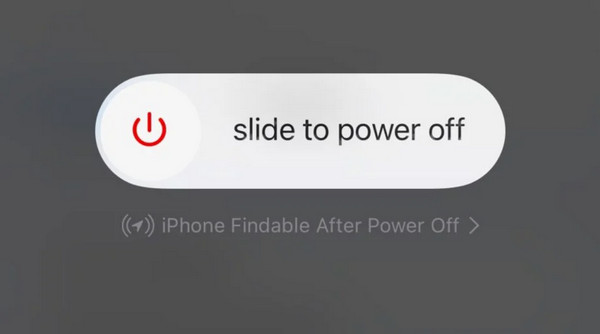
The first thing to try is to restart your iPhone. Hold the power and any of the volume buttons until it requires you to slide off your iPhone. Wait a few seconds, then hold the power button to turn your iPhone back on. This can sometimes resolve minor software glitches that cause white lines on the screen. If it doesn't work, try a force restart.
Update iOS Version
If your iPhone is running an outdated version of iOS, updating to the latest version can sometimes fix display issues. Go to Settings - General - Software Update. Click Update Now if there is a newer version.

Tips: If you are ready to update your iOS system, make sure your battery is charged enough and your internet connection is stable.
Check for App Updates
If the white lines only appear when using a particular app, the app may be causing the problem. Check the App Store for updates to the app and install any available updates.

Reset All Settings
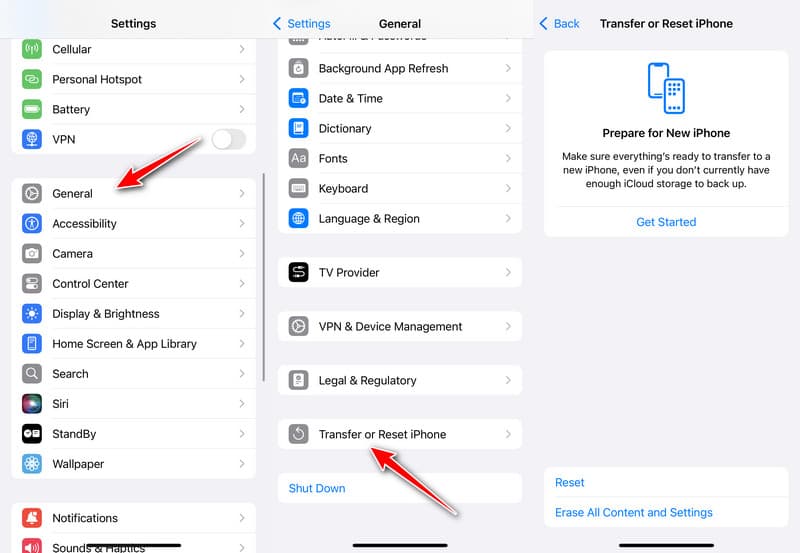
If the methods above cannot repair white lines on the iPhone screen, you can reset all settings. It can fix display issues such as white lines resulting from system configuration. Go to Settings - General - Transfer or Reset iPhone - Reset. Your iPhone will reset system settings such as network, display, and preferences to default, but your photos, apps, and other personal data will remain unchanged.
One-Stop Solution - iOS System Recovery Tool
If none of the basic troubleshooting methods can solve the white lines problem on your iPhone screen, then it might be caused by deeper iOS system errors. In this case, you can try using professional iOS repair tools, such as Apeaksoft iOS System Recovery Software, which is designed to fix various iPhone system issues.
It offers three different modes to handle simple or complex problems. Moreover, you do not have to worry about data loss while repairing your iOS. This software will keep your data safe when fixing screen issues.

Downloaded by over 1,000,000 users
- 3 repair modes to fix iOS issues that may cause white lines on the iPhone screen.
- Fix white lines on the iPhone screen safely while keeping all data.
- Repair the white line on all iOS versions and iPhone models.
- Offer a Free Quick Fix feature.
Secure Download
Secure Download
Step 1. Download this tool from the button above. Connect your iPhone with white lines to your computer and choose System Repair.
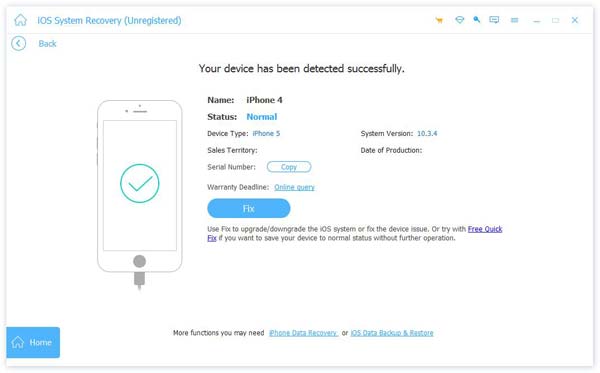
Step 2. Click Start and confirm your device information. Here you can click the Free Quick Fix button to repair some simple issues that cause white lines on your iPhone screen.
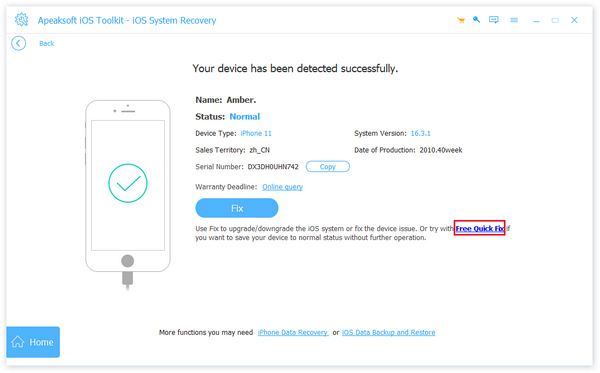
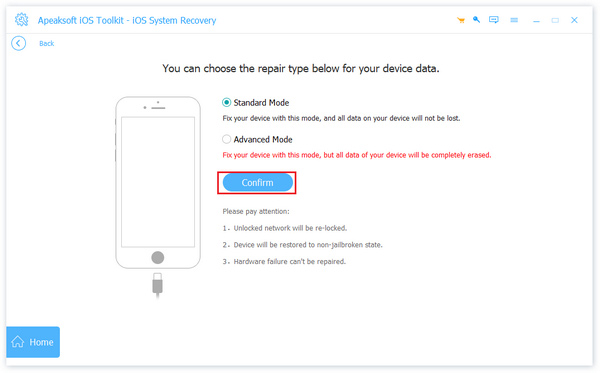
Step 3. If the problems are complicated, click the Standard or Advanced buttons to fix your iPhone.
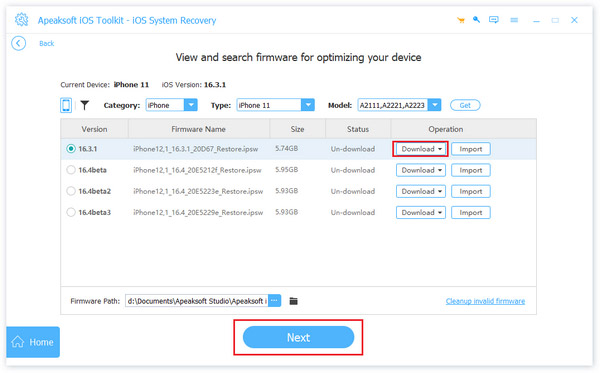
Step 4. When you choose the Advanced mode, you need to set your iPhone's firmware and install it.
Screen Repair service
If you see white lines on the iPhone screen after a drop or water exposure, it is often caused by hardware damage. If so, take your iPhone to a professional repair service to assess and repair the damage. Apple recommends contacting Apple Support or visiting an Apple Store if display issues persist after basic troubleshooting.
Bonus: Whether White Lines Are Caused by a Software or Hardware Issue
Before performing any repair operation, it is necessary to first determine the specific cause of the white lines appearing on the iPhone screen. Because software issues can usually be resolved at home by yourself, while hardware problems often require professional repair. Here, we will introduce 2 methods:
Take a Screenshot
Screenshot any screen. Zoom in on the screenshot and check whether there are white lines. If yes, it is caused by software issues.
Check in Recovery Mode
Get your iPhone into recovery mode and observe the screen. If the white lines on the iPhone screen are still visible even in recovery mode, the problem is most likely hardware-related.
Part 3: FAQs about White Lines on iPhone Screen
Can white lines on an iPhone screen go away on their own?
Generally, it's unlikely that white or green lines on an iPhone screen will go away alone. In some cases, white lines caused by software glitches may disappear after a restart or update.
Should I replace my screen if there are white lines on the screen?
No, you do not have to do that unless it is a hardware issue. You can try many solutions, such as resetting the screen, updating iOS or app versions, or using Apeaksoft iOS System Recovery.
How to tell if physical damage caused white lines on the iPhone screen?
If the cracked iPhone screen causes the white lines on your iPhone screen, you may notice cracks or other signs of damage on the screen or the device itself. Taking your iPhone to a professional repair service for assessment is best if you suspect physical damage.
Conclusion
In conclusion, white lines on an iPhone screen can be caused by various factors, ranging from software glitches to hardware defects. If you are experiencing this problem, this post gives you some primary ways and a tool to heelp you fix white lines on your iPhone screen. Remember to use Apeaksoft iOS System Recovery when the primary way cannot fix your problem.
 Apeaksoft iOS System Recovery
 Fix virious iOS system issues on iPhone, iPad, and iPod.
Secure Download
Secure Download
Related Articles