Why Are There Colored Lines on iPhone Screen - Fix Guide

Key Takeaways
- Colored lines on the iPhone screen are usually caused by physical damage, hardware issues like loose display connectors, or software glitches.
- If the colored lines appear on the lock screen or during startup (Apple logo screen), the issue is likely hardware-related.
- Simple fixes like restarting or updating iOS can solve software-related issues.
- Severe screen damage usually requires screen replacement.
Colored lines appearing on the iPhone screen can be a frustrating and concerning sight. Whether they are thin vertical lines, thick horizontal bands, or a mosaic of vibrant colors, these visual abnormalities can significantly impact your device’s functionality and user experience. This article will explore the potential causes behind these colored lines on iPhone screens, their possible implications on your iPhone’s usability, and the steps you can take to diagnose and address the issue.
PAGE CONTENT:
Part 1. Why There Are Colored Lines on the iPhone Screen
Colored lines on an iPhone screen can indicate a hardware or software issue. Here are a few reasons you may see colored lines on your iPhone screen. You can see the potential reasons that cause your issue and then take the proper solutions.
Cause 1 - Physical Damage
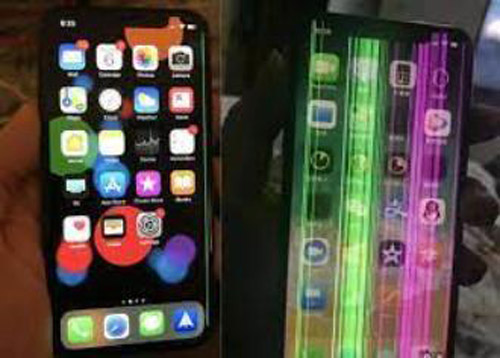
If your iPhone has been dropped or subjected to physical impact, it can cause damage to the display. Cracks or internal damage to the screen can result in colored lines appearing on the iPhone screen.
Cause 2 - Display Connector Issues
The colored lines on the iPhone screen can also be caused by a loose or faulty connection between the iPhone’s display and the internal components. Over time, the connection may become loose, leading to display abnormalities.
Cause 3 - Software or Firmware Glitch
Software or firmware issues can sometimes cause colored lines to appear on the screen. This can happen due to incompatible apps, operating system glitches, or improper software updates.
Cause 4 - Water or Liquid Damage
Exposure to water or other liquids can damage the internal components of an iPhone, including the display. Water damage can result in various display issues, including colored lines.
Cause 5 - Hardware Failure
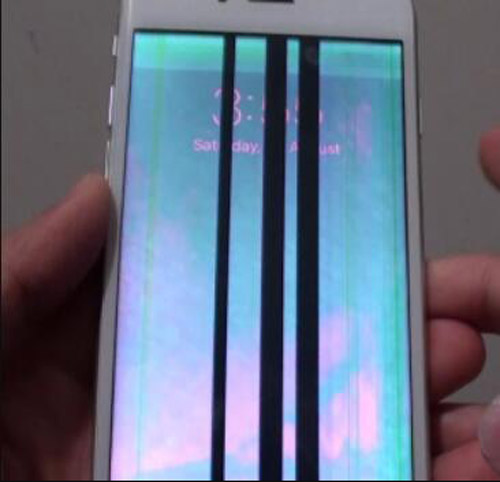
In some cases, a hardware component related to the display, such as the graphics processor or the display itself, may malfunction, leading to the appearance of white lines on the iPhone screen.
Part 2. Will Colored Lines on the iPhone Screen Effect Using
Colored lines on an iPhone screen can significantly impact the device’s usability. Here’s how they can affect the usage:
Display visibility: Depending on the severity and location of the colored lines, they can obstruct the screen’s visibility, making it difficult to read text, view images, or interact with the user interface.
Touch functionality: If the colored lines on the iPhone screen are present in areas where you typically tap or swipe, they can interfere with the touchscreen’s responsiveness. This can make navigating through apps, typing accurately, or performing other touch-based actions challenging. Especially yellow or green lines on the iPhone screen will cause this problem.
App and Content Distortion: Colored lines can distort the appearance of apps, images, videos, and other content on the screen. This can affect the viewing experience and make it challenging to enjoy multimedia or engage with visual content effectively.
Interface Issues: Sometimes, colored lines on the iPhone screen can cause the user interface elements to become misaligned or appear in unexpected places. This can make operating the device confusing and disrupt the normal interaction flow.
Eye Strain and Discomfort: Constantly viewing a screen with colored lines can cause eye strain and discomfort, especially if the lines are vibrant or flashing. Prolonged exposure to such visual abnormalities may lead to headaches or other discomforting sensations.
Part 3. How to Fix Vertical/Horizontal Colored Lines on iPhone Screen
Solution 1 - Restart iPhone (Basic Troubleshooting)
Sometimes, rainbow lines on the iPhone screen are caused by temporary system lag or a display crash. Many Reddit users report that a simple restart often makes the lines disappear immediately.
Step 1. Long-press the side button and any of the volume buttons.
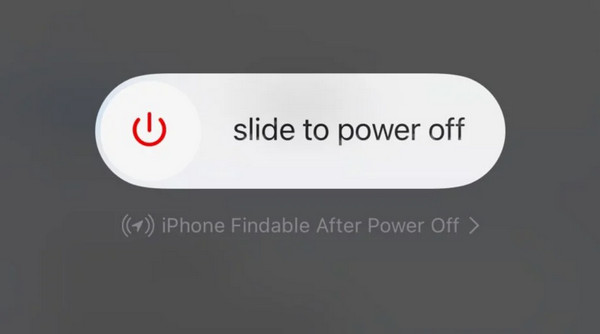
Step 2. Slide to turn off your iPhone.
Step 3. Wait for about 30 seconds, and then long-press the power button to turn it on.
Solution 2 - Update iOS System
Sometimes, software glitches that will affect the rendering method of the pixels may cause vertical or horizontal lines to appear on the screen. Apple often releases updates that include bug fixes and improvements to the graphics system. Updating your iPhone to the latest iOS version may help resolve these issues if they are caused by software glitches.
Step 1. Open Settings.
Step 2. Click General, and then choose Software Update.

Step 3. Check the available updates and click Update Now.
Solution 3 - Remove Case
We have noticed that a few forum users reported that when they removed the phone case, the colored-line screen disappeared. This is also a reasonable solution. Because if the phone case is too tight, it may continuously apply pressure to the edges of the iPhone OLED screen. The iPhone screen is very sensitive to physical pressure. Therefore, this may affect the screen connection or cause temporary visual distortion, leading to vertical or horizontal lines.
Solution 4 - Force Restart iPhone
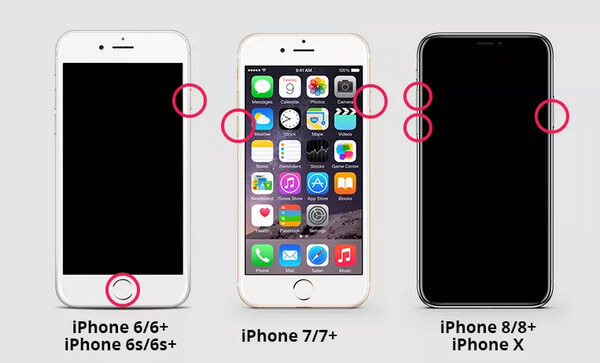
Sometimes, temporary system crashes or display driver failures can cause abnormal visual flaws on the iPhone screen, such as colored stripes or flickering lines. In such cases, an iPhone force restart can help refresh the display system at a deeper level, which is more effective than a regular restart operation.
Solution 5 - Use iOS System Recovery Software (Recommended)
If you are unable to resolve the issue through regular restarts or updates, then professional iOS system repair tools, such as Apeaksoft iOS System Recovery, can offer more advanced solutions. Because sometimes the colored lines are caused by deeper iOS system problems. Different from the basic troubleshooting methods, these system recovery tools are designed to repair damaged system files and solve display-related issues.

Downloaded by over 1,000,000 users
- Fix a wide range of iPhone system issues, including colored lines on the screen.
- Fully compatible with all iPhone models and iOS versions
- Keep your important data safe in most cases.
- Provide a quick free fix feature.
- Provide multiple repair modes for different levels of system issues.
Secure Download
Secure Download
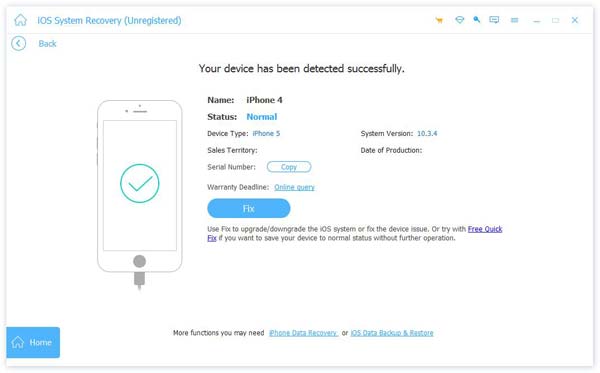
Step 1. Free download, install, and launch this tool.
Step 2. Choose the System Repair mode, and then click Start.
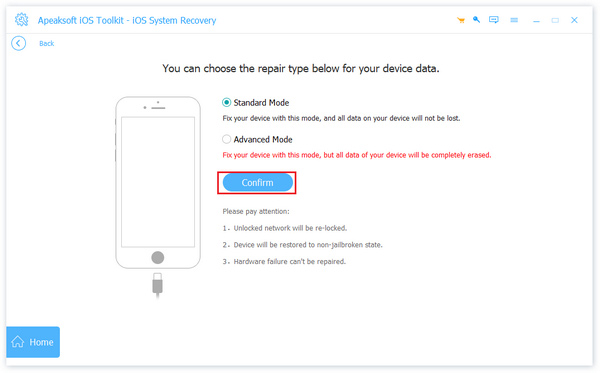
Step 3. Choose a recovery mode.
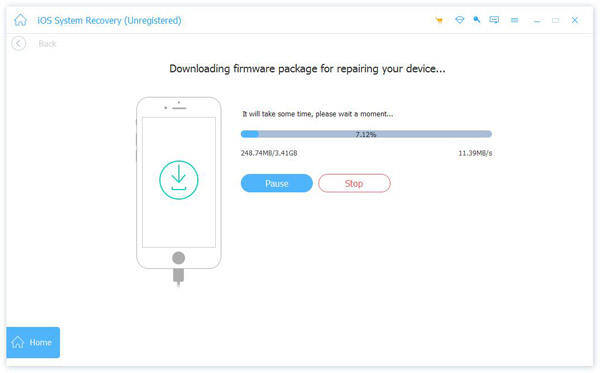
Step 4. Confirm relevant firmware information and start downloading the firmware.
Step 5. The fix process will be initiated immediately.
Solution 6 - Replace Screen (Hardware Issue)
If there are vertical lines on the iPhone screen after dropping, and the colored lines still appear after trying all software-based solutions, the issue is most likely caused by hardware damage. A drop may damage the OLED or LCD screen and affect the internal display components. In this case, the software troubleshooting method doesn't work. The only reliable solution is to replace the iPhone screen. It is recommended to go to a professional repair service or an authorized repair center for a correct diagnosis and screen replacement.
Part 4. FAQs about Colored Lines on iPhone Screen
Can a factory reset fix the colored lines on my iPhone screen?
A factory reset can potentially resolve software-related issues causing colored lines. However, it’s important to note that a factory reset will erase all data on your iPhone.
Will a software update fix colored lines on my iPhone screen?
Yes. It’s possible that a software update can address specific software-related issues causing the colored lines. Make sure your iPhone is running the latest available software version.
What should I do if my iPhone screen has colored lines due to physical damage?
If the colored lines result from physical damage, such as a cracked screen, it’s recommended to contact Apple Support or visit an authorized service center for repair options.
Can the iOS version cause colored lines on the iPhone screen?
Yes. Sometimes the latest iOS version will have bugs that cause color lines on your iPhone screen.
Can colored lines be fixed without replacing the iPhone screen?
Yes. Sometimes, if a software issue causes the colored lines, they may be resolved through software updates or troubleshooting steps without replacing the screen.
Conclusion
In conclusion, colored lines on an iPhone screen can indicate various underlying issues, ranging from software glitches to hardware failures. While some cases may be resolved through software updates or simple troubleshooting steps, others may require professional assistance and repairs. But if you cannot address the issue promptly, you can also use Apeaksoft iOS System Recovery. This software can detect your iPhone issues and apply different methods to fix them.
 Apeaksoft iOS System Recovery
 Fix virious iOS system issues on iPhone, iPad, and iPod.
Secure Download
Secure Download
Related Articles