Apeaksoft Screen Recorder Review Based on Our Testing

Capturing what happens on your screen has become an essential skill for educators, marketers, students, professionals, vloggers, and content creators. It empowers people to share information and knowledge, showcase workflows, and troubleshoot without complicated technology. The right screen recorder can generate the desired result. Apeaksoft Screen Recorder, for example, is one of the top screen recording software options. This article shares an honest review based on our lab testing.
ページコンテンツ:
- Part 1: What Is Apeaksoft Screen Recorder
- Part 2: Tech Specs of Apeaksoft Screen Recorder
- Part 3: Key Features of Apeaksoft Screen Recorder
- Part 4: Apeaksoft Screen Recorder Test
- Part 5: Apeaksoft Screen Recorder Review Based on Testing
- Part 6: Apeaksoft Screen Recorder Pricing
- Part 7: Apeaksoft Screen Recorder vs. OBS vs. Loom
- 第8部:最終判決
Part 1: What Is Apeaksoft Screen Recorder
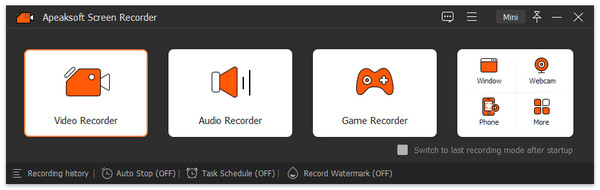
Apeaksoft スクリーンレコーダー is a safe, premium screen recorder for PC and Mac. It includes six modes for capturing the screen, audio, gameplay, windows, webcam, phone, and screenshots on your desktop. The latest version is 2.5.10.
Part 2: Tech Specs of Apeaksoft Screen Recorder
Apeaksoft Screen Recorder is a desktop screen recorder. It means that you need to download and install it on your hard drive to capture what you want to save. Before downloading Apeaksoft Screen Recorder, you should learn the tech specs and other information.
Tech Specs of Apeaksoft Screen Recorder
| OS | Windows 11/10/8/8.1/7/Vista/XP macOS 10.13 and above |
| CPU | 1GHz Intel/AMD CPU 1GHz Intel processor and Apple M1/M2/M3/M4/M5 chip |
| RAM | 1G RAMまたはそれ以上 |
| Storage | 512MB以上 |
Supported File Formats and Codecs
| 4Kビデオ | MP4、AVI、FLV、WebM、TS、MKV、MOV、MXF |
| 4K Codec | H.265 / HEVC、H.264、VP8、VP9、MPEG、XviD |
| HDビデオ | MPEG2, MP4, MOV, WMV, HD TS, HD MTS, HD M2TS, HD TRP, HD TP |
| SDビデオ | 3GP, AVI, DV, MOD, MJPEG, FLV, SWF, F4V, MKV, MPEG, VOB, M4V, MPV, MOV, RM, RMVB, TRP, WMV, ASF |
| 音楽 | AAC, AIFF, CUE, FLAC, M4A, MP3, OGG, AC3, RA, WAV, WMA |
| 画像 | For Windows: PNG, JPG, GIF, TIFF, BMP For Mac: PNG |
Part 3: Key Features of Apeaksoft Screen Recorder
There are seven modes in Apeaksoft Screen Recorder for different situations. To learn the software, you must understand these modes and key features.
Mode 1: Screen Recorder
Record the full screen, partial region, or custom area with system audio. Moreover, you can overlay your face and voice to the recording in real time. To automatically record the screen, the Take Schedule option is available. During the process, you can draw on the recording directly.
Mode 2: Audio Recorder
Capture system sound and/or microphone at the same time. When the recording finishes, you can pre-listen to the result and edit it.
Mode 3: Screen Capture
Take a screenshot on your desktop with one click. Then, edit the screenshot with the built-in image editor and save it to the clipboard or hard drive.
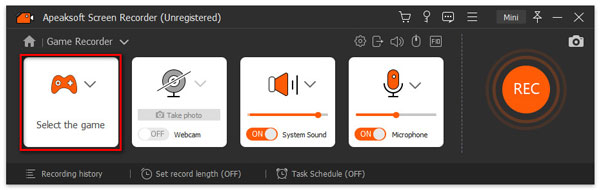
Mode 4: Game Recorder
Optimize resource usage while capturing gameplay on your desktop. Add your comments and reactions to the recording.
Mode 5: Window Recorder
Select a window or process on your desktop to record immediately. When it finishes, you can preview and edit the recording.
Mode 6: Webcam Recorder
Record a video through your webcam with background music and your voice. Customize the video resolution up to 4K.
Mode 7: Phone Recorder
Connect your iPhone or Android phone to your computer with a compatible cable and follow the on-screen instructions to mirror your phone screen. Then, you can screen record or screenshot it.
Besides, Apeaksoft Screen Recorder for Mac and Windows offers a video editor and a media player for retouching recordings and previewing results. Plus, it provides custom options to adjust output formats, quality, and more.
Part 4: Apeaksoft Screen Recorder Test
テスト方法
We tested the main modes and features in Apeaksoft Screen Recorder to learn about its performance. We tested the software to record live streams, gameplay, and tutorials in our professional lab.
ハードウェアとソフトウェア
| OS | 11 64ビットWindows |
| CPU | インテルCore i7-14700K |
| GPU | NVIDIA RTX 4070 |
| RAM | 32GB |
| Storage | 1TB SSD |
| モニター | 3840×2160の解像度 |
Scenario 1: Record Streams
We recorded live-stream videos on YouTube and Twitch. After installing Apeaksoft Screen Recorder on a PC, we open it and choose the スクリーンレコード mode from the left side. After setup, we record the live stream.
| ビデオ品質 | 音声同期 | チーム | How long rendering | |
| YouTube | 4K | シームレス | いいえ | 26 seconds for 2 hours video |
| Twitch | 1080p | シームレス | いいえ | 11 seconds for 1 hour video |
Scenario 2: Record Gameplay
recording gameplay on Windows with Apeaksoft Screen Recorder, we tested using Minecraft and The Legend of Zelda. We also tested the performance when adding a webcam and voiceover to the recording.
| ビデオ品質 | 音声同期 | チーム | ハードウェアアクセラレーション | |
| Minecraftの | 4K | シームレス | いいえ | はい |
| Minecraft recording with webcam and microphone | 4K | シームレス | いいえ | はい |
| ゼルダの伝説 | 4K | シームレス | Little lag after 10 hours | はい |
Scenario 3: Record a Tutorial
If you need to record a video tutorial to display a software program or a presentation, learn about the testing results of Apeaksoft Screen Recorder below. The table is based on a test in our lab.
| ビデオ品質 | 音声同期 | チーム | メモ | |
| Tutorial with voiceover | 4K | シームレス | いいえ | The toolbar allows users to add annotation on recordings |
| Tutorial with webcam and voiceover | 1080p | シームレス | いいえ |
Part 5: Apeaksoft Screen Recorder Review Based on Testing
我々が好きなもの
- Simple and easy to set up with an intuitive interface.
- Support 4K UHD recording at up to 60 fps.
- Capture multiple audio sources, including the system and microphone.
- Add annotation, drawing, and cursor effects in real time.
- Schedule recording for automated capture.
- Compatible with a wide range of output formats.
- Lightweight and integrates hardware acceleration.
嫌いなもの
- Cannot stream or broadcast your desktop.
- Generate large video files if you set high resolutions.
- The free version limits a three-minute recording per session.
- Occasional performance lag if you record too long.
Part 6: Apeaksoft Screen Recorder Pricing
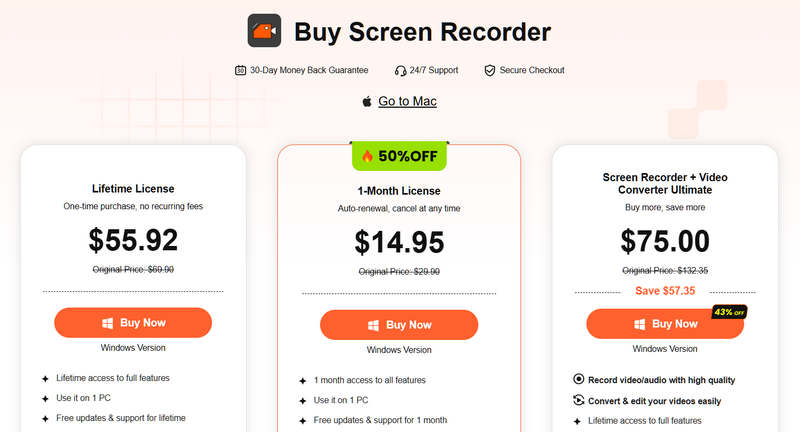
As mentioned previously, you can download Apeaksoft Screen Recorder from the official website for free. If you want to unlock all features, purchase a license. The monthly license costs $14.95, and the lifetime license costs $55.92.
Part 7: Apeaksoft Screen Recorder vs. OBS vs. Loom
Apeaksoft is a user-friendly screen recorder program designed for quick and high-quality recording. Other popular recorders include OBS and Loom. They have different advantages for different purposes.
| Apeaksoft スクリーンレコーダー | OBS | 織機 | |
| ベスト | High-quality recording and gameplay capture | Live stream with maximum control | Quickly screen record |
| Platform | WindowsおよびmacOS | Windows、macOS、Linux | Windows、macOS、iOS、Android |
| 価格 | 月額14.95ドル、生涯利用料55.92ドル | Free | Free, $18 per month, $24 per month |
| 最高品質 | 4K UHD at 60 fps | 4 fpsで60K | 4K on paid plan Free limited to 720p |
| キーの強さ | Real-time annotation Dual audio tracks Schedule recording Support wide formats | Extend with plugins Low resource usage | Record-to-link Instant sharing Auto transcription |
| 製品制限 | No broadcast | Steep learning curve Lack video editor | Free version limits 5 minutes Minimal editing |
第8部:最終判決
Apeaksoft Screen Recorder is a premium, beginner-friendly screen recorder that balances ease of use with 4K 60 fps output and real-time annotation. It performs well in independent testing, particularly for users who prioritize ease of use over advanced customization. It is suitable for recording everything on your desktop without lag or delay.
結論
This article reviewed one of the most popular screen recording software, Apeaksoft スクリーンレコーダー. It is a capable and reliable tool for screen recording, gameplay capture, tutorial generation, and more. Moreover, it offers bonus features, such as video editing and recording previews. Moreover, we compared the screen recorder with the top 2 alternatives. Our review based on lab testing, can help you make the best decision.

関連記事