In-depth Review of Apeaksoft iPhone Data Recovery Software

While Apple has added multiple backup options to iOS devices, losing important data from an iPhone or iPad can be stressful. According to our research, most data loss occurs in the absence of backups. The good news is that you can retrieve lost data before it is overwritten in iPhone memory. Apeaksoft iPhone Data Recovery offers flexible solutions to recover deleted data from any iOS device.
PAGE CONTENT:
Key Takeaways
Apeaksoft iPhone Data Recovery focuses on three data recovery modes:
- Recover from an iPhone or iPad memory directly without any backup.
- Extract data from iTunes backup and restore lost files without overwriting the iOS device.
- Retrieve selected files from an iCloud backup without erasing the iPhone or iPad.
Part 1: What is Apeaksoft iPhone Data Recovery
As mentioned previously, Apeaksoft iPhone Data Recovery is a powerful data recovery program that helps iPhone users recover lost or deleted data from iOS devices. It covers almost all data types, such as contacts, photos, videos, messages, iMessage, notes, call history, bookmarks, app data, and more.
Apeaksoft iPhone Data Recovery is designed for anyone who has lost important files on their iPhone or iPad, with or without a backup.
Secure Download
Secure Download
The available scenarios include:
- Accidentally delete important files on an iPhone or iPad.
- Factory reset an iOS device without backing up files.
- Erase an iOS device when troubleshooting.
- File loss due to software update failure.
- Free up space, then find lost files.
- Recover data from a locked, disabled, or broken iOS device.
At a Glance: Tech Specs of Apeaksoft iPhone Data Recovery
Hardware Requirements
- CPU: 1GHz Intel/AMD CPU, above 1GHx Intel processor, or Apple M1/M2/M3/M4/M5 •chip
- RAM: 1G RAM or more
- Free Storage: At least 200MB
System Requirements
- Operating System: Windows 11/10/8.1/8/7/Vista/XP or Mac OS X 10.7 and above
- iOS/iPadOS: iOS 5 and above or iPadOS 5 and above
- iTunes: 10.7 or above
Key Features of Apeaksoft iPhone Data Recovery
- 1.Recover deleted data from an iPhone or iPad directly without a backup.
- 2.Extract data from an iTunes backup and restore it to an iPhone or a computer.
- 3.Grab lost data from iCloud backup without erasing the iOS device.
- 4.Support more than 31 file types, including media files, app data, messages, call logs, and social media apps.
- 5.Work in a wide range of data loss scenarios.
- 6.Preview lost data and select specific files before recovery.
- 7.Support the latest editions of iOS and iPadOS.
- 8.Protect data and keep it in its original condition.
User Reviews
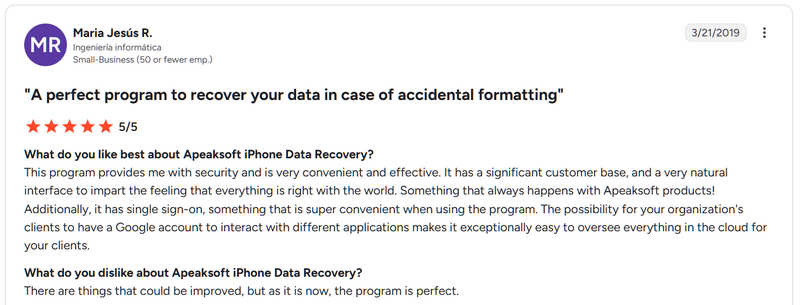
User Review on Trustpilot: I purchased Apeaksoft iPhone Data Recovery to recover voice memos from my iPhone 13 Pro so I could hear the deleted meeting recordings. It always works. I encountered a few problems at first. However, whenever I contacted the company for help, they always provided the assistance needed.
User Review on G2: This product is a standout amongst the best. It spares the iOS operating system on your iPad. It works with the iPhone likewise. It recovered photos, recordings, files, and WhatsApp.
User Review on Capterra: My experience made Apeaksoft iPhone Data Recovery stand out from others. The connection is very fluid and fast. The design is clear and really great. The disadvantage is that it uses a lot of resources.
Part 2: Hands-on Test for Apeaksoft iPhone Data Recovery
To help you learn the real performance of Apeaksoft iPhone Data Recovery, we tested it in our professional lab. We used a PC running Windows 11 64-bit and an iPhone 16 to test the software.
Scenario 1: Recover Data from an iOS Device
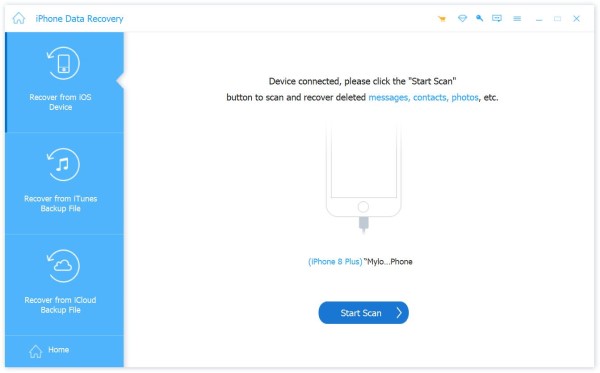
We deleted some contacts, messages, notes, photos, videos, and chats in WhatsApp on an iPhone 16. We also accessed the Recently Deleted folder in the supported apps and removed deleted content. Then, we connected the iPhone to the PC with a Lightning cable and scanned the lost data. We listed the recovery rate for each data type in our test:
| Data Type | Recovery Rate |
| Contacts | 100% |
| Messages | 97% |
| Notes | 99% |
| Photos | 100% |
| Videos | 100% |
| WhatsApp Chats and Attachments | 99% |
Scenario 2: Recover Data from iTunes Backup
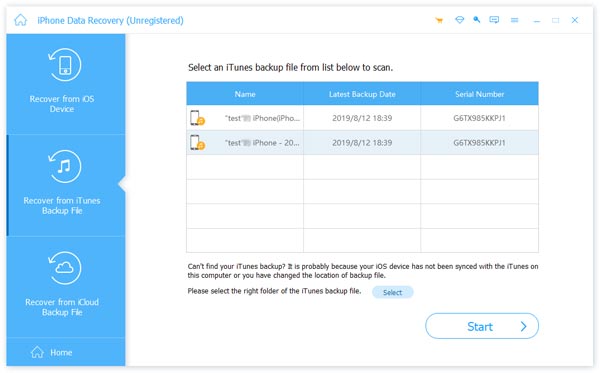
Firstly, we backed up an iPhone 16/17/18 Pro to a PC with iTunes. Next, we deleted a few contacts, messages, call logs, notes, Safari bookmarks, photos, voice memos, and WhatsApp chats. After connecting the iPhone to the PC with a Lightning cable, switch to Recover from iTunes Backup File, select the latest backup, and scan it.
| Data Type | Recovery Rate |
| Contacts | 100% |
| Messages | 100% |
| Call log | 99% |
| Notes | 100% |
| Safari Bookmarks | 99% |
| Photos | 100% |
| Voice Memos | 99% |
| WhatsApp Chats and Attachments | 98% |
Scenario 3: Recover Data from iCloud
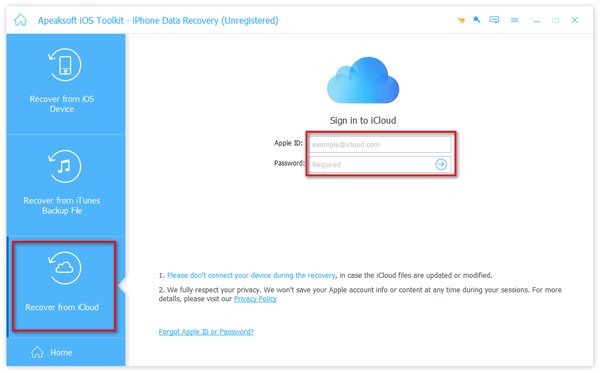
To test the recovery rate for iCloud backup, we backed up an iPhone 16 to iCloud. Next, we deleted several contacts, messages, notes, bookmarks, photos, and WhatsApp chats. Turn to the PC and run Apeaksoft iPhone Data Recovery. Switch to Recover from iCloud, and log in with the associated Apple Account and password. Then, recover lost data from iCloud backup.
| Data Type | Recovery Rate |
| Contacts | 100% |
| Messages | 100% |
| Notes | 99% |
| Safari Bookmarks | 99% |
| Photos | 100% |
| WhatsApp Chats and Attachments | 98% |
Apeaksoft iPhone Data Recovery Testing Summary
It is very easy to use Apeaksoft iPhone Data Recovery to retrieve lost or deleted files on an iPhone or iPad. In our tests, directly recovering from the device is the easiest method if you only need to recover lost files.
But if what you want is just files in iCloud Backup or iTunes Backup, you'll need to use the other two features, as those desired files may not have been deleted or lost recently.
Note: The Recover from Device feature can not only recover recently deleted files, but also permanently deleted ones, as long as you don’t frequently add or delete files on your device.
Apeaksoft iPhone Data Recovery Pricing and Plans
Apeaksoft iPhone Data Recovery is free to download from the official website. Plus, it offers a free demo. If you are satisfied with the software, purchase a license to recover lost data. The 1-Month License costs $27.45, and the Lifetime License costs $65.96. The developer also offers a 4-in-1 bundle for $85.00.
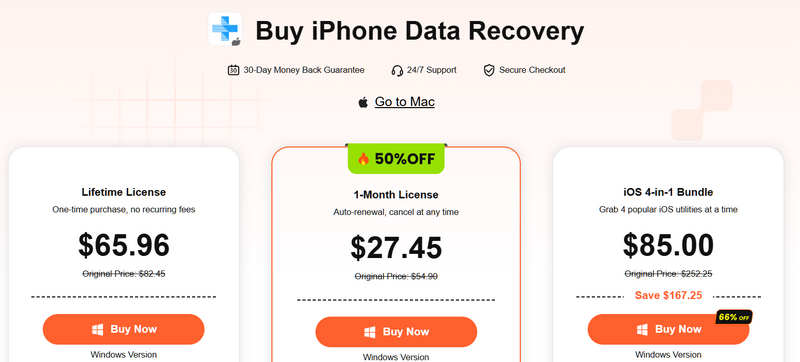
We highly recommend that you download and use the free version first. Then, you can check whether Apeaksoft iPhone Data Recovery can retrieve your desired data with the preview feature. Then, you can decide whether to purchase this program.
Part 3: Apeaksoft iPhone Data Recovery vs Other iPhone Recovery Tools
To compare and review Apeaksoft iPhone Data Recovery with other iPhone data recovery tools, we identified the top 3 alternatives: iMazing, EaseUS MobiSaver, and PhotoRec. We tested them on the same PC running Windows 11 64-bit.
| Apeaksoft iPhone Data Recovery | iMazing | EaseUS MobiSaver for iOS | PhotoRec | |
| Recovery Mode | Three modes | Two modes | Three modes | One mode |
| Support Data Types | 30+ | 20+ | 20+ | 40+ |
| Recovery Rate | 97% | 87% | 89% | 30% |
| Strength | Good for non-technical users | Backup management | Good for backup recovery | Completely free |
| Weakness | Overwritten data recovery | Success rate for iPhone recovery is very low | Device scan takes time | Cannot access iPhone memory directly |
Final Verdict: Should You Choose Apeaksoft iPhone Data Recovery
If you recently deleted media files, contacts, messages, or other data, or you have an old backup, Apeaksoft iPhone Data Recovery is the best option. If you want a freeware data recovery tool, or if your lost data has been overwritten, it is not an ideal option.
Further Reading
Part 4: FAQs About Apeaksoft iPhone Data Recovery
Is Apeaksoft iPhone Data Recovery safe and legal?
Yes, Apeaksoft iPhone Data Recovery is a safe tool released by a reputable software brand. Moreover, it is legal to recover deleted data on your own iOS device.
Can Apeaksoft iPhone Data Recovery recover permanently deleted files?
Yes, Apeaksoft iPhone Data Recovery can recover permanently deleted data from your iOS device memory using advanced technology.
Is it possible to recover deleted data on an iPhone without a backup?
Yes. After you delete a file on an iPhone, iOS doesn't remove the data. Alternatively, it marks the space empty for storing new data. Before the new data overwrites it, you can recover the lost file.
Conclusion
Now, you should understand what Apeaksoft iPhone Data Recovery is, what it can do, and what other knowledge you should know. To help you learn about the iOS data recovery tool, we tested it and researched the three core modes. We also shared and compared the test results for the top three alternatives. This can help you make the best decision.
Related Articles