How to Get Deleted Call Log Recovery on Android Phones

The call log or call history is a systematic record of incoming and outgoing phone calls, capturing details like the caller ID, call duration, time, direction, and more. Losing call history on an Android phone can be a frustrating experience, especially if you need to recall important phone calls. This guide shares the proven methods to get deleted call log recovery on your Android phone efficiently.
PAGE CONTENT:
Part 1: How to Recover Call Log from Your Carrier
Most carriers save call log history for 1 to 7 years, depending on the type of record and the specific carrier. It is a simple way of Android call log recovery. You can access the website or app of your carrier, log in with your account, and check your call history. Another option is visiting a nearby carrier store and asking the support teams to recover your call logs.
Part 2: How to Recover Android Call Log from Phone
Even if you delete your call logs from the Phone app, they may be stored in the Recent or History list. It means that you can recover deleted phone calls on Android without extra Android data software or hardware.
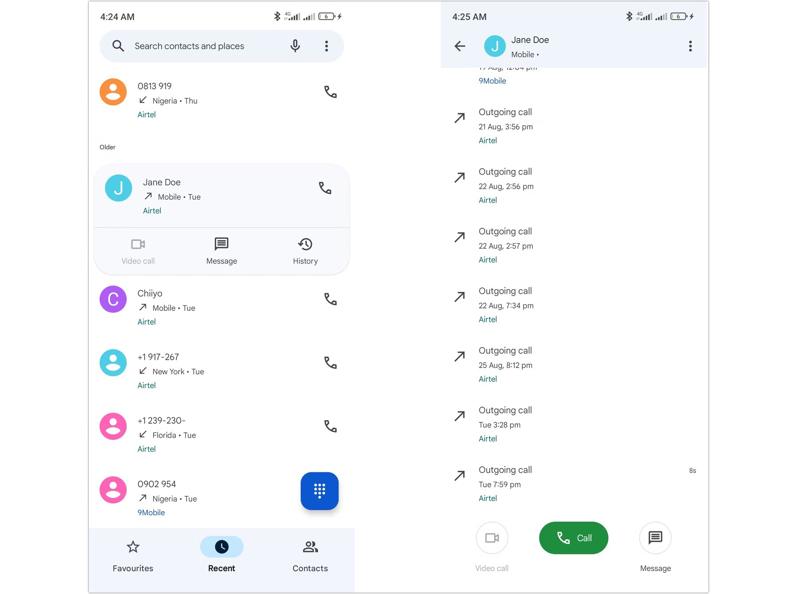
Step 1. Run Google's Phone app from your app tray.
Step 2. Go to the Recent tab from the bottom.
Step 3. Find the desired contact or phone number and tap it.
Step 4. Choose the History option to recover all call history about the contact.
Part 3: How to Recover Call Log on Android from Backup
Another way to recover the Android call log is a Google backup. When setting up your Android phone, you need to add a Google account. Then, you can back up your phone to Google, including call history. Bear in mind that you have to factory reset your phone during the process.
Step 1. Run the Settings app on your phone
Step 2. Go to General Management, and then Reset.
Step 3. Tap the Factory data reset option.
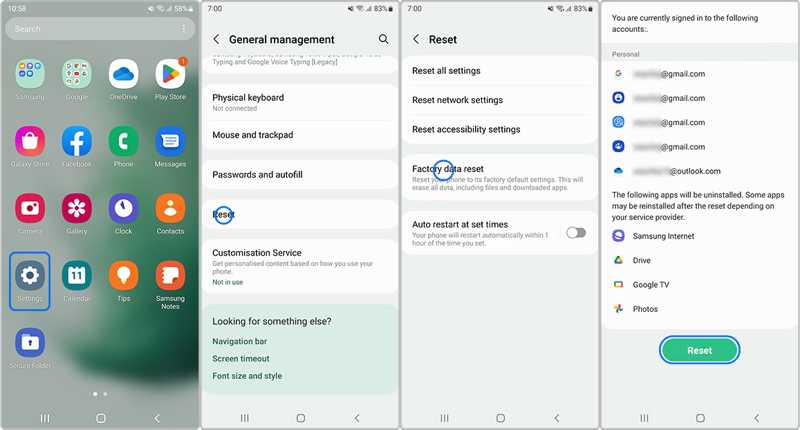
Step 4. Read the alert and tap the Reset button.
Step 5. Follow the onscreen instructions to confirm the action.
Step 6. When it is done, restart your phone.
Step 7. Choose your preferred language and connect to a Wi-Fi network.
Step 8. When prompted, enter the same Google account used for the backup.
Step 9. Next, select the backup that includes the lost call logs.
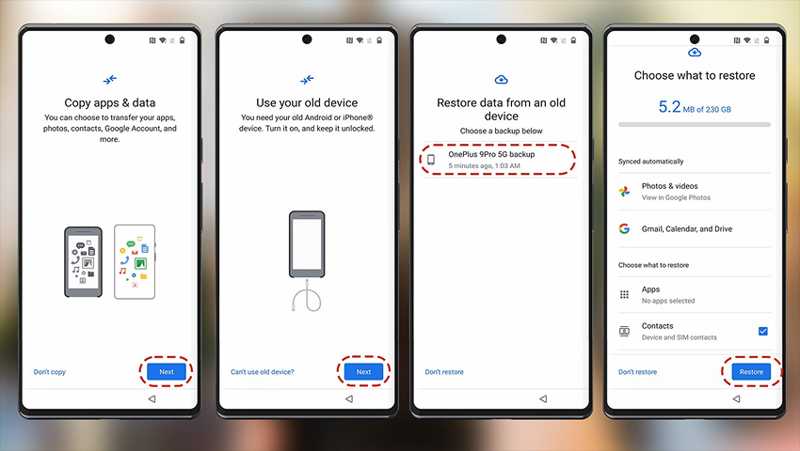
Step 10. Make sure to select call history on the list and tap Restore.
Step 11. After restoring, complete the setup.
Step 12. Then, go to the Phone app and check the recovered call history.
Part 4: How to Use an Android Call Log Recovery Application
Without a backup, it is difficult to retrieve permanently deleted call history on an Android phone. The ultimate option is an Android call log recovery software, such as Apeaksoft Android Data Recovery. It is able to scan your phone memory and look for deleted call logs before new data overwrites them. More importantly, the intuitive interface simplifies the workflow.

Downloaded by over 1,000,000 users
- Recover deleted call logs on Android in 3 steps.
- Work for a wide array of data types.
- Extract call history from a broken phone.
- Preview your call history for selective recovery.
- Support almost all Android device brands and models.
Secure Download
Secure Download
How to Recover Deleted Call Logs on Your Android Phone
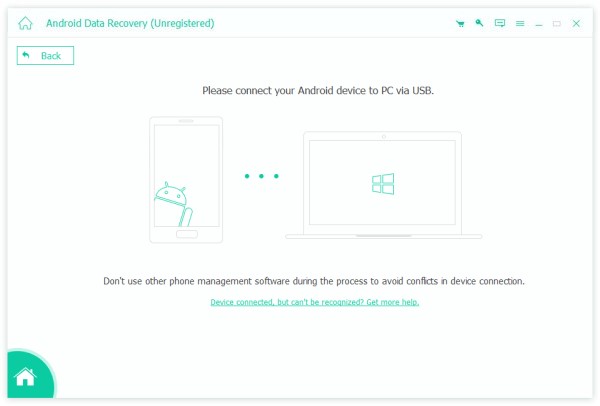
Step 1. Scan your phone
Start the Android call log recovery software after installing it on your computer. It is available on Windows 11/10/8/7/XP/Vista and Mac OS X 10.6 or above. Turn on your phone, go to the Settings app, choose Developer options, and enable the USB debugging mode. Then, connect your phone to the computer with a USB cable. If prompted, select Transfer files on the Use USB for dialog.
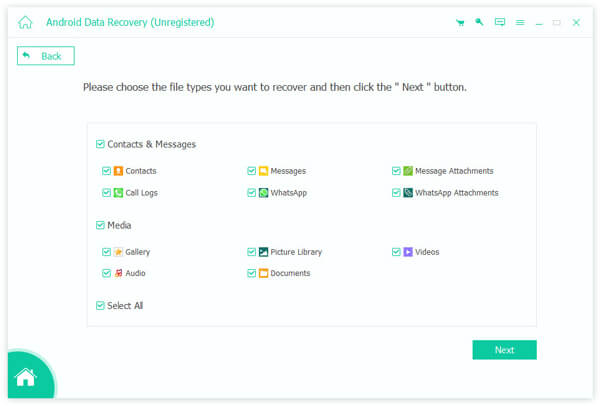
Step 2. Preview call history
Once your phone is recognized, check the box next to Call Logs and click on the Next button to begin scanning call history on your phone memory. When the process finishes, you can view all call logs recoverable. Toggle on Only display the deleted items to preview deleted items.
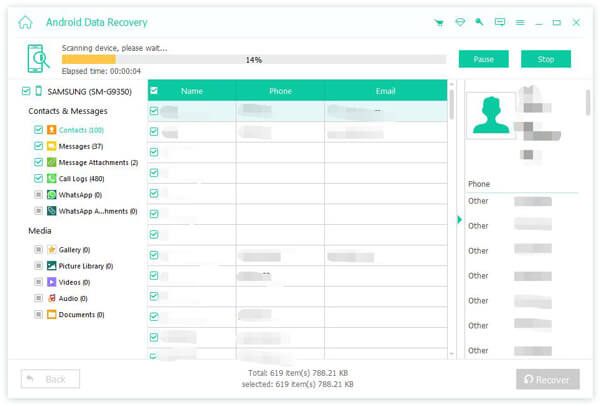
Step 3. Recover call logs
Select the call logs you want to retrieve and click the Recover button at the bottom right corner. Next, navigate the destination folder and confirm call log recovery on your Android phone. Then, you can check the call history on your hard drive.
Note: The process won’t interrupt the current call history on your phone.
Conclusion
This guide demonstrated four ways of deleting call log recovery on Android devices. Contacting your carrier is the first option to get back your call history. This way works for almost all devices. You can try Google's Phone app on your device to find the lost call logs. Google backup is another option if you have set it up. Apeaksoft Android Data Recovery can retrieve Android data without a backup.
 Apeaksoft Android Data Recovery
 Recover various deleted or lost data from all popular Android devices.
Secure Download
Secure Download
Related Articles