

How to Recover Kik Messages after Logging out on iOS/Android

Kik is a popular and easy-to-use instant messaging app for iOS and Android users. Its anonymity appeals to various people to send and receive messages, photos, GIFs, and videos. However, you should know that your Kik data will be erased from your device after logging out. If you want to see these deleted Kik messages and grasp some important information, read this guide and learn 6 methods to recover Kik messages.
PAGE CONTENT:
Part 1: Can I Retrieve Deleted Kik Messages
It is frustrating when you lose important Kik messages because Kik will not save the chat history on its server. Once a message is deleted or you log out or reinstall the app, it is removed permanently from your device. Therefore, many users may have such a question: Can I retrieve deleted Kik messages? How do I retrieve deleted Kik messages?
Don’t worry! It is possible to recover the missing Kik messages. Below we will introduce 6 useful ways to help you restore deleted Kik messages. These include checking your chat history, using professional data recovery software, restoring from device backups, etc. Read more!
Part 2: See Old Kik Messages from the Kik History
Kik will only keep messages from the last 48 hours. Moreover, since Kik will keep messages using your phone memory, it can keep only a limited number of messages - about 1,000 on iPhone and around 600 on Android.
Therefore, if your conversations fall within this time or quantity range, you may still be able to view part of your old messages directly in Kik. However, if you have already uninstalled the app, your local history will be erased, and you can only ask the other person to check the conversation on their device.
Step 1. Launch Kik on your phone.
Step 2. Open the conversation window.
Step 3. Scroll up to check the old messages.

Part 3: How to Recover Deleted Kik Messages on iPhone
If you accidentally deleted your Kik messages on an iPhone, there are still several effective ways to get them back. In this section, we’ll focus on how to find deleted Kik messages on iPhone, including using professional iPhone data recovery software, restoring data from an iCloud backup, and recovering Kik chats through an iTunes backup.
Using Professional Software
If you want to recover old or deleted Kik messages for different scenarios from iPhone, Apeaksoft iPhone Data Recovery should be your first solution. This professional tool can easily scan deleted or lost Kik messages from your iPhone without any backup.
Recover Deleted Kik Messages on iPhone Without Backup
- Effortlessly retrieve deleted Kik messages from iOS devices.
- Preview the old Kik messages before recovery.
- Besides Kik messages, you can recover deleted notes, text messages, contacts, Safari bookmarks, etc., from iPhone if needed.
- It fully works for various iOS devices and versions.
Secure Download
Secure Download

Step 1. Download and launch this Kik messages recovery tool on your Mac or Windows PC. Plug your iPhone with a suitable USB cable. Select Recover from iOS Device by default.
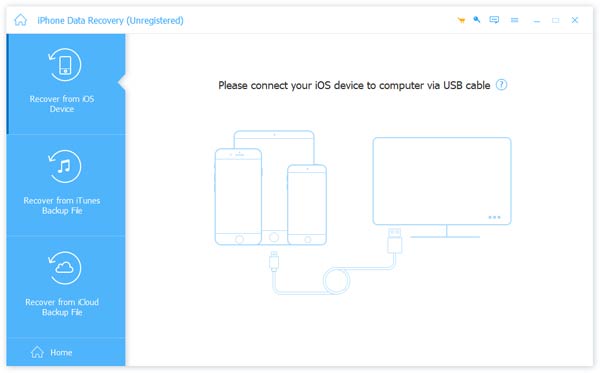
Step 2. Once your iPhone is detected successfully, click the Start Scan button at the bottom. When scanning is complete, tick Kik option under the Applications list. Then, you can see all deleted Kik messages on the right detail panel.
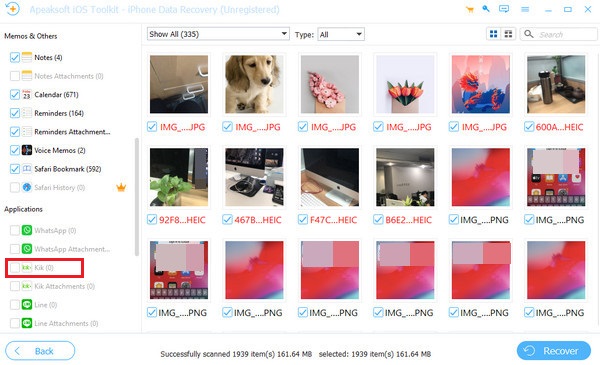
Step 3. Here, you can preview and check Kik messages you want to recover. Click on the Recover button in the right corner. Pick up a destination to store the recovered Kik messages and click Recover again. Then, you can see old and deleted Kik messages on your computer.
Retrieve Kik Messages from iCloud Backup
If you have ever backed up your iPhone to iCloud, you can restore deleted Kik messages from iCloud backup. Follow the detailed steps below:
Step 1. Factory reset your iPhone first. Open Settings > General > Transfer or Reset iPhone. Select Erase All Content and Settings. Follow the on-screen directions to confirm.
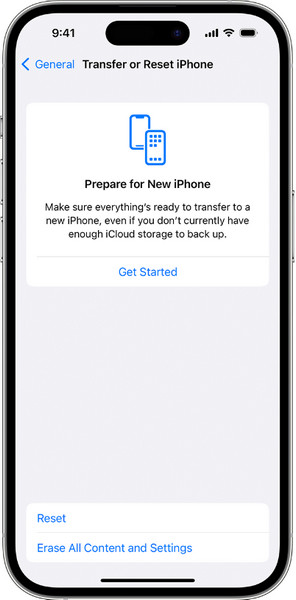
Tips: Remember to back up your current iPhone content to other places in advance.
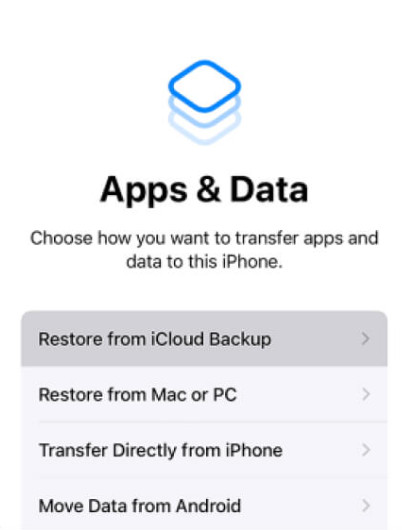
Step 2. Set up your iPhone as the on-screen instructions show. When you are on the Apps & Data screen, select Restore from iCloud Backup.
Step 3. Select the backup that contains your Kik messages. Wait for the restore process to complete.
Get Deleted Kik Messages Back from iTunes Backup
If you have enabled iTunes (or Finder) to back up your iPhone, you can also retrieve deleted Kik messages from iTunes backup. Below are the detailed steps:
Step 1. Connect your iPhone to your computer and launch iTunes/Finder.
Step 2. Press your device button and select Restore Backup.
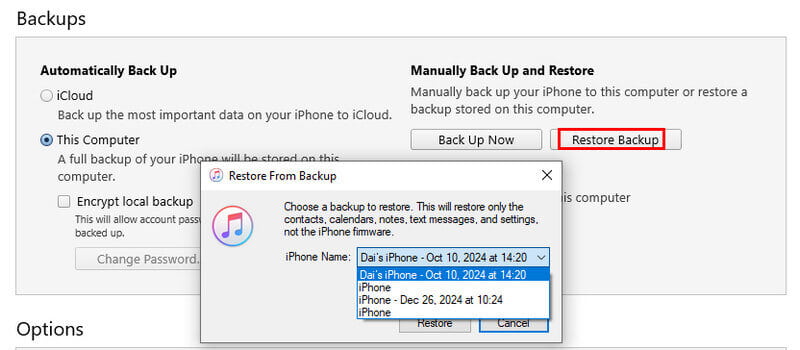
Step 3. Select a backup that contains your deleted Kik messages.
Step 4. Press the Restore button and wait for the recovery.
Part 4: How to Retrieve Kik Messages on Android
Kik messages are also stored locally on Android devices. As long as you delete chats, log out, or uninstall the app, the data will be removed forever. However, there are still ways to recover deleted Kik messages. In this section, we will show you how to retrieve Kik chats using professional recovery software and available device backups.
Use a Recovery Tool Without a Backup
Apeaksoft Android Data Recovery is such a program for your to recover deleted Kik messages and see old Kik messages on your Android phone.
Restore Deleted Kik Messages on Android Without Backup
- Recover deleted/old Kik messages without backup.
- Besides Kik messages, you can also recover deleted text messages.
- Compatible with almost all Android phones and tablets.
Secure Download
Secure Download

Step 1. Download it with the above download button. Plug your Android device with a USB cable.
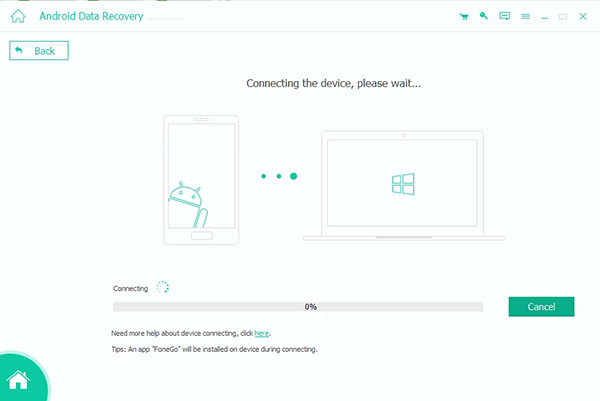
Step 2. In the new interface, follow the detailed on-screen steps to enable USB debugging for an Android device.
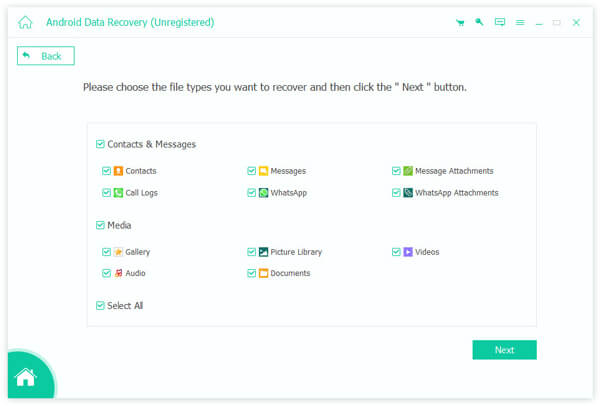
Step 3. After you have enabled USB debugging mode on your Android phone, you can see the list listing file types. Here, you can tick the Messages option and Next button to allow this program to scan your possible Kik messages. Please tap the Allow/Authorize/Grant option on your Samsung phone when it prompts.
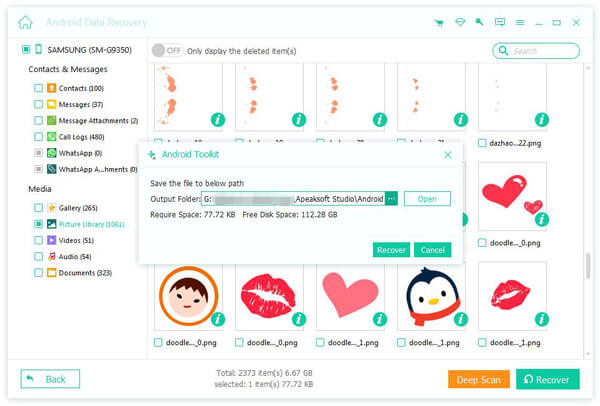
Step 4. Once the process is finished, check all the deleted Kik messages on the result interface. If you find deleted Kik messages successfully, click the Recover button and select output folder to restore them.
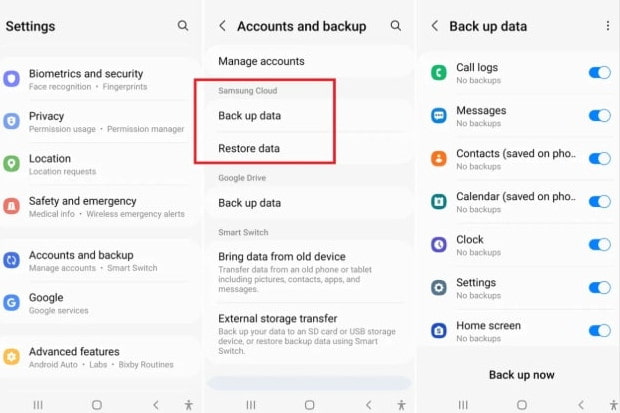
Restore from Android Backup
If your Android device has previously created a system backup, you can recover deleted Kik messages by restoring from the backup. Follow the steps below:
Step 1. Open Settings on your Android phone. Enter System or Backup and Restore.
Tips: The paths for different brands are slightly different, but the backup options can all be found in the Settings.
Step 2. Find Local Backup or Cloud Backup, and choose a backup created before your Kik messages were deleted.
Step 3. Tap Restore. Follow the on-screen instructions to complete.
Part 5: FAQs About Recovering Deleted Kik Messages
Does Kik delete messages?
Yes, Kik will delete your chat history after 48 hours. So, if you want to store these important Kik messages, you should use third-party backup tools because there is a limit to Kik backup storage.
Are Kik messages deleted forever?
Not always. Kik does not store chat history on its servers, so deleted messages are removed from your device permanently. However, you can still retrieve them if they remain within Kik’s local history limits, or if you have a backup. Otherwise, the messages are permanently deleted.
How to sync Kik messages to my new iPhone?
You can take screenshots or use iCloud to back up and sync Kik messages to your new iPhone.
Conclusion
Now you can learn how to recover Kik messages after logging out on iOS or Android phone with 6 methods. If this guide works for you and help you recover deleted Kik messages, you can share it with others in need.
Related Articles




