

How to Retrieve Deleted Voicemail on Android Phone

Voicemail is an essential communication feature for many Android users, allowing messages to be stored when calls go unanswered. But what happens when you accidentally delete an important voicemail? Whether you erased a message by mistake, your phone glitched, or a network error caused your voicemail inbox to reset, it's natural to wonder if you can recover deleted voicemail on Android. The good news is that in many cases, you can.
This guide explains how to recover deleted voicemail on Android, how to retrieve deleted voicemail messages on Android, and how to find deleted voicemails using built-in carrier tools, third-party recovery methods, and even voicemail backups. You will also learn how to retrieve voicemail from another phone and what to do if you're using a Samsung device.
PAGE CONTENT:
- Part 1: Can You Recover Deleted Voicemails on Android?
- Part 2: The Easiest Way to Recover Deleted Voicemail on Android
- Part 3: How to Recover Deleted Voicemail on Android Using Visual Voicemail
- Part 4: How to Retrieve Deleted Voicemails on Samsung Phones
- Part 5: How to Retrieve Deleted Voicemail on Android Through Carrier Voicemail
- Part 6: How to Retrieve Voicemail from Another Phone
Part 1: Can You Recover Deleted Voicemails on Android?
Many users ask: can you recover deleted voicemails on Android? The answer is yes, sometimes. Whether the recovery is possible depends on factors like: whether your carrier supports voicemail recovery, how long ago the voicemail was deleted, whether it's soft deleted or permanently erased, and more.
In many cases, deleted voicemails stay in a temporary Deleted Messages folder for a limited time, typically 30 days. That means you may still be able to retrieve deleted voicemails on Android before they're permanently removed.
Part 2: The Easiest Way to Recover Deleted Voicemail on Android
If you have no voicemail backup, and the voicemails are permanently deleted, your best solution is to use Apeaksoft Android Data Recovery. This program can quickly scan your Android device to detect lost voicemails, even if they are permanently erased. Whether you've accidentally deleted voicemails or factory reset your Android, Apeaksoft Android Data Recovery can recover deleted voicemail on Android easily.
The Best Way to Recover Deleted Voicemail on Android
- Connect your Android phone to computer to recover lost voicemails.
- Quickly scan your Android phone to retrieve existing and lost voicemails.
- Mark the lost voicemails in red for easy selection.
- Quickly recover lost Android voicemails during the scanning process.
Secure Download
Secure Download

Step 1. Download, install, and launch Apeaksoft Android Data Recovery on your computer. Connect your Android phone to your computer.
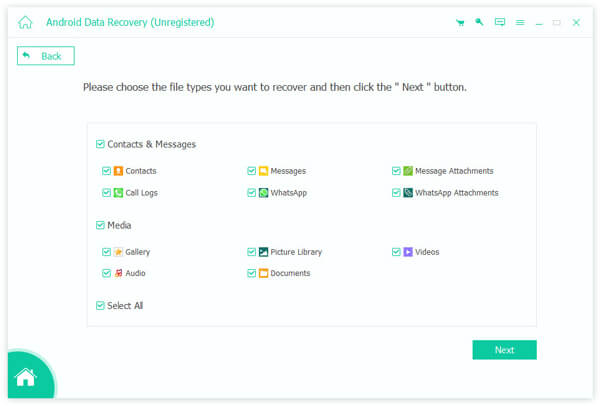
Step 2. You should select the desired file types. Since you want to retrieve deleted voicemail on Android, you can select Audio and Messages. If you want to recover contacts on Android, just select Contacts. Then, click the Next button.
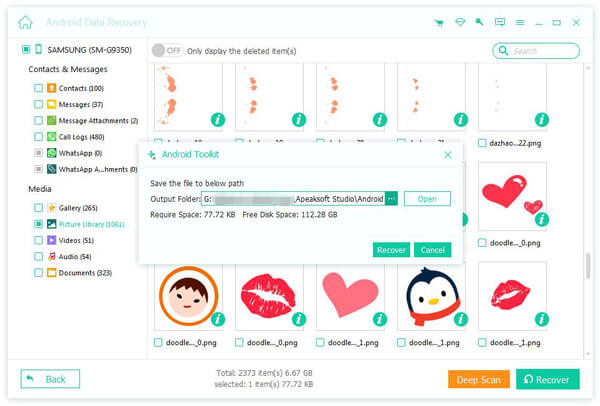
Step 3. The program will scan your Android phone. You will see lost voicemails on your Android phone. Select them and click the Recover button to recover deleted voicemails from your Android easily.
Part 3: How to Recover Deleted Voicemail on Android Using Visual Voicemail
If your Android phone has Visual Voicemail, you can easily recover deleted voicemail on Android with it.
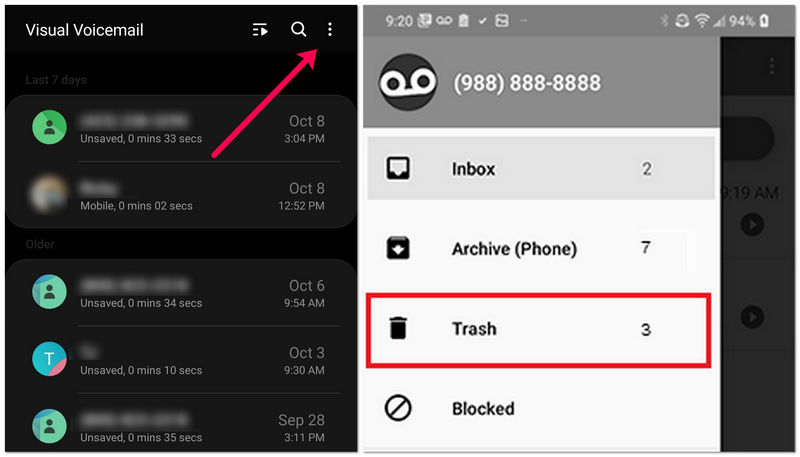
Step 1. Launch Visual Voicemail on your Android phone. Then, look for an option that allow you to view deleted messages. You can do that by tapping an option like Menu or More.
Step 2. Select Deleted Messages, or a certain option like Trash. Then, browse to see if you can find deleted voicemail on Android. Select your desired ones and tap the Restore or Save button to recover deleted voicemail on Android phone.
Part 4: How to Retrieve Deleted Voicemails on Samsung Phones
Samsung phones often use their own interface on top of carrier voicemail. Fortunately, you can still retrieve deleted voicemails on Samsung the same way.
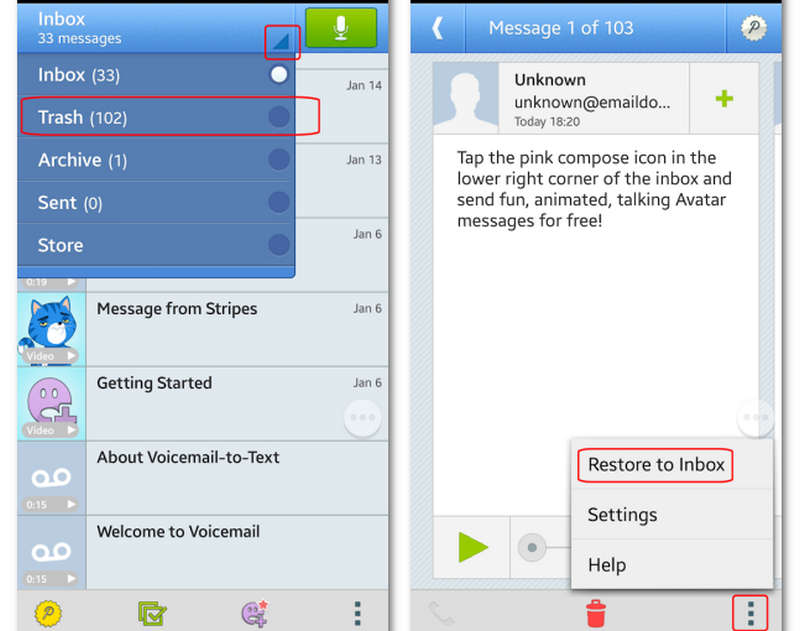
Step 1. Open the Phone app. Go to the Voicemail section. Look for Deleted Voicemails, Trash, or Recently Deleted.
Step 2. Select the voicemail you want to recover. Tap the Restore or Retore to Inbox button to recover deleted voicemail on your Android phone.
Samsung phones running One UI 6.0 or higher often keep deleted voicemails for several days, making recovery more likely.
Part 5: How to Retrieve Deleted Voicemail on Android Through Carrier Voicemail
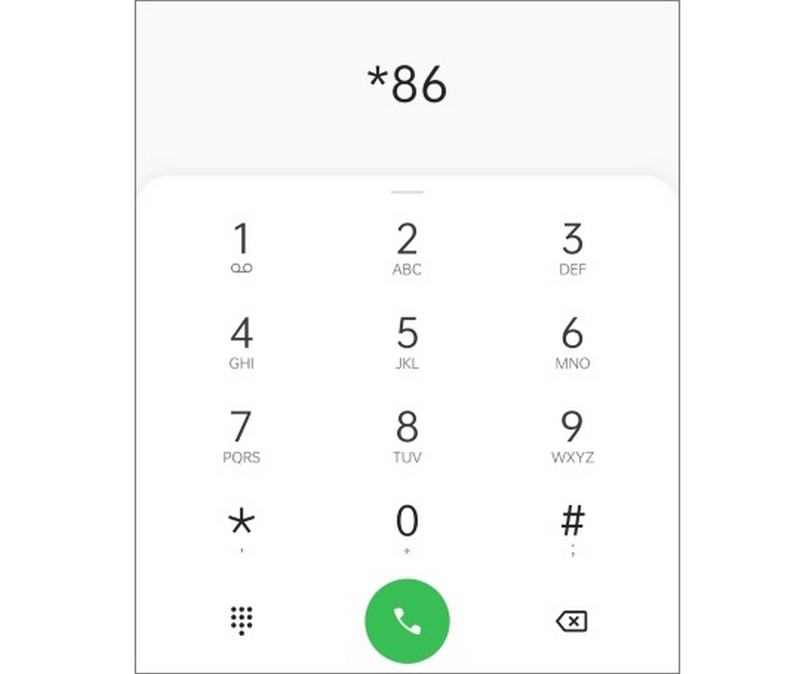
If you don't use Visual Voicemail or it's not supported by your carrier, you can still try calling your voicemail inbox directly. They usually have a temporary backup of your voicemail and can help you recover deleted voicemail on your Android phone.
Step 1. Dial your carrier’s voicemail number. Enter your voicemail PIN.
Step 2. Look for a menu option like Deleted Messages or Recover Messages. Then, follow the prompts to recover deleted voicemail Android.
Part 6: How to Retrieve Voicemail from Another Phone
If your Android phone is damaged, lost, or inaccessible, you may still want to know how to retrieve voicemail from another phone. Most carriers allow voicemail to be checked from any phone.
You can dial your own phone number from any phone. Wait for the voicemail greeting to play. Press * or # to interrupt the greeting. Then, enter your voicemail PIN. After that, you can browse your voicemail inbox, including saved or recently deleted messages.
This method is useful when you’re locked out of your Android phone but still need to check your voicemail.
Conclusion
Retrieving deleted voicemails on Android is often possible, as long as you try the solutions in this article. Whether you're using a Samsung phone, a standard Android device, or even retrieving voicemail from another phone, there are many methods that can help you recover deleted voicemail Android messages.
If you want to use the best and fastest methods, Apeaksoft Android Data Recovery is your best choice. It can quickly scan and retrieve deleted info and files without any backup. Even if your voicemail is permanently deleted, you can use this program to recover it easily.
Related Articles
You can recover lost videos on an Android phone with different methods. Moreover, you can recover deleted videos on Android without backups.
This article shows how to see blocked messages on Android devices from Samsung, Google Pixel, One Plus, Asus, Motorola, and more.
You can recover lost videos on an Android phone with different methods. Moreover, you can recover deleted videos on Android without backups.
Learn where are deleted text messages stored on Android and explore how to recover text messages on Android in several proven ways!



