How to Recover Deleted Voicemails on Your Android Phone

Voicemail is a digital voice message system that enables callers to send and receive recorded voice messages when the recipient is unavailable, ensuring messages can be retrieved later. However, losing a voicemail is a big challenge, especially if it contains significant information or has sentimental value. If you accidentally delete a voicemail or a voice message has expired, it is possible to recover deleted voicemail on Android devices through proven methods and detailed steps.
PAGE CONTENT:
Part 1: How to Recover Deleted Voicemail on Android from Carrier
For Android phones, voicemails end up on your network provider's server. They are not stored directly on smartphones. Each carrier has its own voicemail system that is accessible via the pre-installed Android voicemail app.
That means voicemails won't take up storage space on your phone if you don't save them. Of course, you can manually store them locally on your device within the built-in voicemail app.
By default, carriers keep voicemails for a period, usually at least 14 days. You can listen to them before they reach the server expiration date.
Even if you delete a voicemail or it has expired, your carrier may have a process for recovering deleted voicemails on your Android phone. You can visit your carrier's website or contact customer support to retrieve your voicemails.
Part 2: How to Recover Deleted Android Voicemail in the Voicemail App
Both Google and cellular carriers offer voicemail apps. It saves all your voicemails. The built-in Trash or Recycle Bin feature keeps the deleted voicemail for up to 30 days. Before they are permanently removed, you can recover deleted voicemails on Android directly.
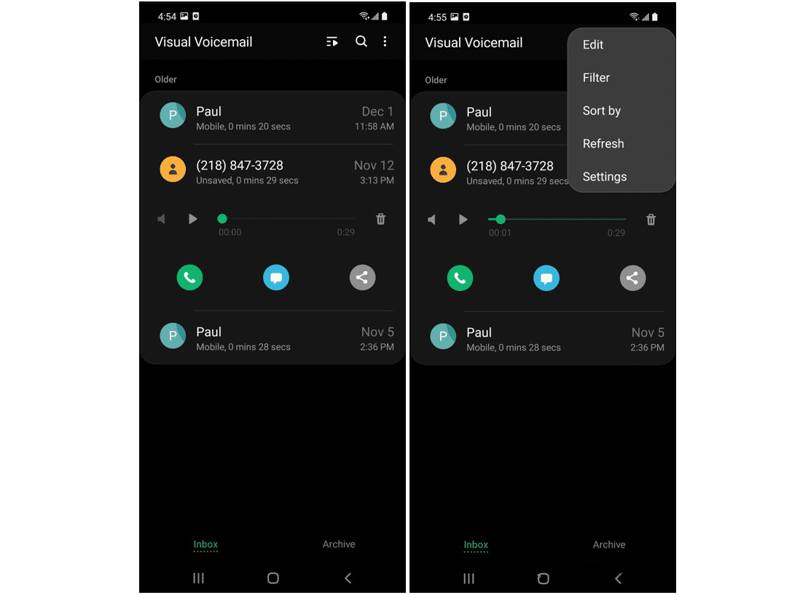
Step 1. Open the Voicemail app on your phone.
Step 2. Tap the More or Menu button and choose Settings.
Step 3. Then, choose the Trash or Recycle Bin folder to view all recently deleted voicemails.
Step 4. Select the voice messages you wish to retrieve and tap the Recover or Restore button.
Step 5. Now, go to the main interface in Voicemail and check if the deleted messages are back.
Note: If you don’t have a voicemail app on your phone, find the deleted voice messages in the Voicemail tab in your Phone app.
Part 3: How to Recover Deleted Voicemail on Android from Backup
If you accidentally delete the voicemails that were stored on your phone, try to retrieve them from a backup. A Google backup, for example, enables you to recover deleted voicemails on Motorola Android phones and other Android devices.
Step 1. Turn on your phone.
Step 2. Go to Settings and tap on your profile.
Step 3. Tap All services and choose Backup.
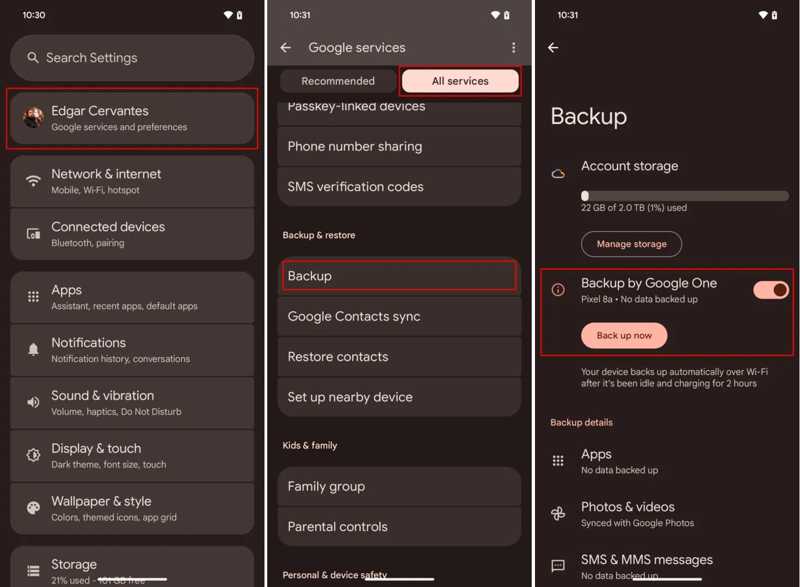
Step 4. If you have a backup, go back to the Settings app.
Step 5. Choose General management, tap Reset and hit Factory data reset. Android factory reset will erase all data on your Android phone.
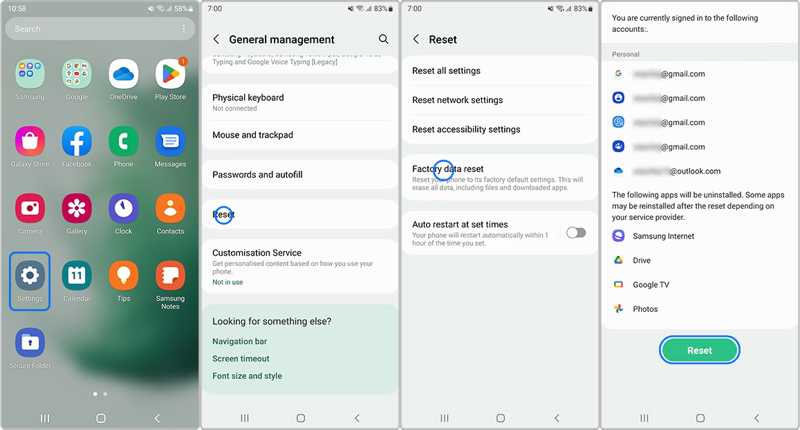
Step 6. Follow the onscreen instructions to reset your phone.
Step 7. When your phone restarts, set it up as a new device.
Step 8. Tap Next on the Copy apps & data screen.
Step 9. Tap Can't use old device.
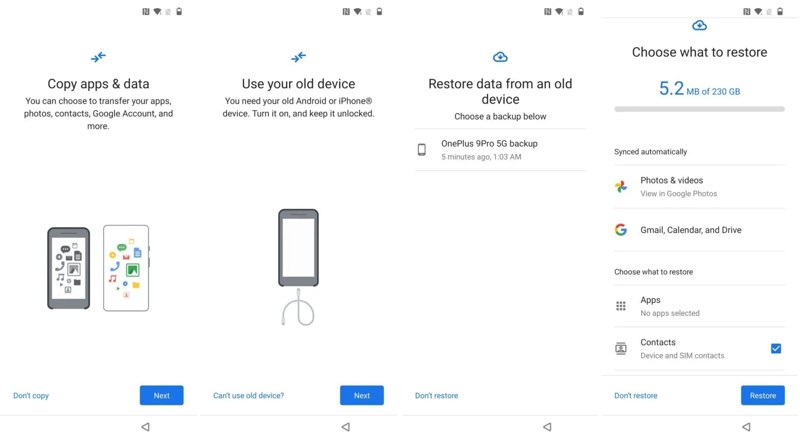
Step 10. Sign in to your Google account and choose the latest backup.
Step 11. Select the desired data types and tap Restore.
Step 12. When it is done, go to the Voicemail or Phone app to check deleted voicemails.
Part 4: How to Recover Deleted Voicemail on Android Without Backup
Apeaksoft Android Data Recovery is another option to recover deleted voicemails on Android devices without a backup. Before they are overwritten by new data, the software can scan your phone memory and look for lost data as much as possible.

Downloaded by over 1,000,000 users
- Recover deleted voicemails on Android without a backup.
- Easy to use and complete the process in 3 steps.
- Preview deleted voicemails and other data.
- Support a wide range of Android brands and models.
Secure Download
Secure Download

How to Recover Deleted Voicemails on Your Phone Without Backup
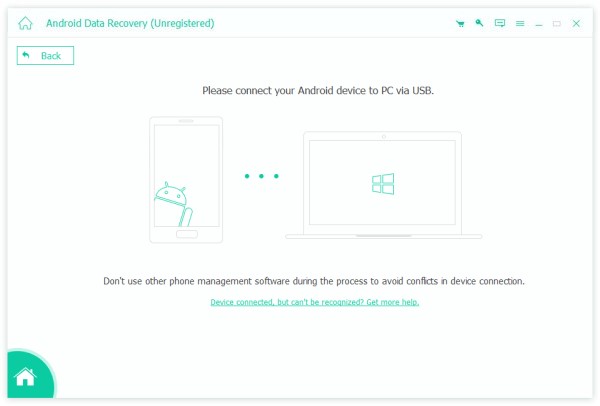
Step 1. Connect to your phone
Download and install the voicemail recovery software on your computer, and then launch it. Connect your phone to your computer with a USB cable. Turn on the USB debugging mode on your phone and choose Transfer files if prompted.
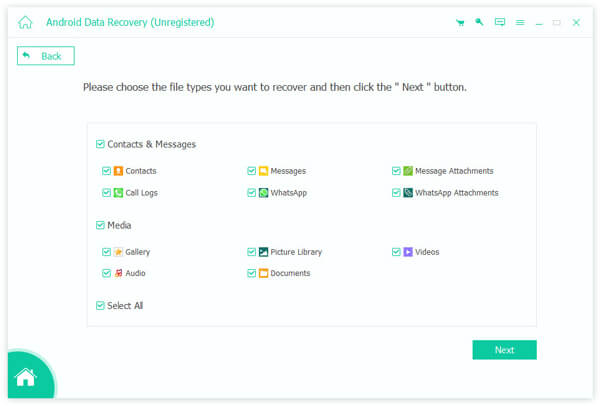
Step 2. Preview voicemails
Once your phone is detected, select the desired data types, like Messages, Message Attachments, Audio, and more. If you are not sure, check Select All. Click the Next button to start scanning your phone. Then, you can check the voicemails on your phone.
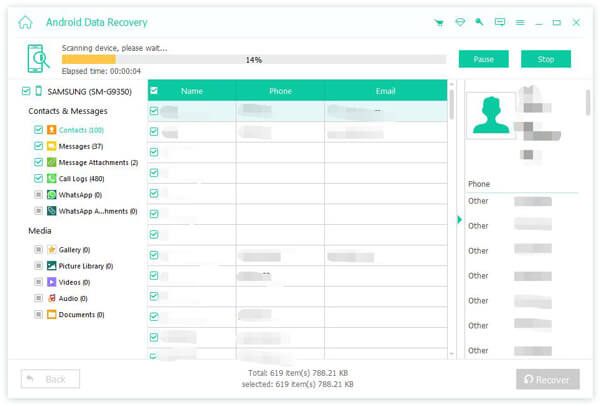
Step 3. Recover deleted voicemails
Select the voice messages you want to retrieve and click the Recover button. Set an output folder and confirm voicemail recovery.
Further Reading
Conclusion
Now, you should learn four ways to recover deleted voicemails on Android devices. You can contact your carrier to get back the lost voicemails or try the built-in Voicemail app. The backup is another option to find the lost voicemails. Apeaksoft Android Data Recovery enables you to retrieve voicemails on your phone without a backup.
 Apeaksoft Android Data Recovery
 Recover various deleted or lost data from all popular Android devices.
Secure Download
Secure Download
Related Articles