

How to Recover Deleted Emails on Yahoo Easily and Quickly

Have you lost your important emails in Yahoo? Do you need to recover Yahoo emails right away, especially when it’s related to your work or social relationships? What should you do to make it?
This article will introduce 3 proven ways to recover deleted Yahoo emails on Yahoo. Also, if you forget your Yahoo email account, you can also find your answers here.
PAGE CONTENT:
Part 1: How to Recover Deleted Emails on Yahoo from Trash
When you can't find emails in Yahoo, the first thing you should do is check your Yahoo emails in the Trash folder. You should log into your Yahoo Mail account and click the Trash button on the left side. Then you can check if there are deleted emails here.
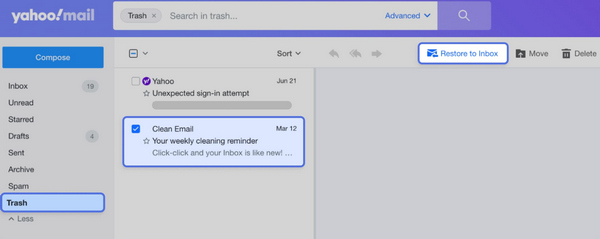
Tips: Emails in the Trash folder are only kept for up to 7 days before being permanently deleted. Please recover them within this time.
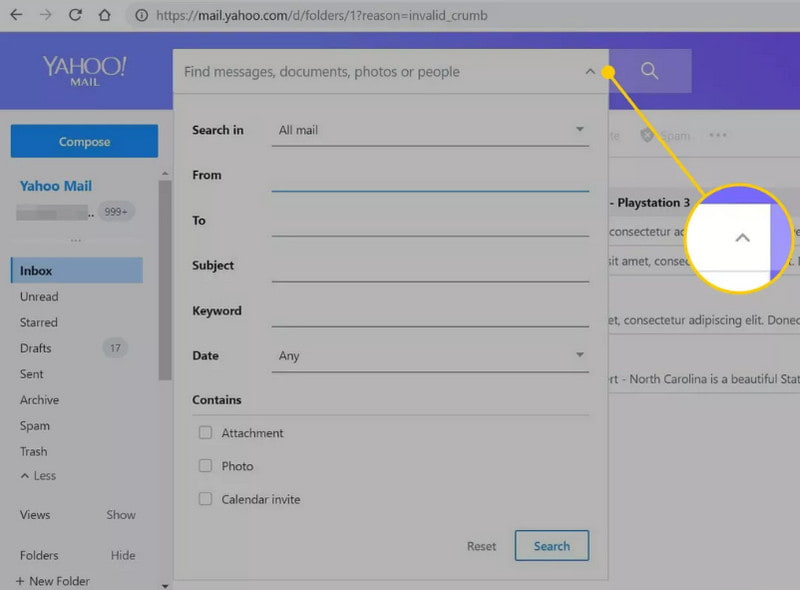
If you can't find Yahoo emails in the trash folder, they may have been accidentally moved to another folder instead of being deleted. You can also use the search bar and click the Restore to Inbox button to recover the deleted emails on Yahoo.
Part 2: How to Recover Permanently Deleted Yahoo Emails
If you’ve tried searching for your Yahoo emails but still can’t find them, there’s a high chance they’ve been permanently deleted. If you don’t have a backup for your Yahoo Email, and you’ve even erased the emails in the Trash folder, what you need is a professional way to recover deleted emails on Yahoo. Apeaksoft Data Recovery can recover all deleted emails on Yahoo, even if you have permanently deleted them. It can scan your computer and list the deleted emails. What you need to do is only selectively recover the Yahoo emails you want.
Recover Permanently Deleted Yahoo Emails
- Recover deleted Yahoo emails from years ago.
- Scan your device thoroughly for deleted Yahoo emails.
- Preview the email file type and date before you retrieve it.
- One click to initiate the recovery process.
- Besides Yahoo emails, it can also recover deleted emails in Outlook, Gmail, AOL, Firefox, etc.
Secure Download
Secure Download

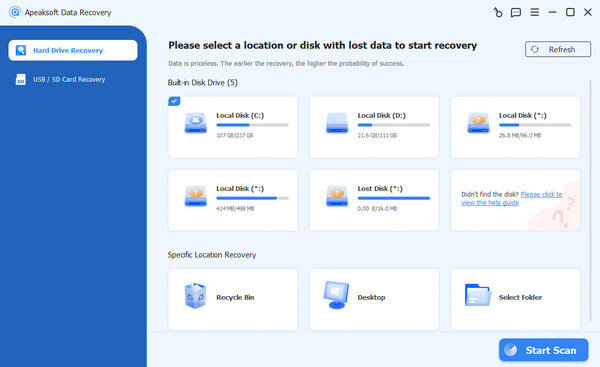
Step 1. Download Apeaksoft Data Recovery and launch it. Then, choose a hard disk where you have lost your emails and click the Start Scan button.
Step 2. You can see there’s an Email classification on the left side. Open it and search for your lost Yahoo emails. If you cannot find them immediately, try to use the Filter feature in the top ribbon.
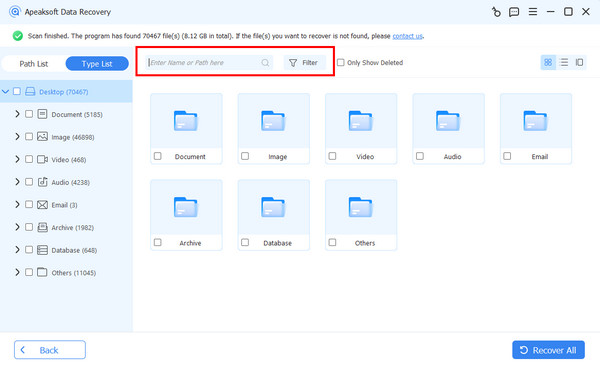
Step 3. Check the files, and then click the Recover All button.
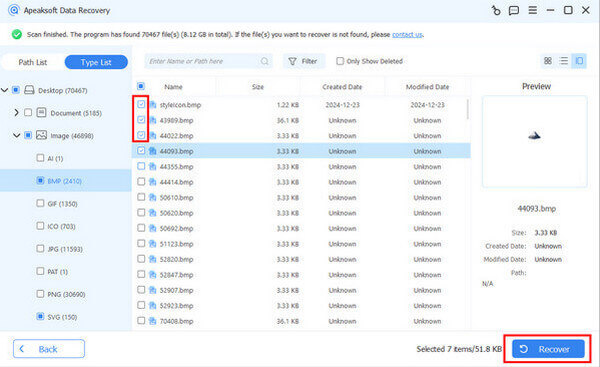
Tips: Similar steps are also applicable for Hotmail recovery.
Part 3: How to Recover Lost Yahoo Emails with Yahoo’s Restore Tool
There is also another way to recover deleted Yahoo emails using Yahoo Mail Help. This method allows you to submit a restore request and attempt to retrieve recently deleted messages. Maybe you can restore your iPhone from a backup that has stored Yahoo emails for 10 years, but if you have no backup files, you can turn to Yahoo Mail Help to find a way out.
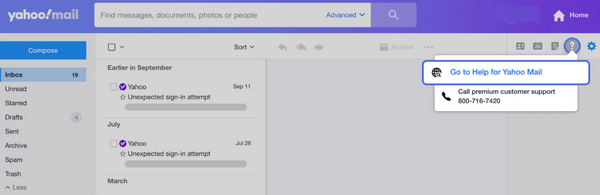
Step 1. Open your Yahoo Mail in a browser and click the Help button in the top right corner. Then, choose Go to Help for Yahoo Mail.
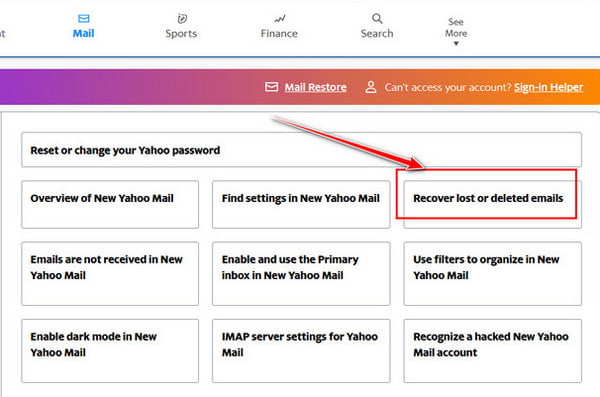
Step 2. Choose Recover lost or deleted emails in the panel to ask for recovering old Yahoo emails.
Step 3. You should click the Send a Restore Request button. You can wait for Yahoo to help you recover deleted Yahoo emails.
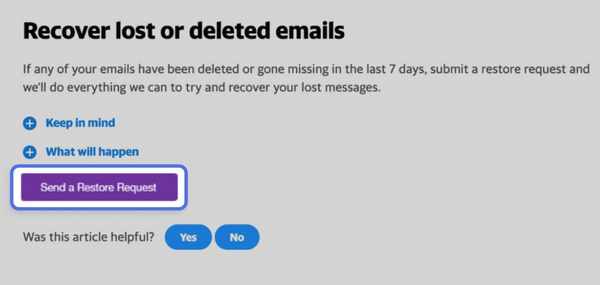
Tips: As Yahoo official stated, this method is only applicable for emails that have been deleted or gone missing in the last 7 days.
Bonus Tip - How to Recover Yahoo Email Account
A lost Yahoo Email account is also as troublesome as a lost Yahoo email. But luckily, the way to recover a Yahoo Email account is fixed.
Step 1. When you log into Yahoo, you can choose to recover your Yahoo account. You only need to choose the Text or Email recovery method.
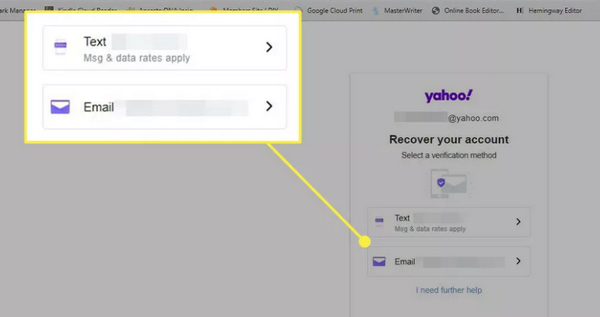
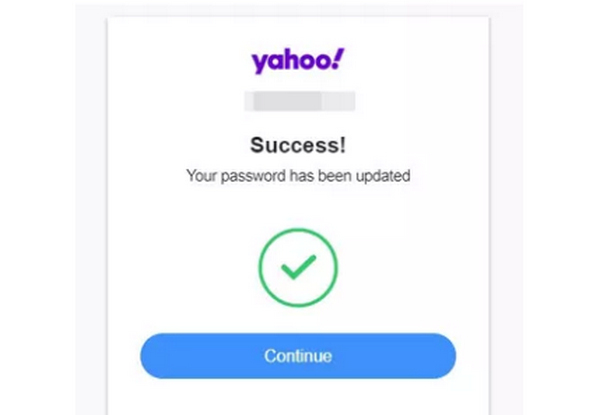
Step 2. The verification code will be sent to your phone or other combined email. You should enter the code in the verification box to recover the Yahoo Email account.
Part 4: FAQs of Yahoo Email Recovery
How can I keep my Yahoo emails from being lost?
You can set all your Yahoo emails to an Archived folder, which means that those Yahoo emails will be sent to this folder. You can consider it a backup folder that can help you recover deleted emails on Yahoo.
Can I recover deleted Yahoo emails from Gmail?
Yes, you can. However, you should combine the two mail services in advance. You can add Yahoo Mail to Gmail so that all emails that you receive will also be synced in Gmail. Therefore, you can recover Yahoo emails from Gmail.
Why does Yahoo delete all my emails?
If you haven’t logged into your Yahoo Mail account for 12 months, Yahoo will view your account as inactive and delete all your emails. It can be a strategy to optimize their storage usage.
Conclusion
It’s not difficult to recover deleted emails on Yahoo. The Trash folder can help you keep deleted emails for 7 days, and you can also request Yahoo to help you recover old Yahoo emails. If you have no backup files for your emails, you can still use Apeaksoft Data Recovery to recover Yahoo emails right away, even if they are permanently deleted.
By the way, if your Yahoo account turns inactive, you can still easily recover your Yahoo Email account by following the guide above.
Related Articles




