
Recycle Bin Recovery: How to Recover Deleted Files on Windows

Deleting a file on Windows does not always mean it is gone forever. If you accidentally remove a document, photo, video, or other important file, you may still be able to get it back. The Windows Recycle Bin is the first place to check. But what if you have already emptied it? In this case, you may need a Recycle Bin recovery tool to help.
This guide explains how Recycle Bin data recovery works, how to restore files from the Recycle Bin, and what to do when files are permanently deleted. You will also learn how to choose reliable recycle bin recovery software, including free options.
PAGE CONTENT:
Part 1: What Is Recycle Bin Recovery?
Recycle bin recovery is the process of restoring deleted files from the Windows Recycle Bin or recovering files that have been removed from it. When you delete a regular file on Windows, it usually goes to the Recycle Bin first instead of being immediately erased.
You can open the Recycle Bin, find the deleted file, right-click it, and select Restore. The file will return to its original location.
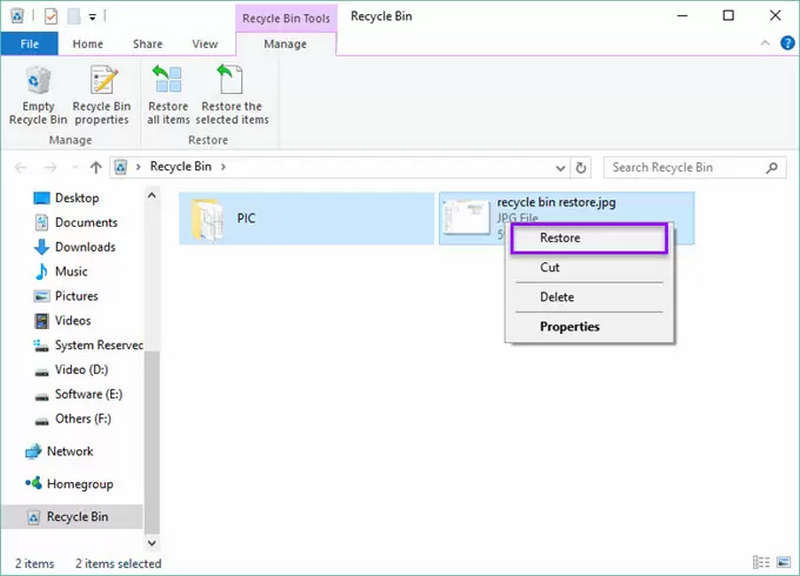
However, this method does not work if you have emptied the Recycle Bin, used Shift + Delete, or deleted files from a USB flash drive or other removable storage device. In these situations, you may need Recycle Bin file recovery software.
Part 2: How to Recover Files from the Recycle Bin
Before installing any recovery tool, check whether your deleted files are still in the Recycle Bin. This is the easiest way to restore them.
- 1.Double-click the Recycle Bin icon on your Windows desktop.
- 2.Browse the deleted files or use the search box to find a specific item.
- 3.Right-click the file you want to recover.
- 4.Select Restore.
Windows will return the file to its original folder. If you want to restore several files, select them together and choose Restore.
Can't find your files? Check whether the Recycle Bin has been emptied or whether the files were deleted using Shift + Delete. If so, continue with the recovery methods below.
Part 3: How to Recover Files After Emptying the Recycle Bin
Recovering files after emptying the Recycle Bin is more difficult, but it may still be possible. When Windows deletes a file permanently, the system may mark its storage space as available rather than immediately overwriting all the data.
This means a deleted file may remain recoverable for a while. However, new files and other disk activity can overwrite the data.
For a better chance of recovery, stop saving files to the affected drive. Avoid installing recovery applications on the same drive where your deleted files were stored.
Method 1. Use Windows File History
If you enabled File History before deleting the files, you may be able to restore an earlier version.
- 1.Open Control Panel and select System and Security.
- 2.Choose File History.
- 3.Select Restore personal files.
- 4.Browse the available backups and locate the files you need.
- 5.Select the files and click the Restore button.
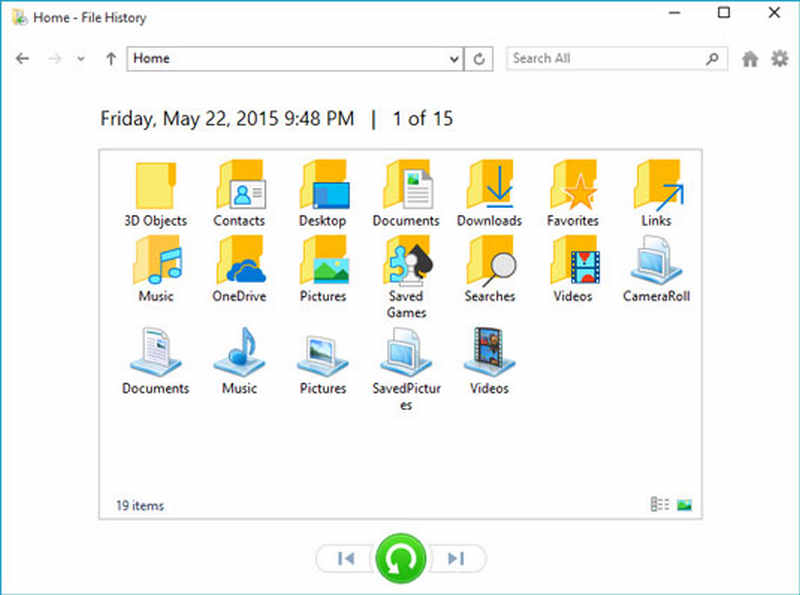
This method works only if File History was configured and suitable backups are available.
Method 2. Try Windows File Recovery
Windows File Recovery is a command-line recovery tool from Microsoft. It can help recover certain files deleted from local storage devices, including files that are no longer in the Recycle Bin.
You can install it from the Microsoft Store. After installation, open Command Prompt or Windows Terminal and use the winfr command with the appropriate source drive, destination drive, and recovery mode.
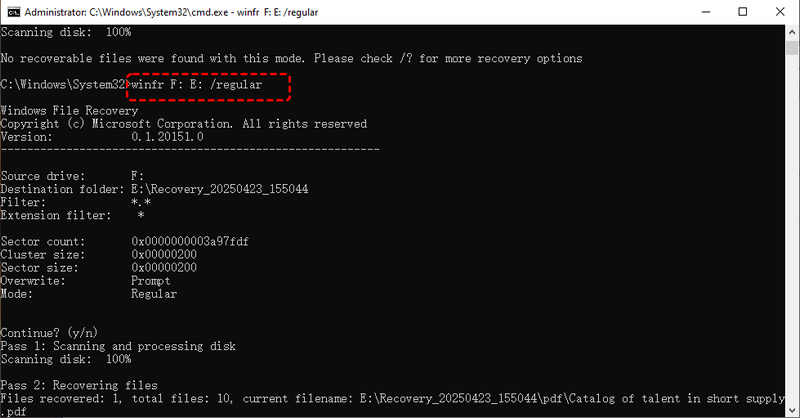
For example, you can use Regular mode for recently deleted files on an NTFS drive, while Extensive mode may help in more difficult cases.
However, Windows File Recovery does not offer a typical graphical interface, so beginners may find it confusing to do Recycle Bin recovery. Also, save recovered files to a different drive instead of the original location.
Method 3. Use Recycle Bin Recovery Software
For users who prefer a graphical interface, recycle bin recovery software can be easier to use. These programs scan a selected drive for recoverable data and allow you to preview or select files before restoring them. Depending on the software and the condition of your storage device, you may be able to recover deleted photos, videos, documents, archives, and other file types.
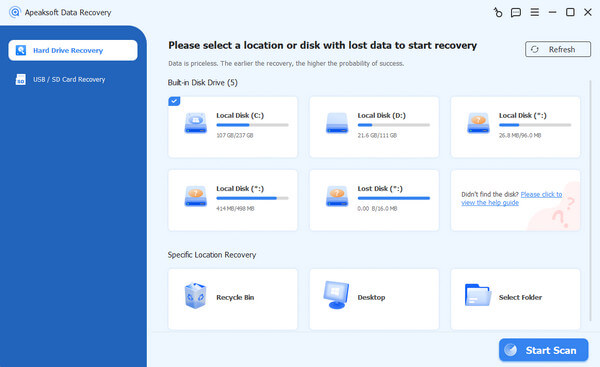
A good Recycle Bin recovery program should support common Windows file systems, provide clear scan results, and let you choose where recovered files are saved. We highly recommend Apeaksoft Data Recovery. This Recycle Bin recovery program let you directly scan all hard disks on your Windows computer, and then you can find and retrieve all lost files, whether they are from the Recycle Bin, hard drive, or app data.

Downloaded by over 1,000,000 users
- Quickly scan and retrieve lost files from the Recycle Bin or hard drive.
- Let you preview and choose desired files one by one or in batch.
- Best Recycle Bin data recovery software for Windows and macOS.
- Recover deleted videos, photos, document files, app files, and more.
Secure Download
Secure Download

Part 4: How to Choose Recycle Bin Recovery Software
Not every Recycin Bin recovery tool offers the same features. Some focus on simple file restoration, while others support emptied Recycle Bin recovery, formatted drives, and multiple storage devices.
Here are several things worth checking before choosing a tool.
1. Support for Emptied Recycle Bin Recovery
The most important feature is the ability to scan a drive for files deleted from the Recycle Bin. Look for Recycle Bin software that supports permanently deleted files rather than only restoring items that are still in the bin.
Remember that no program can guarantee recovery if the original data has already been overwritten.
2. A Free Recovery Option
If you only need to restore a few files, Recycle Bin recovery free tools may be enough. Some applications offer free scanning and previewing, while others allow a limited amount of data to be recovered without payment.
Check the free recovery limit before spending time scanning your drive. A tool that advertises free recovery may still require payment to save your files.
3. An Easy-to-Use Interface
The best Recycle Bin recovery software should not require advanced technical knowledge. A clear interface, file-type filters, search options, and a preview feature can make it much easier to locate the right files.
This is especially helpful when a scan finds hundreds or thousands of deleted items.
4. Support for Different File Types
Choose a Recycle Bin data recovery tool that can recover the file types you actually need, such as DOCX documents, JPG images, MP4 videos, PDFs, and ZIP archives.
Some programs also support recovery from external hard drives, memory cards, and USB drives. This is useful if your missing files were not originally stored on the system drive.
Further Reading
Part 5: Why Recycle Bin Recovery Sometimes Fails
Even a capable recycle bin recovery program cannot restore every deleted file. Several factors can affect the result:
- Data overwritten: New files have reused the storage space occupied by deleted data.
- SSD TRIM: Windows may notify an SSD that deleted data blocks can be cleared, making recovery more difficult.
- Drive damage: Physical problems or file system errors may prevent a successful scan.
- Long delay: More disk activity after deletion can reduce the chance of recovery.
- Missing backups: File History or other backup tools may not contain the latest version.
If the files are extremely important and the drive may be physically damaged, stop using it and consider professional data recovery services.
Conclusion
Recycle bin recovery can be simple when deleted files are still in the Windows Recycle Bin. If you have already emptied it, don't give up immediately. Check your backups, try Windows File Recovery, or use suitable recycle bin recovery software to scan the affected drive. For users who want a straightforward solution, a graphical recycle bin file recovery software, like Apeaksoft Data Recovery, may be easier than command-line recovery. You can compare free recovery limits, supported file types, and scan features before choosing the best recycle bin recovery program for your needs.
 Apeaksoft Data Recovery
Recover deleted or lost data on Windows and Mac computer.
Secure Download
Secure Download
Related Articles