

3 Possible Ways - How to See Deleted Discord Messages on PC and Mobile

As one of the most popular platforms for online gaming communication, Discord has over 500 million registered users currently. Nevertheless, the platform comes with downsides. According to the platform, there is no native way to see deleted messages on Discord. Once the messages are deleted, they are removed thoroughly from the server.
Don't worry! This tutorial is here for you to explore how to get back your lost messages on Discord.
PAGE CONTENT:
- Part 1: Is there a way to see deleted messages on Discord
- Part 2: How to See Deleted Messages on Discord from Notification History
- Part 3: How to Find Deleted Messages on Discord by Dyno Bot
- Part 4: How to View Deleted Messages on Discord Using a Plugin
- Part 5: FAQs About Seeing Deleted Messages on Discord
Recover Permanently Deleted Data on iPhone
- Recover deleted data quickly within 3 simple steps.
- Recover deleted iPhone photos, messages, contacts, WhatsApp messages and attachments, Viber, Line, Kik, Messenger, etc.
- Preview detailed data information before the recovery.
- Recover data selectively - no overwrite.
- Compatible with the latest versions of iOS and iOS devices.
Secure Download
Secure Download
Part 1: Is there a way to see deleted messages on Discord
As mentioned at the beginning, once a message is deleted on Discord, it is permanently removed from Discord’s servers. There is no built-in trash folder or official recovery feature. In most cases, this means deleted messages cannot be restored or viewed again.
However, there are a few limited scenarios where deleted messages may still be accessible:
| Method | Premise |
| Notification History | You must have notifications turned on before the message is deleted. |
| Dyno Bot | The bot must be added to the server before messages are deleted, and Action Log must be enabled; requires server admin permissions. |
| Desktop Plugin | The plugin must be installed on Discord desktop before messages are deleted; works only on PC/Mac with BetterDiscord and MessageLoggerV2, and may carry account risk. |
If you didn’t set up any of these methods before deleting the message, there’s usually no way to get it back. The so-called third-party tools that promise guaranteed recovery are not reliable, because Discord stores all messages on its server instead of the local device.
Part 2: How to See Deleted Messages on Discord from Notification History
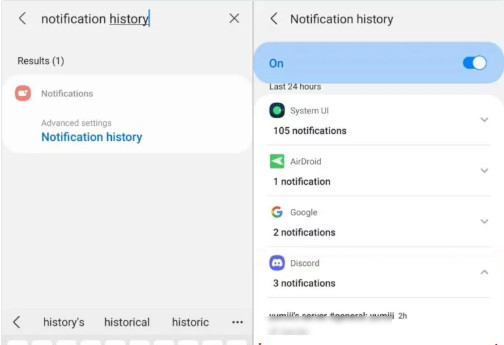
Sometimes, you can view deleted Discord messages from your device's notification. This method only works for Android 11 or later version users, since iOS doesn't support this feature.
Step 1. Go to Settings.
Step 2. Click Apps & notifications > Notifications.
Step 3. Tap Notification history to check relevant Discord messages.
Part 3: How to Find Deleted Messages on Discord by Dyno Bot
As mentioned previously, there is no built-in feature to check deleted messages on Discord. However, there are third-party customizable server moderation bots for Discord, such as Dyno Bot. It comes with powerful moderation features, like Action Log. It records what every user says on your server and delivers you a copy.
But you should note that Dyno Bot only works if it was added to the server before the messages were deleted. You also need server administrator permissions to add and configure the bot, and the Action Log feature must be enabled to record deleted messages.
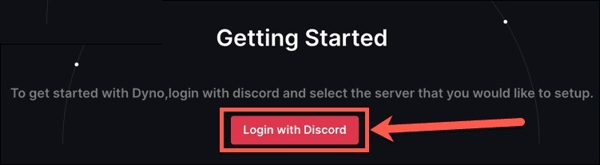
Step 1. To view deleted messages on Discord, visit https://dyno.gg/, click Login with Discord, and log in to your Discord account.
Step 2. Select the server where you want to employ the bot, and hit Continue to enter the Permissions screen. Grant the dot permissions to access your Discord account, and hit Authorize.
Step 3. Next, configure the settings and proceed by hitting Next. Follow the on-screen instructions to add Dyno Bot to your server.
Step 4. Open Discord, access your server, and click the Plus button next to Text Channels.
Step 5. Add a name to the channel, set it to Private Channel, and click Next. Add Dyno as the only member to the new channel, and press Create Channel. That incorporates the new channel into your server.
Step 6. Return to the Dyno website and select Manage Servers. Choose the server and hit the Arrow button beside Modules.
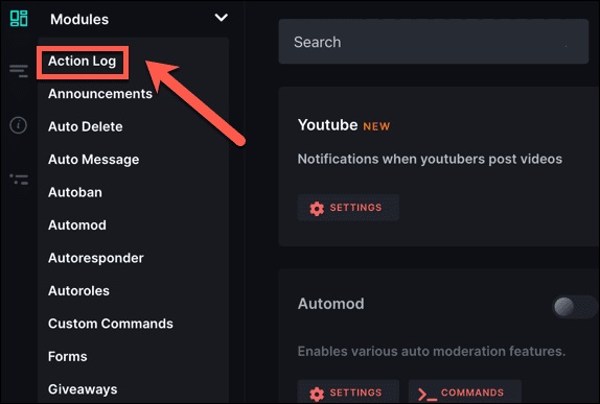
Step 7. Choose Action Log, and set the Log Channel to the new Discord channel. Then check Message Delete, Image Delete, and Bulk Message Delete under Message Events.
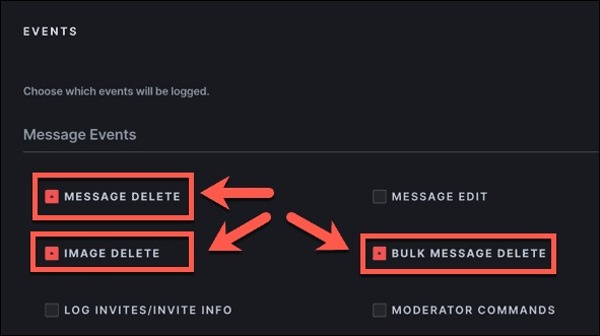
Now, the deleted Discord messages are recovered in the private channel.
Part 4: How to View Deleted Messages on Discord Using a Plugin
Besides, there are plugins to help you view deleted messages on Discord. BetterDiscord, for example, is a plugin for Discord users to get lost messages in their logs easily. Here are the steps to use this plugin:
Step 1. Start by checking the current version of your Discord. Download the plugin from BetterDiscord.app/, run the installer, and follow the instructions to install the plugin on your hard disk.
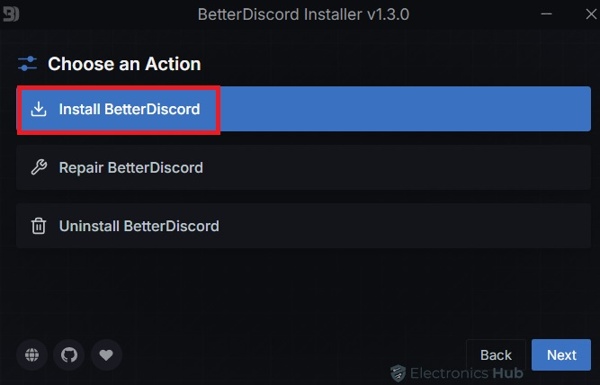
Step 2. Next, visit download the MessageLoggerV2 plugin from the official website.
Step 3. Open Discord, click the Settings button, and click Plugins under the Better Discord section. Next, hit Open Plugins Folder.
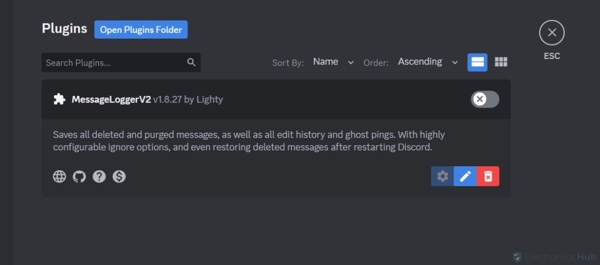
Step 4. Locate the MessageLoggerV2 download, drag and drop it into the Plugin Folder.
Step 5. Go back to Discord and toggle on the switch to enable the plugin. When prompted, click Download Now to install the plugins.
Step 6. Toggle on each library. Go back to the home interface, right-click the select Message Logger, and choose Add to Whitelist.
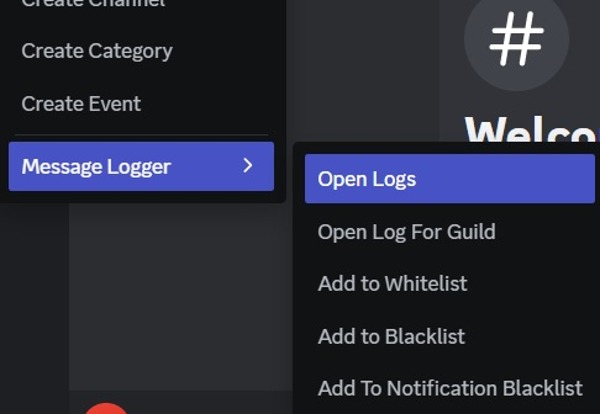
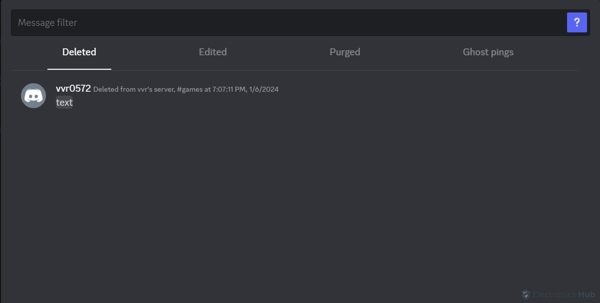
Step 7. Then the plugin will start logging messages on the server. Then you can see the deleted messages in red. To view all of them, right-click the server, choose Message Logger, and hit Open Logs. You will find the deleted Discord messages under the Deleted tab.
Part 5: FAQs About Seeing Deleted Messages on Discord
Can Discord's official see deleted messages?
No. Since deleted messages are gone, no one can see them, including Discord staff.
How long does Discord keep chat history?
Discord keeps messages indefinitely unless you change the default settings. It means that your chats will remain accessible forever in your Discord account unless you actively choose to delete them.
What happens when you delete a message on Discord?
Once you delete a message on Discord, it will be removed from the server permanently. You and other users cannot see it anymore.
Are deleted Discord messages gone forever?
Yes. The Discord official does not offer the Undo or Trash feature. It is recommended to take a screenshot before the deletion.
Conclusion
This guide tells you how to see and recover deleted messages on Discord on your computer and mobile phone. The notification history can be your first choice when deleting Discord messages. Dyno Bot is one way to restore your messages on your computer. Or you can use a plugin to get the job done.
Moreover, although it cannot recover deleted Discord messages, you can use Apeaksoft iPhone Data Recovery when you've deleted Kik messages, photos, etc.
Related Articles




