

How to Get Back Deleted Twitter Messages (What Really Works)

"Twitter deleted my DMs history with a person." Have you ever encountered such issues? Recently, someone reported a bug in Twitter that Twitter shows only around 10-20 latest messages, but all the history before is gone. You may feel overwhelmed when your DMs are deleted somehow, or you delete messages on Twitter by mistake.
How do you recover deleted Twitter messages? Can you recover deleted Twitter messages? Don't worry! This post will show you how to recover deleted messages from Twitter. Keep reading this useful post.
PAGE CONTENT:
- Part 1: Can You Really Recover Deleted Twitter Messages
- Part 2: How to Check Deleted Messages on Twitter from Email ID
- Part 3: How to See Deleted Messages via Twitter Archive Deleted DMs
- Part 4: How to Recover Deleted Twitter Messages from the Receiver/Sender
- Part 5: Tips to Avoid Twitter Messages Deletion
- Bonus Tip: Recover Lost iPhone Data with Apeaksoft
Part 1: Can You Really Recover Deleted Twitter Messages
Honestly, most deleted Twitter DMs cannot be recovered. However, in some limited cases, you may still retrieve messages through X archives, email notifications, or your backups. The following sections will guide you through these methods in detail.
Part 2: How to Check Deleted Messages on Twitter from Email ID
Twitter may send email notifications for direct messages if you have enabled them, sometimes including part of the message content. This allows you to check your emails to locate deleted messages. Here, we’ll use Gmail as an example to show how to do this.
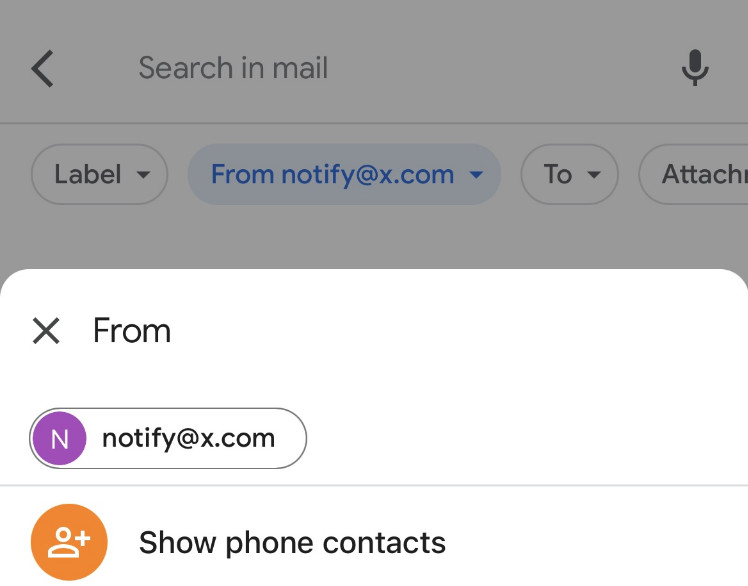
On mobile:
Step 1. Launch Gmail and click on its search bar.
Step 2. Click on the From button and enter notify@x.com or notify@twitter.com.
Step 3. Set the time period in the Date tab to locate the desired one quickly.
On desktop:
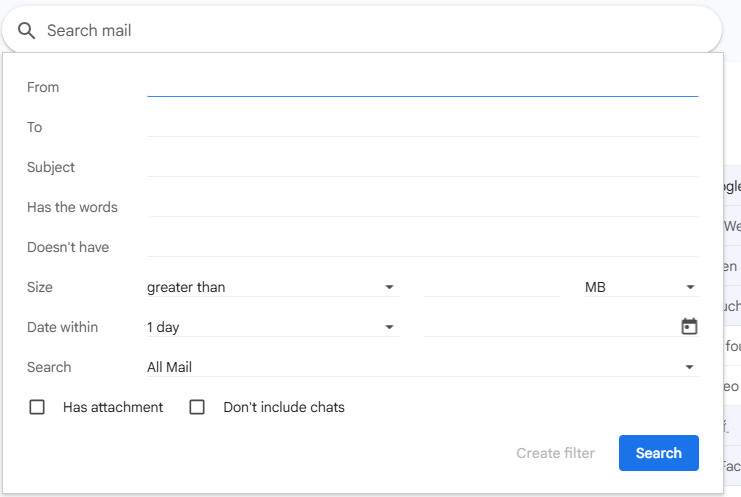
Step 1. Launch Gmail on the web and click on its search bar at the top.
Step 2. Click on the pattern on the right side of the box and enter relevant information in the form.
For instance, you can enter notify@x.com or notify@twitter.com in the From tab and set a detailed time period to search for the targeted email accurately.
Part 3: How to See Deleted Messages via Twitter Archive Deleted DMs
Twitter provides an official way for users to download their data archive, in which you can see your deleted Twitter DM. Although it is not guaranteed that all deleted messages will be recovered, you can access some of them by viewing the data archive. Follow the possible steps below to see how to get back deleted Twitter messages:
Step 1. Log into your Twitter account on a secure browser. Click the More option on the left side to select Settings and privacy.

Step 2. In the page, select Your account > Download an archive of your data.
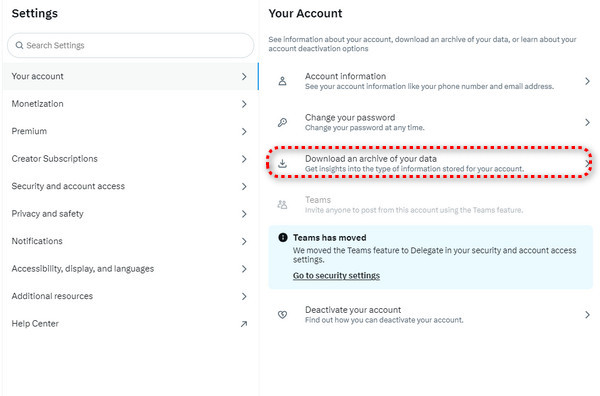
Step 3. In the pop-up window, confirm your identification and enter the correct password. Then, you can click Request archive.
Step 4. Now, you can wait for Twitter to inform you when your Twitter data is ready. The process will take 2 to 4 days. Then, you can download the Twitter archived data on your computer and unzip them to check all the deleted Twitter messages.
Part 4. How to Recover Deleted Twitter Messages from the Receiver/Sender
If you still can't recover deleted Twitter messages with the methods above, you can ask for the deleted Twitter message receiver or sender to screenshot your conversation and transmit it to you. Just be polite and express yourself clearly.
Part 5. Tips to Avoid Twitter Messages Deletion
• Double-check when deleting your Twitter DMs. Go through the important messages in detail before deleting them.
• Back up your Twitter DMs regularly. You should back up important or meaningful messages regularly, whether through screenshots or other Android or iPhone backup software.
• Ensure your Twitter is updated. Regularly update your Twitter to the latest one to avoid bugs that will result in data loss.
• Avoid Exceeding Message Limits. Twitter has a limit on the number of messages sent and received at a given time. To avoid Twitter DMs deletion, please do not send too many DMs in a short time.
Bonus Tip: Recover Lost iPhone Data with Apeaksoft
Although deleted Twitter messages usually cannot be directly restored, it is still important to protect other important data on your iPhone. Accidental deletion, system crashes, or device malfunctions can all cause you to lose photos, messages, contacts, and other important files. Special data recovery tools like Apeaksoft iPhone Data Recovery can help you scan the device or backup to recover lost data.
Retrieve Deleted Data Easily
- One-click to recover deleted data on your iOS devices.
- Recover permanently deleted data using a professional algorithm.
- Effectively recover over 20 data types like text messages, contacts, photos, videos, music, notes, and more.
- Allow you to preview deleted data before recovery.
Secure Download
Secure Download

Conclusion
This post lists three possible methods on how to check deleted messages on Twitter. With these methods, you can easily get back deleted Twitter messages from SMS on your mobile phone or on Twitter website. If you have any better methods, please write them down and share them with others in need.
Related Articles




