
What to Do When You Forgot the Pattern Lock on Android

Did you forget your phone's security pattern? That can be more common than you might think. Many users search desperately for answers with questions like "forgot pattern lock Android" or "forgot my pattern lock on my Android". Whether you're using a smartphone or tablet, being locked out of your device can be stressful, especially when you need immediate access to your files, apps, and contacts.
The good news is that there are several effective solutions you can try. In this guide, you can see what to do if you forgot your Android lock pattern, how to unlock your phone or tablet, and how to prevent this issue in the future.
PAGE CONTENT:
Part 1: Unlock Android Phone When You Forgot Pattern Lock
What to do if I forgot my Android lock pattern? Before trying complicated factory reset, you can try a you can try some simple third-party Android unlockers, such as Apeaksoft DroidAide Android Unlocker. It can help you easily unlock all popular Android mobile devices without a pattern, PIN, Touch ID, or Face ID. You will quickly regain access to your Android when you forgot the pattern lock.

Downloaded by over 1,000,000 users
- Remove pattern, PIN, and password locks from your Android phone.
- Support Samsung, Google, LG, OnePlus, and more.
- Remove a forgotten pattern lock with simple steps.
- Provide step-by-step unlocking guidance.
Secure Download
How to unlock Android pattern with Apeaksoft DroidAide Android Unlocker:
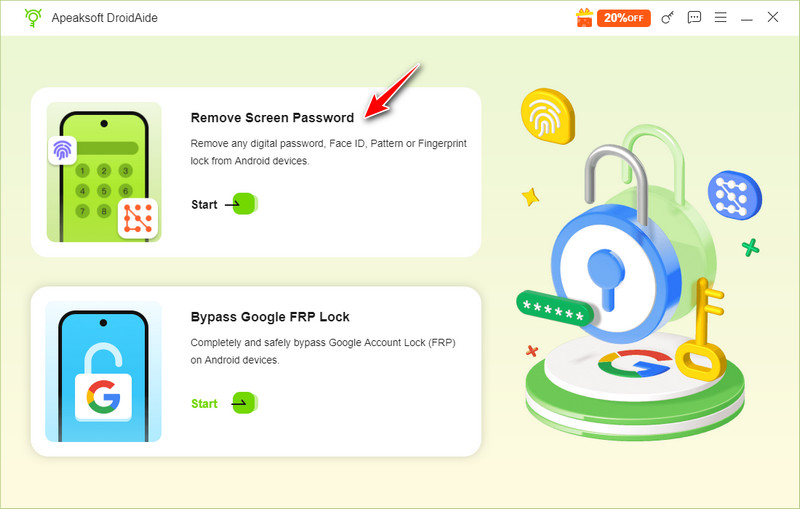
Step 1. Download, install, and launch Apeaksoft DroidAide Android Unlocker on your computer. Connect your Android phone to your computer. Then, click the Remove Screen Password button.
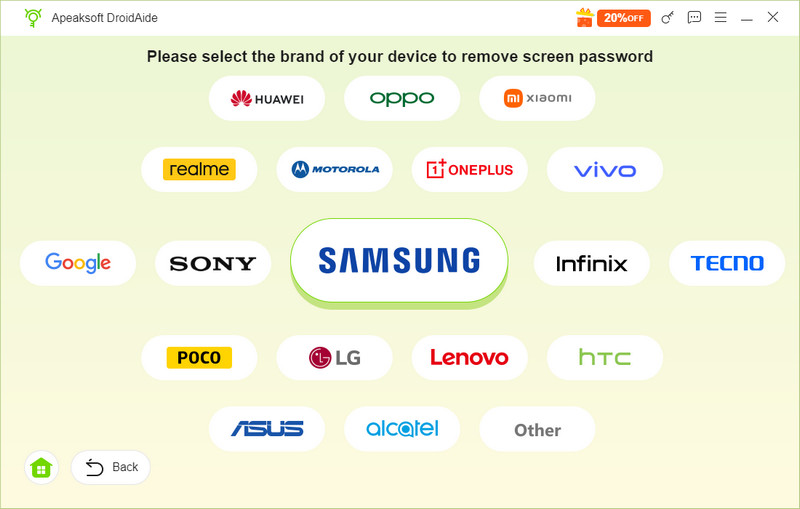
Step 2. This program will detect your device automatically. Or, you can choose your phone brand. This program supports Samsung, Sony, LG, OnePlus, and many popular brands.
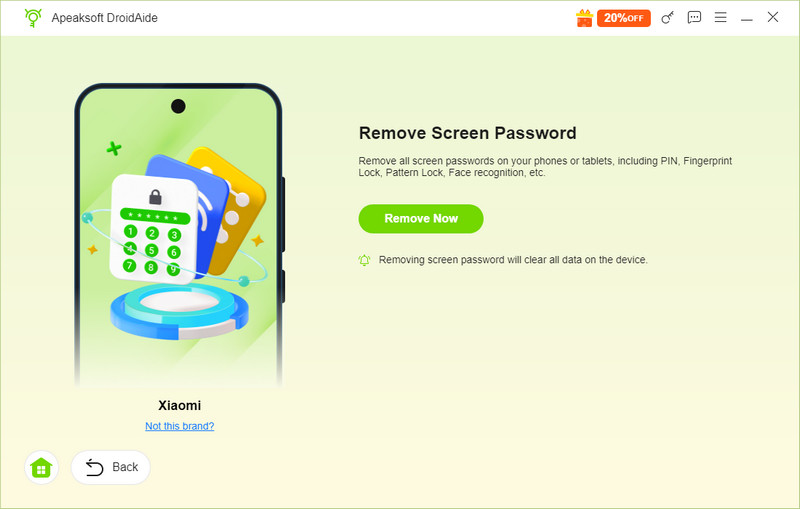
Step 3. Finally, click the Remove Now button to unlock your Android device. That's how easy you can use this program when you forgot lock pattern on Android tablet or phone.
Part 2: Erase Android Phone with Google Find Hub
If you prefer not to use a third-party Android unlocker, you can try Google's built-in tools instead when you forgot your Android pattern lock. Google Find Hub (previously Find My Device) can help you remotely erase your Android phone if you forgot the pattern lock. After the reset, you can set up your Android phone again and create a new screen lock. You don't need to access your phone during the whole process. However, this feature will factory reset your device.
Step 1. Go to Google Find Hub on another device. Then, enter your Google account and password to log in.
Step 2. Select your device from the device list. Click Settings (the gear pattern), and choose Factory reset device. Follow the on-screen instructions to reset your phone.
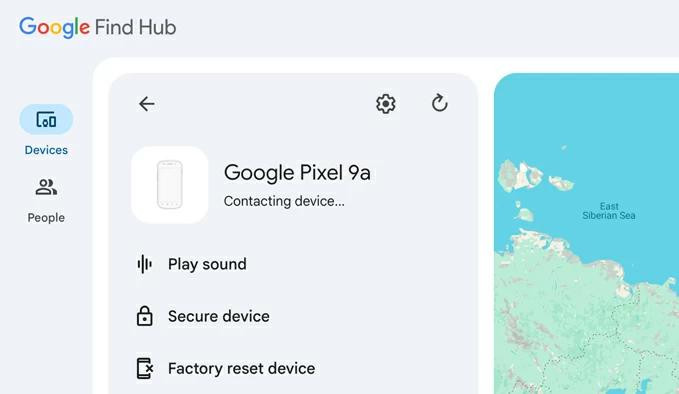
Step 3. After the reset, set up your Android phone again and create a new screen lock.
Part 3: Factory Reset Android Phone with Recovery Mode
If you don't have a Google account and cannot use Google Find Hub when you forgot the Android pattern passcode, you can reset your Android phone through Recovery Mode. This feature will factory reset your device, but you can regain access to your phone if you forgot the pattern lock on your Android.
Step 1. Turn off the Android tablet or phone, Hold Volume Up and Power buttons to enter Recovery Mode.
Tips: The button combination for entering Recovery Mode varies by device manufacturer and model. Check your manufacturer's instructions to enter Android recovery mode correctly.
Step 2. Use the volume buttons to select an option like Wipe data/Factory reset.
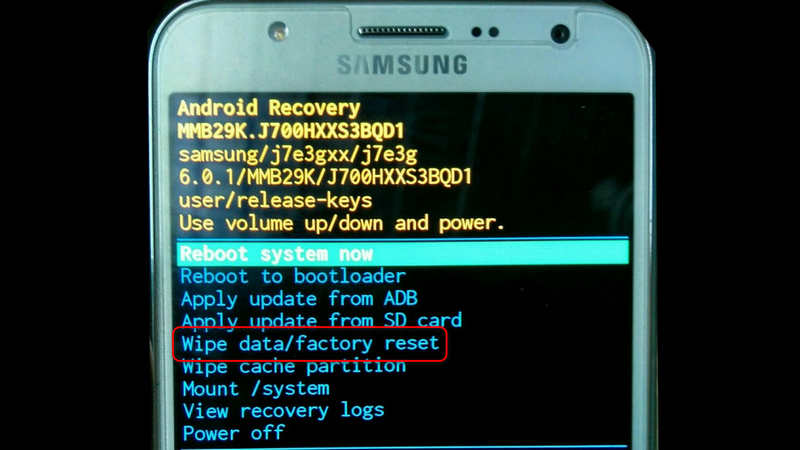
Step 3. Press the Power button to confirm and follow the on-screen instructions to complete the reset.
Step 4. Restart your device and set it up again.
Part 4: Use Forgot Pattern to Unlock Android Phone on Android 4.4 or Earlier
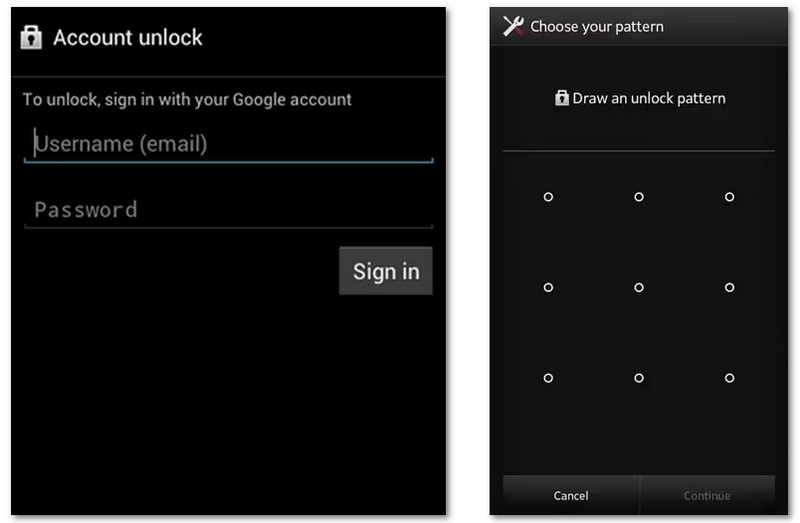
If your Android phone runs Android 4.4 or earlier, you may be able to use the Forgot pattern option to reset your screen lock. After you verify your identity with the Google Account previously added to your device, you can create a new pattern, so you can easily fix it when you are locked out of your Android phone due to a forgotten pattern.
Step 1. Enter the wrong pattern several times until you see the Forgot pattern? option.
Step 2. Here, you should tap Forgot Pattern?. Then, you need to enter your Google account password.
Step 3. After that, you can create a new pattern. With this new one, you can easily get into your phone when you forgot the pattern lock on Android.
Conclusion
Being locked out because you forgot pattern lock Android can be frustrating, but solutions exist. Whether you forgot your pattern lock on your Android, have an Android phone with a forgotten lock pattern, or need to know how to unlock Android phone if forgot pattern lock, these methods can help. Apeaksoft DroidAide Android Unlocker is your best solution if you want to remove the screen lock right away on your phone.
 Apeaksoft DroidAide
 Unlock your Android passwords and bypass the FRP lock easily.
Secure Download
Related Articles