


How to Effectively Bypass the FRP Lock on LG Devices

If you are using an LG phone and are familiar with the factory reset feature, you may have figured out the FRP lock. Factory Reset Protection keeps your data safe in case your phone gets stolen or lost. Anyone who intends to access your LG phone after a factory reset will be asked for your Google account password. If you just forgot your password, follow our guide to get an FRP bypass on LG quickly.
Disclaimer
The FRP bypass method applies only to devices you legally own or are authorized to access. Some older LG FRP bypass techniques exploit system loopholes, but they may no longer be effective in newer Android versions.
PAGE CONTENT:
Part 1: What Is LG FRP Lock
As mentioned in the beginning, FRP is a security measure introduced by Google on Android 5.1 Lollipop and later. Google asks all manufacturers to keep FRP on their devices. Therefore, almost all LG phones are equipped with the FRP feature, including the LG G/Q/K/V series and more.
If you’ve factory reset your LG phone without deleting the Google account first, the FRP lock will be triggered. At that time, any unauthorized people will be locked out unless they enter the same Google account credentials as the account last synced with the device. Besides preventing unauthorized access, it also brings much trouble to the legal owner or a second-hand owner.
Is it possible to remove the FRP lock on LG?
Yes. If you remember the Google account password that you used to activate your LG phone, you can remove FRP on your device directly. If you forgot your password, you will need an LG FRP bypass APK.
Part 2: Before You Bypass LG FRP
There are risks and difficulties in LG FRP bypass. And not every LG phone or Android version can be successfully bypassed. Before you move on to bypassing the FRP lock on LG, you should know the supported Android versions, possible risks, and the basic requirements and preparations needed before starting the process.
Supported Android Versions
The success rate of LG FRP bypass is closely related to the Android versions. As Google continuously updates its security system, many of the early FRP bypass methods have been fixed.
Android 8-9: The success rates of most traditional FRP bypass methods remain relatively high.
Android 10-11: Only certain manual methods are effective, but the success rate is relatively low, and the operation steps are also more complicated.
Android 12 and above: Many old loopholes are patched. At this point, you should use advanced tools.
Risks Warning
Although LG FRP bypass can help you regain access to your devices, improper operation can still cause problems, such as:
- The device is stuck in the Setup Wizard loop.
- The system functions have been restricted. For instance, you can't add a Google account or use the Play Store.
- If the operation is interrupted or goes wrong, the phone may fail to start properly and can only be restored by flashing the firmware.
- …
Requirement and Preparations
The FRP bypass process may require multiple restarts of the equipment. Therefore, before bypassing the FRP lock on LG, please make sure:
- Keep your phone battery at 50%-60%.
- Perform under a stable Wi-Fi connection.
- Do not shut down or disconnect the power during the operation.
Part 3: How to Bypass FRP on LG Without a Computer
How to Bypass LG FRP Lock Using Accessibility + YouTube
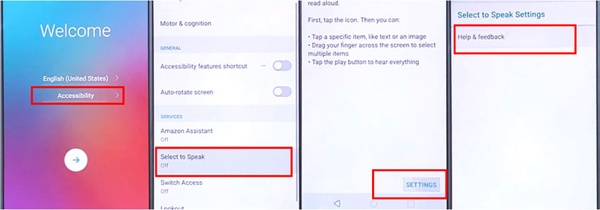
Step 1. Make sure that your LG phone has at least a 60% charge. Connect it to a Wi-Fi network.
Step 2. Open Accessibility on the Welcome screen, tap Select to speak, choose Settings, and tap Help & feedback.
Step 3. Now, type Use Morse code in the top search bar. Then tap the YouTube video tutorial to open it. Press the Share button, and choose Gmail.
Step 4. When the Gmail app starts, choose Add an email address, and then select Exchange. Then input an email address. It does not have to be a real Outlook email address.
Step 5. Next, choose Change, and select Pattern. Tap Require Pattern to turn on Phone, and hit Next.
Step 6. Follow the instructions to draw a pattern, confirm it, and tap Next.
Step 7. Go back to the setup wizard screen, tap the right arrow, press Next, and skip setup until you reach the Copy Apps & data screen.
Step 8. Finally, choose Set up as new, and draw your pattern to bypass FRP on LG without a computer.
- You don’t need a computer or third-party software.
- Free.
- The steps are complex.
- It takes a relatively long time.
How to Bypass the LG FRP Lock Using SIM
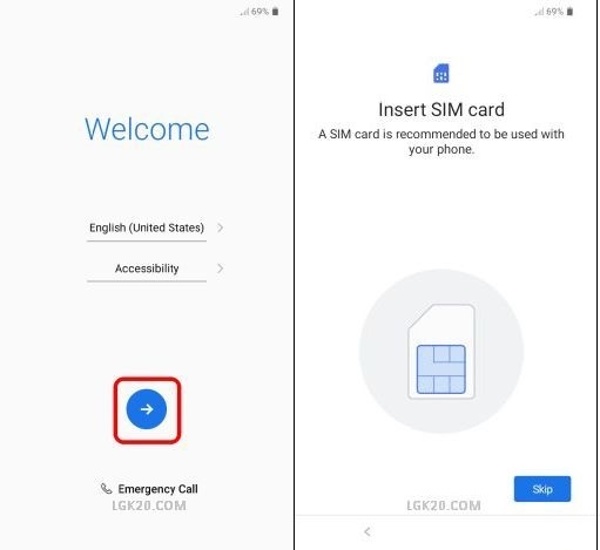
Step 1. Insert a PIN-locked SIM card into your LG phone to bypass Factory Reset Protection.
Tips: If you don’t have a PIN-locked SIM card, you can use an idle SIM card and lock it by entering the wrong PIN at least 3 consecutive times.
Step 2. Restart your device, enter the SIM PIN code, and tap OK. You can find the PIN code on the package of the SIM card.
Step 3. Open the Quick Settings panel, and turn on Bluetooth. Then send an image to your LG phone from another device.
Step 4. Tap Receive when your phone detects the transfer. Press the Options button with a three-dot icon at the top right side, choose the image, and share it through email.
Step 5. Choose Others, enter your email address, and tap Add. Choose Change, press PIN screen lock, and tap Create a New PIN. Now, you will be asked to set up a Google account. Just skip it and move on.
- Easier than the method above.
- You need another LG phone.
- You need a locked SIM card.
Part 4: How to bypass the FRP Lock on LG with PC
If you have a computer, you can bypass FRP on LG without a SIM card by downloading an LG FRP bypass tool, like Tungkick. It is available for the LG Stylo and other models. Bear in mind that the application is not compatible with the new models.
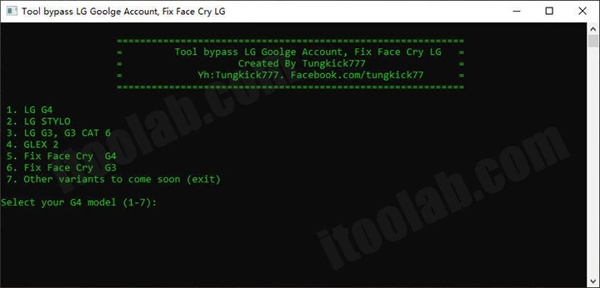
Step 1. Step 1Install and launch the LG FRP bypass application on your PC.
Step 2. Step 2Boot your LG phone in Download Mode. Shut down your phone, hold down the Power + Volume Up buttons at the same time, and connect it to your PC with a USB cable. When you see the Download Mode screen, let the button combination go.
Step 3. Step 3Go to the folder where you’ve downloaded the LG FRP bypass tool, and run the Tool.exe file.
Step 4. Step 4Input a number according to your LG phone model, and the tool will do the rest of the job. When it finishes, restart your phone normally.
- Simple steps.
- Free to use.
- The supported LG phone models are limited.
- No technical support.
- You need to prepare a computer.
Comparison Table of Best LG FRP Bypass Methods
| Method | Android Support | PC Needed | Difficulty | Success Rate |
| Accessibility + YouTube | Android 8-10 | No | Hard | Relatively Low |
| SIM Card Trick | Android 8-11 | No | Medium | Medium |
| Tungkick | Android 8-12+ | Yes | Relatively Easy | High |
*We tested the methods in this guide on multiple LG devices, including LG Stylo 6 (Android 10), LG K51 (Android 11), LG Velvet (Android 12), and LG G8 ThinQ.
Bonus Tip: Bypass the LG Screen Lock in One Click
For people who want to unlock the LG screen easily, Apeaksoft DroidAide Android Unlocker is an ideal choice. This is an effective and powerful tool to bypass the LG screen without any accounts or passwords. If you want to bypass the FRP lock of other brands like Samsung, OPPO, realme, Motorola, OnePlus, etc., you can also try it.

Downloaded by over 1,000,000 users
- Easily remove screen locks like PIN, password, pattern, fingerprint, and face lock on LG devices.
- Bypass FRP lock on Samsung, Motorola, OnePlus, etc. in one click.
- Support most Android phones and newer Android versions.
- Get full access to your Android phone with no restrictions.
- Simple and beginner-friendly steps.
Secure Download
Step 1. Get Apeaksoft DroidAide Android Unlocker by clicking the link above.
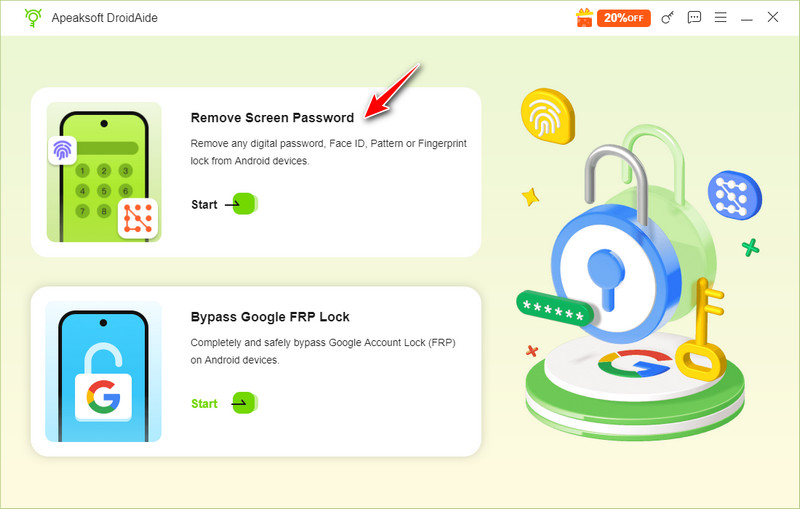
Step 2. Select the Remove Screen Password option on the main interface and connect your device with a USB cable.
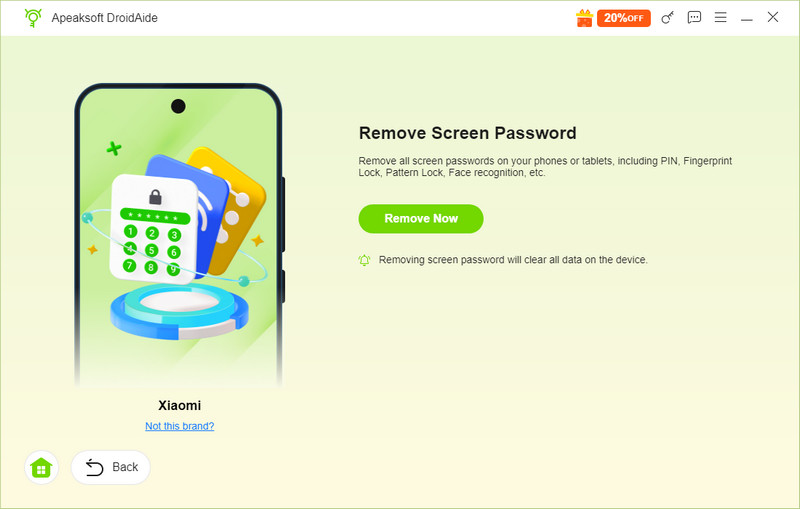
Step 3. Check your phone’s model and click Bypass Now.
Step 4. Follow the given instructions on the interface and then remove the FRP lock.
Tips: After a successful unlock, your data will be removed. Make an LG cloud backup in advance.
Part 5: FAQs about FRP Bypass LG
Why is there a FRP lock on LG devices?
FRP (Factory Reset Protection) will be triggered when you factory reset your LG phone without deleting the Google account.
How to remove the Google account from your LG phones?
You can turn off the FRP lock by heading to Settings > Accounts > your Google account > Remove account.
Will LG FRP bypass erase my data?
Yes. After bypassing the LG FRP lock, all your data will be gone permanently. Therefore, it is of great importance to back up your LG phone in advance.
Does LG FRP bypass work on Android 13?
Google has strengthened security on newer Android versions and patched many common loopholes that old methods utilized. In most cases, Android 13 devices require more advanced solutions, and the success rate of manual methods is very low.
Is LG FRP bypass legal?
It depends. Bypassing FRP on other people’s devices is illegal. Only perform FRP bypass on LG phones you own or are authorized to use.
Conclusion
Now, you should understand how to bypass FRP on your LG phone with or without a computer. With a SIM card, you can bypass the Google lock on your LG Android phone quickly. The Accessibility feature is another way to do the job without a computer. Of course, there are specialized FRP bypass tools to unlock the Google lock on a computer.
 Apeaksoft DroidAide
 Unlock your Android passwords and bypass the FRP lock easily.
Secure Download
Related Articles




