How to DNS Activation Lock Bypass for a Locked iPhone

For most iOS users, iCloud Activation Lock is a robust protective measure for an iPhone or iPad. However, there are times when you are locked out of the devices, seeking methods to bypass this lock. One method that has gained attention is the iCloud DNS bypass. Whether you buy a second-hand iOS device with this lock or forget the iCloud password, here is a solution.
Does it really work? Don't worry. This article will walk you through what iCloud DNS bypass is, how it works, its pros and cons, and best alternative to iCloud DNS bypass.
PAGE CONTENT:
Part 1: What Is iCloud DNS Bypass and How Does It Work
iCloud DNS Bypass is a technique that allows you to temporarily bypass the iCloud Activation lock on an iPhone or iPad. It mainly works by changing the DNS (Domain Name System) servers on the iOS device. By doing so, you can redirect the device from Apple's server to a third-party server. Then, you can access the iOS device limitedly. However, this method doesn't remove the iCloud lock permanently. It only provides a way to interact with the device.
After a successful iCloud DNS bypass, you can access a few basic features, such as web pages, weather, maps, the camera, or locally stored photos. While you cannot access Apple ID sign-in, iCloud services, App Store, and more.
When to Use iCloud DNS Bypass (Important Legal Considerations)
Usually, DNS bypass is used when there is an iCloud activation lock on the screen when the iPhone is locked to the owner. DNS bypass iCloud enables you to bypass the iCloud activation lock to unlock the screen without Apple ID and passwords. It is particularly useful when you don't know the Apple ID and password of a second-hand iPhone.
But it’s important to note that DNS bypass only works on devices you legally own. Attempting to use this method on someone else's iPhone without permission is illegal and may violate local laws.
Pros & Cons of iCloud DNS Bypass
- It is free, so you don't need to pay extra fees to go to a local Apple support store for help.
- It is easy to use. No other device is required. You can use DNS to bypass iPhone with several clicks.
- It mainly works on iOS 7-11. It is not compatible with late iOS versions.
- You can only access some basic functions like weather, camera, etc.
- The iCloud DNS bypass is temporary and not 100% working.
Part 2: How to Perform iCloud DNS Bypass on iPhone/iPad
Requirements
- You can access the initial Wi-Fi setup screen to modify DNS settings.
- Your iPhone runs old iOS version, such as iOS 7-11.
- You are under a stable Wi-Fi connection.
- You are the lawful owner of the device or have authorization to access it.
User Guide
When you want to access an iOS device with iCloud Activation Lock temporarily, you can try bypassing iCloud with a DNS server. Please confirm that your iPhone or iPad installed a SIM card before bypassing. Then, follow our steps to learn how to use DNS to bypass iCloud lock.
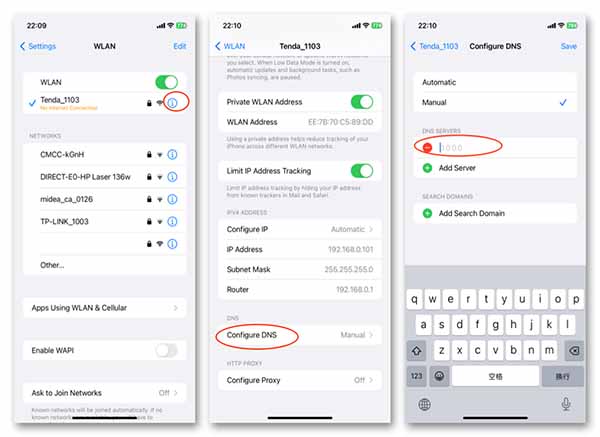
Step 1. Set up your iOS device as a new one. Follow the prompts until you reach the Wi-Fi Settings page.
Step 2. Tap the Information button next to the Wi-Fi you're connecting to. Scroll down to enter Configure DNS and select Manual.
Step 3. Delete the existing DNS. Then, tap Add Server to input the iCloud bypass DNS server.
The specific server address can vary based on your region:
| Region | DNS for iCloud Bypass |
| USA | 104.154.51.7 |
| Australia and Oceania | 35.189.47.23 |
| Europe | 104.155.28.90 |
| Asia | 104.155.220.58 |
| South America | 35.199.88.219 |
Step 4. After entering the new DNS, tap Save to return to the Wi-Fi page and connect to the network. Continue with the device setup, and you'll be redirected to a custom iCloud DNS Bypass page.
Tips: When you restart iPad or iPhone, your device will return to the locked state.
Part 3: Best Alternative When iCloud DNS Bypass Doesn't Work
As we mentioned above, the manual iCloud DNS bypass method can only offer a temporary solution to bypass the iCloud activation and support fewer iOS versions. If DNS iCloud bypass is unavailable on your device or fails to work, you can try alternative solutions, such as Apeaksoft iFoneKit iOS Unlocker. This iCloud DNS bypass tool can unlock your iPhone or iPad without an iCloud password. It lets you get full control of your iOS device without any limits. Besides iCloud DNS bypass, it can remove Apple ID, bypass MDM lock, wipe passcode, etc. Download and bypass the iCloud Activation lock now!
Here is a table for you to intuitively learn the differences between using DNS to Bypass iCloud and removing iCloud Activation Lock. You can make your own decision to use which methods.
| Items | iCloud DNS Bypass | Apeaksoft iFoneKit iOS Unlocker |
| Bypass Status | Temporary bypass | Permanent bypass |
| Operating Process | Complex | Easy to use |
| Compatibility | iOS 7-11 | Up to iOS 17 |
| Best For | People who have old devices and want a free solution. | People who want to bypass iCloud activation lock on new iOS versions easily, quickly, and safely. |

Downloaded by over 1,000,000 users
- Bypass iCloud activation lock if DNS bypass iCloud failed.
- Remove the iCloud activation lock without passwords.
- Access most functions of your iPhone by bypassing the iCloud lock.
- Remove the iCloud lock with one click in a few seconds.
- Support almost all popular iPhone models and versions.
Secure Download
Secure Download
Step 1. Download the iCloud DNS bypass tool on your computer by clicking the buttons above. Connect your iPad or iPhone to your desktop and tap Trust.
Step 2. Launch the software and select the Bypass iCloud Activation Lock option.
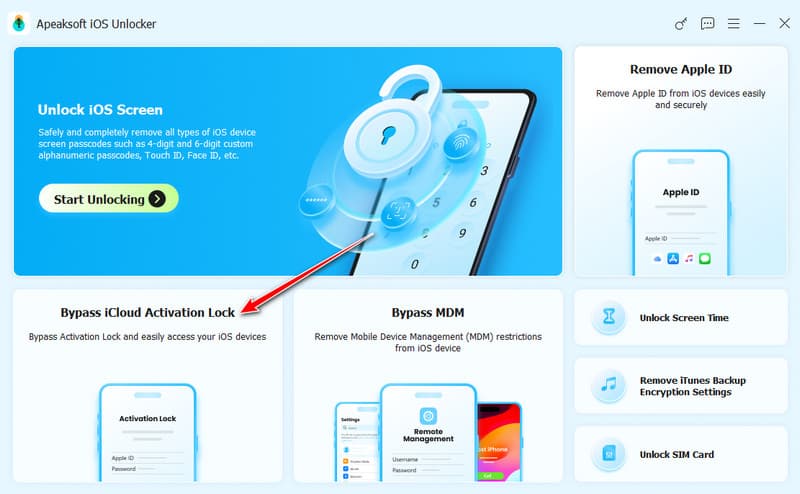
Step 3. Connect your device to the computer with a USB cable. Click Start Now to get started.
Step 4. Click the Jailbreak Tutorial button to jailbreak your iPhone.
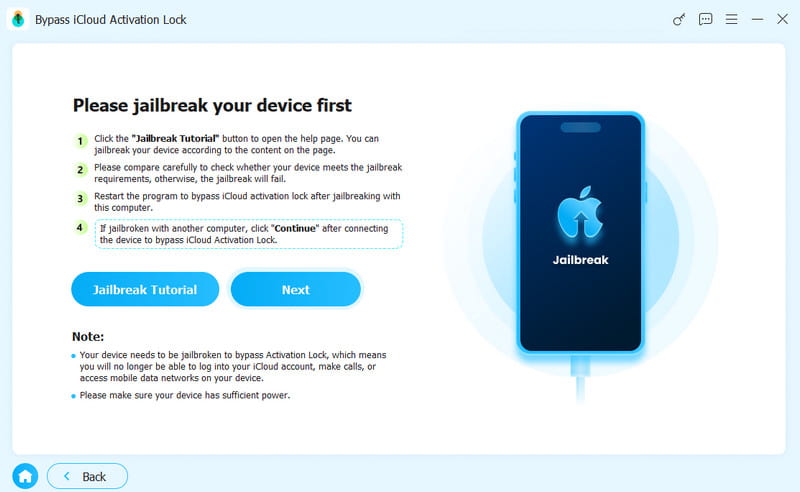
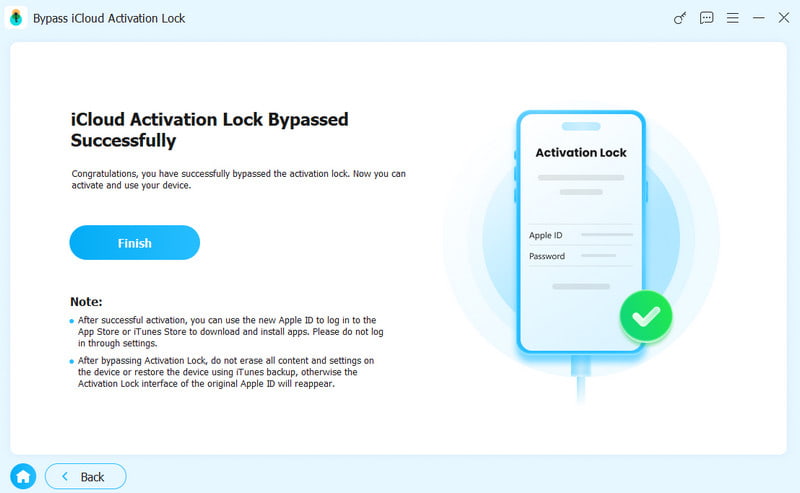
Step 5. Back to the software interface after a successful jailbreak. It will automatically bypass the iCloud activation lock for you.
Part 4: FAQs About Bypassing iCloud with DNS
Does iCloud DNS Bypass really work?
Yes, but it is not a true unlock. DNS bypass may provide temporary access to a few device functions, but it does not remove the iCloud Activation Lock permanently.
Is DNS Bypass permanent?
No. It only enables you to temporarily access your device. The iCloud activation lock will return after restarting.
Does DNS Bypass work on iOS 18/26?
Generally, no. Apple has strengthened the activation security on newer iOS versions.
Why is DNS Bypass not working?
Your device may run a newer iOS version. In this case, you can try some alternative tools, such as Apeaksoft iFoneKit iOS Unlocker.
Conclusion
Bypassing iCloud by DNS is an effective solution when you have your iOS devices locked. It offers a temporary solution to access iOS devices. Meanwhile, you can turn to a more permanent fix using an iCloud DNS bypass tool like Apeaksoft iFoneKit iOS Unlocker. Regardless of the method chosen, it's essential to prioritize device security and be cautious of potential risks.
 Apeaksoft iFoneKit
 Unlock all types of iOS passwords from iPhone, iPad and iPod.
Secure Download
Secure Download
Related Articles