How to Unlock iPhone Carrier Through Jailbreak: Read This First

PAGE CONTENT:
Part 1: What is Jailbreaking
Jailbreaking refers to cracking and modifying Apple's operating system to remove Apple's system restrictions. When people want to install third-party applications or perform system customization, they often search for how to jailbreak an iPhone.
Is Jailbreaking an iPhone legal?
Many users wonder whether jailbreaking an iPhone is legal before trying it. In short, jailbreaking is generally legal in the U.S. under a DMCA exemption, as long as it's done for lawful purposes, like unlocking a carrier lock or customizing the device.
However, while the act of jailbreaking itself is not illegal, using it to bypass carrier locks or install pirated apps could trigger legal issues. This is because such actions may violate the DMCA's anti-circumvention provisions, which protect the carrier's network lock mechanisms.
Apple explicitly advises against jailbreaking and clarifies in its official documentation that only the carrier specified in your contract is authorized to unlock your iPhone. Any attempt to unlock the device without authorization would violate Apple's terms of service.
- Install apps that are not available in the App Store.
- Remove the pre-installed apps from your iPhone.
- Take advantage of more advanced services.
- Customize the user interface and change the iOS appearance.
- Adjust system behaviors and add advanced tweaks.
- Reduce system stability and shorten battery life.
- Weaken security since untrusted apps or tweaks can enter.
- Cause the software problems like crashes and freezes.
Part 2: Why Does Your iPhone Say Locked by Carrier
If your iPhone shows a message like "SIM Not Supported", "Carrier Lock", or "SIM Locked", it usually means your device is restricted to a specific mobile carrier. This case usually happens when:
1. The iPhone was purchased through a carrier contract
Many carriers sell iPhones at discounted prices with the condition that the device can only be used on their network for a certain period.
2. The installment plan is not fully paid off
If you're still paying for the phone, the carrier may keep it locked until the balance is fully paid.
3. The device was lost or stolen
Carriers may lock the device for security reasons if it has been reported as lost or stolen.
Tips: You can check if your carrier has locked your device by tapping Settings > General > About . If you see No SIM restrictions next to Carrier Lock, it means your device is unlocked.
Part 3: Does Jailbreaking an iPhone Unlock the Carrier
Many users ask, "Does jailbreaking an iPhone unlock the carrier?" The answer is half right. Jailbreaking removes Apple system restrictions to give users deeper control over iOS, while a carrier lock is set by the mobile network provider to restrict which SIM cards the device can use. These two protections work differently.
To sum up, jailbreaking does not directly unlock a carrier-locked iPhone. But if you want to remove the carrier lock on your iPhone, you need to jailbreak your iPhone first.
Part 4: How to Unlock iPhone Carrier with Jailbreak
Want to switch your network carrier, but it's locked by a certain carrier? How to unlock iPhone through jailbreak? Apeaksoft iFoneKit can help you remove SIM card locks easily and safely! This too is designed for all iOS lockout scenarios and works on both Windows PC and Mac.

Downloaded by over 1,000,000 users
- Remove SIM Card restrictions from different carriers.
- Get into a locked/disabled/stolen iPhone without a passcode.
- Remove MDM, Screen Time, and Apple ID password safely.
- Support all iOS models and versions (iOS 26/27, iPadOS 26/27).
Secure Download
Secure Download
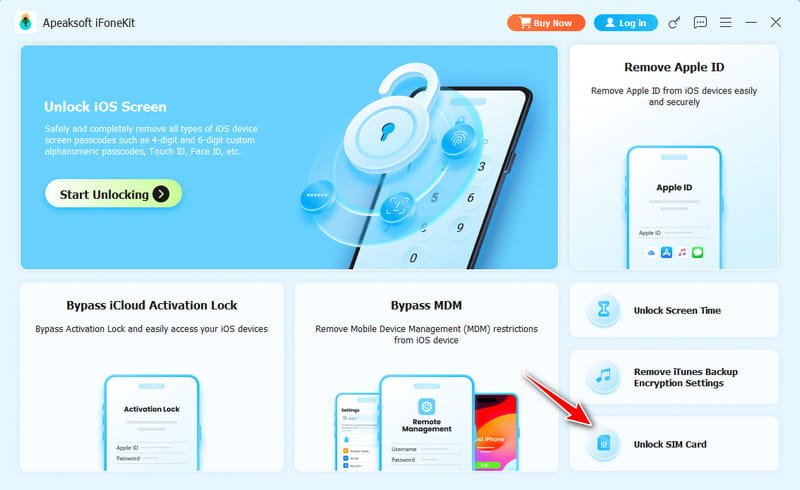
Step 1. Launch the software on your computer and choose the Remove SIM Locks option from the main interface.
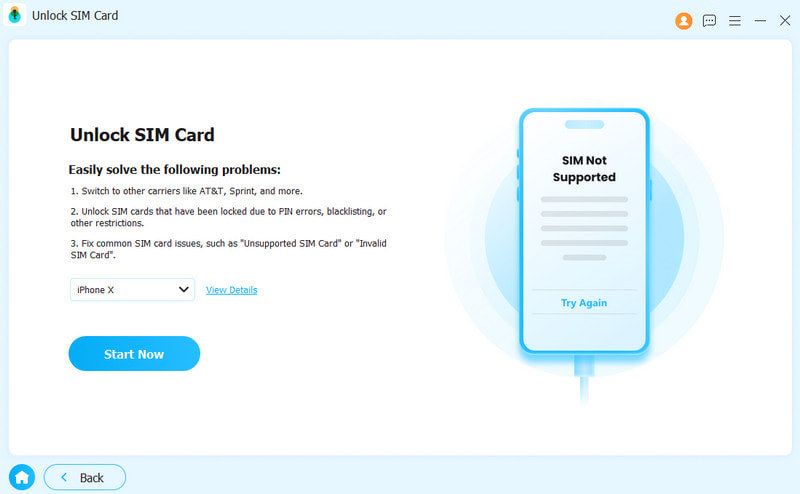
Step 2. Connect your iOS device to the computer. Hit the Start Now button to continue.
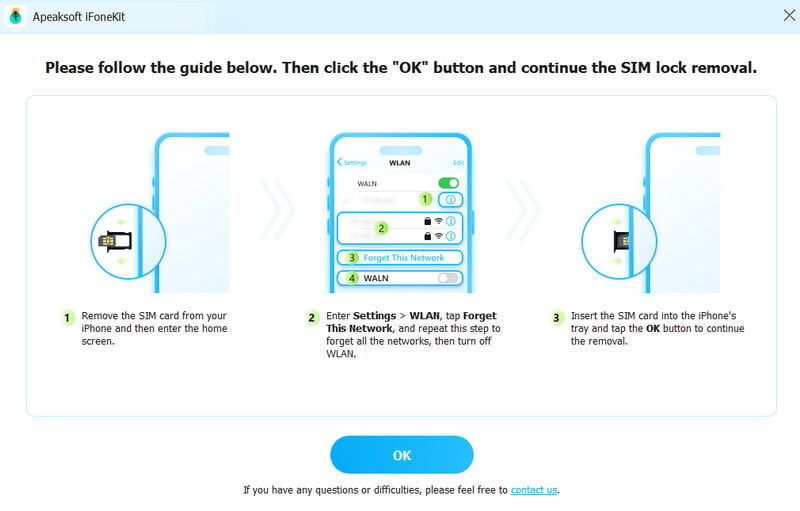
Step 3. Confirm the device information, then click Start Bypassing. Follow the on-screen instructions to set up your iPhone. Click the Jailbreak Tutorial to jailbreak your iPhone.
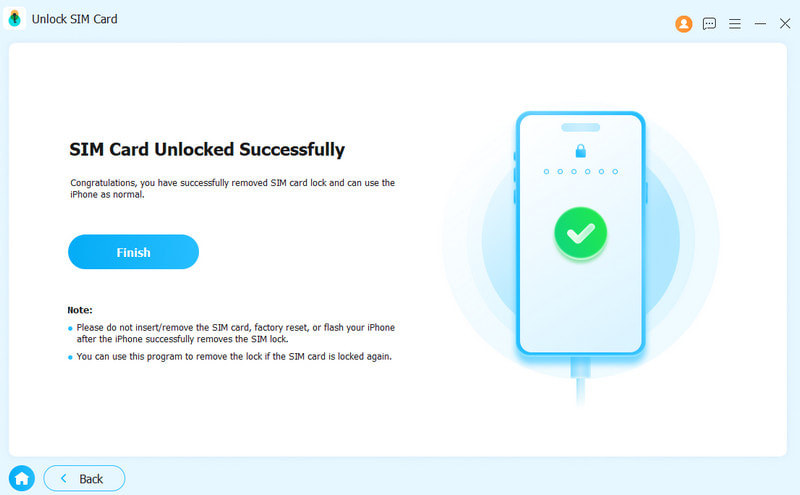
Step 4. Then, your SIM card will be removed from restrictions successfully.
Part 5: Things You Should Know After Jailbreaking
1. Download tweaks from trusted sources
Make sure to install apps and tweaks from well-known platforms such as Cydia or Sileo, and avoid unknown repositories.
2. Monitor system performance
Certain tweaks may affect your iPhone's speed or battery life. If you notice lag or fast battery drain, check your installed tweaks and remove the ones causing issues.
3. Backup your device regularly
Always backup your iPhone to iTunes or iCloud before installing or updating tweaks. This ensures you can restore your iPhone quickly if a new modification causes issues.
Conclusion
Jailbreaking gives users more control over their iPhones, including customization options and deeper system access. In some cases, it is also a required step when users try to unlock iPhone through jailbreak methods.
However, it's important to remember that jailbreaking comes with risks. It may affect the security, system stability, and app compatibility. In some cases, certain features may also stop working, and the device can become more vulnerable. Overall, jailbreaking gives more freedom, but it should always be done carefully.
 Apeaksoft iFoneKit
 Unlock all types of iOS passwords from iPhone, iPad and iPod.
Secure Download
Secure Download
Related Articles