How to Unlock Xfinity Mobile Phone with/Without Codes

When your Xfinity phone says messages like "SIM card is invalid" when switching carriers or inserting a new SIM card while traveling abroad, it may be carrier-locked. Do you have to contact Xfinity support? Is there a fee? Can I unlock my Xfinity phone online by myself? Based on the actual use scenario, this article will analyze the Xfinity unlock phone in detail.
PAGE CONTENT:
Step 1: Check Xfinity Unlock Requirements and Eligibility Rules
Before you can start unlocking, you must confirm that your device meets the official conditions for Xfinity unlock phone. Xfinity Mobile does not offer instant unlock access to all users; it has a clear eligibility mechanism. If your phone does not meet these requirements, you may be unable to unlock it for a while, even if you have an unlock code or tool.
Here are the main official unlocking conditions:
- 1.The device must have been active for at least 60 days and be in good account status.
- 2.The device must be fully paid off, and the account must be in good standing.
- 3.The phone must not have been reported as lost, stolen, or involved in fraud, or you cannot apply for unlocking.
- 4.The account owner or an authorized user may need to request the unlock. Third parties or new users cannot bypass this process.
In addition, before switching to another carrier, you need to confirm that your Xfinity iPhone has been unlocked. Before proceeding, you can log into your Xfinity Mobile account to check if your device is eligible to unlock. This step is critical; otherwise, all subsequent unlocking steps may be invalid. Mastering these basic rules will help you save time and avoid getting stuck in ineffective attempts.
Step 2: Wait for Automatic Unlock or Request an Unlock from Xfinity
Wait for automatic unlock
After confirming that your Xfinity phone meets all the unlocking requirements, the next step is to wait for the carrier to handle the unlocking process. For eligible devices, as long as all the conditions are met, Xfinity may automatically unlock your phone.
Contact Xfinity if your phone is still locked
If your phone is not unlocked automatically, contact Xfinity Mobile support through the Xfinity app or customer service. They can manually start unlocking based on your account information and device status. Provide your account details and IMEI number for verification.
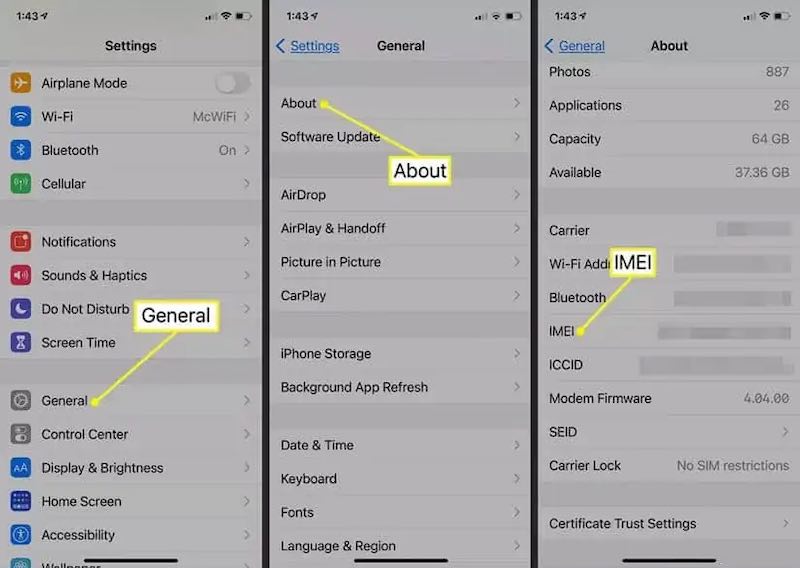
How to check IMEI number
First, go to Settings > General > About to see the IMEI number. Then, make sure the network connection is working so you can submit an unlocking request or use the relevant tools.
How to Contact Xfinity for Unlock
You can call Xfinity Mobile customer service at 1-888-936-4968 or contact the support team through the chat function in the Xfinity Mobile App. Then provide the necessary information, including the account holder's name, account number, mobile phone model and IMEI number.
Usually, customer service will first confirm that you meet the qualifications mentioned earlier. Many users also ask a common question: Can Xfinity unlock my device for free? The answer is: If your device is fully compliant with the unlock policy, Xfinity will usually offer it for free, with no additional cost or new contract.
Step 3: Complete the Xfinity Phone Unlock
After confirming the conditions, customer service will complete the unlocking request within three working days. If approved, the system will automatically mark your device as unlocked, and you may receive an SMS or email notification that your device has been unlocked. Once you've unlocked the Xfinity mobile phone, reinsert your SIM card or restart your device to use another carrier's network.
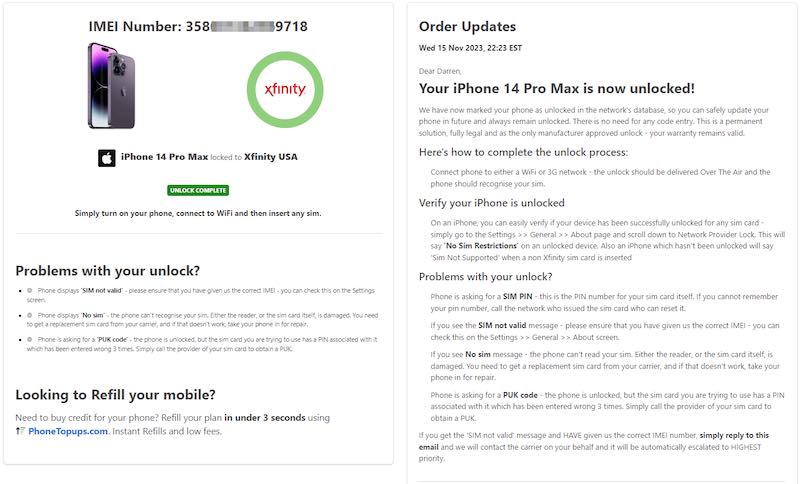
Tips: Some users will try Xfinity imei unlock via a free apk; however, it should be noted that this kind of APK is not an official authentication, and there are security and privacy risks, which can easily lead to device data leakage or system damage. We do not recommend using them unless you know the sources and mechanisms of such tools. In contrast, choosing official channels or official software is more reliable in ensuring the unlocking effect without worrying about damaging the device.
Bonus: How to Unlock Xfinity iPhone Without Carrier Support
Xfinity provides an official way to unlock eligible devices, but the process depends on carrier requirements and approval. If you are looking for a more flexible way to remove SIM restrictions from your iPhone, a professional unlocking tool, such as Apeaksoft iFoneKit iOS Unlocker, can be an alternative option.

Downloaded by over 1,000,000 users
- Unlock Xfinity phone without carrier.
- Remove SIM restrictions with a simple process.
- Support a wide range of iPhone models and iOS versions.
- User-friendly interface for beginners and advanced users.
Secure Download
Secure Download
Step 1. Press the download button above to download and install this powerful Xfinity unlock tool.
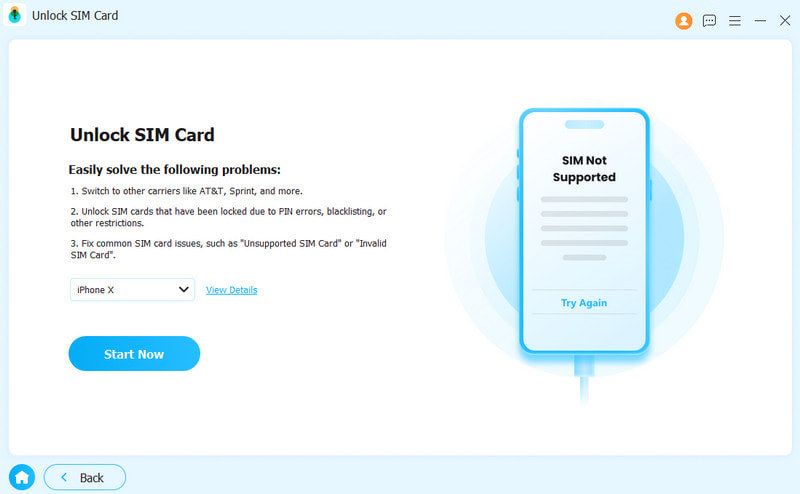
Step 2. Choose Unlock SIM Card.
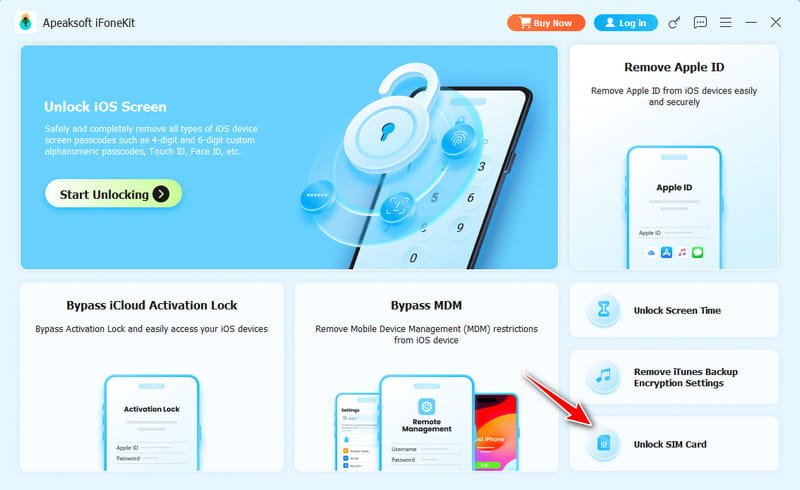
Step 3. Connect your device and click Start Now.
Step 4. Follow the on-screen instructions to set up your device.
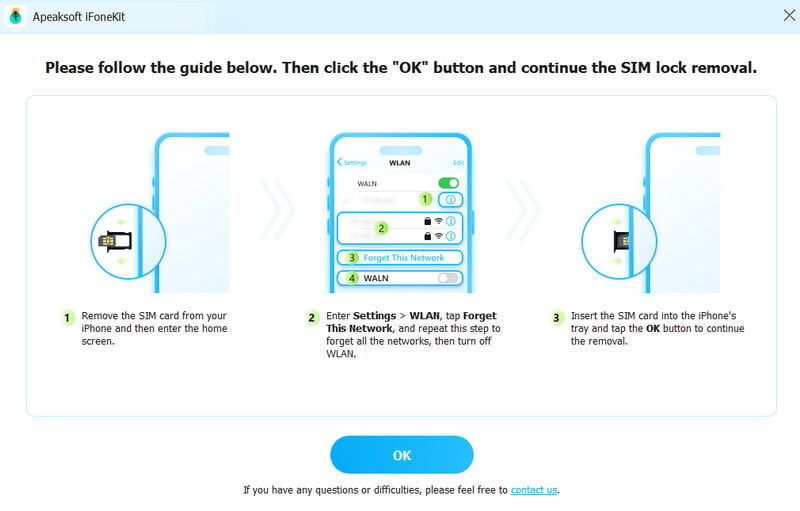
Step 5. Wait for a while, and the carrier restrictions will be removed soon. Restart your device to have a check.
FAQs about Xfinity Unlock iPhone
How long does the official unlock process take?
Xfinity usually checks IMEI and replies within about 3 business days. But the actual times may vary by carrier workload and case complexity.
Can locked/lost/stolen phones be unlocked?
No. You should meet the unlocking requirements we mentioned above.
Will Xfinity unlocking erase my data?
No. Official carrier usually removes SIM/carrier restrictions. Your data won’t be erased.
Does Xfinity provide an unlock code?
Some Android devices may require an unlock code, while iPhones and many newer devices are unlocked remotely without entering a code.
Conclusion
Whether switching carriers or buying a used device, mastering how to unlock Xfinity mobile phone can quickly restore your freedom of use. Ultimately, Apeaksoft iFoneKit iOS Unlocker is your best choice if you want to unlock Xfinity phones on your own.
 Apeaksoft iFoneKit
 Unlock all types of iOS passwords from iPhone, iPad and iPod.
Secure Download
Secure Download
Related Articles