

7 Best No Root Firewall Apps for Android to Block Internet Access

Almost all Android applications require an internet connection. But do you know which applications are secretly using data in the background?
While you can toggle Wi-Fi or mobile data, controlling which apps are online isn’t easy. Some people reported that they have spent a lot on cellular data even though they do not use it. But if you enable Restrict app background data, it will block all apps and you cannot receive any notifications. That’s where no-root firewall apps come in. It can help you manage each app’s internet access without rooting your device. Maybe you are not familiar with no-root firewall apps, but they are quite useful for Android owners.
PAGE CONTENT:
Part 1: What Is No Root Firewall
What is a no-root firewall? Briefly, it is an Android firewall app that can control which apps to access the internet without root, thereby protecting privacy and saving cellular data.
Key features of a no-root firewall
- Restrict apps' access to the internet. For example, it can prevent games from secretly uploading data and block ad SDKs from accessing servers.
- Protect users' privacy. It can prevent apps from secretly uploading user data, connecting to an unknown server, and tracking your behavior.
- Save cellular data.
- Reduce advertisements and tracking by disconnecting the advertising components from the network.
- Create a virtual VPN without root.
Root vs No Root Firewall
| Feature | No Root Firewall | Root Firewall |
| Requires Root Access | No | Yes |
| Ease of Use | Easy | Advanced |
| Control Level | Moderate | Powerful |
| Security Risk | Low | High |
| Works with VPN | No | Yes |
Part 2: A Quick Overview of No Root Firewall
| Name | Best For | Use Case | Pricing | Availability Status |
| NoRoot Firewall | Beginners | Simple data control for everyday use | Free | Available on Google Play |
| NoRoot Data Firewall | Power users | Detailed usage tracking and schedule | Free | Available on Google Play |
| DroidWall | Tech-savvy | Highly customizable control for granular network rules | Freemium | Removed from Google Play; APK available via third-party |
| Mobiwol | Lightweight users | Minimalist app-level internet blocking | Free | Available on Google Play |
| NetGuard | Privacy-focused users | Privacy-oriented firewall with advanced filtering | Freemium | Available on Google Play |
| LostNet NoRoot Firewall | Open-source enthusiasts | Community-driven firewall with automation options | Free | Removed from Google Play; Amazon Store/APK |
| CIA Firewall | Users who prefer visual analytics | Visual-focused network monitoring and access control | Free (In-app purchases) | Available on Google Play |
Part 3: Top 7 No Root Firewall Recommendations
Top 1: NoRoot Firewall
Key features:
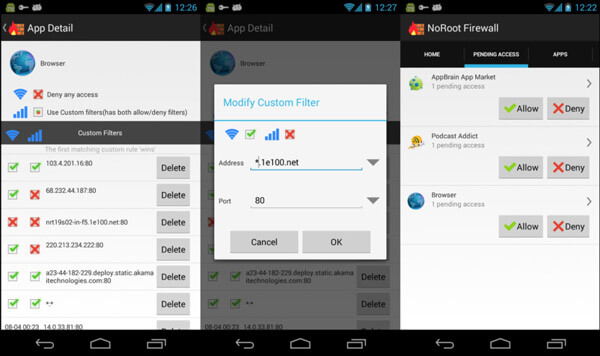
- Permit or deny internet connection for a certain app.
- Control internet usage on Android tablets and smartphones easily.
- Get notifications when an app is trying to access the internet in the background.
- Create personalized filter rules based on IP address.
- Block websites to access your information or prevent your information from being sent to the internet.
- This no-root firewall app is free to download from the Play Store.
- There is no spyware, ads, virus or other malware in it.
- It does not require root access.
- It is not available to LTE as well as IPv6.
- This no-root firewall app is only compatible with Android 4.0 and later.
Top 2: NoRoot Data Firewall
Key features:
- Control the internet access permission for each app on Android devices.
- Available to both cellular data and Wi-Fi networks.
- Block background apps to use your internet connection.
- Record and analyze data usage for each app separately.
- Notify you when an app starts using the internet.
- Schedule the internet usage of apps, such as how long.
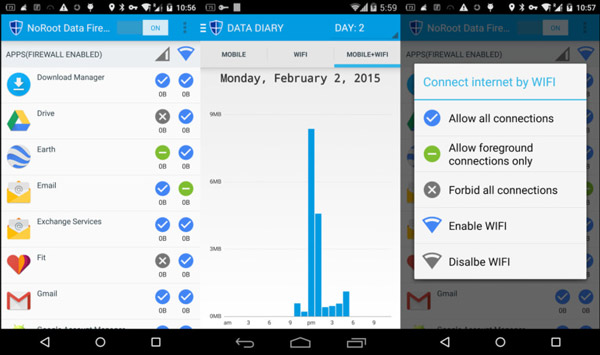
- This no-root firewall app integrates a wider range of features.
- It also offers a night mode.
- This app is available on Google Play.
- Sometimes, it blocks the SMS app by mistake.
- It is only compatible with Android 4.0 and above.
Top 3: DroidWall
Key features:
- Control the internet access for each app on Android devices by a white list and a black list.
- Grant only Wi-Fi network or cellular data permission to a certain app.
- Apply rules for HTTP, HTTPS, SSH and more at any time and restore settings when restarting.
- Add a password to this no-root firewall app.
- Offer custom scripts for advanced users.
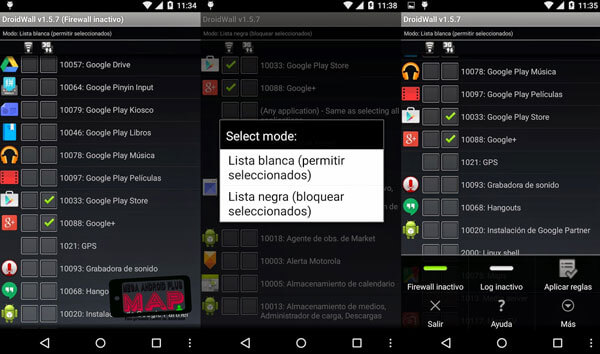
- It is able to block ads and other interruption items.
- This app is available to a wider range of Android OS, from Android 1.5.
- This no-root firewall app was removed from the Google Play Store. You can only get it from a third-party APK online.
- Some features need an in-app purchase.
Top 4: Mobiwol
Key features:
- Automatic work on Android once your device starts up.
- Detect apps currently on your mobile phone and set internet permissions for each.
- Permit Wi-Fi network or mobile internet for apps separately.
- Look at the data usage of your apps including current status and history.
- Get notifications when an app tries to access the internet.
- Disable background activities and internet usage of specific apps.
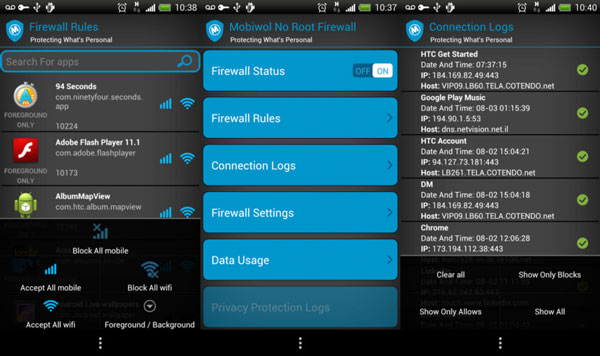
- This no-root firewall app is available to almost all Android devices.
- It is free of charge.
- You have to view annoy ads to exchange free features.
- Too many custom options may make beginners frustrated.
Top 5: NetGuard
Key features:
- Optionally allow or block apps to access the internet connection.
- When an app starts using the internet, you will get a notification.
- Record network usage for each app and address.
- Customize the theme as you wish.
- Permit or block certain IPs and websites to protect your privacy.
- Support IPv4/IPv6 and TCP/UDP.
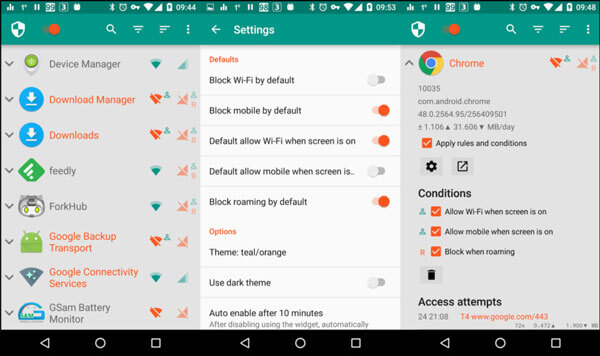
- This no-root firewall app contains plentiful features.
- It is free to get on Google Play and integrates an in-app purchase option.
- It is available to Android 5.0 and above, so you cannot use it on an old phone.
- Some features are only available to the pro version.
Top 6: LostNet NoRoot Firewall
Key features:
- Show you the internet access information about apps on your Android device.
- Display current or recent information about running tasks visually.
- Block or unblock internet access for any apps.
- Restrict apps from using the internet while in background mode.
- Monitor traffic data consumption on tablets and smartphones.
- Start automatically after startup.
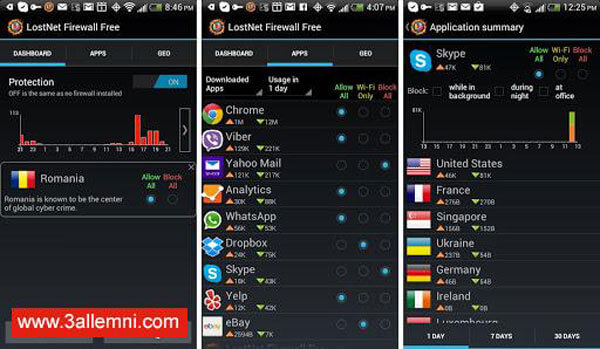
- This no-root firewall app is ad-free and open source.
- The interface is user-friendly and easy to navigate.
- It is available on the Amazon App Store.
- This no-root firewall app has been removed from Google Play.
- It may block important notifications.
Top 7: CIA Firewall – Internet Security Noroot Firewall
Key features:
- Easily control the access to internet for each app separately.
- Set up a mobile internet and Wi-Fi network for any apps.
- Visualize data consumption by hour, data or month.
- Analyze what websites are accessed by apps and display them in a chart.
- Equip domain filter, IP filter, domain resolution and more.
- Customize the interface with built-in themes and colors.
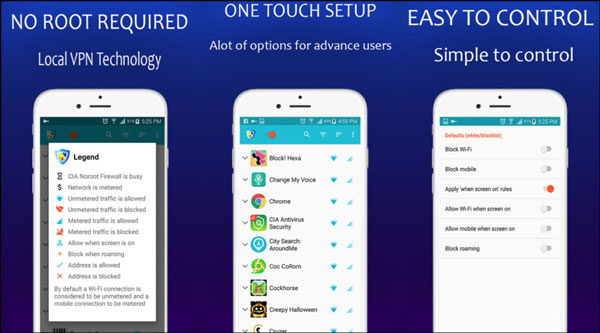
- This no-root firewall app is available in Google Play for free.
- The interface is well designed.
- The visual chart of data consumption is clear and clean.
- It pops up annoy ads.
- Some features need to be purchased in-app.
Tips:
Don’t Miss:
Brief Review on Top 12 Root Apps for Android Devices
Top 10 Android File Managers to Manage Various Data on Android
Bonus Tip: Recommended Tool for Android Data Backup & Restore
While no root firewall apps can help you control the internet access of each app and protect your privacy, it is equally important to manage your data security. Many people have reported that they have lost their Android data for various reasons. Therefore, to ensure your device and data safety, backing up device data using a reliable backup and recovery tool is essential.
Back up & Restore Android Data
- Quickly back up any data files, like images, messages, contacts, call logs, etc.
- Encrypt your backup as needed.
- Selectively back up specific data.
- Preserve backup history for restore anytime.
- Support all popular Android phones and tablets, including Samsung, Huawei, LG, Xiaomi, HTC, Motorola, Sony, ZTE, etc.
Secure Download
Secure Download
Conclusion
In this post, we identified and shared several popular firewall apps with no root for Android. They do not require root access, so you can download and use them on your device without rooting. And our introductions and reviews offer the best clue for you to discover the most proper tool.
To sum up:
Beginners/Daily Data Control - NoRoot Firewall, Mobiwol
Advanced Users/Data Usage Analysis - NoRoot Data Firewall, NetGuard
Privacy Protection/Advanced Features - LostNet, NetGuard
Tech Enthusiasts/Customization Needs - DroidWall (requires third-party APK)
Data Visualization Needs - CIA Firewall - Internet Security Noroot Firewall
Related Articles
You can install Game Killer on Android without root. Follow this guide to get the app and enjoy advanced gaming features easily.
Rooted Android phone can't run many apps, like payment and bank apps. This article shows you how to hide root access and use these apps again.
Want to hack Wi-Fi networks around you without password? Here are top 5 best Wi-Fi hacker no root apps to help you connect to Wi-Fi network effectively.
Can you recover deleted files from Android without rooting? Yes, you can, and this page shows a way to recover deleted files from Android unrooted in 3 steps.



