Voicemail Not Showing Up on iPhone? 8 Troubleshooting Fixes

Have you missed important messages because voicemail does not work on iPhone? Maybe you can't get new voicemail messages, the Voicemail box is empty, or new voicemails disappeared. It's annoying, but don't worry. Fortunately, there are several ways to troubleshoot voicemail problems yourself. Here are 8 simple ways to fix iPhone hlasová schránka nefunguje and get your voicemails back.
OBSAH STRÁNKY:
Part 1: Why Is My iPhone Voicemail Not Working
What's actually causing your voicemail problem? Let's quickly break down the common reasons.
- 1.Poor Cellular Connection: Your iPhone may have a weak signal or no service. Sometimes the carrier network also has problems. When this happens, new voicemails may not show up on your iPhone.
- 2.Nesprávné nastavení: You may have disabled Live Voicemail or enabled Call Forwarding, so your iPhone never receives or records voicemails at all.
- 3.Omezení dopravce: Your cellular plan may not include Visual Voicemail and Live Voicemail services in your region.
- 4.Softwarové závady iOS: Temporary system bugs cause the Phone app to freeze, fail to load voicemail messages, or display an empty Voicemail list.
- 5.Full Voicemail Mailbox: If your mailbox is full, some carrier automatically stops accepting new voice messages, so callers are unable to leave new messages.
Part 2: 8 Quick Fixes: Solve iPhone Voicemail Not Working
If your iPhone voicemail is not working, try these 8 fixes one by one. If simple fixes don't help, you need to opravit svůj iPhone system with a dedicated tool.
Reopen the Phone App & iPhone
90% of minor voicemail freezes are fixed by simply restarting the Phone app. Swipe up from the bottom of your screen or double-click the Home button to open the app switcher. Close the Telefon app and reopen it after 15 seconds. If your voicemail still doesn't work, restart your iPhone to refresh the system and clear software glitches. Just press and hold the Strana tlačítko a buď Objem nádrží button, drag the power-off slider and reboot it later.
Zkontrolujte síťové připojení
If your iPhone has no service or a weak signal, voicemail will fail to show up on iPhone. You can open Nastavení a klepněte na tlačítko Buněčný to close and reopen it. Toggling Airplane Mode on and off can refresh your iPhone's cellular network connection. Swipe down for Control Center, tap the Režim V letadle icon to turn it on. Wait 10 seconds, tap it again to turn it off, then test your voicemail again.
Check Your Voicemail Setup
If your iPhone voicemail does not work or the Voicemail tab is empty, your voicemail profile may not have been set up correctly.
Krok 1. Přejít Telefon > Hlasová schránka > Nastavit nyní.
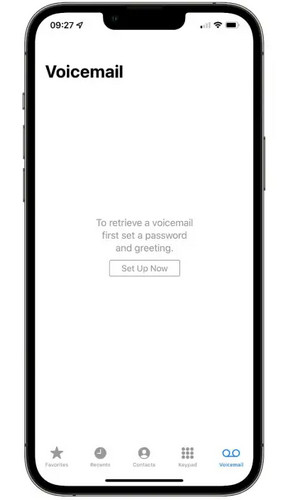
Krok 2. Create a new voicemail password.
Krok 3. Vybrat Automaticky or Zvyk for your greeting. If you choose Zvyk, follow the instructions to record your greeting.
Zkontrolujte svůj plán
Visual Voicemail is an independent feature. Not every cellular plan or carrier supports Visual Voicemail. If your iPhone voicemail is not showing up, the reason can be that your carrier doesn't offer this feature, or it hasn't been activated on your account. Check your cellular plan through the mobile carrier's official website, or contact your carrier if you cannot find this information.
Obnovit nastavení sítě
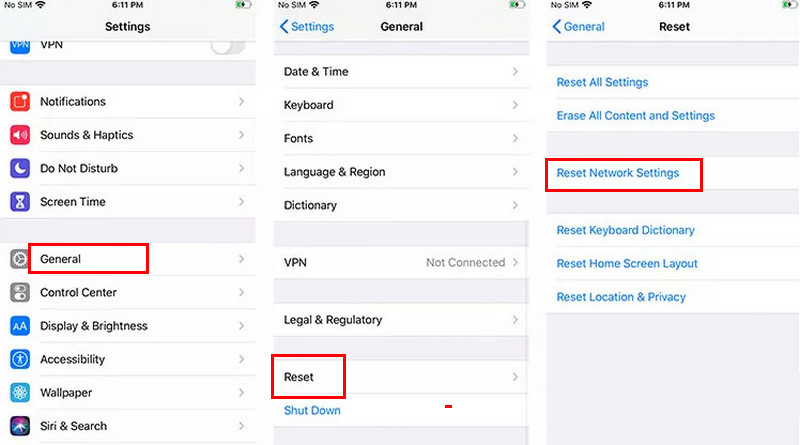
Still can't get your voicemail to work? You can try resetting the network settings. Sometimes the network settings cause problems with calls and voicemail. Don't worry, this won't delete your photos or apps, but your saved Wi-Fi passwords will be gone.
Krok 1. Otevřená Nastavení > obecněa klepněte na tlačítko Přeneste nebo resetujte iPhone.
Krok 2. vybrat resetovat, pak zvolte Obnovit nastavení sítě.
Krok 3. Enter your passcode and confirm your choice. Wait for your iPhone to restart.
Zakázat přesměrování hovorů
Call Forwarding redirects incoming calls to another phone number. If call forwarding is on, incoming calls may be sent somewhere else. If you don't need this feature, try turning it off.
Krok 1. Přejít Nastavení > Telefona klepněte na tlačítko Přesměrování hovorů.
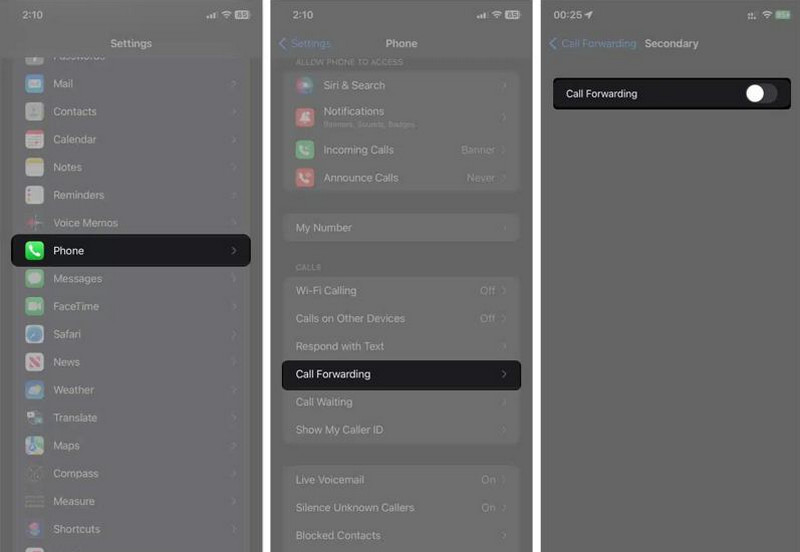
Krok 2. Toggle the switch off if it's enabled.
Krok 3. Once disabled, incoming calls will finally route to your iPhone voicemail as normal.
Free Up Mailbox Storage
If your iPhone voicemail is not receiving new messages, your mailbox may be full. Once the limit is reached, callers may hear a message saying that your mailbox is full and cannot accept new messages. Delete old, unnecessary voice messages, spam calls, and expired recordings.
Zkontrolujte aktualizace systému iOS
An outdated iOS version may contain software bugs that affect the Phone app. You need to install the latest update to fix voicemail not working on iPhone.
Krok 1. Otevřená Nastavení, klepněte na tlačítko obecněa vyberte Aktualizace softwaru.
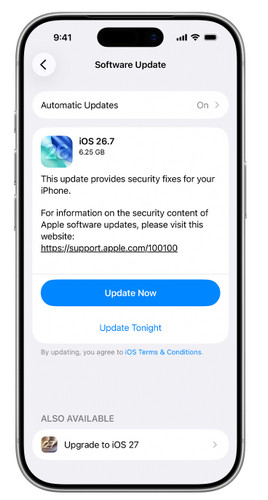
Krok 2. Wait for your iPhone to check for new updates.
Krok 3. Pokud je k dispozici aktualizace, klepněte na Aktualizujte teď or Stažení a instalace.
Part 3: iPhone Voicemail Still Not Working? Try This Solution
If none of the above methods work, the problem may be related to a deeper iOS system issue. For these stubborn cases, Apeaksoft Recovery systému iOS is the safest, most effective solution to repair your iPhone system. It is a desktop tool designed to troubleshoot various iOS problems, including iPhone apps not working, system freezes, disabled iPhone and more.

Staženo více než 1,000,000 uživatelé
- Fix iPhone voicemail not working without data loss.
- Resolves common iOS errors: black screen, boot loop & failed iOS upgrade.
- No technical skills needed and beginner-friendly.
- Supports every iPhone model & all the latest iOS versions
Bezpečné stahování
Bezpečné stahování
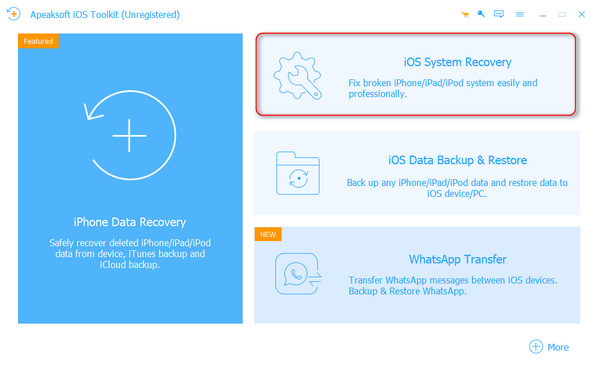
Krok 1. Install and launch Apeaksoft iOS System Recovery. Connect your iPhone to your computer with a Lightning cable. Choose Nástroj pro obnovu systému iOS z rozhraní.
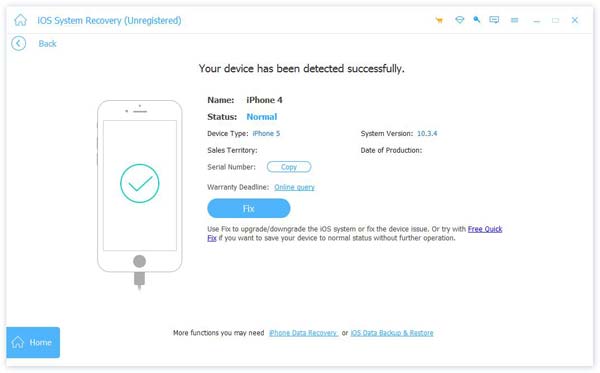
Krok 2. Klepněte na tlačítko Home pod tlačítkem System Repair Karta.
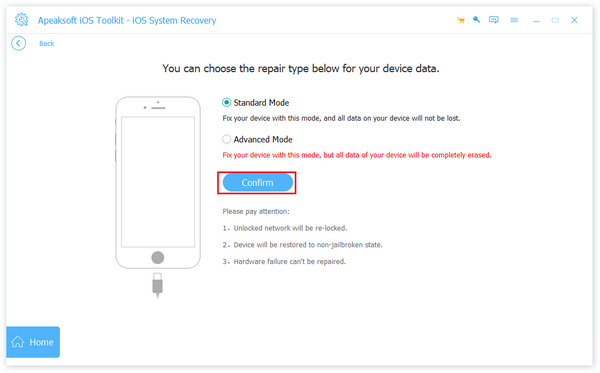
Krok 3. Vybrat Standardní režim or Pokročilý mód to fix iPhone voicemail not working problem. Note that Advanced Mode can solve more serious system problems, but it will erase your data.
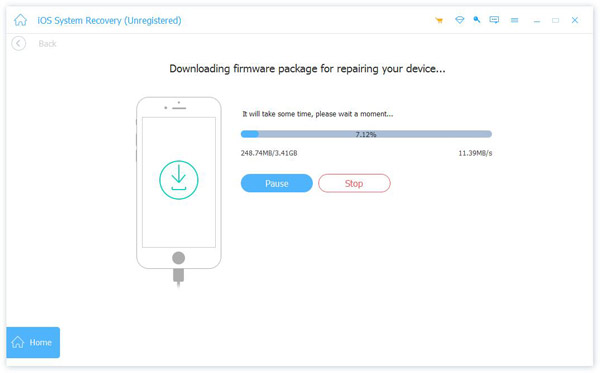
Krok 4. Follow the on-screen instructions to repair your iPhone. Wait the recovery process patiently and keep the iPhone connected.
Part 4: FAQs About Voicemail Not Working
Why are voicemails not showing up on my iPhone until days later?
Sometimes the network is just slow. You may get the messages a few days later, which is annoying. Try restarting your iPhone and checking your network. If it keeps happening, ask your carrier what's going on.
Why is my iPhone not notifying me about new voicemails?
If you have new voicemails but don't receive notifications, go to Nastavení > Oznámení > Telefon a ujistěte se Povolit oznámení je zapnut.
Can I recover deleted voicemails on my iPhone?
Můžeš obnovit smazané hlasové zprávy from the Deleted Messages folder in the Phone app. Open Telefon, Jděte na Hlasové zprávy filter, and look for Odstraněné zprávy.
Závěr
Voicemail not showing up on iPhone is super common. Sometimes you just need to restart your phone or check a few settings. There are 8 fixes above, so give them a try. Most users solve their problem in 2 minutes or less. You can also use Apeaksoft iOS System Recovery if your iPhone still has problems. Hopefully, your voicemail will show up again and you won't miss any more messages.
 Apeaksoft Recovery systému iOS
Opravte závažné problémy se systémem iOS na iPhonu, iPadu a iPodu.
Bezpečné stahování
Bezpečné stahování
Související články