How to Fix the Apple ID Not Valid or Supported Issue

Key Takeaways
When it says This Apple ID is not valid or not supported, it is because Apple has detected an issue related to your Apple ID, device, account status, or sign-in environment. You can
- Check your Apple ID and password. Make sure they are right.
- Check your Apple ID region and account information.
- Check your network and VPN settings.
- Restart your device.
- Check Apple system status.
- Update your iOS system.
- Remove Apple ID from your device.
- Contact Apple Support.
Have you ever encountered the This Apple ID is either not valid or not supported error pop-up when logging into your account, activating your device, downloading apps, or even resetting your Apple ID on your iPhone or iPad? Now you are in the right place! This article will thoroughly explain the core reasons behind the Apple ID Not Supported or Valid issue and provide a step-by-step troubleshooting guide.
PAGE CONTENT:
Part 1: When Will Apple ID Not Supported or Valid Pop up
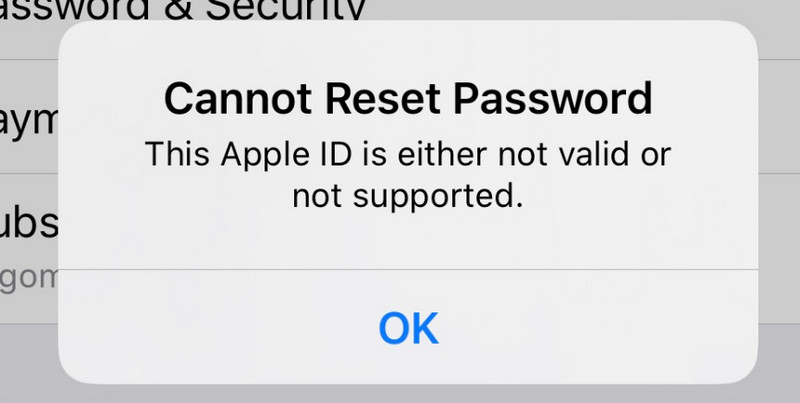
The Apple ID Not Supported or Valid error usually pops up when Apple detects an issue with your account, device, or login environment. When it occurs, you cannot go on with your current activities. Here, we summarize common scenarios you will see in the prompt:
- Activate iPhone or iPad after reset or flashing.
- Log in or switch iCloud accounts on different devices.
- Switch the login Apple ID account in the App Store.
- Reset Apple ID password via the web page.
- Use third-party tools to verify device binding IDs.
- Log in to an overseas Apple ID across regions using a proxy.
- Account anomaly triggers Apple's security risk control verification.
Part 2: Why Is My Apple ID Not Supported or Valid
1. Incorrect Apple ID Information
It is one of the most common reasons why you see the Apple ID Not Valid or Supported message. Common mistakes include:
- Incorrect Apple ID characters, including extra spaces or spelling errors in the email suffix, such as xxxxx@gmail .com, xxxxx@gmail.con, etc.
- Missing country code when using a phone number as your Apple ID, such as forgetting to add "+1" before a US phone number.
- Hidden spaces or invalid characters when copying and pasting an Apple ID.
- The email address you use has never been registered as an Apple ID.
2. Abnormal Apple ID Account Status
- The email address has not been verified after registration.
- The account has been inactive for a long time. You need to activate it again.
- Temporary security restrictions are caused by unusual sign-ins from different places or multiple devices.
- Your Apple ID has violated Apple's terms of service, such as account sharing, suspicious payment activities, phone flashing, or attempts to bypass the iCloud Activation Lock.
- You have submitted an account cancellation request.
3. Region or Service Compatibility Issues
Sometimes, an inconsistent Apple ID region and current usage environment may cause the pop-up of the Apple ID not valid or supported message.
- Your Apple ID region and the current App Store region are not the same.
- You are using an Apple ID from another region without a valid local payment method or address.
- You are using a company or school-bound Apple ID.
4. Abnormal Device or System Environment
- Outdated iOS versions.
- Device time and date is not synced.
- You are using a VPN or proxy.
5. Payment Information Issue
- Your Apple ID's payment method is expired.
- Your account has unpaid orders or billing issues.
- Incomplete billing address or other account information.
6. Temporary Apple Server Issues
Sometimes, the Apple ID Not Valid or Supported error is not caused by your account but by temporary issues with Apple services.
Part 3: How to Fix Apple ID Not Supported or Valid
Solution 1: Check your Apple ID and password
You can manually enter the account, ensuring there are no hidden spaces. Also, you can verify the email suffix, making sure it ends with .com.
Solution 2: Check your Apple ID region and account information
Make sure your Apple ID region, payment method, and account details are correct and the latest. Update your Apple ID in Settings if necessary.
Solution 3: Check your network and VPN settings
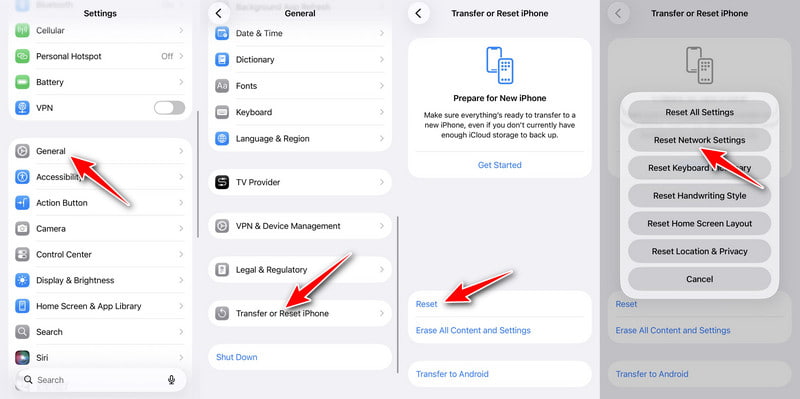
You can switch between cellular data and Wi-Fi. You can also try to disable VPN or proxy connections to ensure a stable login environment. If necessary, you can reset your network by following the path: Settings - General - Transfer or Reset iPhone - Reset - Reset Network Settings.
Solution 4: Restart your device
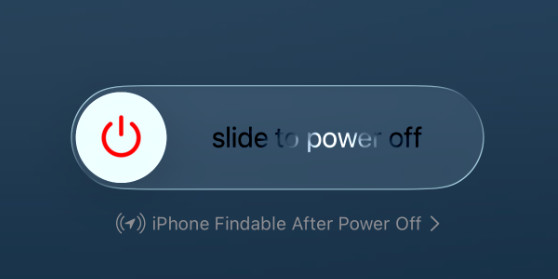
Try to restart your iPhone or iPad to fix temporary system errors that may affect the Apple ID verification. For modern devices, just press and hold the Power button and any volume button together. Slide to turn off your iPhone.
Solution 5: Check Apple system status
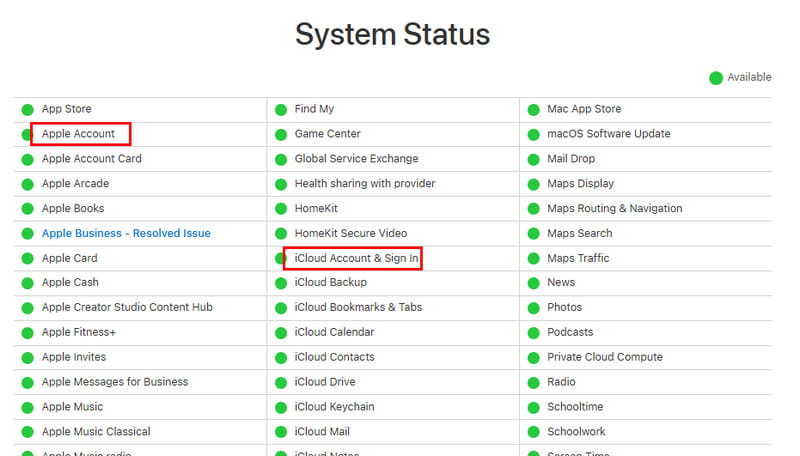
Go to the Apple System Status page and check whether iCloud Account & Sign In, Apple Account, or related services show an outage. If there is an issue, wait for Apple to restore the service.
Solution 6: Update iOS Versions
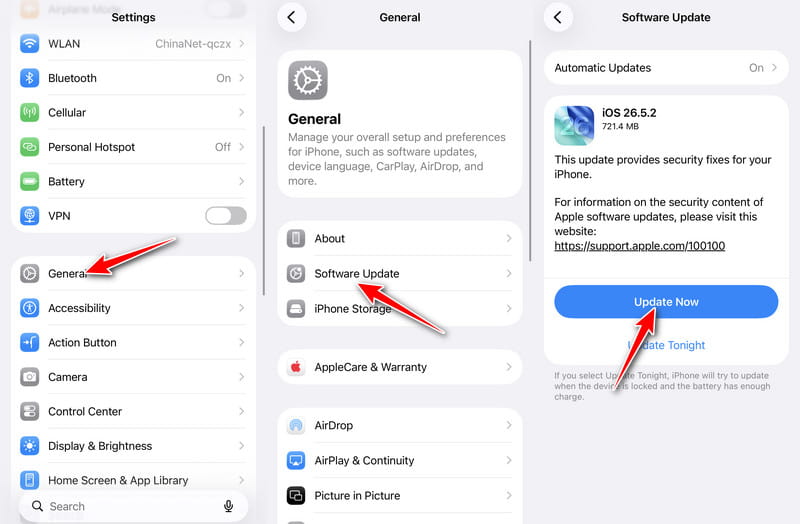
You can also update the iOS system to the latest version to exclude potential causes that will lead to the Apple ID is either not valid or supported issue. Simply go to Settings - General - Software Update - Update Now.
Solution 7: Remove Apple ID
If you cannot access your iPhone due to the invalid Apple ID issue, you can try tools like Apeaksoft iFoneKit iOS Unlocker to remove the Apple ID from your iPhone and regain access to your device when you cannot sign in with the original account.

Downloaded by over 1,000,000 users
- Remove Apple ID without a password.
- Bypass the invalid or unsupported Apple ID prompt.
- Streamlined workflow and easy-to-follow guide.
- Compatible with all popular iPhone models and iOS versions.
Secure Download
Secure Download
Tips: Try this software and remove Apple ID from iPhone with ease if all the solutions don't work.
Solution 8: Contact Apple Support
If all operations fail, you need to go to Apple Support for help. Provide as much proof of ownership as possible to help Apple verify your identity quickly and handle your issue more efficiently.
Conclusion
Why does it say Apple ID is not valid or supported? You must get the answer now. Hope this article will help you solve the Apple ID not valid or supported issue and regain access to your device successfully!
 Apeaksoft iFoneKit
 Unlock all types of iOS passwords from iPhone, iPad and iPod.
Secure Download
Secure Download
Related Articles