[Tested] How to Record a Facebook Video and Does It Notify

Does Facebook notify screen recording? If you keep wondering this, you're not alone. The answer is, it depends on what you are recording. Usually, you can record freely without alerts, but if you record something encrypted, others will know. This article will give you a clear list of situations where you can or cannot record, as well as a complete guide on how to record Facebook videos. Let's go ahead.
PAGE CONTENT:
- Part 1: Does Facebook Notify Screen Recording? – A Clear List
- Part 2: How to Screen Record on Facebook on Windows/Mac
- Part 3: How to Screen Record on Facebook on iPhone
- Part 4: How to Screen Record on Facebook on Android
- Part 5: How can I protect my videos from being recorded?
- Part 6: FAQs on Facebook Recording
Part 1: Does Facebook Notify Screen Recording? – A Clear List
Mostly, the answer is no. The only exception is when you're in a Messenger chat with Disappearing Messages turned on. Basically, it's the one place where Facebook plays Mission Impossible: messages are set to self-destruct after a short time. In this case, yes, Facebook will notify the others, if you save the Facebook message before it's gone.
Tips: By the way, screenshots and screen recordings are treated identically by Facebook in almost all cases. So screenshots work the same way – when someone takes a screenshot with Disappearing Messages on, people in the chat will be notified.
| Situation | Notifies recording? | Notifies screenshot? | Details |
| Facebook Posts / Photos | No | No | Fully safe |
| Stories / Highlights | No | No | Fully safe |
| Reels / Videos | No | No | Fully safe |
| Live Streams | No | No | Fully safe |
| Profiles | No | No | Fully safe |
| Regular Messenger Chats | No | No | Fully safe |
| Messenger Disappearing Messages | Yes | Yes | Alert sent to sender |
Part 2: How to Screen Record on Facebook on Windows/Mac
With customized recording range, scheduled auto-recording, and rich editing features, Apeaksoft Screen Recorder is one of the best screen recorders for desktop. If you are going to record Facebook on a PC, it's a perfect choice. Here's a clear introduction on how to screen record Facebook Reels, videos, and Lives.

Downloaded by over 1,000,000 users
- Record screen and audio with high quality.
- Customize the screen recording range to fit Facebook videos.
- Trim, edit, convert, and compress recordings as you like before saving.
- Set a start time to record Facebook Lives automatically.
Secure Download
Secure Download
Step 1. Download and install the software according to your operating system, and then launch it.
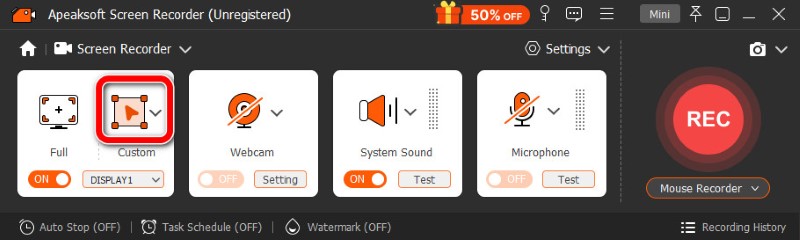
Step 2. The software is set by default to record the full screen. To record only the specific window of Facebook, click Custom and drag out the range.
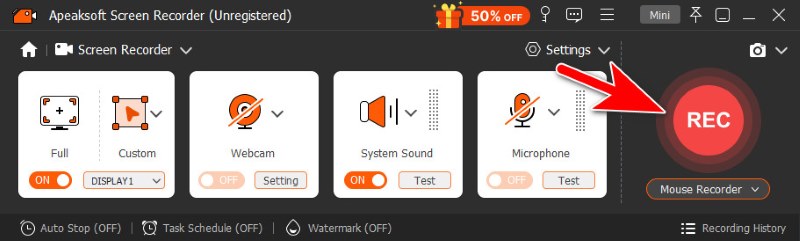
Step 3. Click REC to start recording.
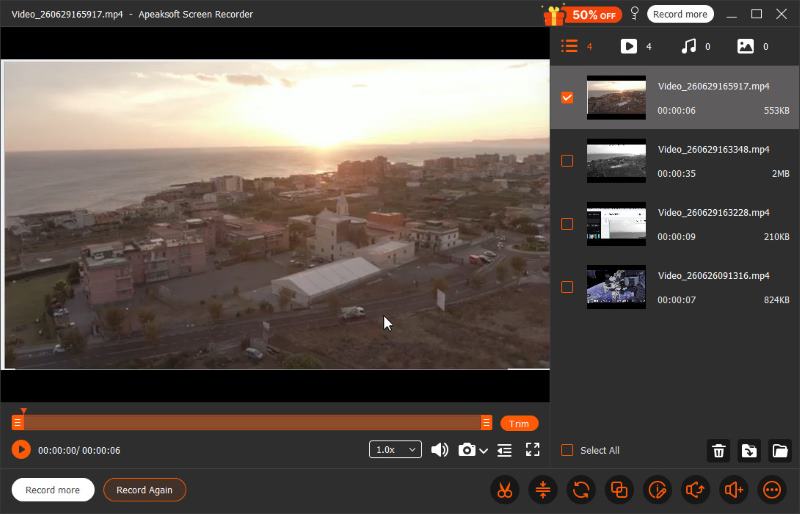
Step 4. To finish recording, click the red square on the floating bar. Then the video file is auto-saved, and the editing window appears. Here you can trim, convert, compress, and merge the videos, or adjust their audio tracks.
Part 3: How to Screen Record on Facebook on iPhone
Step 1. Activate the built-in recorder on your phone. How? Go to Settings, and select the Control Center option. Then, scroll down till you find the Screen Recording app, and tap the green plus button to turn it on. If it's already turned on, then just let it be.
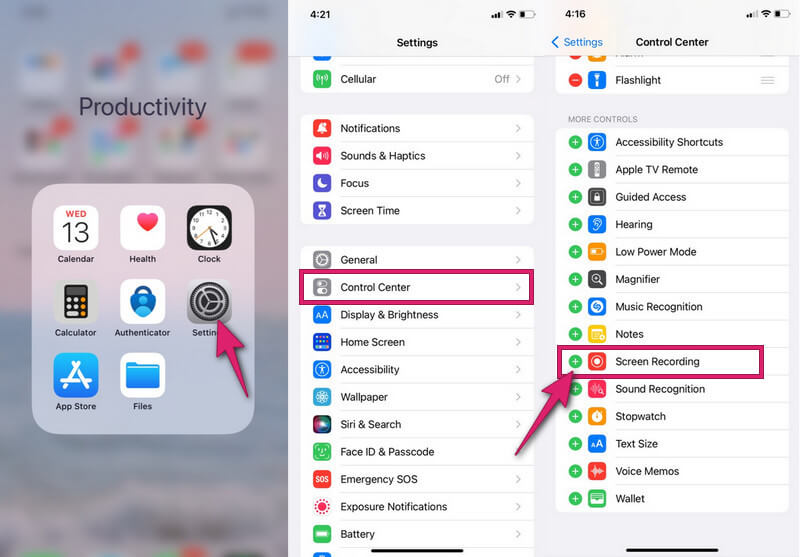
Step 2. Swipe down your screen to summon the Control Center. There, tap the circular button indicating Record. When it turns red, it means the recording has started. Now open your Facebook to capture.
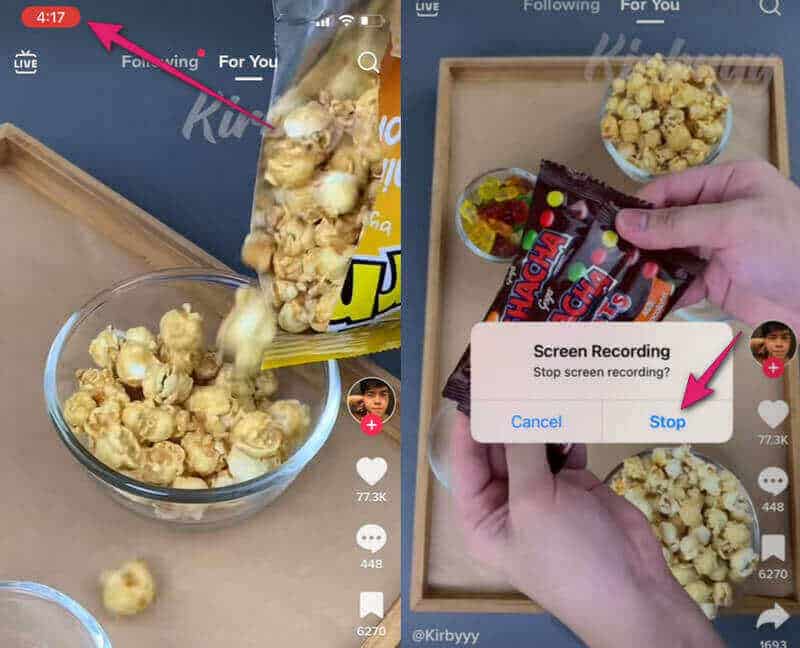
Step 3. To end the recording, tap the red-shaded timer. On the small window that appears, tap Stop.
Part 4: How to Screen Record on Facebook on Android
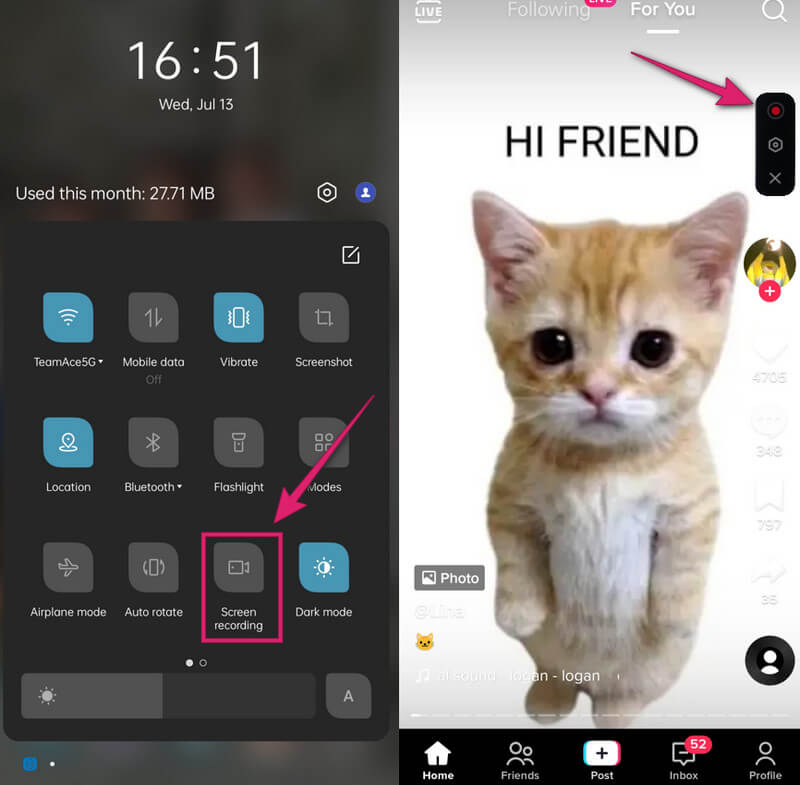
Step 1. Swipe down your screen to access the Quick Setting. Look for the Screen Recording tool and open it.
Step 2. On the floating bar, tap the red circle to start the recording.
Step 3. To finish recording, tap the same red circle button again. Then you can check your recorded Facebook video in your photo gallery.
Part 5: How can I protect my videos from being recorded?
I understand your concerns about copyright and privacy, but alas, there's no effective way to completely prevent your public posts from being recorded. In the end, you either have to give up broader reach, or accept the trade-off and add a watermark.
Lock profiles/Select audience
- To lock your profile, click the three dots next to Edit Profile. Select Lock Profile, so your posts are only shown to your friends.
- To select an audience, tap the Audience Selector button below your name before posting, and choose an audience range. You can also change the audience settings of past posts. Go to Settings & Privacy > Settings > Privacy. Click Limit Past Posts to change all past public posts to Friends or Only Me.
These two methods limit your Facebook content to only your trusted ones. But on the downside, fewer people will be engaging with you.
Add watermark
Facebook doesn't have a built-in watermark feature, so you need to do it with a third-party tool before uploading to Facebook. In this way, people can still record your content, but the watermark claims your ownership.
Part 6: FAQs on Facebook Recording
Can I record Facebook video calls?
Yes, you can. Apeaksoft Screen Recorder fits perfectly for this job. Start a video call, and launch Apeaksoft to record the window.
Can I see who stalks my Facebook?
No, not directly. Facebook doesn't let you see who has visited your profile, and third-party tools are too risky to try. But you can speculate from indirect clues such as frequent likes and total visits. May not be enough, but better than nothing.
How to record a Facebook Live?
Ever caught off guard by your favorite creator starting an unplanned live when you're occupied? Apeaksoft Screen Recorder helps you record Live from Facebook for later viewing with no hassle. Click Task Schedule at the bottom to set a start time, so it can record Live on Facebook automatically. You don't have to keep an eye on it all the time.
Conclusion
Does Facebook notify screen recording or screenshots? No, except for Disappearing Messages. How do you record a video on Facebook? The best choice overall is Apeaksoft Screen Recorder. With rich recording features and customized settings, it is one of the best screen recorders for Mac and Windows. But keep in mind: while Facebook doesn't notify users when someone screen records, it does have rules about how content can be used and shared on its platform. Don't go against its policy, and never use unauthorized recordings for commercial situations.
 Apeaksoft Screen Recorder
 Record any video and audio on phone and computer screen.
Secure Download
Secure Download
Related Articles