Honest Review of Apeaksoft Android Data Recovery Software

Currently, everyone processes oceans of data every day, retrieving and viewing information, creating and saving digital files, and sharing and distributing data online. However, data loss is still a big challenge, whether due to accidental deletion, device damage, or a system crash. This article reviewed Apeaksoft Android Data Recovery, one of the best data recovery software options for Android devices, based on our lab test.
PAGE CONTENT:
- Part 1: What Is Apeaksoft Android Data Recovery
- Part 2: Real-World Performance of Apeaksoft Android Data Recovery
- Part 3: What We Like & Dislike About Apeaksoft Android Data Recovery
- Part 4: Apeaksoft Android Data Recovery Current Pricing Plans
- Part 5: Apeaksoft Android Data Recovery vs Other Android Recovery Tools
- Part 6: Final Verdict: Is Apeaksoft Android Data Recovery Worth Trying
Key Takeaways
- Apeaksoft Android Data Recovery is dedicated to data recovery from Android devices. It works for a wide range of data types, including media files, messages, contacts, call history, and app data. Besides, it can extract lost data from broken, damaged, disabled, or frozen Android devices without backups.
Secure Download
Secure Download
Part 1: What Is Apeaksoft Android Data Recovery
As a reliable and efficient data recovery program, Apeaksoft Android Data Recovery excels at recovering important data across almost all data types on Android devices. It can scan the phone memory and retrieve lost data without a backup.
It is designed for everyone who has lost important data on their Android phone or tablet, or whose device is inaccessible due to hardware damage, disabling, or software glitches.
Available Scenarios
- Accidentally delete important files.
- The Android device is locked or disabled.
- The Android phone or tablet is broken.
- Data loss due to software glitches, such as update failure.
- Data loss due to rooting errors.
- SD card issues.
- System crashes.
- Virus attack.
Tech Specs
Hardware Requirements
- CPU: 1GHz Intel/AMD CPU or above 1GHz Intel® processor and Apple M1/M2/M3/M4/M5 chip
- RAM: 1G RAM or more
- Free Space: 200 MB and above
System Requirements
- OS: Windows 11/10/8.1/8/7/Vista/XP and Mac OS X 10.6 or above
- Android: All Android OS
What Can Android Data Recovery Do for You
- Recover deleted files from Android devices without backups.
- Support photos, contacts, messages, documents, WhatsApp, and more.
- Available to a wide array of data loss situations, like accidental deletion, system crash, root failure, and software glitches.
- Extract lost data from inaccessible Android devices, including broken phones.
- Preview deleted data and select specific files or items.
- Compatible with over 5,000 Android device brands and models.
- Won't interrupt existing data on your phone or tablet.
Part 2: Real-World Performance of Apeaksoft Android Data Recovery
Test Hardware and Software Preparation
CPU: Intel Core i7-6700
RAM: 32GB DDR4
Operating System: Windows 11 64-bit
Android Device: An Android phone from Samsung running Android 11
Test 1: Recover Recently Deleted Contacts
Phase 1: Preparation
Downloaded Apeaksoft Android Data Recovery from the official website and installed it on the PC. Launched the software.
Phase 2: Delete Data
In our test, we deleted some contacts, messages, photos, videos, and WhatsApp chats on the phone.
Phase 3: Recover Data
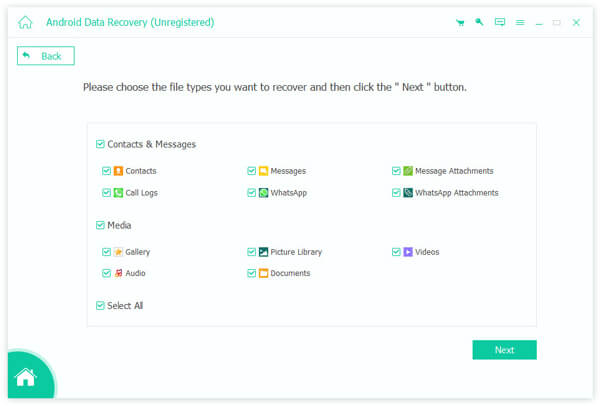
Connected the Android phone to the PC with a USB cable. Then, follow the on-screen instructions to select the desired data types and scan the phone memory. After the data scan, we previewed the recoverable data and recovered the deleted files.
Phase 4: Test Result
| Recovery Rate | |
| Contacts | 100% |
| Messages | 100% |
| Photos | 100% |
| Videos | 100% |
| WhatsApp Chats and Attachments | 99% |
Test 2: Retrieve Permanently Deleted Photos
Phase 1: Delete Data
We deleted some contacts, messages, photos, videos, and WhatsApp chats on the phone. We also accessed the Trash, Recycle Bin, or a similar folder to remove the deleted data permanently. Then, we kept using the phone as usual.
Phase 2: Recover Data
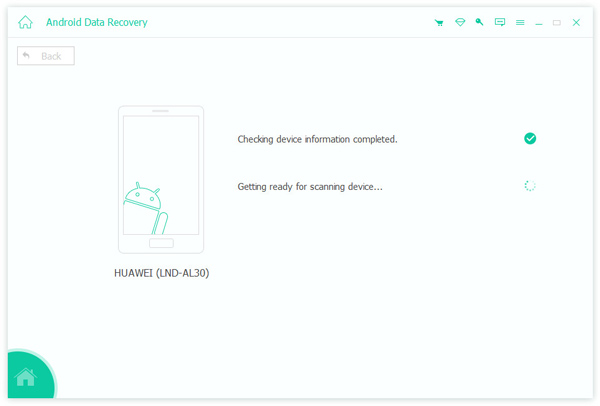
Next, we connected the phone to the PC and ran Apeaksoft Android Data Recovery. Follow the instructions to scan, preview, and retrieve lost data on the phone.
Phase 3: Test Result
| Recovery Rate | |
| Contacts | 100% |
| Messages | 99% |
| Photos | 100% |
| Videos | 100% |
| WhatsApp Chats and Attachments | 97% |
Test 3: Extract Lost Data from a Broken Phone
Phase 1: Preparation
We saved some contacts, messages, photos, videos, and WhatsApp chats on the phone. Then, we broke the phone screen.
Phase 2: Extract Data
We linked the phone and the PC with a USB cable. Run Apeaksoft Toolkit, choose Broken Android Data Extraction, and follow the on-screen instructions to extract data from the broken phone.
Phase 3: Test Result
| Recovery Rate | |
| Contacts | 100% |
| Messages | 100% |
| Photos | 100% |
| Videos | 100% |
| WhatsApp Chats and Attachments | 95% |
Further Reading
Part 3: What We Like & Dislike About Apeaksoft Android Data Recovery
After our testing, we summarized the strengths and weaknesses of Apeaksoft Android Data Recovery. Plus, we collected hundreds of users' reviews. Here is an honest assessment of the software:
- Integrate a clean and intuitive interface.
- Recover a variety of file types on Android.
- Perform a standard scan without rooting.
- Preview files before recovering to ensure relevance.
- Choose specific files for recovery rather than bulk restoration.
- Support almost all Android device models from major brands.
- The success rate varies, especially for overwritten data.
- Lack a standalone mobile app.
Part 4: Apeaksoft Android Data Recovery Current Pricing Plans
| Windows | Mac | |
| 1-Month License | $17.95 | $17.95 |
| Lifetime License | $44.96 | $44.96 |
| Android Toolkit | $75.00 | $55.00 |
Part 5: Apeaksoft Android Data Recovery vs Other Android Recovery Tools
In addition, we also tested other popular Android data recovery software in our lab. To help you learn the test results and make the best decision, we shared the comparison in the table below:
| Apeaksoft Android Data Recovery | Tenorshare UltData | Dr.Fone for Android | Disk Drill | |
| Recovery Rate | 97% | 95% | 95% | 92% |
| File Type Support | 30+ | 20+ | 20+ | 25+ |
| Speed | 2-5 minutes to scan a phone | 3-7 minutes | 5-8 minutes | Over 10 minutes |
| Device Support | 5000+ | 2000+ | 2000+ | 3000+ |
Part 6: Final Verdict: Is Apeaksoft Android Data Recovery Worth Trying
Yes, Apeaksoft Android Data Recovery is worth trying if you have failed with the free methods, like Google Drive, the deleted data is important, the deletion happened recently, and you are not tech-savvy enough for manual recovery.
It is not an ideal option if your lost data is available via Google Drive or other backups, your phone is already rooted, or you are on a tight budget.
Conclusion
Following our sharing, you should understand what Apeaksoft Android Data Recovery is, what it can do, and other necessary information. This can help you make the best decision. If you recently lost important files and data on your phone, try the software to recover them.
 Apeaksoft Android Data Recovery
 Recover various deleted or lost data from all popular Android devices.
Secure Download
Secure Download
Related Articles