How to Recover Deleted Messages on TikTok for iOS/Android

As one of the most popular social platforms, TikTok has exceeded 1.5 billion users. According to our research, over 60% of TikTok users have accidentally deleted important messages. With information exchanged so quickly on this video-based social platform, losing valuable chats can be frustrating. This guide walks you through effective methods to recover deleted messages on TikTok, exploring both free and paid solutions to help retrieve lost data.
PAGE CONTENT:
- Part 1: How to Recover Deleted Messages on TikTok from Others
- Part 2: How to Recover Deleted Messages on TikTok by Requesting TikTok Data
- Part 3: How to Recover Deleted TikTok Messages from Notification History
- Part 4: How to Recover Deleted Messages on TikTok from Support
- Part 5: How to Recover Deleted TikTok Messages on iPhone Without Backup
Part 1: How to Recover Deleted Messages on TikTok from Others
No matter whether you accidentally delete messages you receive or send, they won't be removed on the other end. Once you realize you deleted important chats on TikTok, ask the sender or recipient to resend the messages. That is the easiest way, but you have to stay in touch with the other user.
Part 2: How to Recover Deleted Messages on TikTok by Requesting TikTok Data
TikTok doesn't provide an official undelete button or trash folder for messages. Once you delete a message or a chat, there is no direct way to recover it. However, you can request your TikTok data. The download includes a Direct Messages folder.
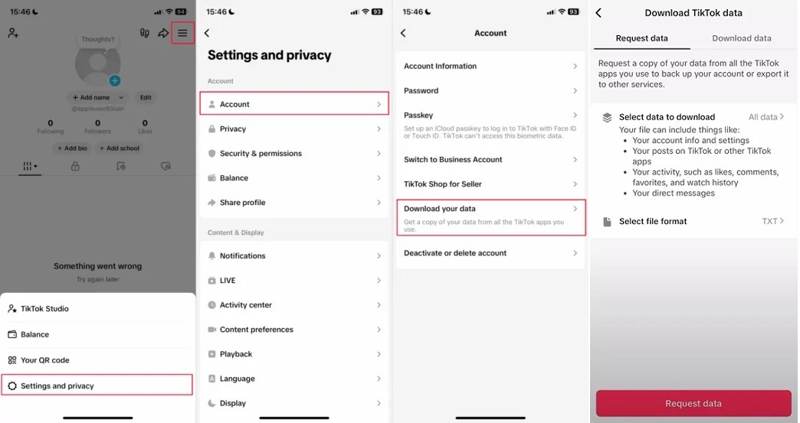
Step 1. To recover deleted messages on TikTok, open the app.
Step 2. Go to the Profile page and tap the Hamburger button in the top-right corner.
Step 3. Tap the Settings and privacy option.
Step 4. Choose Account and tap Download your data.
Step 5. Tap All data in the Request data tab, choose Custom, and select Messages.
Step 6. Tap the Done button to confirm the selection.
Step 7. Tap the Request data button to submit the request.
Step 8. Once TikTok receives your request, it will send you the download file.
Step 9. Then, go to the Download data tab and tap the Download button.
Step 10. Navigate to the Direct Messages folder and recover deleted TikTok messages.
Part 3: How to Recover Deleted TikTok Messages from Notification History
If you access TikTok on an Android device and accidentally delete some important messages, you can find them through the Notification History section. Bear in mind that this method is only available for messages received within the past 24 hours.
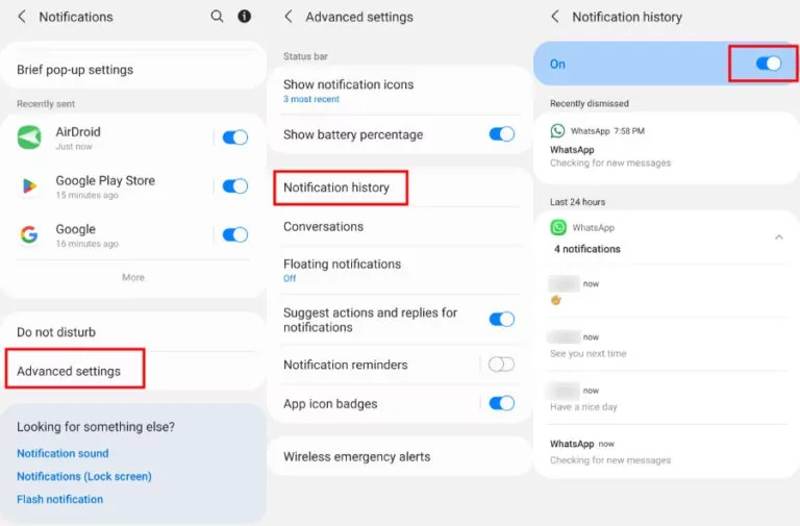
Step 1. Open the Settings app from the app tray or from the Quick Access panel.
Step 2. Go to the Notification tab.
Step 3. Navigate to Advanced and Notification history.
Step 4. Locate TikTok and see all TikTok messages you recently received.
Note: This way cannot recover deleted messages from TikTok. It means that you can only view them.
Further Reading
Part 4: How to Recover Deleted Messages on TikTok from Support
Another option is to contact TikTok support to recover deleted messages on TikTok. You can explain your deleted messages issue in detail, but recovery help is not guaranteed.
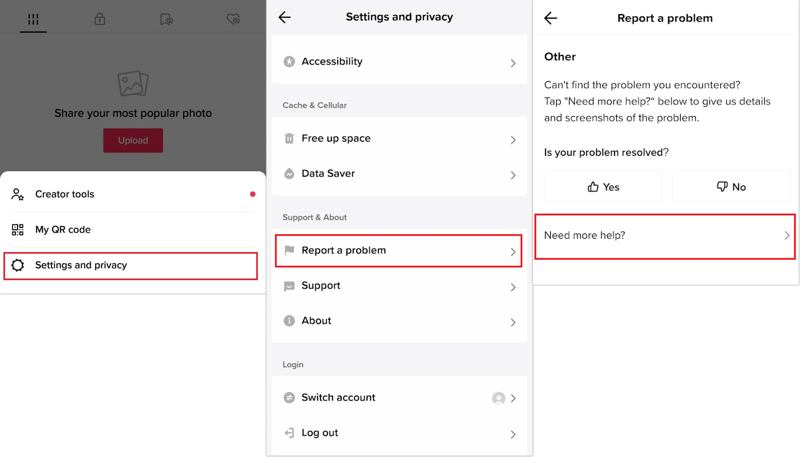
Step 1. Go to the Profile tab in the TikTok app.
Step 2. Tap the Hamburger button.
Step 3. Navigate to Settings and privacy, and Report a problem.
Step 4. Then, follow the on-screen instructions to leave your recovery request.
Step 5. Tap the Submit button and wait for TikTok to send your messages.
Part 5: How to Recover Deleted TikTok Messages on iPhone Without Backup
Apeaksoft iPhone Data Recovery is a quick way to recover deleted TikTok messages on iOS, even without a backup. It quickly scans your iPhone's memory for deleted messages and attachments.

Downloaded by over 1,000,000 users
- Recover deleted messages on TikTok from iOS devices.
- Extract lost messages from iTunes or iCloud backup.
- Preview deleted messages for selective recovery.
- Won't interrupt existing data on your iPhone.
- Support the latest editions of iOS and iPadOS.
Secure Download
Secure Download

How to Recover Deleted Messages on TikTok for iOS
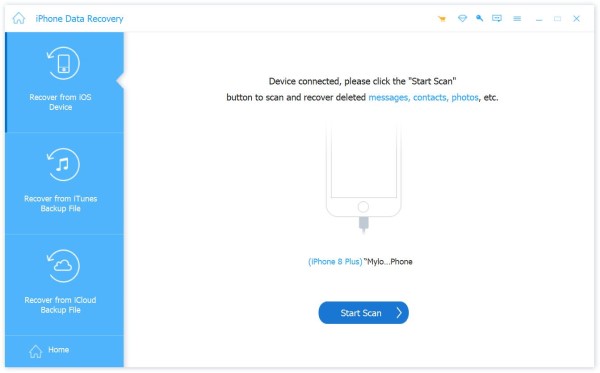
Step 1. Scan your iPhone
Launch the iOS data recovery software after installing it on your PC. There is another version for Mac. Go to the Recover from iOS Device tab. Connect your iPhone to your PC with a Lightning cable. After it is detected, click the Start Scan button to proceed.
Step 2. Preview lost messages
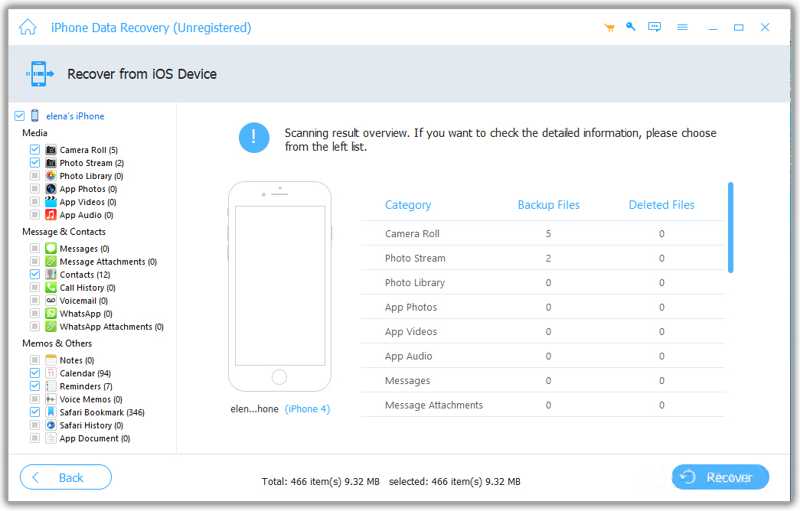
Once data scanning finishes, choose the data types you want to recover. Then, you can preview the chats and messages. To view deleted messages, choose Show Deleted Only from the top dropdown list.
Step 3. Recover deleted messages
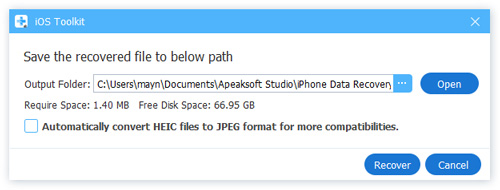
Select the desired messages and attachments, then click the Recover button at the bottom right. Select an output folder, then click Recover again to confirm.
Conclusion
This guide shared five ways to recover deleted messages on TikTok on an iPhone or Android device. While TikTok doesn't have a Recycle Bin or Trash feature, you can request a download of your messages from TikTok's servers. Apeaksoft iPhone Data Recovery is an easy way to retrieve deleted messages from any app, including TikTok.
 Apeaksoft iPhone Data Recovery
 Recover deleted or lost data from iOS Devices, iTunes, and iCloud backup.
Secure Download
Secure Download
Related Articles