


5 Ways to Recover Deleted Phone Numbers on iPhone and Android

Can you recover deleted phone numbers? The short answer is yes. When a contact is removed, the data is rarely erased from your phone's memory immediately. Instead, the operating system marks that storage slot as available, meaning the information remains hidden until new data overwrites it.
Whether you are using iOS or Android, this comprehensive guide will teach you exactly how to recover deleted phone numbers using native cloud backups, built-in system tools, and specialized recovery techniques.
PAGE CONTENT:
Part 1: How to Recover Deleted Phone Numbers on Android
Method 1: Apeaksoft Android Data Recovery
Apeaksoft Android Data Recovery should be the most effective solution to bring back lost Android files, including phone numbers. Just connect your Android phone to your PC or Mac, and then you can easily detect your phone and select the lost phone numbers to recover. It can do the recovery process without previous backup, which means you can directly recover phone numbers as long as your phone can boot.

Downloaded by over 1,000,000 users
- Connect your Android phone to computer to start recovery.
- Mark the lost phone numbers and other files in red for your quick selection.
- Select your desired or select all phone numbers to recover.
- Protect your data and privacy security.
Secure Download
Secure Download
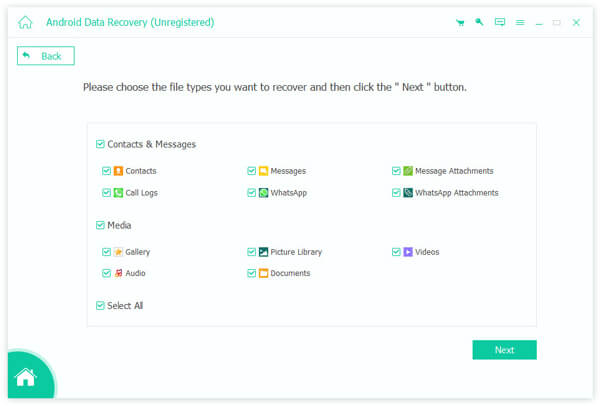
Step 1. Download, install, and launch Apeaksoft Android Data Recovery on your PC or Mac. Connect your Android phone to the computer. Then, make sure to select Contacts to let the program be able to detect lost phone numbers.
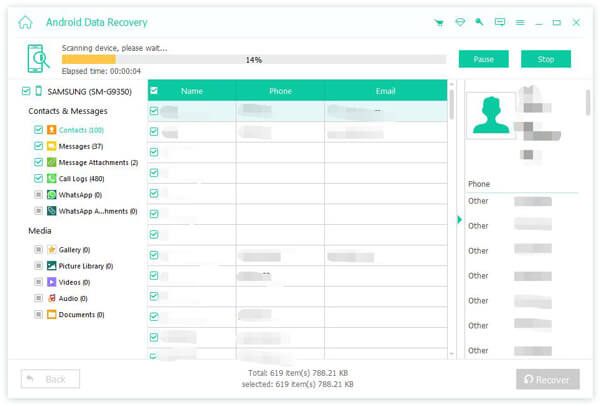
Step 2. Apeaksoft Android Data Recovery will quickly detect and analyze your phone. During the detecting process, your lost files and data will gradually appear. Check if there are your lost phone numbers.
Step 3. Then, select your desired contacts and click the Recover button to recover the deleted phone numbers to your Android phone.
Further Reading
Method 2: Check the Google Contacts Trash Bin
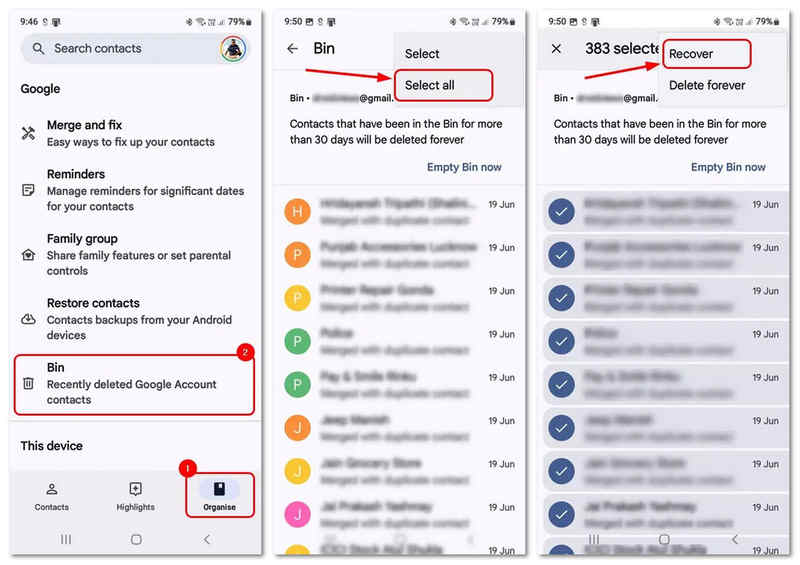
Step 1. Open the Google Contacts app on your Android device.
Step 2. Tap the Organise tab at the bottom of the screen.
Step 3. Select the Trash option.
Step 4. Long-press the contact or phone number you accidentally removed. You can also tap the More button to select all contacts.
Step 5. Tap the More button again in the top right corner and select Recover. It will quickly recover the deleted phone numbers on your Android to the address book.
Method 3: Undo Changes via Google Contacts Web
If the phone number was deleted within the last 30 days but isn't showing up in the phone's local trash bin, you can roll back your entire contact database to quickly recover the deleted phone numbers on your Android device.
Step 1. Navigate to contacts.google.com and sign in with the Google account tied to your Android device.
Step 2. Click the Settings button in the top right corner. Select Undo changes.
Step 3. Choose a rollback timeframe (ranging from 10 minutes ago up to 4 weeks ago) and click Undo to easily bring back the lost phone numbers to your Android.

Part 2: How to Recover Deleted Phone Numbers on iPhone
If you are an Apple user, you have several ecosystem safety nets designed for recovering deleted phone numbers on iPhone. Below are the most reliable methods to get back your contacts.
Method 1: Restore Contacts via iCloud.com (No Data Loss)
Many users ask, how do i recover deleted phone numbers on my iphone without wiping the entire device? The safest built-in solution is using the iCloud web interface, which maintains a hidden archive of your contact history.
Step 1. Open a web browser on your computer and log into iCloud.com with your Apple ID.
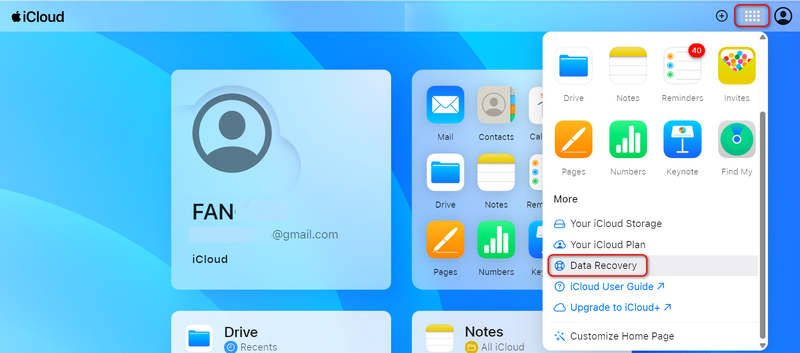
Step 2. Click on the More button (with a grid icon) in the top right corner and select Data Recovery (or scroll down to find the Data Recovery card).
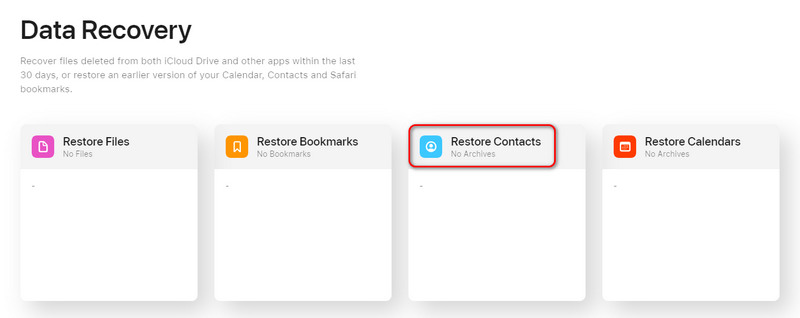
Step 3. Click on Restore Contacts. Browse through the available archive snapshots by date. Find a timeline entry from before the deletion occurred and click Restore.
Step 4. Confirm your choice. iCloud will automatically push the archived contact list to your iPhone, overwriting the current list without affecting any other data.
Method 2: Use an iTunes or Finder Backup
If you regularly back up your device to a computer, you can use it for recovering deleted phone numbers.
Warning: This method will roll back your entire phone to the state it was in at the time of the backup, meaning any new texts, photos, or apps added since then will be removed.
Step 1. Connect your iPhone to your Mac or Windows PC using a USB cable.
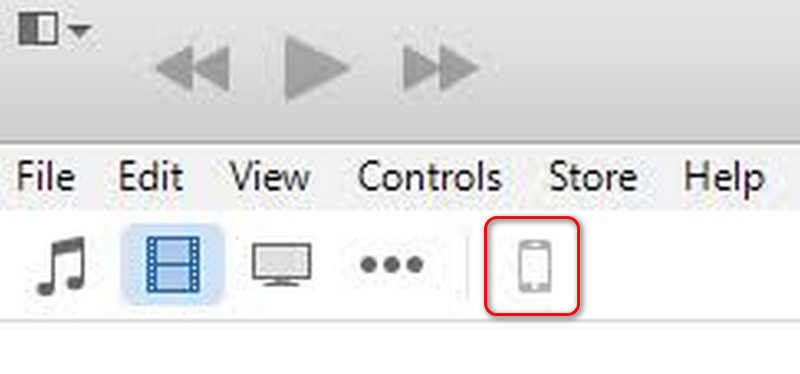
Step 2. Open Finder (on Mac) or iTunes (on Windows) and select your device icon.
Step 3. Under the General/Summary tab, click Restore Backup.
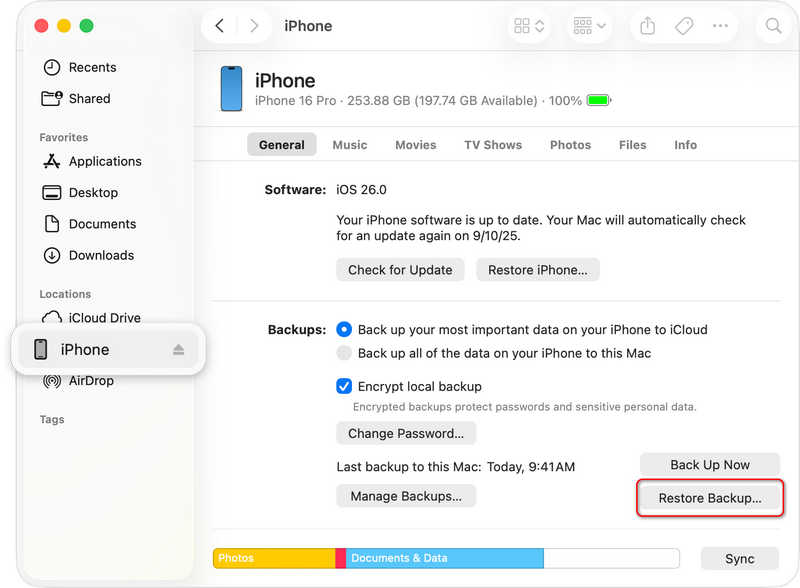
Step 4. Choose the relevant backup file and wait for the restoration process to complete. If you have ever set up an iTunes backup password, you need to enter it when you want to recover the lost phone numbers to your iPhone.
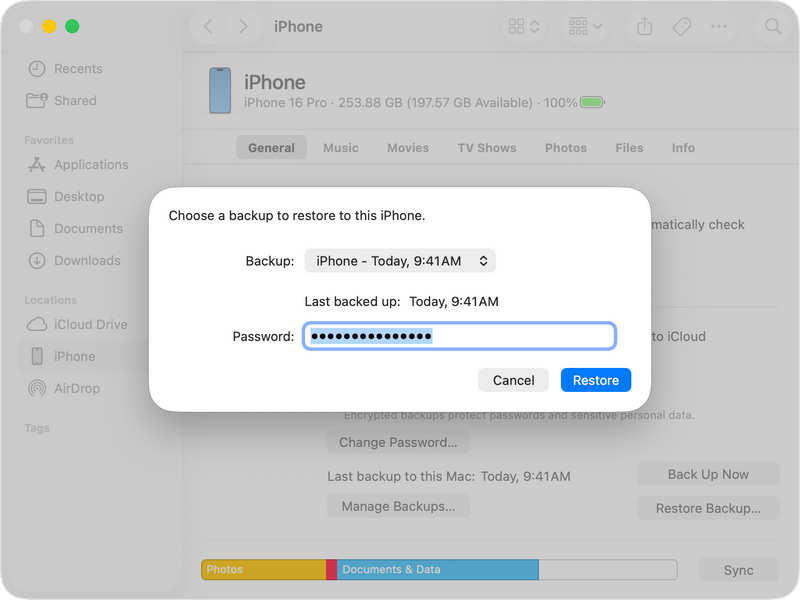
Part 3: Deep Data Recovery Options to Recover Your Phone Numbers
What happens if you don't have a cloud backup, your trash bin is empty, and you are still stuck trying to recover deleted phone numbers? You still have two technical routes left to explore.
Tips:
Check Your Carrier's Call Logs: Every single incoming and outgoing call or text message is tracked by your mobile service provider. If you recently called or texted the missing number, it will be immortalized on your monthly statement.
Use Professional Desktop Recovery Software: If the contact data was saved purely to your local internal storage, third-party data recovery software (like Apeaksoft, Tenorsharem and FoneLab) can scan your device's memory chips directly
Part 4: FAQs of Recovering Deleted Phone Numbers
Can I restore deleted phone numbers?
Yes, you can. Whether your phone numbers are stored in the SIM card or the local phone, Cloud Storage service or professional data recovery software, like Apeaksoft Android Data Recovery, can easily restore your lost phone numbers.
How to see permanently deleted contacts?
If your contacts are permanently deleted, average data recovery methods cannot help. You should use Apeaksoft Android Data Recovery can easily scan your phone and let you select the lost contacts to recovery.
Is there a recycle bin for deleted numbers?
Yes, there is. If your phone number is deleted in the last 30 days, you can go to the recycle bin to bring it back.
Conclusion
It it very easy to recover deleted phone numbers on both Android and iPhone. The basic and official cloud storage can help easily manage contacts, even if they are deleted. For Android users, if you didn't turn on the cloud service, Apeaksoft Android Data Recovery is your resort. It can easily recover permanently deleted phone numbers and other types of files even if there's no any backup.
 Apeaksoft Android Data Recovery
 Recover various deleted or lost data from all popular Android devices.
Secure Download
Secure Download
Related Articles




