

4 Useful Ways to Recover Deleted Viber Messages on iPhone

As a trusted and secure instant messaging app, Viber has attracted a huge number of users since its released. No matter who you chat with in Viber, your messages may be vitally important. What can you do when losing Viber chat history due to accidental deletion or a failed iOS upgrade?
Don’t feel regretful or panic after losing Viber messages. This page will show you how to recover deleted Viber messages or chat history on an iPhone. Even if you did not make backups for your messages, there is chance to get back lost messages.
PAGE CONTENT:
Part 1: How to Recover Deleted Messages from Viber Backup
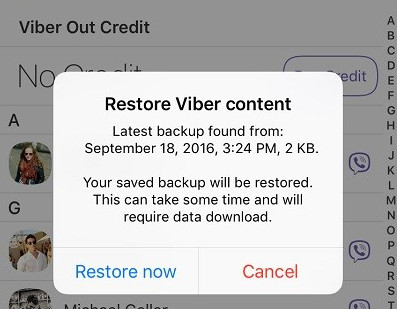
If you have enabled Viber’s cloud backup before deleting the Viber messages, then it will be easy to recover deleted Viber messages on an iPhone. You only need to reinstall Viber and log in to your account. Then, the system will detect the backup automatically and prompt you to restore.
Step 1. Uninstall Viber and install it again.
Step 2. Sign in with the same phone number. Then, the program will detect the existing backup and pop up a window.
Step 3. Press the Restore now button from the pop-up window.
Part 2: How to Recover Deleted Viber Messages on iPhone Without Backup
If you haven’t created a backup before, or you haven’t found any useful messages from Viber backup, what will you do? Don’t panic. You can still get back deleted Viber messages on iPhone, even without a backup, by using a third-party iPhone data recovery tool. Based on our thorough test of more than 10 popular tools on the market, we ultimately recommend Apeaksoft iPhone Data Recovery.
Reliable Viber Messages Recovery Tool
- Recover deleted messages on iPhone without backup.
- Recover lost Viber messages from iPhone with one click.
- Preview and recover deleted Viber messages selectively.
- Available to the latest iPhone, iPad, and iPod Touch.
- Besides the Viber chat history, you can also recover Viber pictures.
Secure Download
Secure Download
Step 1. Install the best iPhone data recovery application
Download and install iPhone Data Recovery on your PC. If you use a MacBook, get the Mac version. Hook up your iPhone to the computer with a Lightning cable and launch the application. It will recognize your device immediately.
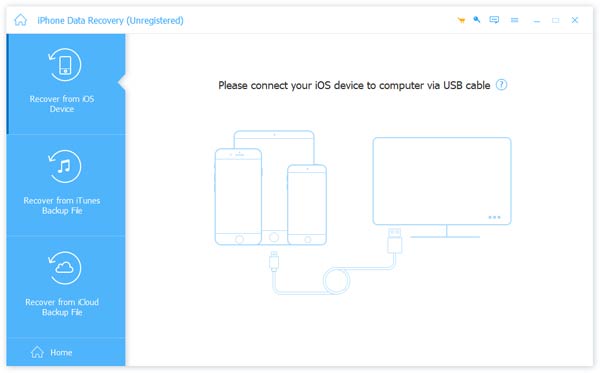
Step 2. Scan for lost data on your iPhone
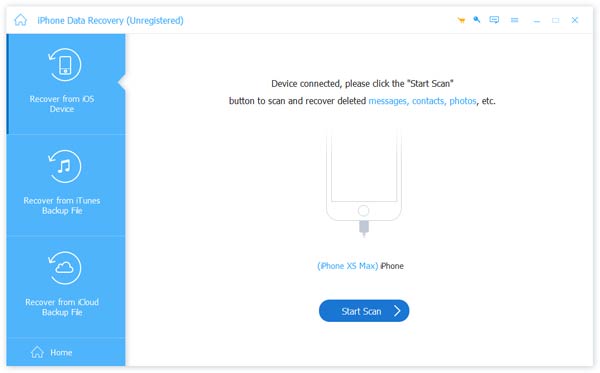
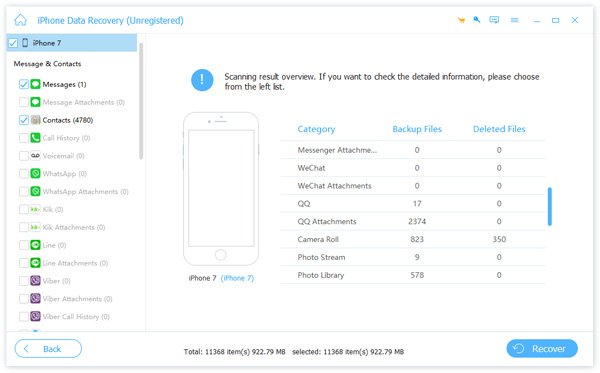
Go to the Recover from iOS Device tab on the left side and click the Start Scan button to initiate looking for deleted data and files in the iPhone memory. When it is complete, you will be taken to the preview window. Then you can select the data types you want to get back from the left sidebar.
Step 3. Recover deleted Viber messages on iPhone
Select the desired Viber messages on the list after previewing and click the Recover button in the bottom right corner. If prompted, drop a destination to save the messages and start deleted Viber messages recovery. A few seconds later, you can read your important messages on your hard drive.
Part 3: How to Retrieve Deleted Messages from Viber on iPhone via iTunes
iTunes is a well-known utility among iPhone owners. It was developed by Apple for iOS users to manage, transfer and download data on iOS devices. Some iPhone users prefer to back up their handsets with iTunes. If you are a member of this group, you can recover lost Viber chat history on the iPhone quickly.
Bear in mind that iTunes uses a unique algorithm to encode iPhone data, so iTunes backup files cannot be opened or accessed before restoring to iPhone. Moreover, the backup will overwrite existing data on your iPhone. If you are sure, follow the steps below to restore your Viber messages on iPhone.
Step 1. Plug in your iPhone to your computer and launch the latest version of iTunes.
Step 2. Wait for iTunes to detect your device and click the Device button in the top left corner. (iPhone does not appear in iTunes?)
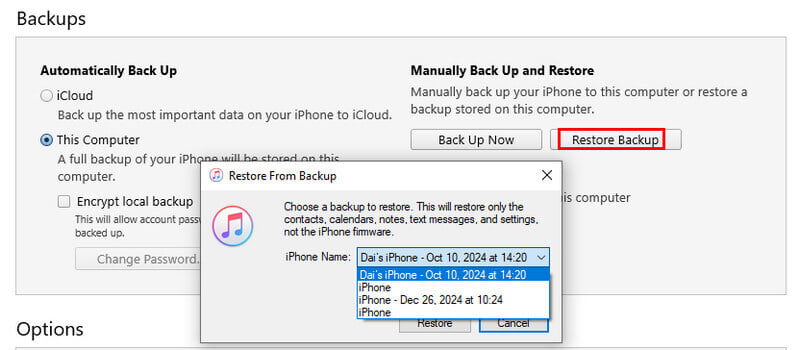
Step 3. Select the Summary tab from the left side and locate the Backups section.
Step 4. Click the Restore Backup button, then select an appropriate backup file from the list and click the Restore button.
Step 5. After the backup restore process finishes, quit iTunes, disconnect your iPhone from your computer, and turn on your iPhone. Then, you can access the deleted Viber chat history.
Part 4: How to Find Deleted Viber Messages on iPhone via iCloud
Much like iTunes, iCloud is another service provided by Apple for iPhone users. Each iPhone owner can get 5GB of free storage on iCloud and purchase more storage capacity. You are allowed to back up Viber messages and other data to your iCloud via a network.
Restoring Viber messages from iCloud has some disadvantages. You have to reset your iPhone in order to recover your Viber chat history on iPhone from iCloud backup. Moreover, a good internet connection is necessary.
Step 1. Connect your iPhone to a network and make sure there is an iCloud backup available.
Step 2. Open the Settings app, tap on your name, and go to General > Reset. Touch Erase All Content and Settings and enter your password when prompted.
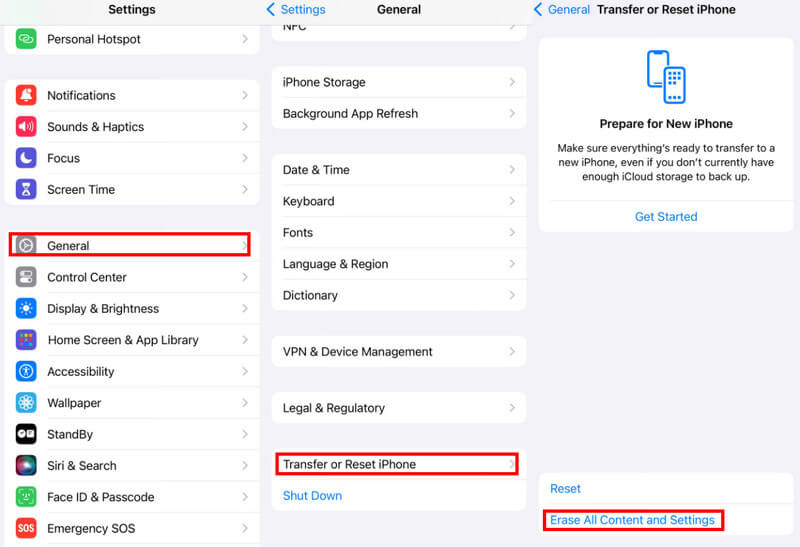
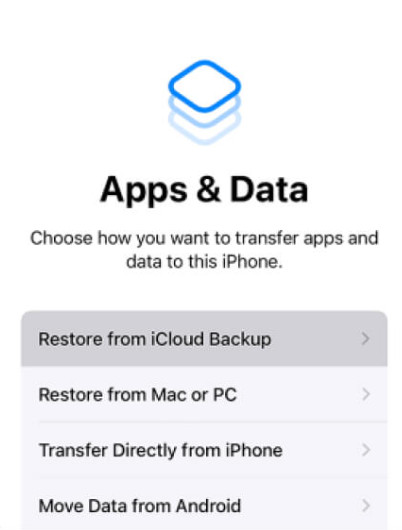
Step 3. Wait for your iPhone to power off and turn back on. Then follow the on-screen instructions until you reach the Apps & Data screen.
Step 4. Select Restore from iCloud Backup, sign in to the account that you used to back up your iPhone, and select the relevant backup to start recovering Viber contents.
Tips: It takes at least half an hour to restore an iPhone with iCloud backup since iCloud relies on a wireless connection to work. If your network connection is not very good, it may take longer. (Network does not work on iPhone? Reset it.)
Conclusion
If you are using the Viber app on your iPhone to keep in touch with your family and friends, you may store some important messages on your handset. Though it is rare, some people delete their Viber messages and then find they are significant. In such cases, you will need an approach to recover deleted Viber messages and conversations on an iPhone. iTunes and iCloud backups provide channels to achieve the task. On the other hand, we suggest you try Apeaksoft iPhone Data Recovery. It is not only easy to use, but also able to recover lost messages efficiently.
Related Articles




