Ta bort tidigare ägares Apple-ID utan lösenord säkert

Kan du inte använda iCloud på din begagnade iPhone eftersom den fortfarande är kopplad till den tidigare ägarens Apple-ID? Vill du veta hur man tar bort Apple-ID från tidigare ägareDen här guiden beskriver de mest effektiva metoderna för att ta bort Apple-ID:t och använda din enhet utan begränsningar.
SIDINNEHÅLL:
Del 1: Så här tar du bort Apple-ID från tidigare ägare
Om du kan kontakta den tidigare ägaren kan det vara enklare att ta bort den tidigare ägarens Apple-ID. Här är de mest effektiva metoderna ni kan prova tillsammans.
Obs: Om enheten köptes via en certifierad begagnad plattform, försök att kontakta den tidigare ägaren via plattformen. Vid privata transaktioner, se till att skydda din personliga integritet och undvik att dela känslig enhetsinformation.
Metod 1: Ta bort tidigare ägares Apple-ID på distans via iCloud
Bäst för: När den tidigare ägaren är tillgänglig för att hjälpa till (snabbast).
Den tidigare ägaren kan ta bort sitt Apple-ID från enheten på distans via iCloud.com.
Steg 1. Gå till iCloud.com och logga in på sitt Apple-konto.
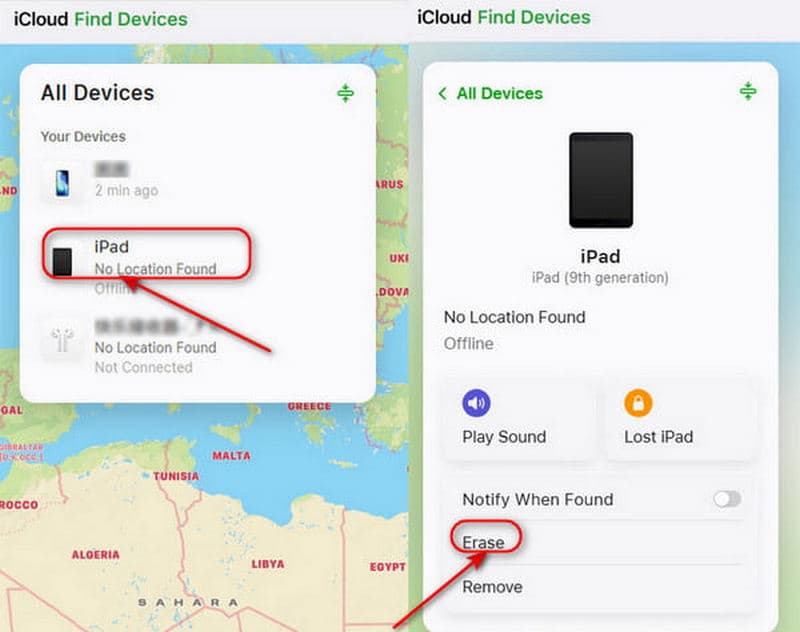
Steg 2. Klicka på Hitta enhetI listan över Alla enheter, välj den enhet du vill ta bort.
Steg 3. Välja Radera den här enhetenTryck på Radera för att börja ta bort det tidigare Apple-ID:t.
Metod 2: Ta bort iPhone från Apple ID-enhetslistan
Bäst för: När den tidigare ägaren inte kan komma åt en dator men kan använda en annan Apple-enhet.
Den tidigare ägaren kan också logga in på sitt Apple-konto för att ta bort din enhet från kontot.
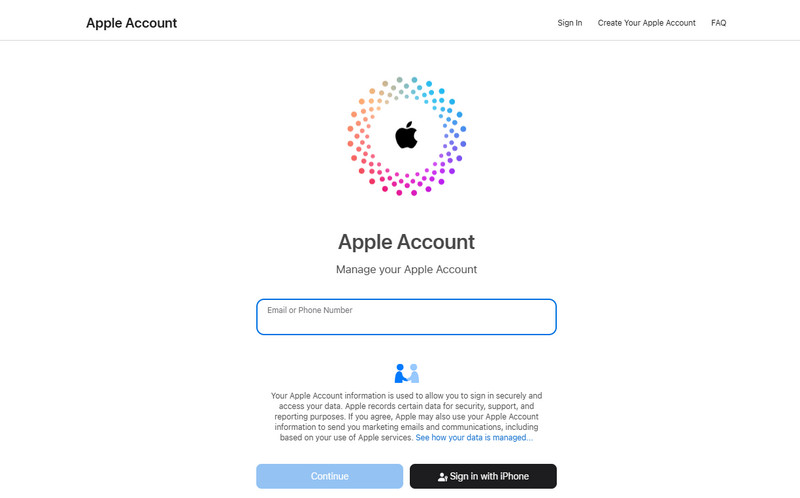
Steg 1. Gå till account.apple.com och logga in med den tidigare ägarens Apple-ID.
Steg 2. Scrolla ner för att välja Enheter avsnittet och välj din enhet.
Steg 3. Klicka Ta bort från kontoDå kommer den tidigare ägarens Apple-ID inte att vara kopplat till din enhet.
Del 2: Hur man tar bort Apple-ID utan tidigare ägare
Om du inte kan kontakta den tidigare ägaren, finns det något sätt att ta bort Apple-ID utan hjälp från den tidigare ägaren? Svaret är ja - kolla in de fyra metoderna nedan för att få det gjort.
Metod 1: Apeaksoft iFoneKit - Ta bort Apple ID utan lösenord
Bäst för: Användare som vill ta bort Apple-ID utan den tidigare ägaren.
Det snabbaste och enklaste sättet är att använda ett professionellt tredjepartsverktyg. Apeaksoft iPhoneKit är ett pålitligt alternativ som kan hantera olika typer av iOS-lås. Det kan ta bort Apple-ID i olika scenarier - oavsett om du har glömt lösenordet eller köpt en begagnad iPhone som är låst till någon annans Apple-konto. iFoneKit kan enkelt kringgå dessa begränsningar och låta dig njuta av alla Apple-tjänster.
Din pålitliga iOS-upplåsningslösning
- Ta bort Apple ID på iPhone/iPad enkelt och säkert utan lösenord.
- Radera Face ID/Touch ID/4-siffrigt/6-siffrigt lösenord med några få klick.
- Bli av med MDM, kryptering av iTunes-säkerhetskopior och skärmtidslås.
- Kompatibel med alla iOS-modeller och versioner (iOS 26/27, iPadOS 26/27).
Steg 1. Starta programvaran på din dator och välj Ta bort Apple ID läge i gränssnittet. Anslut din iOS-enhet till datorn och tryck på Litar på din enhet för att tillåta anslutningen.
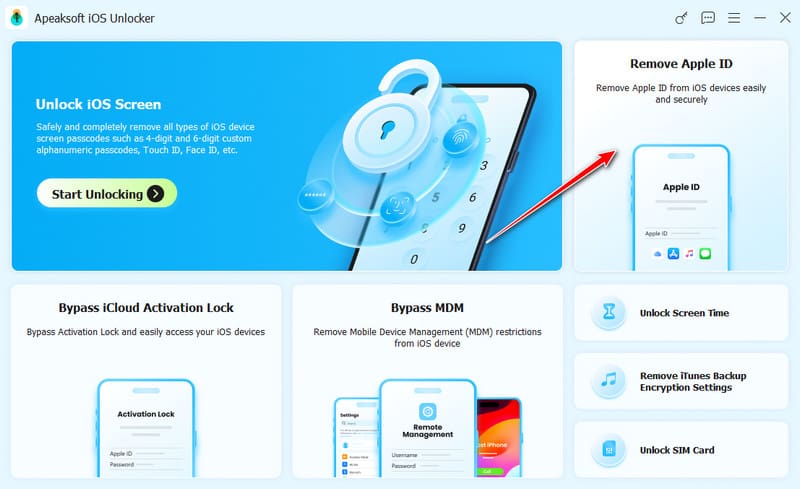
Steg 2. Klicka på Börja nu knappen för att starta borttagningsprocessen.
Om Hitta min är inaktiverat börjar programvaran omedelbart ta bort ditt Apple-ID.
Om Hitta min är aktiverat måste du först följa instruktionerna på skärmen för att återställa din iOS-enhet.
Obs: Återställningen kommer att radera all data på din enhet, så se till att säkerhetskopiera din viktiga information i förväg.
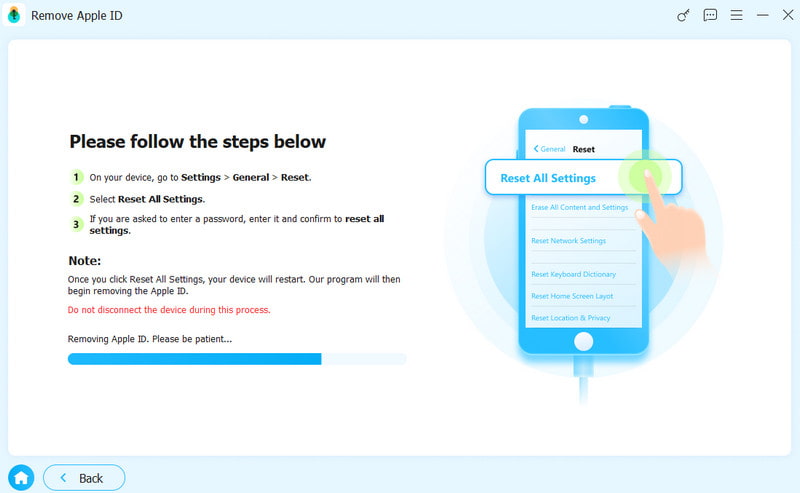
Steg 3. Klicka på OK knappen för att fortsätta, klicka sedan på Bekräfta igen när du uppmanas. Det tidigare ägarens Apple-ID kommer snart att tas bort.
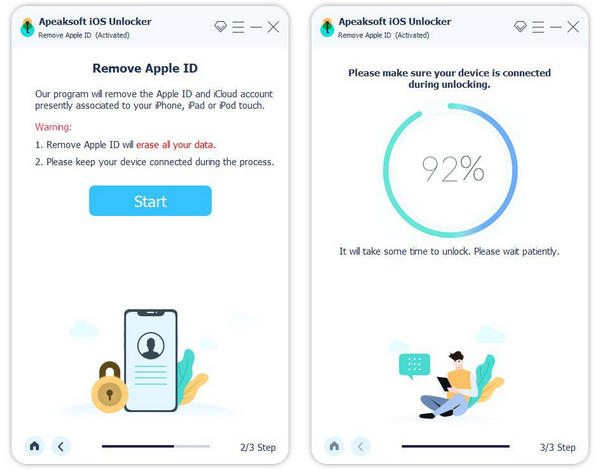
Metod 2: Kontakta Apple-supporten för att ta bort Apple-ID
Bäst för: Användare som har giltigt köpbevis och föredrar en officiell borttagningsmetod.
Om du köpte din iPhone via officiella kanaler, eller om du har ett giltigt ägarbevis, kan du skicka en begäran till Apple Support om att ta bort det tidigare ägarens Apple-ID.
Förbered ditt köpbevis, till exempel ett kvitto eller en faktura från en Apple Store, auktoriserad återförsäljare eller operatör. Du kan kontakta Apple Support via deras officiella webbplats eller besöka en Apple Store. Verifieringsprocessen kan ta några dagar. När din begäran har godkänts tar Apple bort Apple-ID:t från din enhet.
Metod 3: Återställ Apple-ID via iTunes/Finder
Bäst för: När Apple-ID-lösenordet är känt men kontot inte kan tas bort från Inställningar normalt på grund av systemproblem.
Ett annat officiellt sätt att ta bort Apple-ID från tidigare ägare är att använda iTunes/Finder för att återställa din iPhone via iTunes/Finder. Den här metoden raderar all data på din enhet, så se till att säkerhetskopiera din viktiga information innan du återställer. Då kan du återställ din iPhone från en tidigare säkerhetskopia.
Steg 1. Sätt din iPhone i återställningsläge.
För iPhone 8 och senare:
Tryck och släpp volym upp knappen snabbt, sedan volym Ner knapp. Tryck och håll ned Effekt knappen tills du ser Återställningsläge visas.
För iPhone 7 / 7 Plus:
Fortsätt trycka på volym Ner knappen och Sida knappen tillsammans tills Återställningsläge visas på skärmen.
För iPhone 6S och tidigare:
Tryck Hem och Sida knapparna ihop och håll dem intryckta tills återställningsläget visas på din telefon.
Steg 2. Anslut din iPhone till datorn med en USB-kabel och öppna iTunes/Finder.
Steg 3. Välj Sammanfattning fliken och välj sedan återställa iPhone för att återställa ditt Apple-ID.
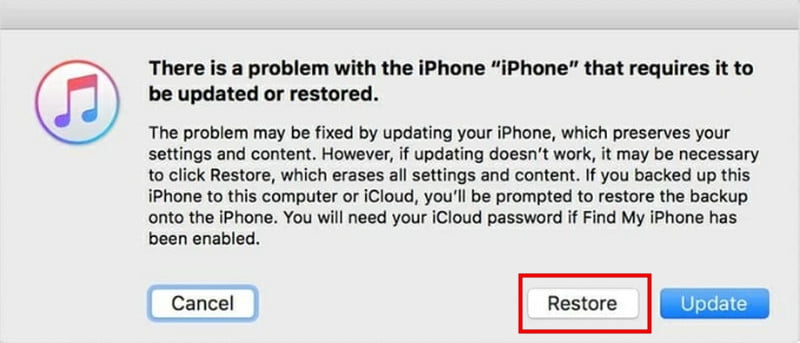
Metod 4: Radera tidigare ägares Apple-ID via Inställningar
Bäst för: När Apple-ID-lösenordet är tillgängligt och enheten är tillgänglig.
Hur tar man bort ett tidigare Apple-ID utan extra appar? fabriksåterställ din enhet för att radera det värdefulla ägarens Apple-ID.
Steg 1. Gå till Inställningar och välj Allmänt.
Steg 2. Tryck Överför eller återställ iPhone Och välj Radera allt innehåll och inst.
Steg 3. Klicka sedan på Fortsätta och följ instruktionerna för att ta bort det tidigare ägarens Apple-ID.
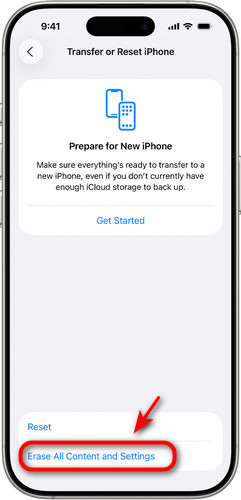
Del 3: Vanliga frågor om att ta bort tidigare ägares Apple-ID
Är det möjligt att ta bort Apple ID utan tidigare ägare?
Ja! Du kan prova att använda ett professionellt upplåsningsverktyg som Apeaksoft iFoneKit, fabriksåterställa enheten eller kontakta Apple Support om du har ett giltigt köpbevis.
Hur lägger man till ett nytt Apple-ID efter att man tagit bort det tidigare?
Gå till Inställningar, knacka på Logga in på din iPhoneoch ange sedan ditt Apple-ID och lösenord. När du har loggat in kommer du att kunna få tillgång till alla Apple-tjänster.
Kan Apple ta bort den tidigare ägarens Apple-ID åt mig?
Ja, Apple kan hjälpa till att ta bort den tidigare ägarens Apple-ID, men bara om du kan uppvisa ett giltigt ägarbevis. Du kan kontakta Apple-supporten online eller besöka en Apple Store.
Slutsats
Nu vet du hur man tar bort ett tidigare Apple-ID från ägaren utan lösenordOm du kan nå den tidigare ägaren är det det ideala scenariot – du kan lösa problemet utan problem. Om inte, oroa dig inte, du kan fortfarande prova alternativa lösningar, som att använda Apeaksoft iFoneKit. Så, vilken metod fungerade bäst för dig?
Relaterade artiklar