
How to Bypass Samsung FRP Safely Using 5 Methods [2026]

When you are locked out by the Samsung FRP lock, you may search online for how to bypass it. However, many free FRP bypass methods available rely on older Android versions or specific security patches and vulnerabilities. This guide will introduce updated methods to bypass Samsung FRP.
Disclaimer
All the Samsung FRP bypass steps mentioned in this article are only for the device that you legally own or have explicit authorization to access. Bypassing FRP on lost, stolen, or unlawfully obtained Samsung devices is strictly prohibited and may violate local laws and regulations.
PAGE CONTENT:
Part 1: What Is a Samsung FRP Lock
FRP is an abbreviation for Factory Reset Protection. Android has introduced the FRP lock to protect your Android device from version 5.1 (Lollipop). As its name implies, it will protect your Android devices from factory resetting by unauthorized persons. However, it can be an obstacle when you forget your Google account password.
The Samsung FRP lock will be triggered when you have factory reset your Samsung phone without removing the Google account in advance. You will see a prompt asking for login credentials when you want to access your Samsung phone. The safest and also the official way to remove the Samsung FRP lock is to sign in with the previously synced Google account. However, if you are the device owner but can no longer access your Google account, you can try other FRP bypass solutions designed for supported devices.
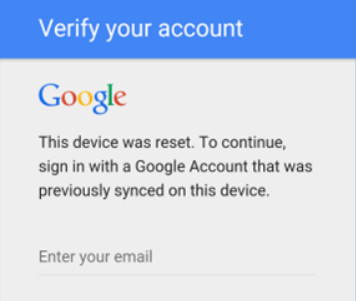
In the past, many Samsung FRP bypass methods relied on system loopholes, such as accessibility features, browser access, emergency call exploits, or third-party APKs. However, these methods may work on certain Android versions or security patch levels, but often become unavailable after security updates.
Therefore, finding a reliable Samsung FRP bypass solution can be challenging, especially for newer Samsung Galaxy devices. This post will share several practical methods to bypass Samsung FRP.
Part 2: Free Samsung FRP Bypass Tool: SamFw FRP Tool
If you are looking for a free solution to bypass the Samsung FRP lock, the SamFw tool can be an ideal solution. It is a desktop-based tool that works on ADB commands and USB connection. Compared with old FRP tricks based on system loopholes, it relies on device communication and supported commands. However, the compatibility still varies by model and security patch.
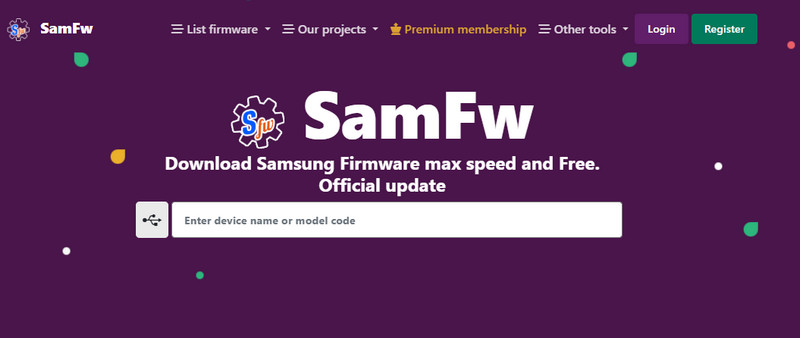
Step 1. Prepare a Windows computer, a USB cable, official Samsung USB drivers, and a Samsung phone that can be recognized by the computer and allow USB debugging access.
Step 2. Go to the SamFw website and choose Remove FRP from Other tools.
Step 3. Install the Samsung USB driver.
Step 4. Connect your device to the computer with a USB cable. Click Emergency Call and dial *#0*# to enter the test mode.
Tips: If there is no USB debugging prompt, it may be because your device has stopped this method. Just stop and try other methods.
Step 5. Choose your device and click Remove FRP. Your Samsung phone may reboot when the process finishes.
Final Verdict
SamFw FRP Tool suits people who are looking for a free Samsung FRP bypass. However, it only works when your device can enter the required mode and enable USB debugging. Compatibility may vary depending on your device model and security patch.
Part 3: 4 Reliable Samsung FRP Bypass Tools
| Tool | Best For | Difficulty | Compatibility | Price (Current) |
| Apeaksoft DroidAide Android Unlocker | Users who want a guided FRP bypass solution for newer Samsung devices | Easy | Updated Samsung FRP removal support with compatibility for Android 17 devices. | From $24.96 |
| iToolab UnlockGo Android | Users looking for broad Android brand support | Easy | Supports Samsung and other Android brands | From $29.95 |
| iMyFone LockWiper Android | Users who need FRP and screen lock removal features | Easy | Depends on device model and Android version | From $49.99 |
| Tenorshare 4uKey for Android | Users who want an all-in-one Android unlocking solution | Easy | Supports various Android brands and models | From $24.95 |
Top 1: Apeaksoft DroidAide Android Unlocker
Apeaksoft DroidAide Android Unlocker is a powerful and effective third-party Samsung FRP bypassing tool on the market. With it, you can make a Samsung FRP bypass without a password. But you should note that it can only be used on a PC, and the Mac version is still in development.

Downloaded by over 1,000,000 users
- One click to bypass the Samsung FRP lock without a Google account.
- Support all Samsung models and most other Android models as well.
- Support Samsung FRP bypass on Android 17.
- Simple and beginner-friendly interface.
Secure Download
How to Bypass the FRP lock on Samsung with Apeaksoft DroidAide Android Unlocker:
Step 1. Free download this Samsung FRP bypass tool from the link above.
Step 2. Click Bypass Google FRP Lock on the main interface.
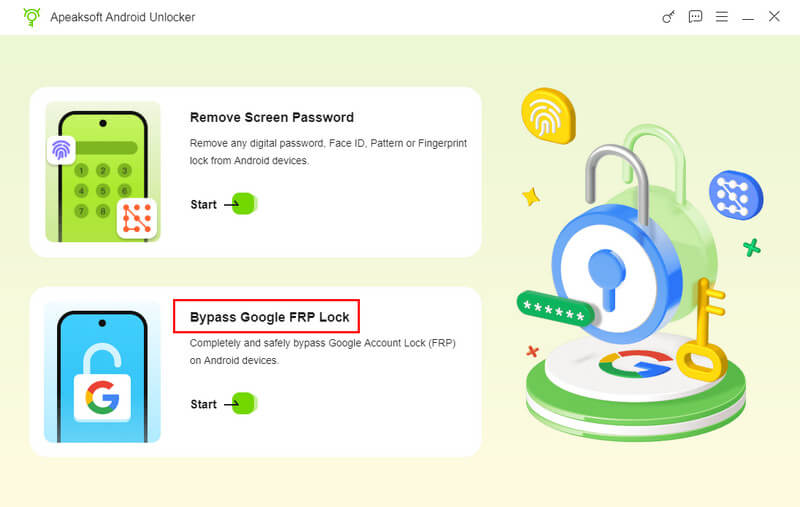
Step 3. Connect your device and choose your phone’s model. Click Bypass Now.
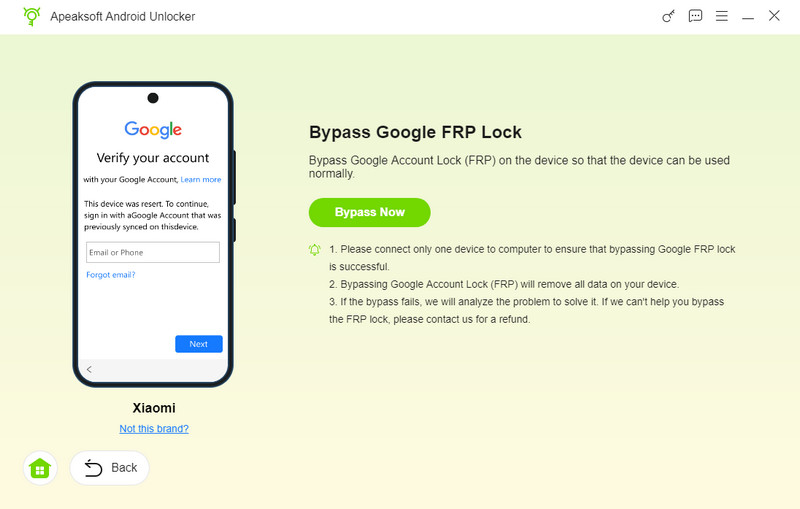
Step 4. Follow the on-screen instructions to turn on the USB debugging mode.
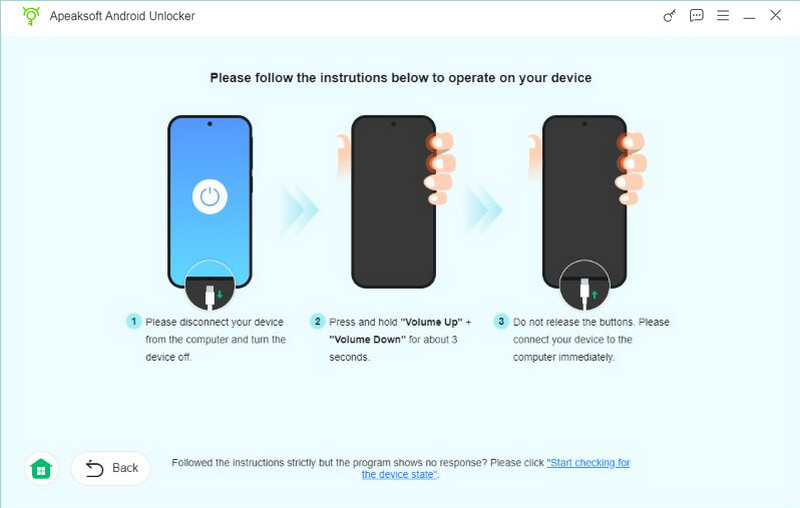
Step 5. Follow the given instructions to activate the environment configuration and wait for the removal.
Tips: Please note that our testing environment is based on several Samsung devices, including Samsung Galaxy A16, Galaxy A15 5G, Galaxy A14, and Galaxy A03. All tests were conducted on Windows 10 (64-bit) PCs using official USB cables. The actual performance and compatibility of the FRP bypass tools may vary depending on your specific Samsung model, Android version, and security patch level.
Top 2: iToolab UnlockGo Android
iToolab UnlockGo Android is a Samsung FRP bypass tool. You can bypass Samsung FRP on Android 5-13. This tool can help you practice Samsung Galaxy/A12/A11/A03 FRP bypass in a few clicks. You can check its usage, pros, and cons below.
- All-in-one Samsung FRP bypass tool.
- Support FRP removal for Samsung and other 15 Android brands.
- A step-by-step FRP bypass process.
- You need a paid license to unlock the full FRP features.
- The whole process takes relatively longer than other tools.
How to Perform FRP Bypass on Samsung Using iToolab UnlockGo Android:
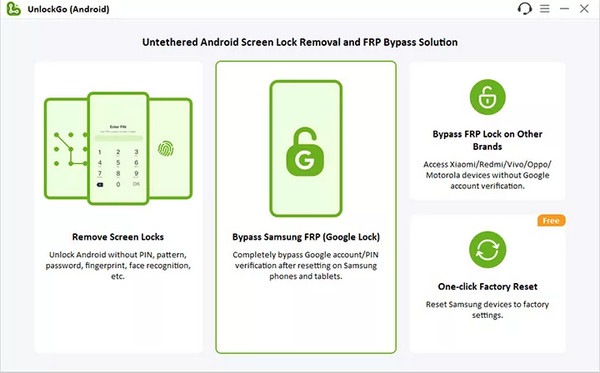
Step 1. After downloading and launching the product on your computer, click Bypass Samsung FRP (Google Lock) and click the Start button.
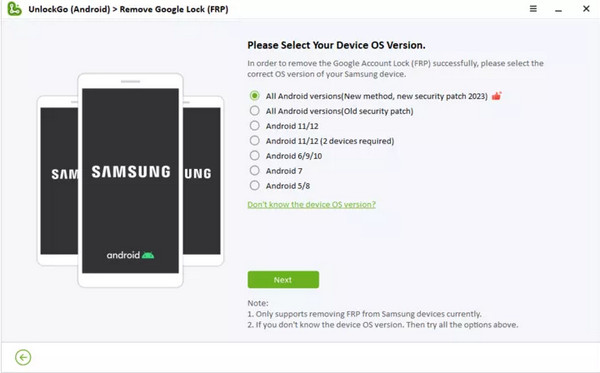
Step 2. Connect your Samsung phone via a USB cable. In the new window, you should choose the corresponding Android OS version based on your Samsung device. Or you can directly click the All Android versions option and click the Next button to continue.
Step 3. Follow the on-screen instructions to access the Samsung Diagnostics menu. Click the Next button, and the program will enable USB debugging on your device.
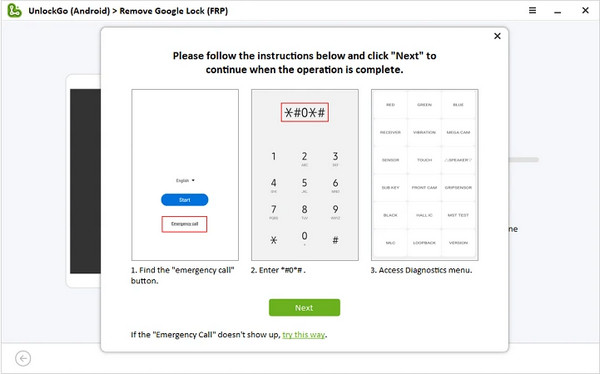
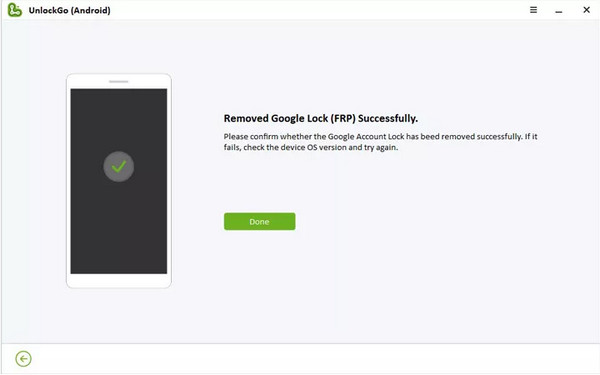
Step 4. Within several seconds, your Google FRP lock will be removed!
Top 3: iMyFone LockWiper Android
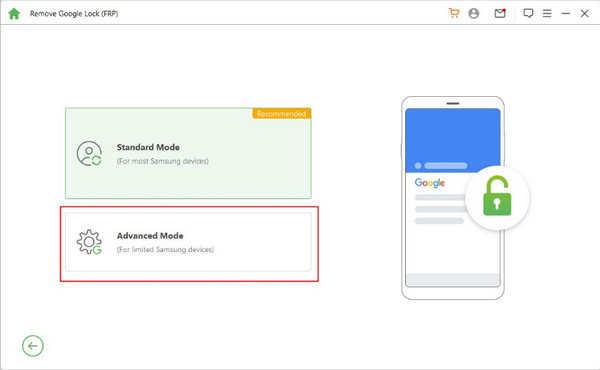
iMyFone LockWiper Android can bypass the Samsung/Xiaomi/Redmi FRP lock screen when you get stuck on the Google account verification screen. You can bypass Google FRP on Samsung using Standard Mode or Advanced Mode.
- Support both Samsung FRP bypass and lock screen removal.
- Bypass Samsung FRP tool without Google accounts.
- This Samsung FRP bypass tool works well with 6,000+ Android devices.
- Advanced feature requires a paid license.
- Supported devices vary by Android versions and security patches.
How to Bypass Google FRP Lock on Samsung Using This Tool:
Step 1. Download and install this Samsung FRP bypass tool on your computer. You need to pay for a plan to unlock the FRP unlock feature or have a free trial. Then, click the Remove Google Lock (FRP) feature on the main interface. In the new window, click the Advanced Mode to continue.
Step 2. Make sure to update your Android version to the latest. Then, click the Start button and plug your Samsung phone into the computer using a USB cable.
Step 3. The software will detect the information about your Samsung phone automatically. Check the information and click the Next button if correct.
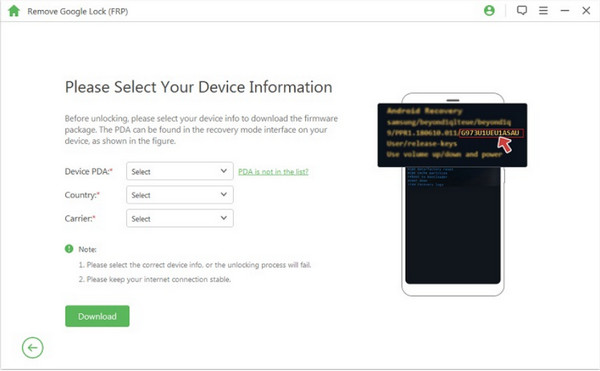
Step 4. You should put your Samsung phone into recovery mode and click the Next button in the new window. Select your device info from the on-screen three options and click the Download button to download a data package.
Step 5. Click Start to Extract button to unpack the data package when the download finishes. Once the extraction is done, follow the on-screen tutorial to put your Samsung phone into Downloading Mode and click the Start button. Then, enter 000000 to install this data package on your Samsung phone.
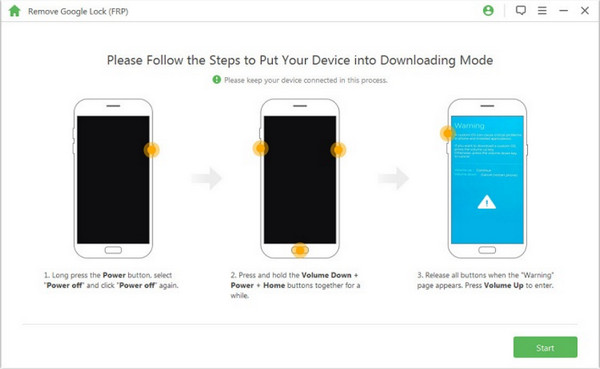
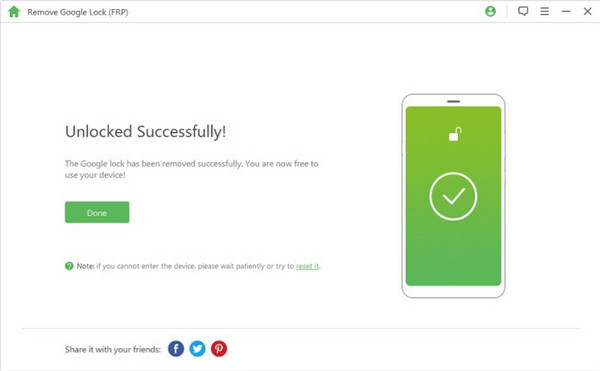
Step 6. Download the firmware package and click the Start to Extract. Then, this tool will start to bypass the Samsung FRP lock.
Top 4: Tenorshare 4uKey for Android
Tenorshare 4uKey for Android is an all-in-one program to bypass the FRP lock and remove the screen lock. This easy Samsung FRP tool can bypass Samsung, Xiaomi, Redmi, Vivo, Realme, Oneplus, Huawei, and Motorola FRP lock without Google account information.
- You can easily bypass the FRP lock and remove the screen lock for Android devices.
- High compatibility with 6,000+ Android devices.
- You can unlock older Samsung devices without data loss.
- Some users complain about its low success rate.
- You need to purchase a license to access its features.
How to Use This Samsung FRP Bypass Tool:
Step 1. Download and install this Samsung FRP bypass tool on your computer. You need to pay for a plan to unlock the FRP unlock feature or have a free trial. Then, click the Remove Google Lock (FRP) feature on the main interface. In the new window, click the Advanced Mode to continue.
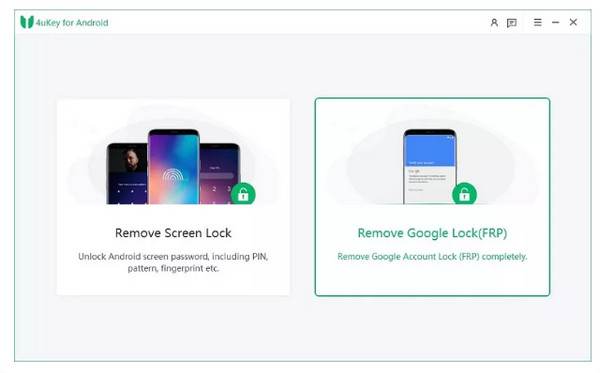
Step 2. Select the corresponding Android version of your Samsung device. Or you can click the All Android versions or Standard Removal to perform FRP unlock with a higher success rate.
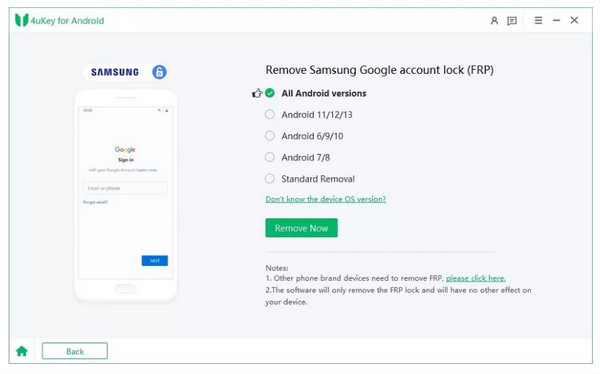
Step 3. Then, you should follow the on-screen instructions on how to remove the Samsung FRP lock based on different Android OS versions.
Part 4: FAQs about FRP Bypass Samsung
How can I perform a free FRP bypass on Samsung?
If you want to bypass the FRP lock on your Samsung device for free, you can download MediaTek Universal Tools. Or you can search for some free Samsung FRP bypass APKs on the Internet.
Can I perform a Samsung S22 FRP bypass without a PC?
Yes, you can bypass Samsung S22 FRP without a PC in several ways. First, if you know the Google account information, you can easily bypass the FRP lock. Second, if you have activated Find My Mobile on your Samsung S22, you can use this feature to disconnect your Google account, and the FRP lock will be removed at once.
How do I turn off my Samsung S10 FRP?
Go to the Settings app on your Samsung S10. Tap on the Accounts or Accounts Backup option. Tap the Manage accounts. Then, remove your Google accounts one by one. At that time, your Google Factory Reset Protection is removed as well.
What is the easiest way to bypass the Samsung FRP?
Given comprehensive consideration, we recommend Apeaksoft Android Unlocker for its reliable performance, user-friendly interface, and broad device compatibility.
Can I bypass the FRP lock on all Samsung models?
Not exactly. It depends on your Samsung models and Android versions. Some tools don’t support the latest Samsung models and Android versions.
Conclusion
Now, you can choose a suitable Samsung FRP bypass tool to download on your computer when you forget the Google account information after reviewing our 4 recommendations. Before you want to sell your old Samsung devices, make sure to turn off the FRP lock and remove your Google accounts.
 Apeaksoft DroidAide
 Unlock your Android passwords and bypass the FRP lock easily.
Secure Download
Related Articles