


What Is FRP FILE and the Best Alternatives to FRP File

Key Takeaways
- FRP FILE is an online platform that mainly offers FRP bypass APKs, firmware, and tutorials.
- Most methods it recommends rely on system loopholes that are patched on Newer Android versions.
- The success rate varies among different Android versions, brands, and security patch levels.
- Be prudent when you download third-party links on this platform.
- Desktop-based FRP tools provide a more reliable alternative.
Getting stuck at the Google verification (FRP) screen after a factory reset can be frustrating. When you search for solutions online, you may notice FRP FILE, a website that provides FRP bypass APKs, firmware downloads, and tutorials.
But is it reliable? Does it work on your Android phone?
In this review, we’ll explain what FRP FILE bypass is, how it works, its pros and cons, and whether it’s worth using before you download any FRP bypass files. We will also introduce several reliable alternatives in case FRP FILE doesn't work for your device. Keep reading!
Disclaimer
Bypassing FRP carries technical and legal risks. It will void your device's official warranty. Improper operation will also lead to data loss, system errors, device freezing, or permanent device damage. Only perform these actions on devices you legally own. Unlocking other people's devices may violate local laws and regulations.
Apeaksoft Studio is not responsible for any damage or legal consequences.
PAGE CONTENT:
Part 1: What Is FRP FILE
FRP is a security measure implemented by Google for Android devices to block unauthorized access. Once the feature is enabled, there will be a forced Google verification lock on the screen after you have factory reset your Android phone. You cannot access your phone normally unless you have verified the ownership with Google account credentials. Although FRP was introduced with Android 5.1 Lollipop, many users still do not understand how to get rid of the lock on their Android devices.
FRP FILE (https://frpfile.com/) is a platform that assists Android users in understanding the Factory Reset Protection feature and bypassing it without a password. It provides comprehensive information and tools for Factory Reset Protection on mobile devices.
Key Features of FRP File
- Offers firmware files for unlocking various Android devices.
- Distributes FRP bypass APK downloads to bypass FRP.
- Provides a concrete guide on bypassing FRP locks on Android devices.
- Shares FRP-related updates and news.
- Provides additional tutorials, tools, and an online unlock service for iCloud bypass.
Part 2: Review of FRP FILE
To evaluate FRP FILE website more objectively, we tested its guides and tools on different Android devices and compared the results with feedback from Reddit discussions.
Test Environment
| Item | Details |
| Android Device | Samsung Galaxy series, Redmi devices, and other mainstream Android phones |
| Android Version | Android 8 to Android 13 (no successful tests observed on newer versions) |
| Patch Level | Different security patch levels and Google Play Services versions |
| Test Scope | APK download links, firmware resources, and tutorial usability |
What We Liked
- In our test, all FRP tools and resources on the website were free to access and download.
- We observed that the platform offers multiple FRP bypass approaches, including APK files, ADB tools, and firmware resources.
- The website includes an active community where users share experiences and troubleshooting tips.
- The content is organized by popular Android brands, which helps users find device-specific resources more easily.
What We Don't Like
- Based on our test, most APK-based bypass methods worked only on older Android versions. Newer Android systems (especially Android 12 and above) showed very low success rates.
- It is overwhelming and confusing for first-time users to see massive tools and ads on the site.
- We found that some download links are outdated or unavailable.
- The operation is not beginner-friendly, and we couldn't find any specialized technical support.
Final Verdict
FRP FILE is best for users who need free FRP resources and are willing to try multiple methods. It works well for experienced users who understand FRP bypass methods, but may not suit beginners who are looking for a simple one-click solution.

Bypass Google FRP Lock with One Click.
Part 3: Is FRP FILE Safe and Reliable
When trying FRP bypass tools, safety and reliability are the top concerns for most users. Based on our testing and user feedback, FRP File is not fully safe or consistently reliable.
Risk Warning
- Most tools on this website are from unofficial APK files, which may carry potential security risks.
- This platform does not explicitly list the official developers or the certified publishers.
- Some downloaded files may trigger antivirus alerts due to modified installation packages.
Success Rate Overview
| Android Version | Success Rate | Stability |
| Android 8-10 | High | Relatively stable |
| Android 11-12 | Medium | Inconsistent |
| Android 13+ | Low | Unstable |
Part 4: How to Use FRP FILE for Android
FRP FILE APK allows you to download all useful FRP apps that you can use to unlock Google lock on any Android device. It can do the job without a computer. We demonstrate the procedure below.
Note: Improper FRP bypass operations or the use of unverified third-party APKs may result in data loss, system instability, and even permanent damage to the device. Please operate with caution and ensure you fully understand the risks before proceeding.
Step 1. You should take advantage of the TalkBack loophole to access the browser on your phone.
Step 2. Open the Settings app, tap Apps, choose Menu, select Special access, and press Install unknown apps.
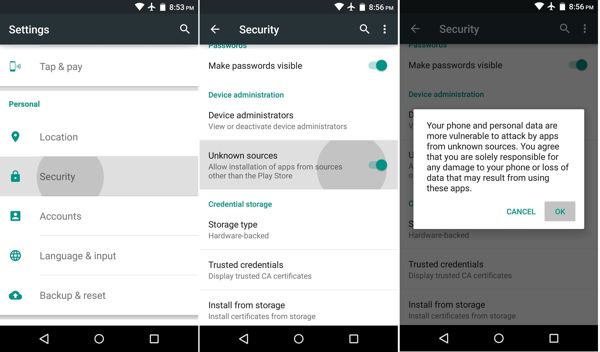
Step 3. Download the FRP File Bypass APK from your browser, install it in the Downloads directory, and open the app on your FRP-enabled Android phone.
Step 4. Next, download the FRP File APK and install it on your device.
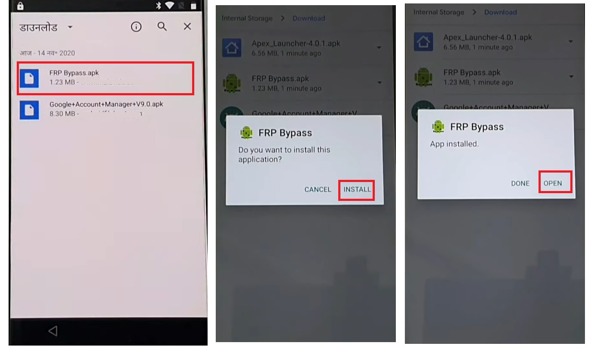
Step 5. Back to your browser, and visit frpfile.com/bypass. Then tap Apex Launcher.apk to download it to your phone. Next, go to the Downloads folder, install it, and open the app.
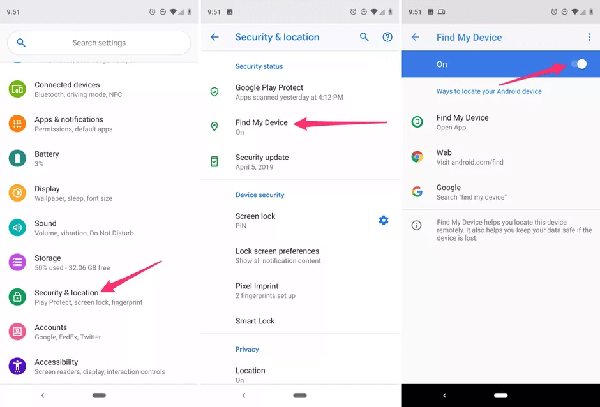
Step 6. Run the Settings app, go to Privacy & Security, choose Other Security Settings, and disable Find My Device.
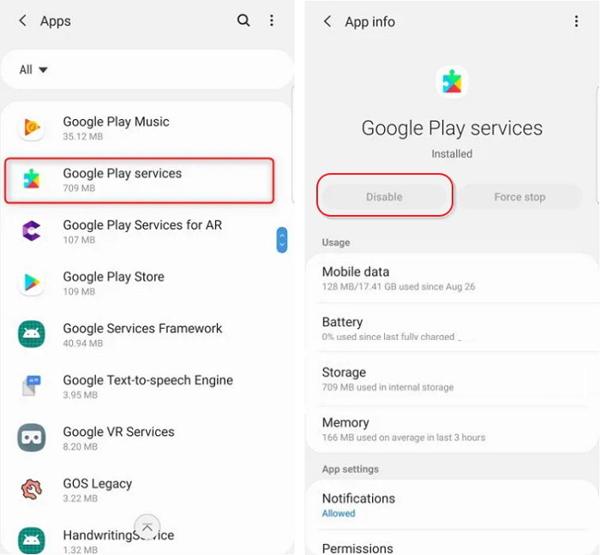
Step 7. Back to the Settings app, choose Apps, select Google Play Services, tap Force Stop, and then Disable.
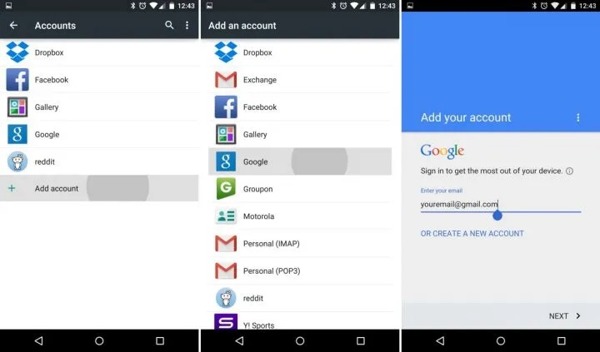
Step 8. Now, go to Accounts in Settings, choose Add account, select Google, and add a new Google account.
Part 5: Top 5 Alternatives to FRP FILE
| Features | Apeaksoft DroidAide | iToolab UnlockGo | iMyFone LockWiper | XDA Developers Forum | GSM-Forum | Supported OS | Windows | Windows & Mac | Windows & Mac | Mobile & PC browser | Mobile & PC browser | Supported Versions | Android 6-16 | Android 5-15 | Android 6-15 | Varies by method | Varies by method | Supported Brands | Samsung, Xiaomi, Motorola, OPPO, vivo, etc | Samsung, Xiaomi, Redmi, vivo, OPPO, etc. | Samsung, Xiaomi, Motorola, Huawei, etc. | Device-dependent | Device-dependent | Support | Customer & technical support | Customer support | Customer support | Community support | Community support | Interface | Clear graphical UI | Guided wizard | Standard written step tutorials | Technical tutorials | Technical tutorials | Additional Functions | Screen unlock | Screen unlock | Screen unlock | Android troubleshooting guides | Firmware resources |
Top 1: Apeaksoft DroidAide Android Unlocker
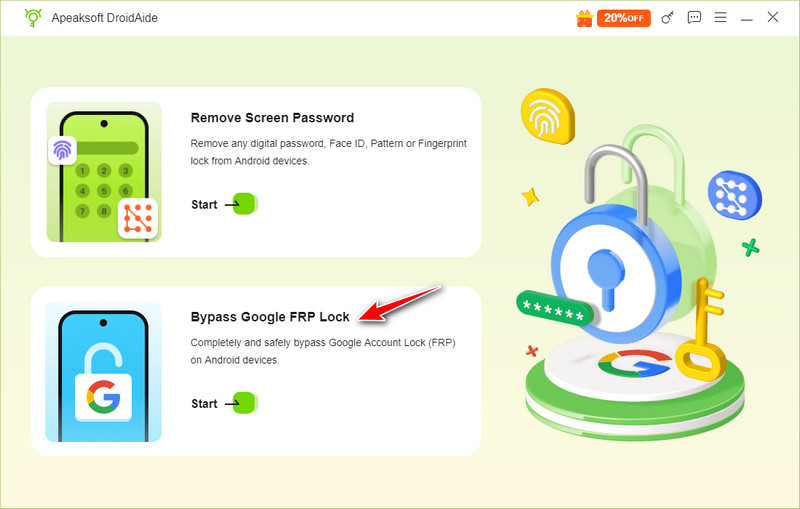
Based on our real-device tests, Apeaksoft DroidAide Android Unlocker performs well for mainstream Android phones. For compatible Android devices, it provides a one-click FRP lock removal. Then, you can get full access to your Android phone with no restrictions. Moreover, it supports most Android devices like Samsung, Motorola, Xiaomi, etc., and the latest Android versions.
What’s worth mentioning is that its interface is clear with intuitive function buttons, which are friendly to beginners.

Bypass Google FRP Lock with One Click.
- Compatible with the latest Android versions.
- Highly compatible with Samsung, Xiaomi, and most mainstream brands.
- 24/7/365 customer service and technical support.
- Professional technical support team.
- Official and reputable source of download links.
- Tested for safety and free of malware.
- It is software, so you need to prepare a computer.
- The Mac version is still in development and coming soon.
Top 2: iToolab UnlockGo
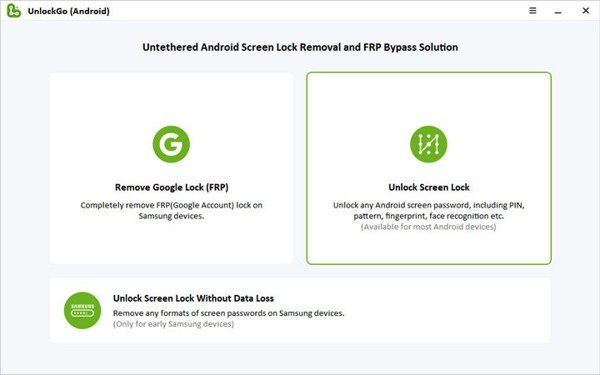
iToolab UnlockGo serves as another alternative to FRP File APK to bypass protection measures on Android devices, including FRP and lock screen. After bypassing FRP, the software enables you to add a new Google account to your Android phone. It is compatible with Android devices like Samsung, LG, Moto, Google, Asus, Huawei, Xiaomi, ZTE, etc. Be aware that the software is not free, and you can subscribe to a plan starting at $29.95 per month.
- Allows adding a new Google account after FRP removal.
- Effectively bypasses FRP and the lock screen on many Android devices.
- User-friendly interface with guided steps for easier operation.
- Success rates vary depending on device model and Android version.
- Potential risks of data loss or device issues if not used correctly.
Top 3: iMyFone LockWiper
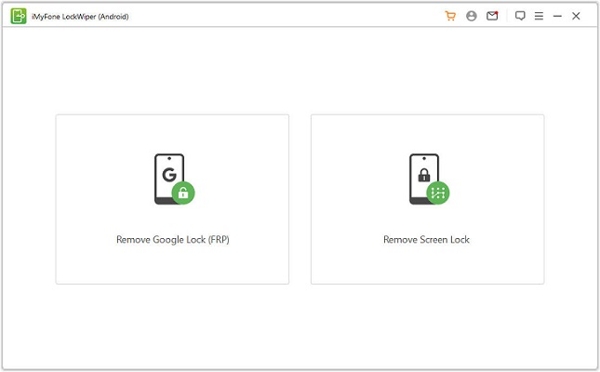
iMyFone LockWiper is also a dedicated Android unlocking tool that can remove FRP locks without requiring Google account credentials. On this website, there is a step-by-step guide. It is compatible with a wide range of Android brands, including Samsung, LG, Huawei, Xiaomi, and more. Compared with APK-based methods like provided in FRP FILE, LockWiper offers a more stable desktop-based solution.
- bypass FRP lock effectively.
- Supports a wide range of Android brands.
- Works on many Android versions and device models.
- Effectiveness may vary by device model and security patch level.
- Requires a computer to run the software.
Top 4: XDA Developers Forum
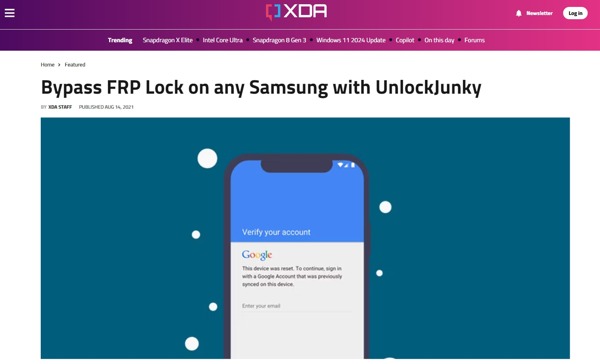
XDA Developers Forum is a famous online community of Android developers and enthusiasts. It includes a wide range of guides, discussions, questions, and open-source tools about Android devices, including FRP bypass tutorials. Similar to FRP File, this platform is completely free to visit in a browser on computers and mobile devices. You can also sign up for an account with your email address so that the website will recommend content according to your preferences. Plus, you can subscribe to the newsletters to get the latest posts and tutorials.
- Rich Android content, including FRP tutorials and open-source tools.
- Free to access on computers and mobile devices.
- Active community with frequent discussions.
- It can be overwhelming for beginners due to the amount of content.
- FRP resources are not fully organized like dedicated platforms.
Top 5: GSM-Forum
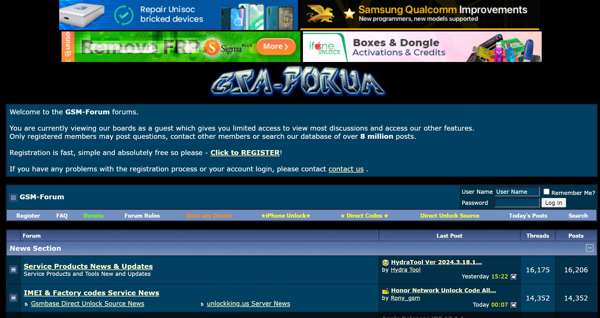
GSM-Forum is another technology forum for Android users and developers. It collects tutorials on FRP bypassing and other topics. It offers links to FRP unlocking software too. Although the interface looks messy, many Android users visit the platform to ask for help and share experiences. The platform is supported by ads and is free to use. Users can create an account for free to save their visit history.
- Free to use with optional account creation to save visit history.
- Contains tutorials on FRP bypass and other Android topics.
- An active user base for help and experience sharing.
- Messy and hard-to-navigate interface.
- A lot of ads.
Part 6: FAQs of FRP FILE
Is the FRP FILE really free?
Yes, FRP FILE is free to access through a web browser on both desktop and mobile devices. You can visit the platform on either a computer or a mobile device. FRP File APK is free to download and use to bypass FRP on Android devices too.
Is FRP File APK legal to use?
FRP is designed to protect your Android phone from a factory reset by someone else without authorization. If you just forgot your Google account credentials, it is legal to bypass FRP with FRP File APK on your device. It is strictly forbidden to use it on a lost/stolen/unauthorized device.
Is the FRP FILE available to all Android devices?
No. FRP FILE supports Android devices starting from Android 5.1 and above, but compatibility is not guaranteed across all models. In our observation, success rates vary significantly depending on your device brand, Android versions, and security patch level.
Conclusion
FRP FILE is a free platform. You can get lots of information on the platform including FRP bypass tutorials for various Android devices. You can download FRP File APK from the platform and bypass Google FRP lock on your phone without a computer.
Suitable for: users who have technical experience and older Android devices.
Not suitable for: beginners or devices running Android 12 and above.
Alternative: Desktop FRP tools offer a more stable and higher-success alternative.
 Apeaksoft DroidAide
 Unlock your Android passwords and bypass the FRP lock easily.
Secure Download
Related Articles




