
Readily Bypass ZTE FRP Lock Using 4 Feasible Methods

Suppose you purchase a second-hand ZTE phone with the default Google account verification (FRP) screen, or you just perform a hard reset without the knowledge of your old Google account. In that case, your ZTE phone is locked by the anti-theft feature - Google Factory Reset Protection (FRP). How to get rid of ZTE FRP lock?
Don’t worry! This post will provide 4 practical methods for you to bypass the ZTE FRP lock. You can pick one method and follow the detailed procedure to perform an FRP bypass for ZTE with ease.
Note: Some methods may only work on older Android versions or specific ZTE models. When using APK files, download them only from trusted sources to avoid potential security risks.
PAGE CONTENT:
- Test Devices: ZTE Z982, ZTE ZMax Pro, and ZTE K88.
- Test Environment: Windows PC, ZTE devices with different Android versions, USB connection, and stable internet connection.
- Test Criteria: Compatibility, usability, and FRP bypass completion.
Part 1: The Easiest Way to Bypass ZTE FRP Lock with Professional Software
How to bypass FRP on ZTE without complicated steps? When it comes to FRP bypass, the easiest way to do so is using a professional third-party software. Apeaksoft DroidAide Android Unlocker is such a good choice. This ZTE FRP bypass tool is designed to bypass the ZTE FRP lock through a clear step-by-step process, which is suitable for users with limited technical experience.

Downloaded by over 1,000,000 users
- Bypass the FRP lock on ZTE phones easily and quickly.
- Beginner-friendly interface and simplified steps.
- Support most Android versions (6.0 and above).
- Get full access to your phone without Google account credentials.
Secure Download
How to bypass the ZTE FRP lock step by step:
Step 1. Download this tool by pressing the button above.
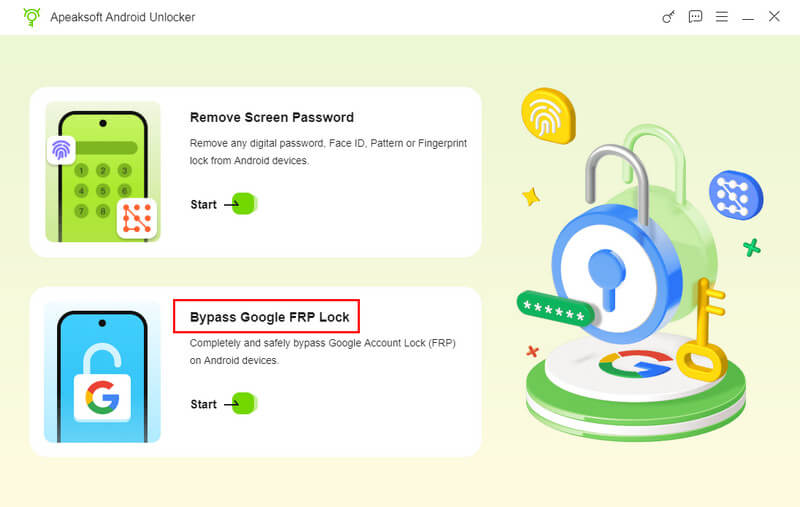
Step 2. Choose the Bypass Google FRP Lock option.
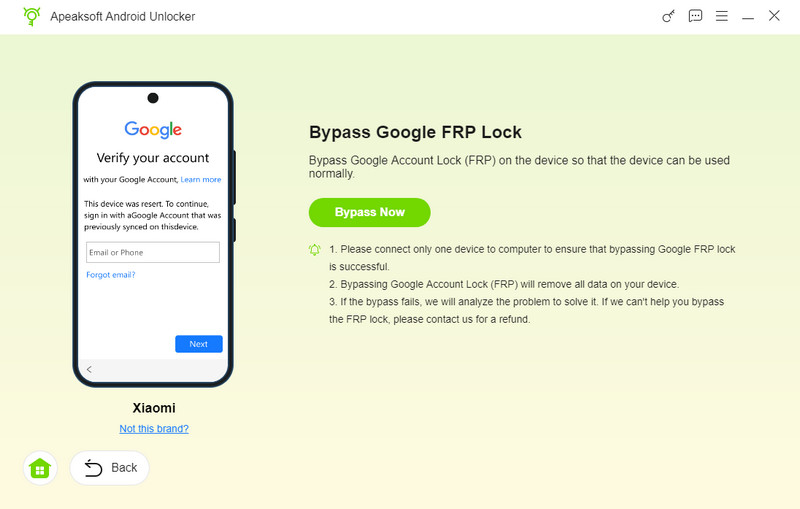
Step 3. Connect your device and confirm your phone’s information.
Step 4. Press the Bypass Now button and follow the instructions on-screen to configure the environment.
Step 5. The program will automatically start the process of bypassing the ZTE FRP lock.
Part 2: How to Perform FRP Bypass on ZTE with an Online Unlock Service
If you don’t want to handle the FRP bypass process yourself or go to the local store to remove the FRP lock on your ZTE device, you can try an online remote ZTE unlock service instead. UnlockBoot is a trusted third-party online service provider. All you need to prepare is a computer and an internet connection. Their technicians can remotely bypass the ZTE FRP for you in minutes.
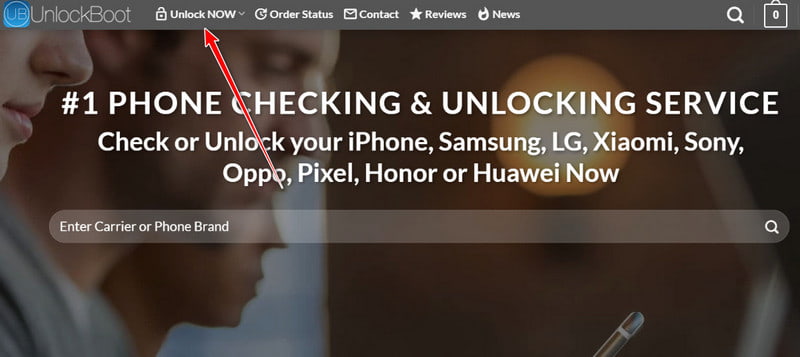
Step 1. Go to the official website of UnlockBoot on your trusted computer. Click Unlock Now to proceed.
Step 2. Select FRP Removal. Then, click the Unlock now button to continue. In the new window, you should provide the necessary information and a viable payment method.
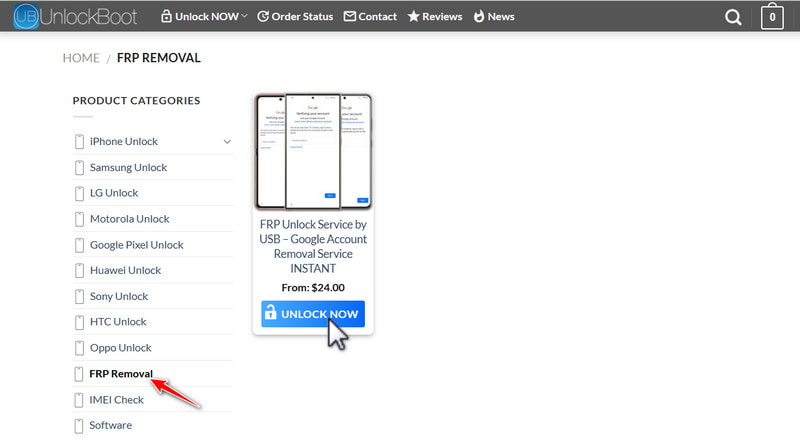
Step 3. Select service from the drop-down list. Then, enter your phone's IMEI number.
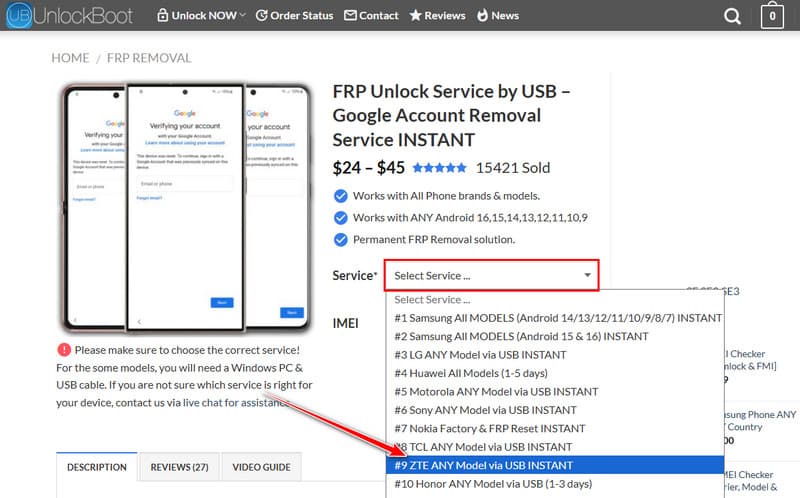
Step 4. Click the UNLOCK NOW button. Then, confirm your order and pay.
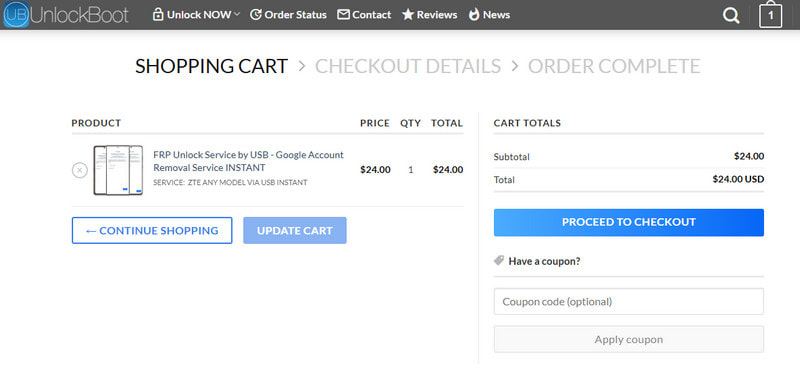
Step 5. Check your email for the instructions after placing the order. Follow the provided steps to connect your device with the technician and complete the FRP removal process.
Part 3: How to Bypass ZTE Factory Reset Protection with SwiftKey
If you are using an older ZTE device and want to perform a ZTE FRP bypass without a PC or third-party software, you can make use of the SwiftKey menu. However, this method exploits security vulnerabilities in some older Android versions, which may allow users to bypass the FRP verification process on certain ZTE devices. Here are the detailed steps for you to follow:
Step 1. Reset your ZTE phone and turn it on. Wait for a few minutes to get your phone ready. Then, select your preferred language and establish a stable Wi-Fi connection.
Step 2. Tap the Skip button several times to arrive at the Verify your account screen. Tap the Enter your email box to activate your keyboard. Now, you should keep pressing and holding the 123 key on the left-down corner until you can see the SwiftKey menu.
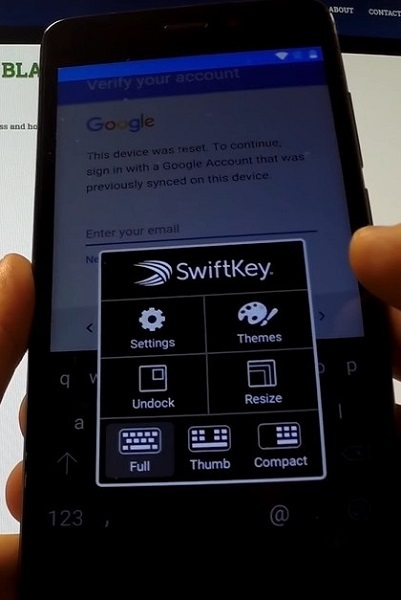
Step 3. Tap Settings to the next interface. Locate and tap the Languages option to proceed. Then, you can minimize the SwiftKey Keyboard by pressing the right LED key at the corner for seconds.
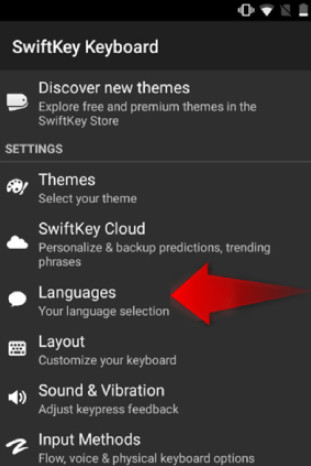
Step 4. In the new interface, you will see the Google search bar at the top of your screen. Tap on it and select the NO THANKS option to move on.
Step 5. Now, you can use your keyboard to enter Settings at the Google search bar. Then, you can tap the Settings to continue.
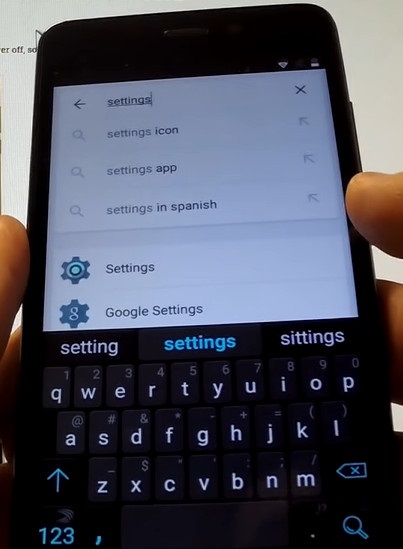
Step 6. In the new pop-up interface, tap Got it > Not now. Scroll down to select the Backup & reset option. Here, you can tap Factory data reset > RESET PHONE > ERASE EVERYTHING to reset your ZTE phone. After the reset process, the FRP lock will be disabled on your ZTE phone.
Part 4: How to Bypass ZTE FRP Lock with FRP Bypass APK
You can use one ZTE FRP bypass APK to help you bypass the FRP lock for free. There are a range of APKs for you to pick. When using this method, make sure to download APK files from trusted sources to avoid potential security risks. However, this method requires some prerequisites: an OTG cable, a flash drive, and a computer. If you have prepared them already, you can follow the steps below to perform a ZTE Factory Reset Protection bypass.
Step 1. Reset your ZTE phone. Select your preferred language and connect with a stable Wi-Fi network.
Step 2. Download the ZTE FRP bypass APK to your flash drive and transfer the APK file using an OTG cable.
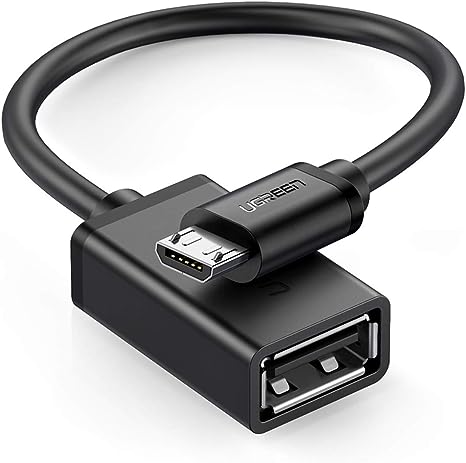
Step 3. Once connected successfully, you can select the APK file from the prompt File Manager. Then, install the APK on your ZTE phone.
Step 4. Open the APK on your locked ZTE phone and access the Settings app. Then, you can perform a factory reset and bypass the ZTE FRP lock.
Part 5: FAQs about FRP Bypass ZTE
Which method is the most beginner-friendly to bypass FRP on ZTE?
If you have no technical skills, we recommend you use Apeaksoft DroidAide Android Unlocker. This tool has an intuitive interface, which enables you to bypass the ZTE FRP in one click.
Are paid remote services like UnlockBoot safe or reliable?
According to UnlockBoot, it scores 4.8/5 in Trustpilot and the website has been rated as an "average to good" trust level on platforms such as ScamAdviser.
Do these methods bypass FRP on all ZTE models?
No. It varies from model to model and version to version. Success is not guaranteed for every firmware.
Disclaimer
Please only attempt to bypass the FRP lock on ZTE devices that you own or have proper authorization to access. Bypassing FRP on devices that do not belong to you or without the owner's permission may violate local laws and regulations.
Conclusion
With this valuable post, you can use the SwiftKey menu, ZTE FRP bypass APK, and UnlockBoot to bypass FRP lock on ZTE with detailed steps. Also, if you prefer a simpler and more convenient way, you can directly use a professional FRP bypass software like Apeaksoft DroidAide Android Unlocker. If this post is useful, you can share it to help more ZTE users.
 Apeaksoft DroidAide
 Unlock your Android passwords and bypass the FRP lock easily.
Secure Download
Related Articles