


Detailed Review of GSM Flasher ADB Bypass FRP Tool

Key Takeaways
- GSM Flasher ADB is a free FRP removal tool that mainly works on Samsung devices.
- It relies on USB debugging and supports Android 5.1-12.
- Success rate on newer versions is limited.
- Before downloading and using it, you should disable antivirus software.
- The process is complicated.
When your phone gets stuck on the Google verification (FRP) screen after a factory reset, and you can’t remember the account password, you may notice GSM Flasher ADB Bypass FRP Tool while searching for solutions online because it is widely shared as a free FRP removal solution.
But is it really safe? Can you trust the GSM Flasher ADB Bypasser FRP Tool? Does it still work on modern Android versions?
This detailed review of the GSM Flasher ADB FRP Tool will show you everything you need to know before downloading the GSM Flasher FRP Tool, and help you determine if it suits you. If not, there’s another solution for you.
PAGE CONTENT:
Part 1: What Is the GSM Flasher ADB Bypass FRP Tool
GSM Flasher ADB Bypass FRP Tool aims to remove the Google Account lock on various Android brands running different Android OS versions. GSM Flasher Bypass FRP is meant to help you in that case when you forget the password of the combined Google account, or when you buy a second-hand Android phone, you can’t use it normally if you can’t remove the FRP.
Main Features of GSM Flasher ADB Bypass FRP Tool
- Works best for Samsung FRP removal. GSM Flasher ADB Bypass FRP Tool works mainly for Samsung phones. You can unlock FRP on other Android phones, but the success rate is higher on a Samsung device.
- Completely free to use. You can remove the Google account lock without paying for premium unlocking software.
- Includes extra repair functions. Besides FRP bypass, it can also bypass screen PIN, pattern, password, and fix the soft brick error on many Android phones.
- Supports multiple brands. Besides Samsung, it can also support Motorola, LG, Lenovo, etc.
- Automatic Download/Odin mode boot. It can put your Samsung phone in Odin or Download mode, which makes it easier to unlock the FRP.
- Emergency calling in FRP mode. It can hack the FRP restriction on calling. You can enter the phone number in the program, and it will help you call the number even if your Samsung is in FRP mode. This feature is exclusive to Samsung phones.
Compatibility of GSM Flasher ADB Bypass FRP Tool
Android and Windows OS Versions:
| Dimensions | Details |
| Android Versions | Android 5.1 Lollipop, Android 6 Marshmallow, Android 7 Nougat, Android 8 Oreo, Android 9 Pie, Android 10, Android 11, and Android 12. |
| Windows OS | Windows 11/10/8/7/XP |
Phone Models
| Models | Details |
| Samsung | • S series: S5, S6, S7, S8, S9, S10, S20, S22 • Note series: Note 4, Note 5, Note 8, Note 9, Note 10, Note 20 • A series: A3, A5, A7, A9, A10, A20, A30, A40, etc. • J series: J1, J2, J5, J7, J7 Prime, J8 |
| Motorola | Moto G3, Moto E, Moto G4 Play, Moto E 4 Plus, Moto M, Moto G 5S Plus, Moto G Turbo, Moto Turbo |
| LG | LG Aristo, LG stylo 3, LG K10, LG K20, LG Stylo 2, LG G6, LG G4, LG G5, LG G20, LG K20 Plus |
| Lenovo | Lenovo Z2 Plus, Vibe K5, A2010, K5, Vibe, A6600, Lenovo A1000 |
| Huawei | Mate 10, Mate 20, P8, P9, P10, P20, and Nova series |
| Xiaomi | Mi 5, Mi 6, Mi 8, Mi 9 Redmi series: Note 4, Note 5, Note 6 |
| ZTE | Sonata 3, Z982, Z835, Z833, N9560, Zmax Pro, Z799vl, Z831, Z981, Blade |
| LYF | Jio LYf Phone, Jio Keypad Phone |
| Intex | Intex Aqua, Aqua Star 2, Aqua Power Plus, Aqua Y2 |
GSM Flasher ADB Bypass FRP Tool - Is It Free, Safe and Legit
Is GSM Flasher ADB Bypass FRP Tool free?
Yes. GSM Flasher ADB Bypass FRP Tool is a free tool to bypass the FRP lock on many Android phones.
Is GSM Flasher ADB Bypass FRP Tool safe?
The answer is yes. But you should be cautious when you get it online. When you search for the GSM Flasher ADB Bypass FRP Tool on the Internet, you can find many links about it. Some of them are safe download centers for third-party programs, while some are fraud websites. It would be best if you navigated to the official developer of GSM Flasher ADB Bypass FRP Tool - GSM Flash Team, from which you can download the official version of this program.
Is GSM Flasher ADB Legit?
GSM Flasher ADB Bypass FRP Tool itself is not illegal, but using it to bypass FRP on devices you do not own or have permission to unlock may be illegal depending on local laws.
Detailed Reviews of GSM Flasher ADB Bypass FRP Tool
- Remove FRP on various models of Samsung phones.
- Make a phone call on a Samsung even if the phone is in FRP.
- Free of charge.
- It isn’t easy to figure out the detailed Samsung model on this program.
- You need to disable the antivirus software on your computer when using this tool, which may raise some security concerns.
- It is not friendly to people without much technical knowledge.
Quick Verdict of GSM Flasher ADB Bypass FRP Tool
| Item | Rating |
| Supported brands | ⭐⭐⭐ |
| Ease of use | ⭐⭐ |
| Safety | ⭐⭐ |
| Success rate | ⭐⭐⭐ |
| Beginner friendly | ⭐ |
| Overall | ⭐⭐⭐ |
Part 2: How to Download and Use GSM Flasher ADB Bypass FRP Tool
If after reading the detailed review above, you decide to continue using GSM Flasher ADB Tool to bypass FRP, here is a step-by-step guide on how to download and use it properly.
How to Download GSM Flasher ADB Bypass FRP Tool
Download link: https://androidfilehost.com/?fid=457095661767155610
Name: GSM Flasher ADB Bypass FRP Tool.zip
File Size: 2.4MB
How to Use GSM Flasher ADB Bypass FRP Tool
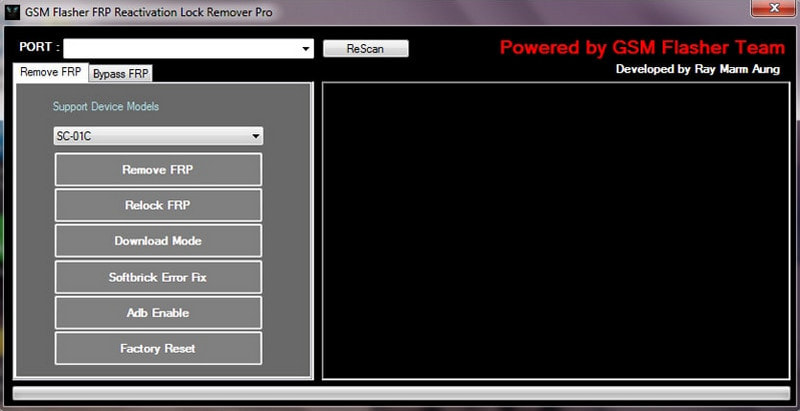
Step 1. Unzip the zip file, then double-click the .exe file to run the program.
Tips: Please disable all antivirus software on your computer for a successful initiation.
Step 2. Activate ADB by enabling USB debugging on your device.
Step 3. Connect your device to your computer and open GSM Flasher.
Step 4. Your device will be detected, and your device’s model and Android version will then be displayed. Check them.
Step 5. Click Remove FRP on the screen. The FRP lock will be removed in minutes.
Part 3: Best Alternative to GSM Flasher ADB Bypass FRP Tool
Since the GSM Flasher ADB Bypasser FRP Tool focuses mainly on Samsung FRP removal, you’d better switch to a program that works well on other Android brands if your Android phone is not Samsung. Apeaksoft DroidAide is the best alternative to GSM Flasher ADB Bypass FRP, which can quickly remove the Google Account lock on many popular Android phone brands.

Downloaded by over 1,000,000 users
- Works well on a wider range of Android brands.
- Beginner-friendly design and guided unlocking process.
- Safe and virus-free environment.
- 24/7 customer service with quick response.
Secure Download
GSM Flasher ADB Bypass FRP Tool vs Apeaksoft DroidAide
| Feature | GSM Flasher ADB Tool | Apeaksoft DroidAide |
| Supported Brands | Limited | Wider |
| Ease of Use | Hard | Easy |
| Safety | Medium | Safe (Official source) |
| Updates | No | Yes |
| Customer Support | No | 24/7 |
Use Guide
Step 1. Go to Apeaksoft's official website and download this tool. Or, you can directly press the download button below.
Secure Download
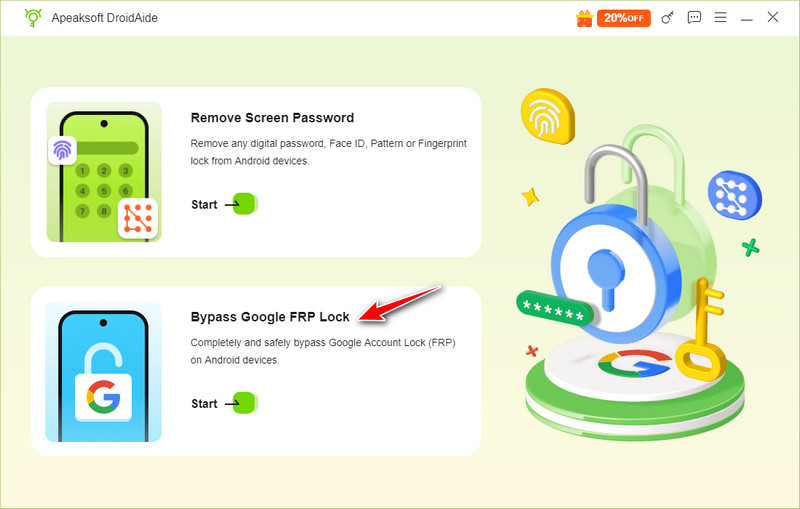
Step 2. Choose Bypass Google FRP Lock.
Step 3. Connect and select your Android brand. Click Bypass Now.
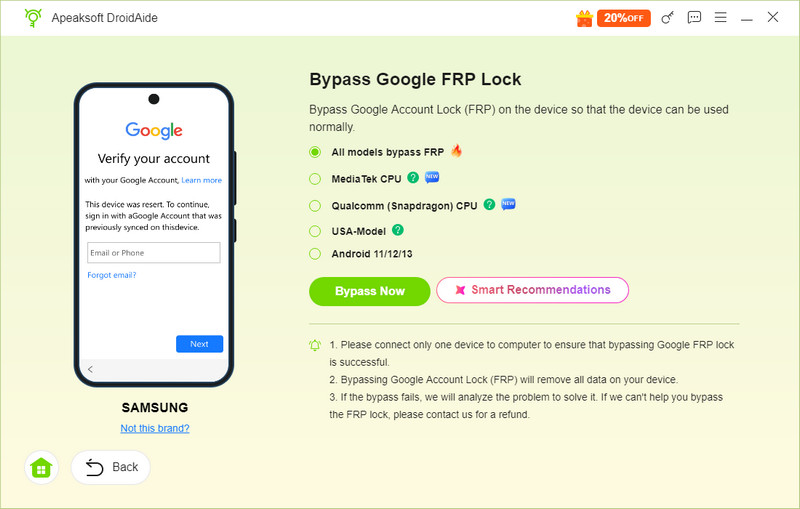
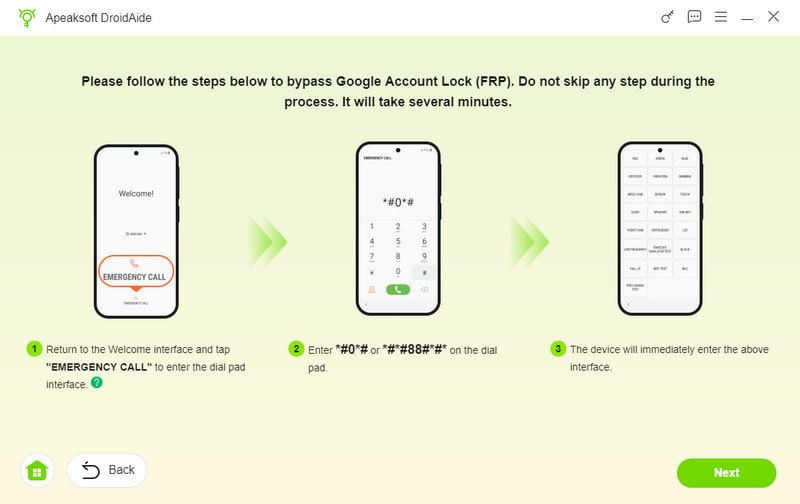
Step 4. Follow the instructions on the interface to configure the environment and activate the device. Then, wait patiently for the FRP bypass.
Part 4: FAQs About GSM Flasher ADB
Does GSM Flasher work on Android 16/17?
Not always reliable. The GSM Flasher ADB is mainly applicable to older Android versions (roughly from Android 5 to 12). New systems like Android 16/17 usually have more powerful security patches, which will prevent them from being cracked.
Why GSM Flasher ADB tool is intercepted by anti-virus software?
Because this tool uses ADB commands and system-level operations similar to those of cracking tools. Antivirus programs will regard it as a potentially risky program.
Why GSM Flasher ADB not detecting phone?
It can be caused by missing USB drivers, USB debugging not enabled, using a bad cable/USB port, the phone not being in the correct mode, or the Android version not being supported by the tool.
Conclusion
GSM Flasher ADB Bypasser FRP Tool is still a useful free solution, especially for older Samsung devices. However, it may be less suitable for beginners and newer Android phones.
If your phone isn’t Samsung, however, you can resort to the best GSM Flasher ADB Bypass Tool - Apeaksoft DroidAide, which helps you remove FRP on many Android phones more safely and easily. We hope that you can use your Android phone with all features without restrictions.
Disclaimer
Please note that all the tools mentioned in this article are intended only for use on devices that you legally own. Any misuse that violates local laws or regulations is strictly prohibited.
 Apeaksoft DroidAide
 Unlock your Android passwords and bypass the FRP lock easily.
Secure Download
Related Articles




